
Duplicate records creep into every table that people type into. One user saves "Northwind Traders", and a month later someone else adds "North Wind Trading" because they did not find the first one. Reports then split the history of one company over two rows.
A unique constraint cannot stop this, because the two names are not equal. A better fix is a friendly warning while the user types: a list of existing records with similar names, shown before the record is saved. The user decides whether it is really new.
This guide builds that warning in Oracle APEX with UTL_MATCH, a classic report region and a debounced dynamic action.
The guide uses business partners as the example; the same steps work for any table with a name column. The post Oracle Apex Validation Without Submit Using JavaScript and Ajax Callback checks a value with an Ajax callback and JavaScript. This one needs no JavaScript: it only uses a region refresh, and it warns instead of blocking the save.
Step 1: Create the Table
The example needs one table, PARTNERS. Next to the name, city and email, it has a virtual column NAME_KEY. It holds the name in upper case without spaces and punctuation, so "Fabrikam, Inc." and "fabrikam inc" get the same key.
Create the table and the sample data:
Example:
create table partners (
  partner_id    number generated by default on null as identity,
  partner_name  varchar2(100) not null,
  city          varchar2(60)  not null,
  email         varchar2(254),
  created_on    date          default on null sysdate not null,
  name_key      varchar2(100 char) generated always as
                  (upper(translate(partner_name, 'x .,-&''/', 'x'))) virtual,
  constraint partners_pk primary key (partner_id)
);

insert into partners (partner_name, city, email) values ('Northwind Traders', 'Seattle', 'info@northwind.example.com');
insert into partners (partner_name, city, email) values ('Blue Harbor Supplies', 'Boston', 'sales@blueharbor.example.com');
insert into partners (partner_name, city, email) values ('Alpine Components', 'Denver', 'hello@alpine.example.com');
insert into partners (partner_name, city, email) values ('Contoso Pharmaceuticals', 'Chicago', 'contact@contoso.example.com');
insert into partners (partner_name, city, email) values ('Fabrikam Inc.', 'Austin', 'office@fabrikam.example.com');
insert into partners (partner_name, city, email) values ('Adventure Works Cycles', 'Portland', 'bikes@adventureworks.example.com');
insert into partners (partner_name, city, email) values ('Tailspin Toys', 'Phoenix', 'play@tailspin.example.com');
insert into partners (partner_name, city, email) values ('Wide World Importers', 'Miami', 'trade@wideworld.example.com');
insert into partners (partner_name, city, email) values ('Fourth Coffee', 'San Diego', 'beans@fourthcoffee.example.com');
insert into partners (partner_name, city, email) values ('Litware Systems', 'Atlanta', 'support@litware.example.com');
commit;

select partner_id, partner_name, city, name_key
from   partners
order  by partner_id;
Output:
Table PARTNERS created.

1 row inserted.

1 row inserted.

1 row inserted.

1 row inserted.

1 row inserted.

1 row inserted.

1 row inserted.

1 row inserted.

1 row inserted.

1 row inserted.

Commit complete.

   PARTNER_ID PARTNER_NAME               CITY         NAME_KEY
_____________ __________________________ ____________ _________________________
            1 Northwind Traders          Seattle      NORTHWINDTRADERS
            2 Blue Harbor Supplies       Boston       BLUEHARBORSUPPLIES
            3 Alpine Components          Denver       ALPINECOMPONENTS
            4 Contoso Pharmaceuticals    Chicago      CONTOSOPHARMACEUTICALS
            5 Fabrikam Inc.              Austin       FABRIKAMINC
            6 Adventure Works Cycles     Portland     ADVENTUREWORKSCYCLES
            7 Tailspin Toys              Phoenix      TAILSPINTOYS
            8 Wide World Importers       Miami        WIDEWORLDIMPORTERS
            9 Fourth Coffee              San Diego    FOURTHCOFFEE
           10 Litware Systems            Atlanta      LITWARESYSTEMS

10 rows selected.- TRANSLATE removes space, dot, comma, dash, ampersand, apostrophe and slash. The first character "x" maps to itself; it is only there because TRANSLATE returns NULL when its last argument is empty.
- NAME_KEY is a virtual column, so no trigger or process has to fill it. It is always in step with PARTNER_NAME.
- Declare it as VARCHAR2(100 CHAR). In a first test, VARCHAR2(100) failed with ORA-12899, because Oracle sizes the expression at 400 bytes in this AL32UTF8 database.
- A first version used REGEXP_REPLACE(partner_name, '[^[:alnum:]]', '') for the key. Wrapped in a CAST, it failed with ORA-54002: only pure functions can be specified in a virtual column expression. TRANSLATE has no such problem.
- CREATED_ON gets SYSDATE from DEFAULT ON NULL.
Step 2: Find Similar Names in SQL
UTL_MATCH.JARO_WINKLER_SIMILARITY compares two strings and returns a score from 0 to 100. It forgives typos and gives extra weight to a matching start. Run it on a few names a user might type, against the keys of the table:
Example:
with typed as (
  select column_value as typed_name
  from   sys.odcivarchar2list('North Wind Trading', 'Fabrikam', 'Contoso Pharma',
                              'Tailspin Toy', 'Blue Harbour Supply', 'Fourth Cafe',
                              'Northern Lights', 'Proseware Inc')
)
select t.typed_name,
       p.partner_name,
       utl_match.jaro_winkler_similarity(
         p.name_key, upper(translate(t.typed_name, 'x .,-&''/', 'x'))) as match_pct
from   typed t
       cross join partners p
where  utl_match.jaro_winkler_similarity(
         p.name_key, upper(translate(t.typed_name, 'x .,-&''/', 'x'))) >= 75
order  by match_pct desc;
Output:
TYPED_NAME             PARTNER_NAME                  MATCH_PCT
______________________ __________________________ ____________
Tailspin Toy           Tailspin Toys                        98
Fabrikam               Fabrikam Inc.                        94
Fourth Cafe            Fourth Coffee                        93
North Wind Trading     Northwind Traders                    92
Blue Harbour Supply    Blue Harbor Supplies                 92
Contoso Pharma         Contoso Pharmaceuticals              91
Northern Lights        Northwind Traders                    82

7 rows selected.
Real variants of existing partners score 91 or more. "Northern Lights" is a different company and scores 82 against Northwind Traders. Proseware Inc scores below 75 everywhere and is not listed. So this guide uses 85 as the limit: a score of 85 or more means "possibly the same".
Jaro-Winkler gives low scores to a short part of a long name, such as "Contoso" for Contoso Pharmaceuticals. So the check also lists rows whose key contains the typed key. Use INSTR for that, not LIKE. If a user types % or _, LIKE treats them as wildcards:
Example:
select count(*) as like_matches
from   partners
where  name_key like '%' || '%%%' || '%';

select count(*) as instr_matches
from   partners
where  instr(name_key, '%%%') > 0;
Output:
   LIKE_MATCHES
_______________
             10

   INSTR_MATCHES
________________
               0
With LIKE, typing "%%%" matched all ten partners. INSTR looks for the literal text and found none.
This is the full query for the warning. It reads two page items, so the test sets them as SQLcl bind variables first:
Example:
variable P401_PARTNER_NAME varchar2(100)
variable P401_PARTNER_ID number
exec :P401_PARTNER_NAME := 'Northwind Trading Co.'

select p.partner_name,
       p.city,
       utl_match.jaro_winkler_similarity(p.name_key, t.name_key) as match_pct
from   partners p
       cross join (select upper(translate(:P401_PARTNER_NAME, 'x .,-&''/', 'x')) as name_key
                   from   dual) t
where  length(t.name_key) >= 3
and    p.partner_id <> nvl(:P401_PARTNER_ID, 0)
and   (instr(p.name_key, t.name_key) > 0
       or utl_match.jaro_winkler_similarity(p.name_key, t.name_key) >= 85)
order  by match_pct desc
fetch  first 5 rows only;
Output:
PL/SQL procedure successfully completed.

PARTNER_NAME         CITY          MATCH_PCT
____________________ __________ ____________
Northwind Traders    Seattle              90
- The inline view T builds the key of the typed name once, with the same TRANSLATE as the virtual column.
- length(t.name_key) >= 3 skips the check until the user has typed three letters or digits.
- p.partner_id <> nvl(:P401_PARTNER_ID, 0) leaves out the record being edited, so a partner is never reported as a duplicate of itself.
- FETCH FIRST 5 ROWS ONLY keeps the warning short.
The query reads every row of the table, because neither INSTR inside the text nor Jaro-Winkler can use an index. To see what that costs, the same check ran on a scratch table with 100,000 random names, which was dropped afterwards:
Example:
create table zz_partners_perf as
select level as partner_id,
       initcap(dbms_random.string('l', 8)) || ' ' || initcap(dbms_random.string('l', 7)) as partner_name,
       cast(null as varchar2(100)) as name_key
from   dual
connect by level <= 100000;

update zz_partners_perf set name_key = upper(translate(partner_name, 'x .,-&''/', 'x'));
commit;

set timing on
select count(*) as matches
from   zz_partners_perf p
where  instr(p.name_key, 'NORTHWINDTRADING') > 0
   or  utl_match.jaro_winkler_similarity(p.name_key, 'NORTHWINDTRADING') >= 85;
set timing off

drop table zz_partners_perf purge;
Output:
Table ZZ_PARTNERS_PERF created.

100,000 rows updated.

Commit complete.

   MATCHES
__________
         0

Elapsed: 00:00:00.176

Table ZZ_PARTNERS_PERF dropped.
The check took 0.18 seconds for 100,000 rows in this example. That is fast enough to run while a user types, for tables of this size.
Step 3: Create the Report and Form Pages
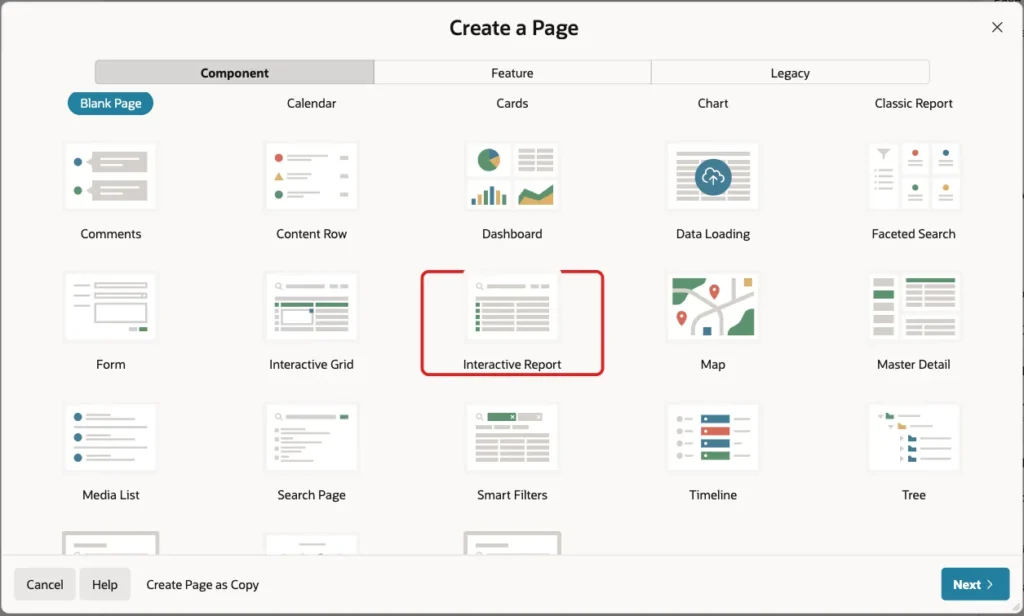
In App Builder, open the application and click Create Page. On the Component tab, click Interactive Report:
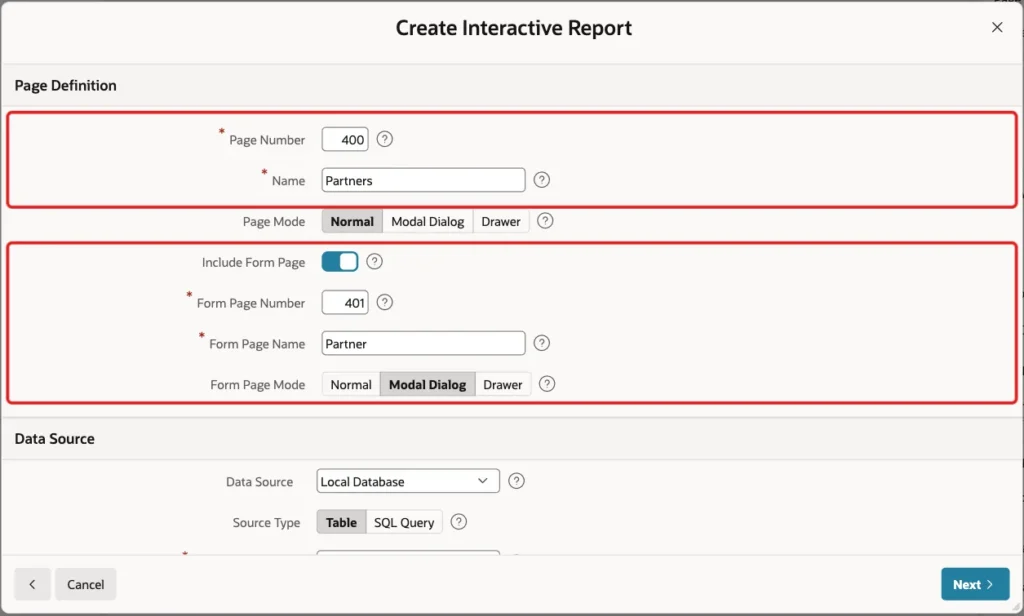
Enter Page Number 400 and Name Partners. Turn on Include Form Page, enter Form Page Number 401 and Form Page Name Partner, and set Form Page Mode to Modal Dialog:
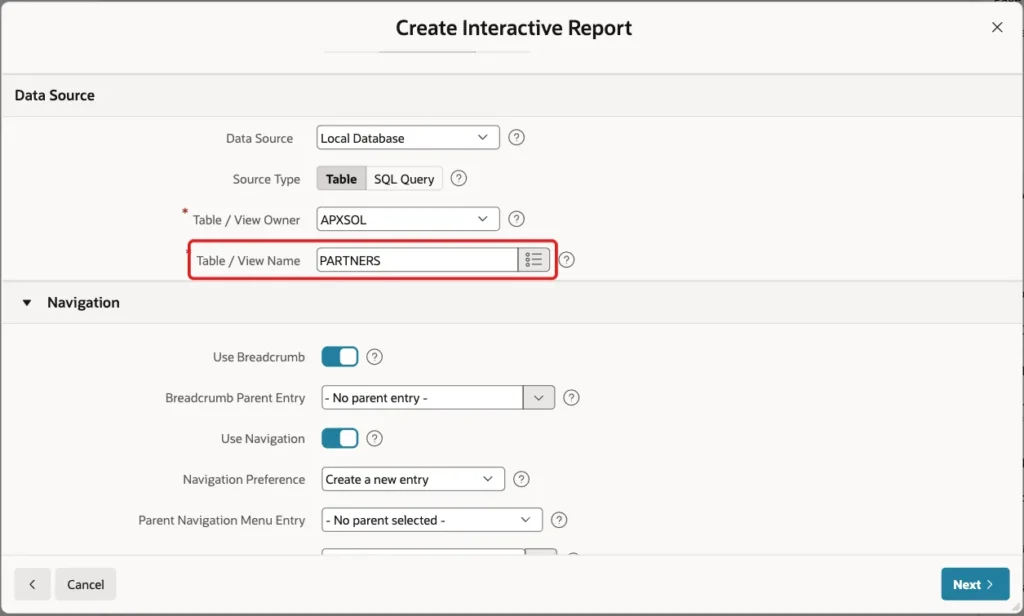
Scroll down to Data Source. Keep Source Type Table and enter PARTNERS as the Table / View Name. Keep the Navigation settings, so the report gets a menu entry, and click Next:
The wizard reads the primary key of the table and fills Primary Key Column 1 with PARTNER_ID. Click Create Page:
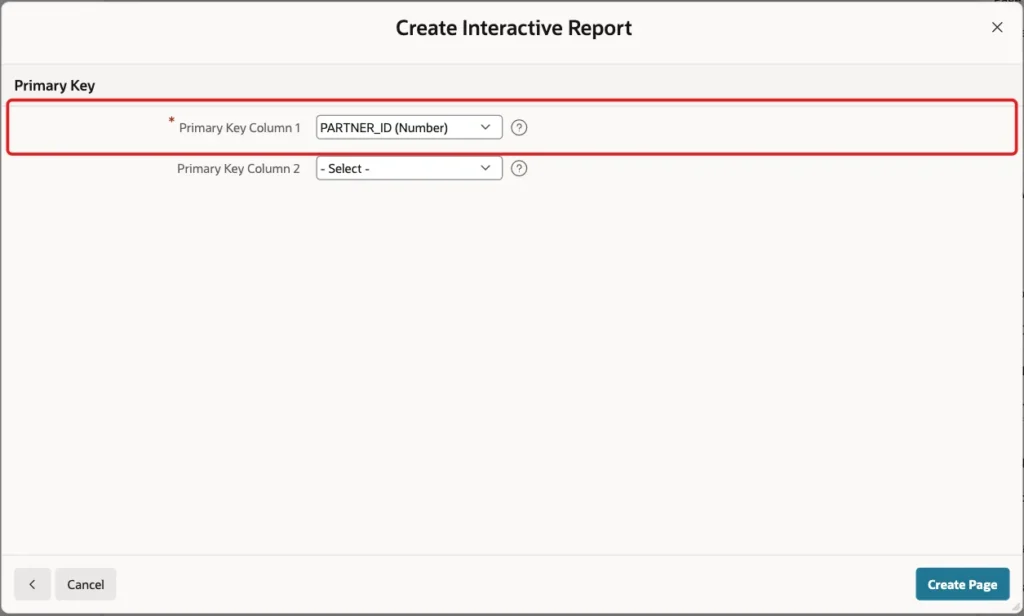
The wizard creates page 400 with the report and page 401 with the form.
Step 4: Remove the Name Key and Created On Items
The wizard made a form item for every column, including the virtual column. Before you remove it, see what happens: in a test, a new partner saved with P401_NAME_KEY on the form failed with "ORA-54013: INSERT operation disallowed on virtual columns". Nothing was saved.
Open page 401 in Page Designer. Right-click P401_NAME_KEY and choose Delete:
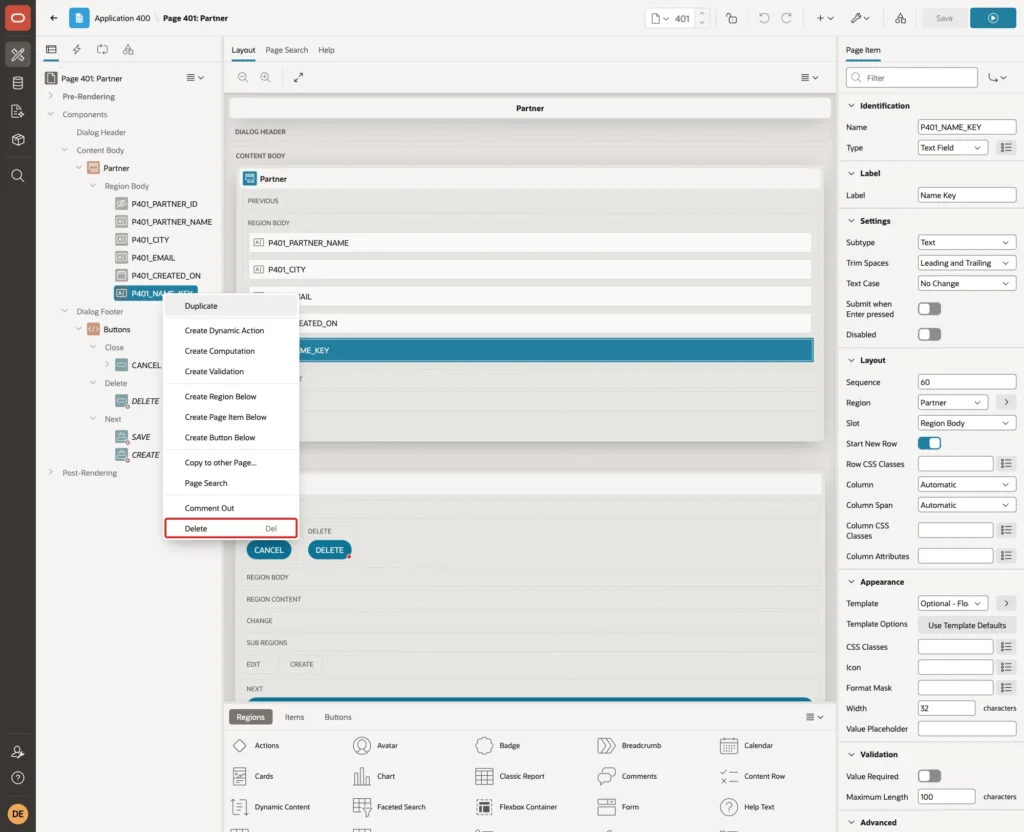
Delete P401_CREATED_ON the same way. The wizard made it a required date picker, but DEFAULT ON NULL fills the column when a partner is saved. The form now has P401_PARTNER_ID (hidden), P401_PARTNER_NAME, P401_CITY and P401_EMAIL.
Step 5: Add the Possible Duplicates Region
In the Rendering tree, right-click Content Body and choose Create Region. Set Name to Possible Duplicates and Type to Classic Report. Under Source, keep Type SQL Query and enter the query from Step 2:
Example:
select p.partner_name,
       p.city,
       p.email,
       utl_match.jaro_winkler_similarity(p.name_key, t.name_key) as match_pct
from   partners p
       cross join (select upper(translate(:P401_PARTNER_NAME, 'x .,-&''/', 'x')) as name_key
                   from   dual) t
where  length(t.name_key) >= 3
and    p.partner_id <> nvl(:P401_PARTNER_ID, 0)
and   (instr(p.name_key, t.name_key) > 0
       or utl_match.jaro_winkler_similarity(p.name_key, t.name_key) >= 85)
order  by match_pct desc
fetch  first 5 rows only
Set Page Items to Submit to P401_PARTNER_NAME:
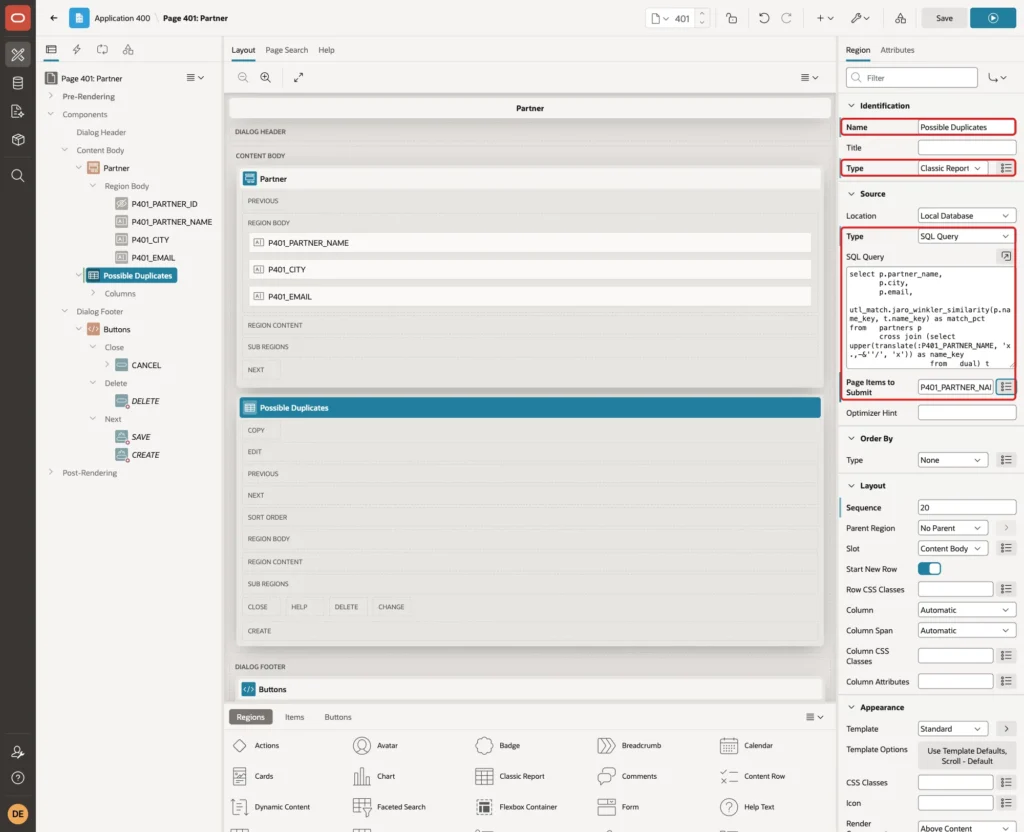
Page Items to Submit is the key setting. When the region refreshes, APEX first sends the current value of P401_PARTNER_NAME to the server, so the query sees what the user has typed so far, not the value from page load.
P401_PARTNER_ID does not need to be submitted. The form process puts its value in session state when the dialog opens, and the user cannot change it.
Under Appearance, set Template to Alert. Its default template options show a warning icon and color. Under Advanced, set HTML DOM ID to possible_dups:
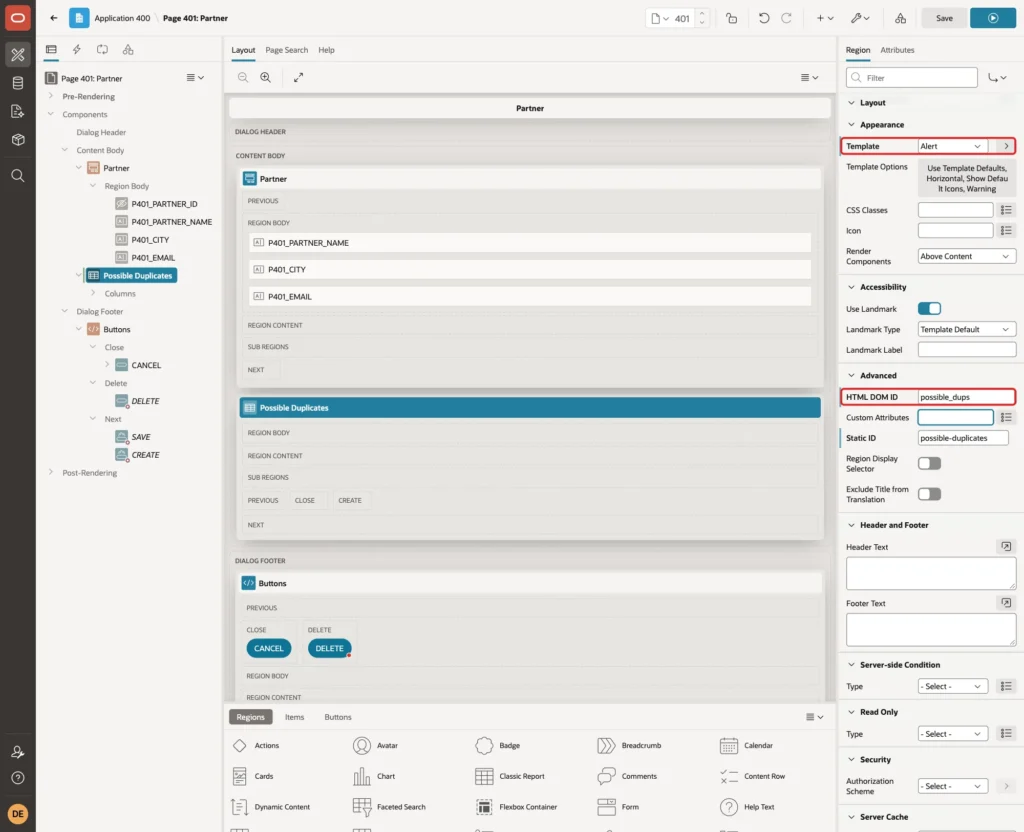
The region comes after the Partner form region, so the warning appears below the fields. When it appears, the field the user is typing in does not move.
Step 6: Name the Match Column
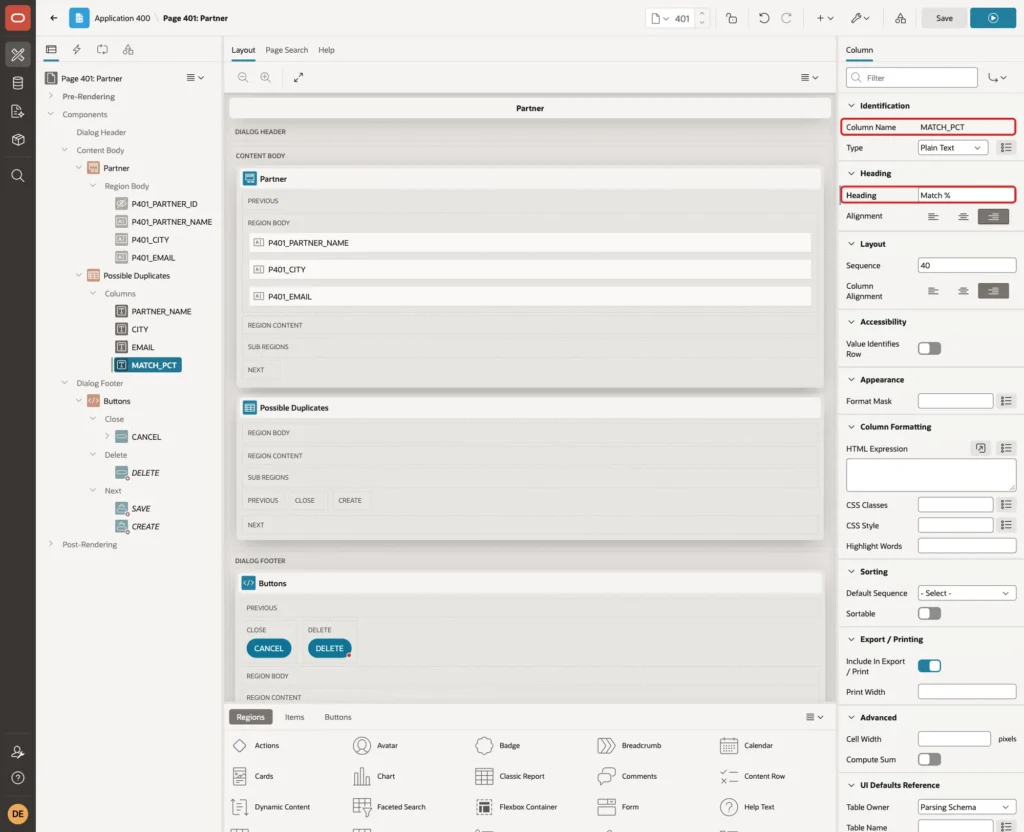
Expand the Possible Duplicates region and its Columns. Select MATCH_PCT and set Heading to Match %:
Step 7: Hide the Region When Nothing Is Found
When the query returns no rows, the classic report renders an empty element with the class nodatafound. The warning box with its title would still show. One CSS rule hides it in that case.
Select the page (Page 401: Partner) at the top of the Rendering tree. Under CSS, enter this in Inline:
Example:
#possible_dups:has(.nodatafound) {
  display: none;
}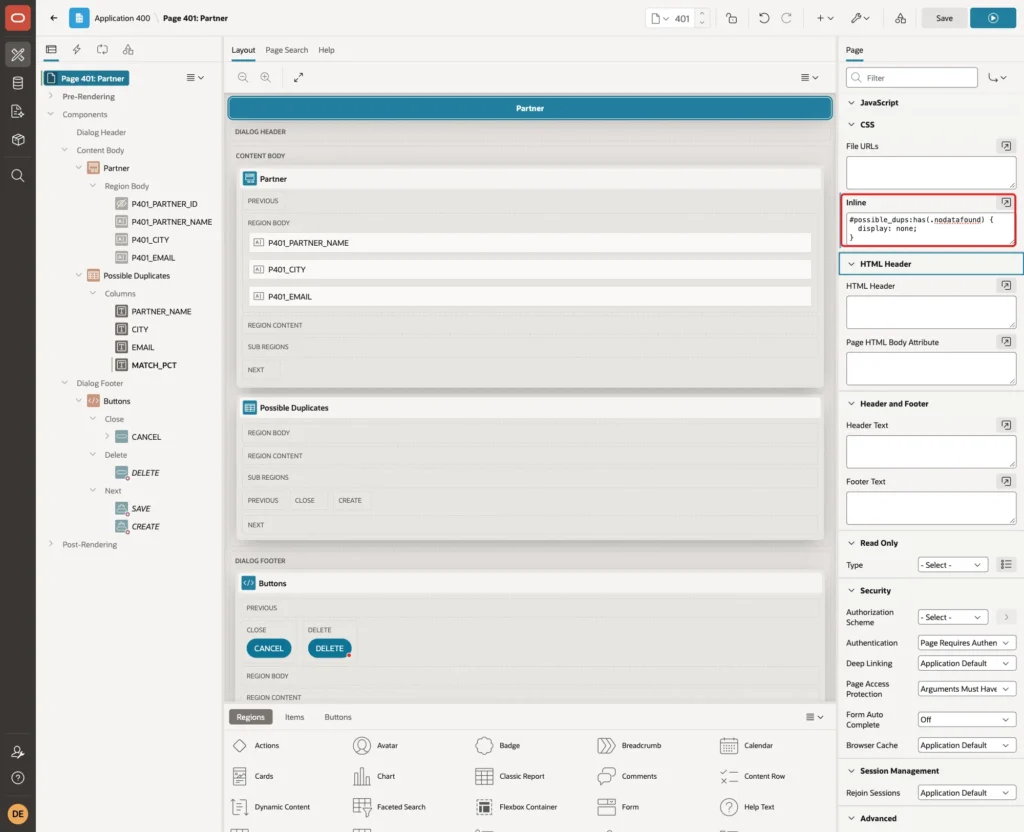
The :has() selector works on page load and after every refresh, so no extra dynamic action is needed to show or hide the region.
Step 8: Refresh the Region While the User Types
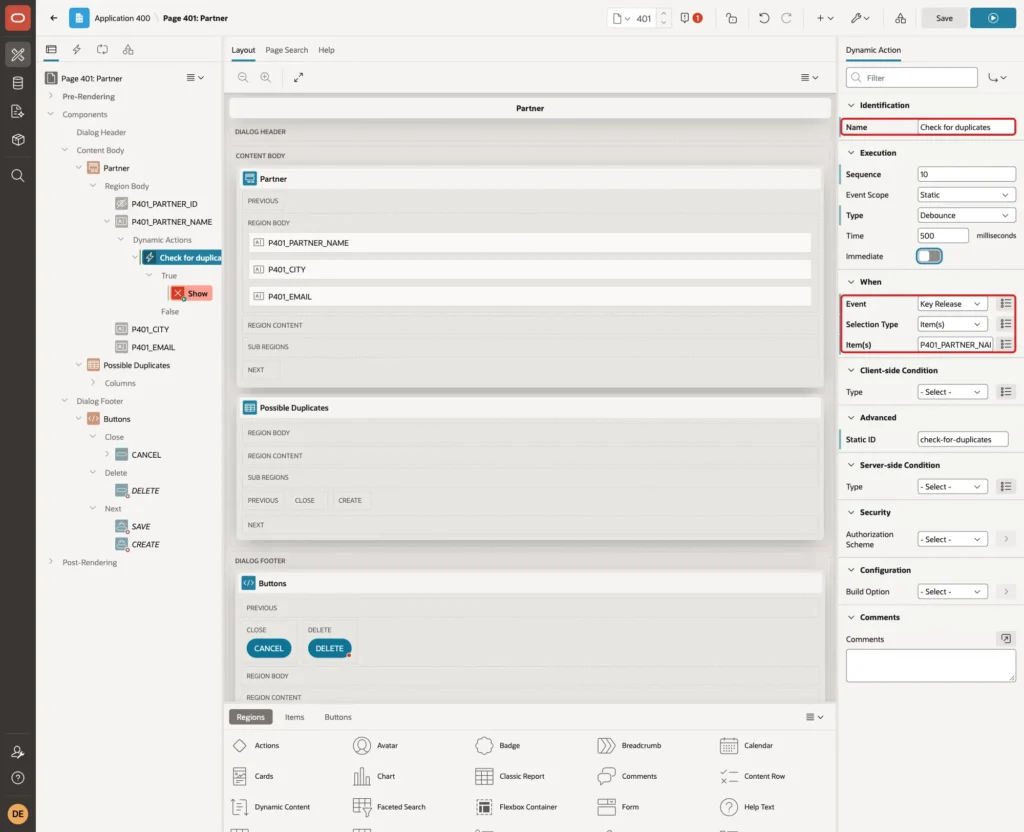
Right-click P401_PARTNER_NAME and choose Create Dynamic Action. Set Name to Check for duplicates. Under When, set Event to Key Release. Selection Type Item(s) and Item(s) P401_PARTNER_NAME are filled in already:
Firing a refresh on every key would send one request per letter. Under Execution, set Type to Debounce and Time to 500 milliseconds, and leave Immediate off:
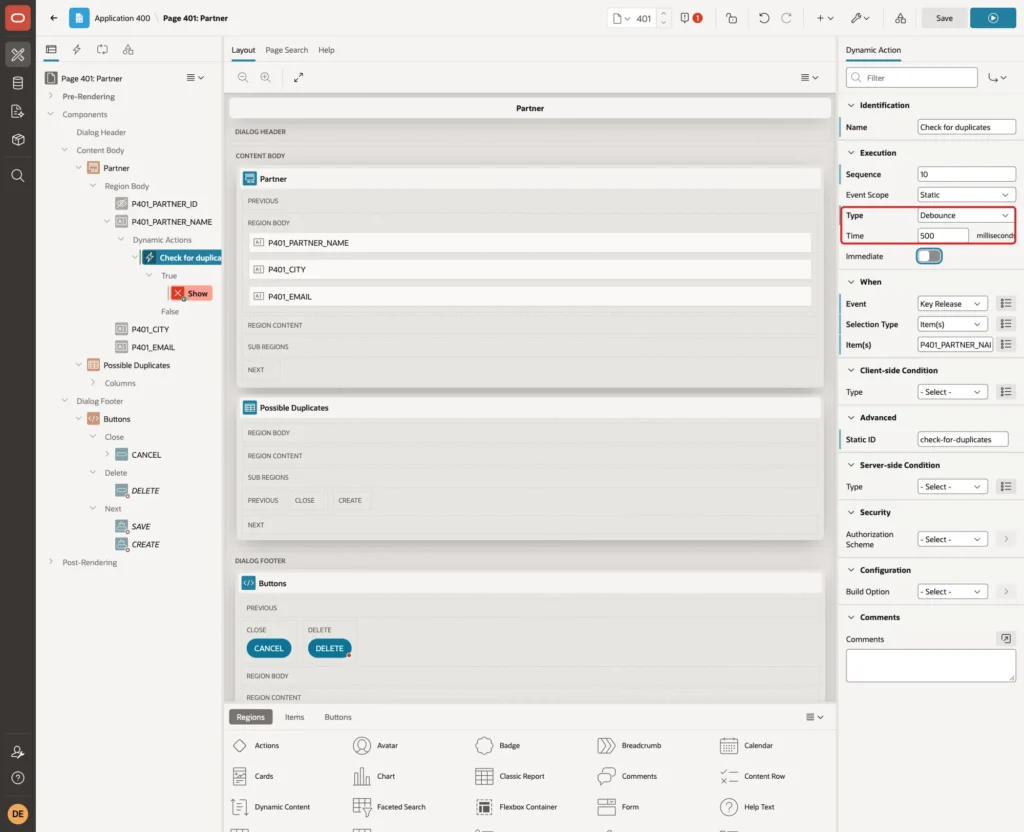
With Debounce, APEX waits until no key was pressed for 500 milliseconds and then runs the actions once.
Under True, select the Show action that APEX created. Set Action to Refresh, Selection Type to Region and Region to Possible Duplicates:
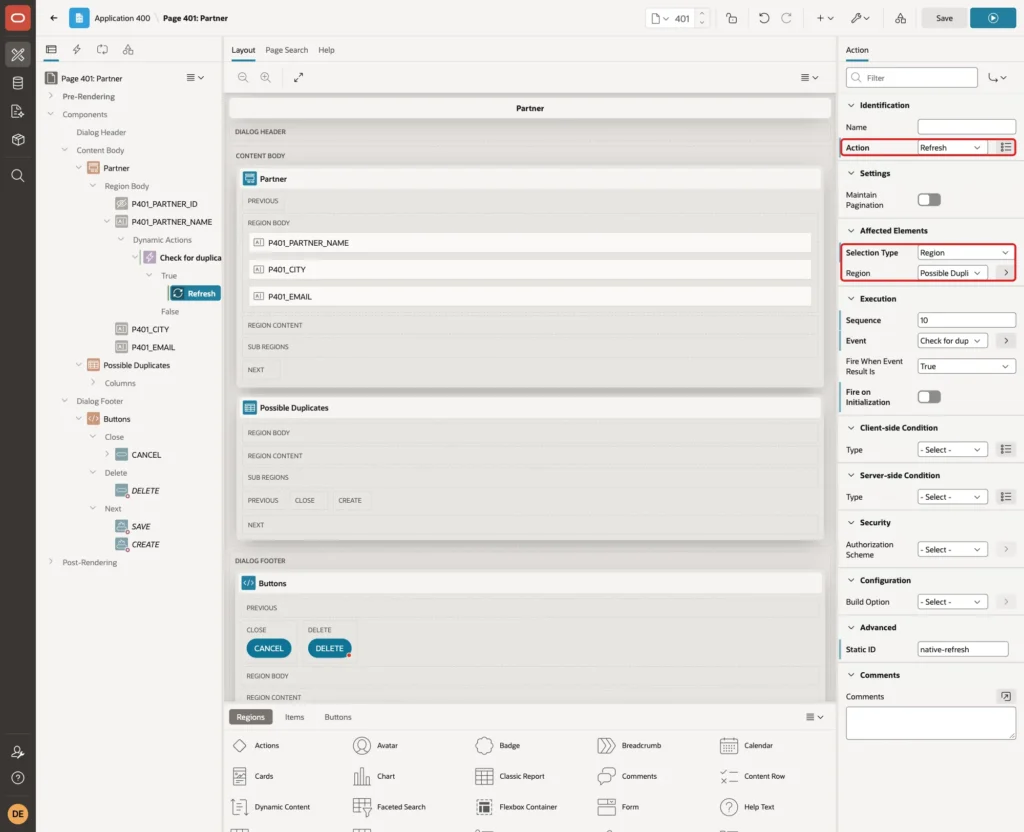
Save the page. The page needs no JavaScript code and no Ajax callback process.
Step 9: Test the Warning
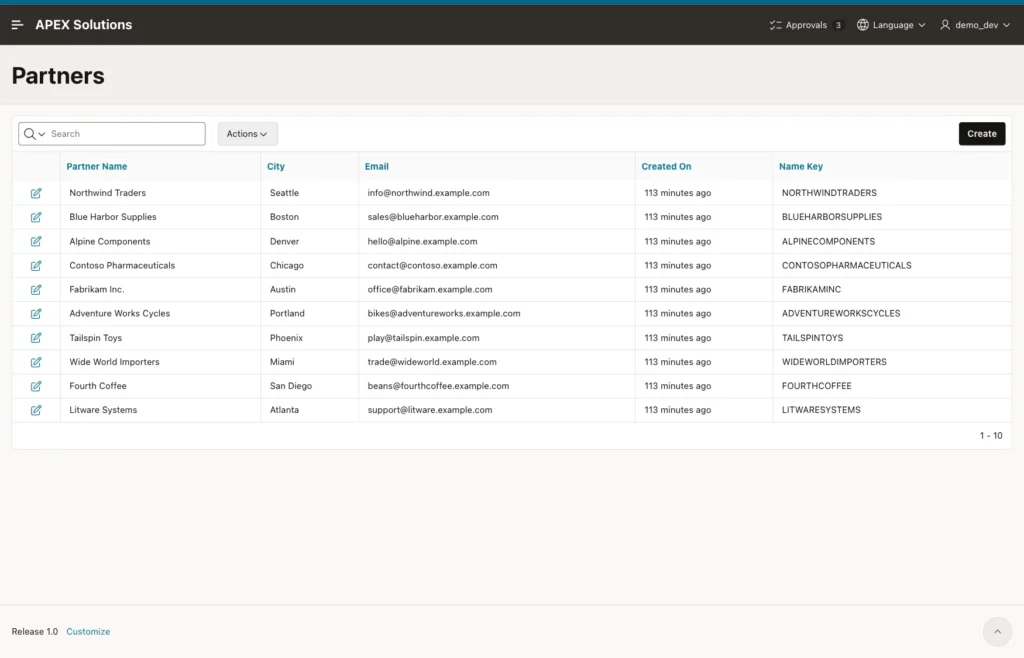
Run page 400. The report lists the ten partners. The Name Key column shows how each name is normalized:
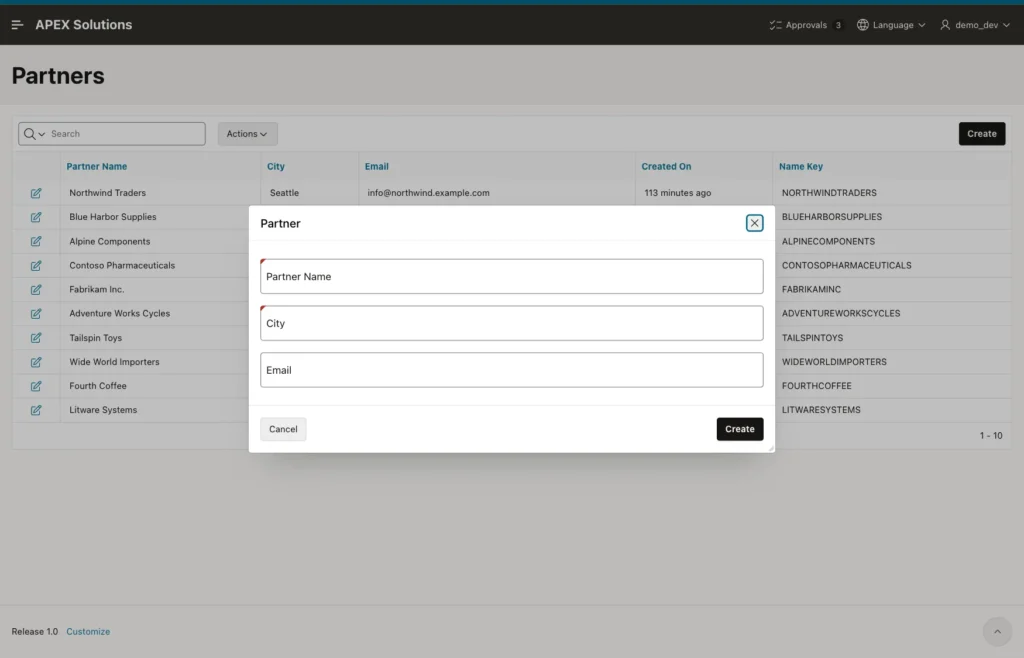
Click Create. The dialog opens without a warning, because the empty name returns no rows and the CSS rule hides the region:
Type North Wind Trading at normal speed. About half a second after the last key, the warning appears with Northwind Traders and a score of 92:
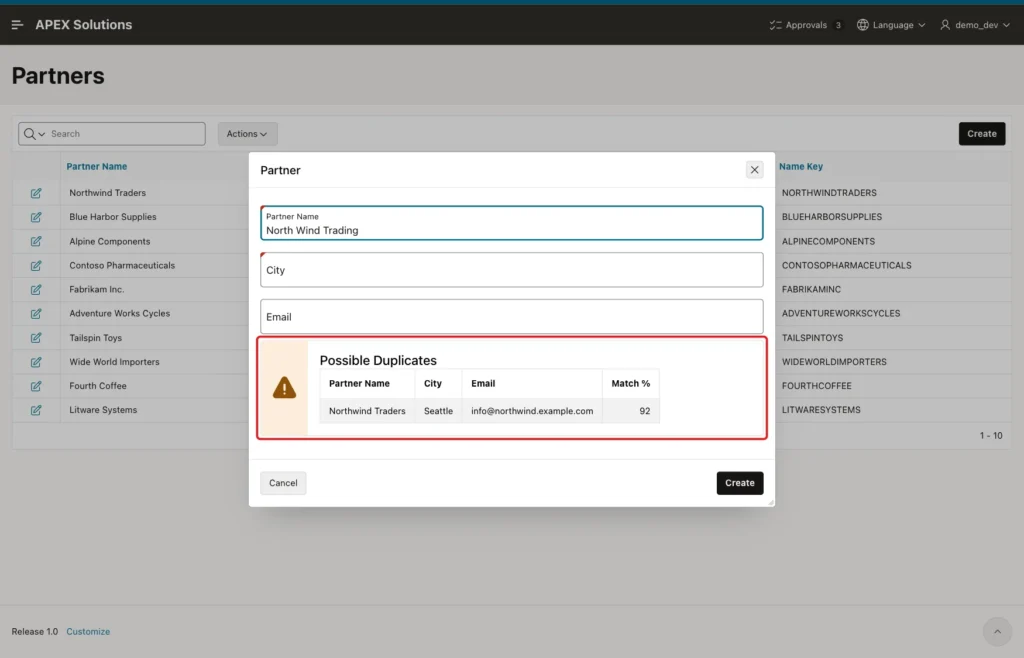
The test counted the requests while typing the 18 characters: the browser sent exactly one refresh request. Without Debounce, every key would have sent one.
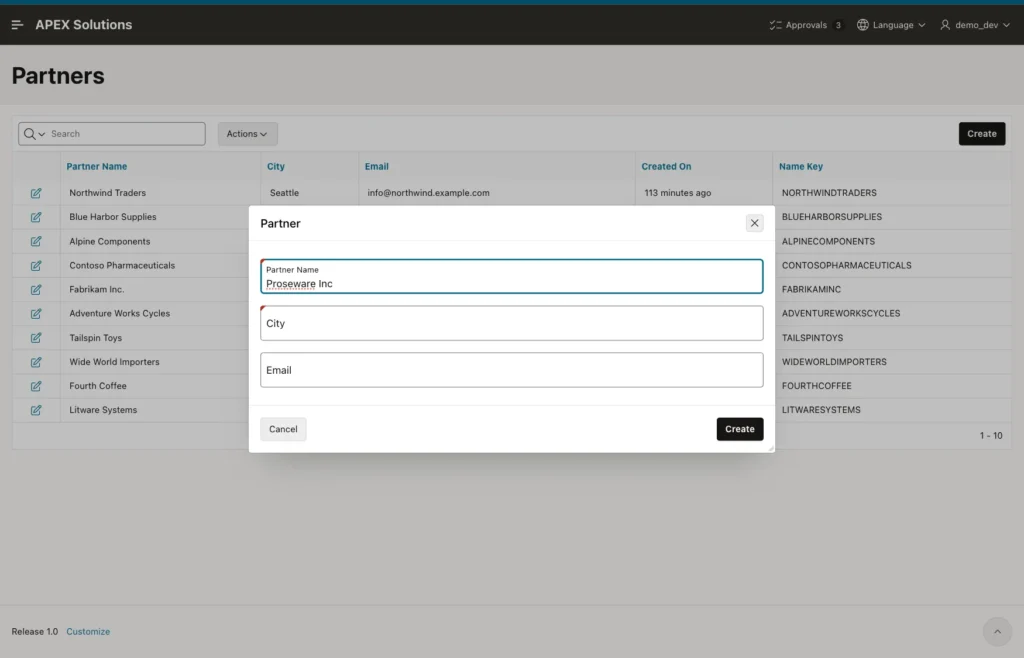
Replace the name with Proseware Inc. No existing name is similar, and the warning disappears:
Two more inputs were tested. "%%%" showed no warning, as INSTR does not treat % as a wildcard. "Fab" listed Fabrikam Inc. with a score of 83: the score is below 85, but the key contains FAB.
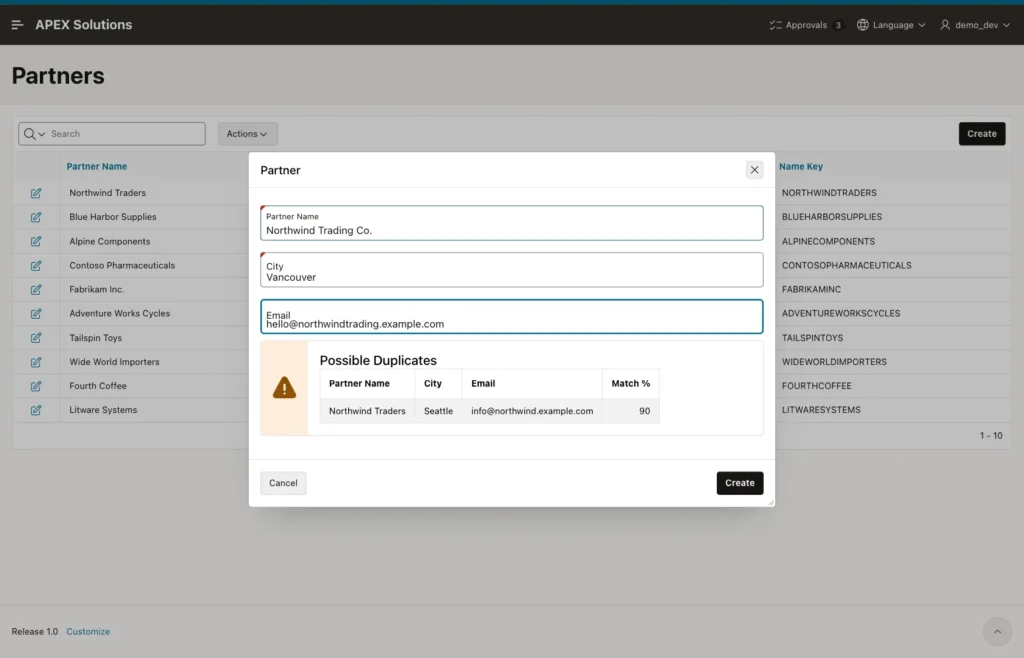
The warning never blocks the save. Type Northwind Trading Co., a different company in Vancouver. The warning lists Northwind Traders with 90. Enter the city and email and click Create:
The dialog closes and the new partner is in the report:
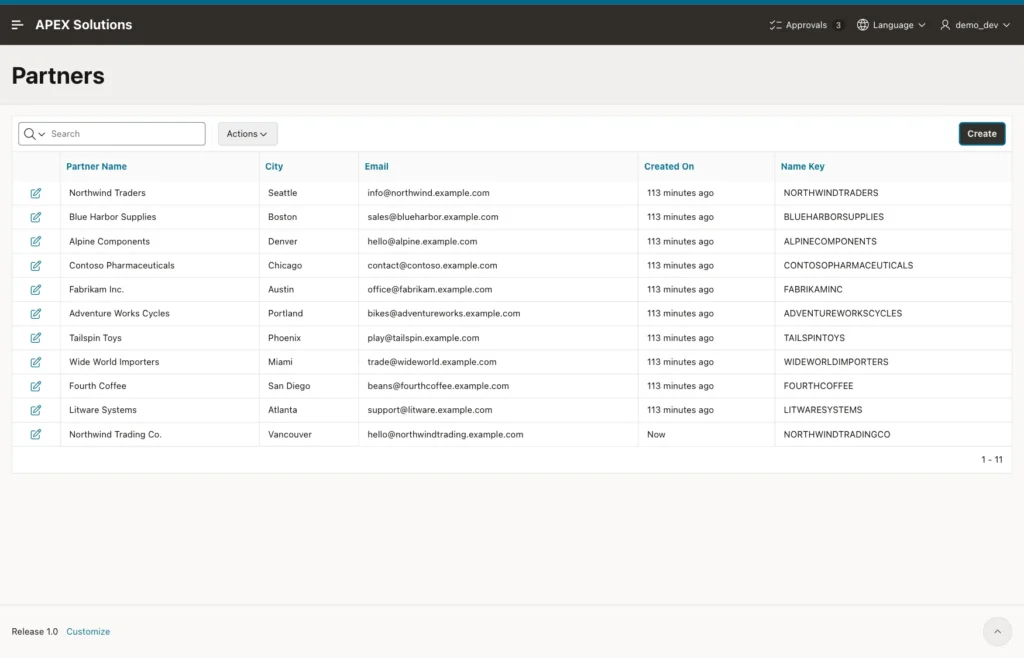
Both Northwind rows are in the table:
Example:
select partner_id, partner_name, city, name_key
from   partners
where  name_key like 'NORTHWIND%'
order  by partner_id;
Output:
   PARTNER_ID PARTNER_NAME             CITY         NAME_KEY
_____________ ________________________ ____________ _____________________
            1 Northwind Traders        Seattle      NORTHWINDTRADERS
           21 Northwind Trading Co.    Vancouver    NORTHWINDTRADINGCO
The new ID is 21, not 11, because the identity column hands out cached values. That is normal.
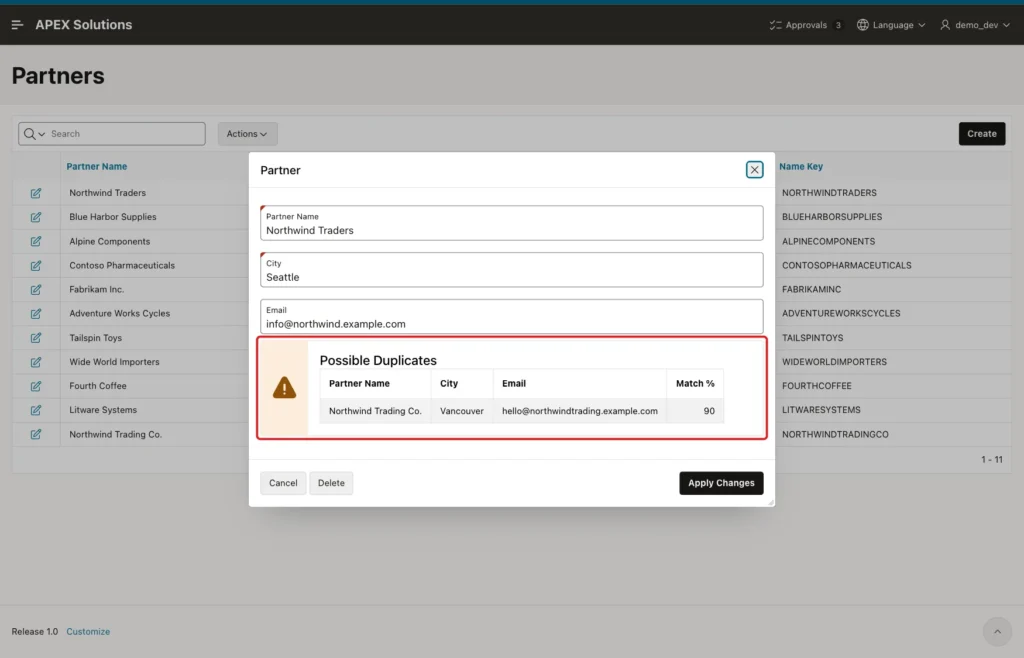
Finally, click the edit icon of Northwind Traders. The region runs at page load with the saved name. It lists Northwind Trading Co. with 90, but not Northwind Traders itself:
Things to Know
- This is a warning, not a rule. To stop exact duplicates, add a unique constraint or index as well, for example on NAME_KEY.
- Pick the score limit from your own data. In this example, true variants scored 90 to 98 and an unrelated name 82, so 85 separated them.
- The query reads all rows. 100,000 rows took 0.18 seconds here; for much larger tables, narrow the rows first, for example by country.
- Oracle 26ai also has the SQL operator FUZZY_MATCH. In this example, FUZZY_MATCH(JARO_WINKLER, ...) returned the same 92 as UTL_MATCH for the same two keys.
Related Guides
- How to Compare Strings with UTL_MATCH (edit distance, Jaro-Winkler)
- Oracle Apex Validation Without Submit Using JavaScript and Ajax Callback
Conclusion
A duplicate warning in Oracle APEX takes one table column, one region and one dynamic action. The virtual NAME_KEY column normalizes names, UTL_MATCH scores them, and a classic report with the Alert template shows the close matches below the form.
A Key Release dynamic action with Execution Type Debounce refreshes the region once the user pauses, and a single CSS rule hides it when nothing is found. The user still decides, so real new records are never blocked, but most accidental duplicates are caught before they are saved.
