
Invoices, receipts and credit notes often need numbers without gaps, such as INV-2026-0001, INV-2026-0002 and so on. Auditors and tax rules may ask why a number is missing. A sequence or identity column cannot promise this, because a rolled-back insert or lost cache values leave holes in the numbers.
The usual fix is a counter table. Each save locks one counter row, adds 1, and uses the new value in the same transaction. If the save fails, the counter rolls back too.
This guide builds the counter, a numbering function and an Oracle APEX form that assigns the number at save, and tests rollbacks and two users at once.
The guide uses invoices as the example. The same steps work for orders, receipts or any other document table.
Step 1: Create the Tables
The example needs three tables: BILLING_CUSTOMERS for the customer list, DOC_COUNTERS for the last number used per document type and year, and INVOICES for the documents. Create them with a few customers:
Example:
create table billing_customers (
  customer_id   number generated by default on null as identity,
  customer_name varchar2(100) not null,
  email         varchar2(200),
  constraint billing_customers_pk primary key (customer_id),
  constraint billing_customers_name_uk unique (customer_name)
);

create table doc_counters (
  doc_type  varchar2(10) not null,
  doc_year  number(4) not null,
  last_no   number(9) default on null 0 not null,
  constraint doc_counters_pk primary key (doc_type, doc_year),
  constraint doc_counters_type_ck check (doc_type = upper(doc_type)),
  constraint doc_counters_last_no_ck check (last_no >= 0)
);

create table invoices (
  invoice_id    number generated by default on null as identity,
  invoice_no    varchar2(20) not null,
  invoice_date  date default on null trunc(sysdate) not null,
  customer_id   number not null,
  amount        number(12,2) not null,
  status        varchar2(10) default on null 'OPEN' not null,
  constraint invoices_pk primary key (invoice_id),
  constraint invoices_no_uk unique (invoice_no),
  constraint invoices_customer_fk foreign key (customer_id)
    references billing_customers (customer_id),
  constraint invoices_amount_ck check (amount > 0),
  constraint invoices_status_ck check (status in ('OPEN', 'PAID', 'CANCELLED'))
);

create index invoices_customer_ix on invoices (customer_id);

insert into billing_customers (customer_name, email) values ('Northwind Traders', 'ap@northwind.example');
insert into billing_customers (customer_name, email) values ('Blue Harbor Foods', 'billing@blueharbor.example');
insert into billing_customers (customer_name, email) values ('Summit Office Supply', 'accounts@summit.example');

commit;

select table_name, constraint_name, constraint_type
  from user_constraints
 where table_name in ('BILLING_CUSTOMERS', 'DOC_COUNTERS', 'INVOICES')
   and constraint_name not like 'SYS%'
 order by table_name, constraint_name;
Output:
Table BILLING_CUSTOMERS created.

Table DOC_COUNTERS created.

Table INVOICES created.

Index INVOICES_CUSTOMER_IX created.

1 row inserted.

1 row inserted.

1 row inserted.

Commit complete.

TABLE_NAME           CONSTRAINT_NAME              CONSTRAINT_TYPE
____________________ ____________________________ __________________
BILLING_CUSTOMERS    BILLING_CUSTOMERS_NAME_UK    U
BILLING_CUSTOMERS    BILLING_CUSTOMERS_PK         P
DOC_COUNTERS         DOC_COUNTERS_LAST_NO_CK      C
DOC_COUNTERS         DOC_COUNTERS_PK              P
DOC_COUNTERS         DOC_COUNTERS_TYPE_CK         C
INVOICES             INVOICES_AMOUNT_CK           C
INVOICES             INVOICES_CUSTOMER_FK         R
INVOICES             INVOICES_NO_UK               U
INVOICES             INVOICES_PK                  P
INVOICES             INVOICES_STATUS_CK           C

10 rows selected.
- DOC_COUNTERS_PK on DOC_TYPE and DOC_YEAR gives one counter row per document type and year, so numbering starts again at 1 each year.
- INVOICES_NO_UK makes sure no invoice number can ever be used twice, even if some code path forgets to use the counter.
- INVOICE_ID stays the primary key. It may have gaps, and that is fine, because users never see it.
Step 2: Create the Numbering Function
The function adds 1 to the counter row and returns the formatted number. The UPDATE ... RETURNING statement locks the counter row until the transaction ends, just like SELECT ... FOR UPDATE would, and reads the new value in one step:
Example:
create or replace function next_doc_no (
  p_doc_type in varchar2,
  p_doc_date in date default sysdate
) return varchar2
is
  l_year doc_counters.doc_year%type := extract(year from p_doc_date);
  l_no   doc_counters.last_no%type;
begin
  update doc_counters
     set last_no = last_no + 1
   where doc_type = p_doc_type
     and doc_year = l_year
  returning last_no into l_no;

  if sql%rowcount = 0 then
    begin
      insert into doc_counters (doc_type, doc_year, last_no)
      values (p_doc_type, l_year, 1);
      l_no := 1;
    exception
      when dup_val_on_index then
        update doc_counters
           set last_no = last_no + 1
         where doc_type = p_doc_type
           and doc_year = l_year
        returning last_no into l_no;
    end;
  end if;

  return p_doc_type || '-' || l_year || '-' || lpad(l_no, 4, '0');
end next_doc_no;
/
Output:
Function NEXT_DOC_NO compiled
- When no row exists yet for the type and year, the function inserts one with LAST_NO 1.
- If another session inserts the same first row at the same moment, the insert fails with DUP_VAL_ON_INDEX and the function updates the row instead. Step 9 tests this case.
- The function does not commit, and it is not an autonomous transaction. The number belongs to the caller's transaction, so a rollback also returns the number.
Now insert three sample invoices with the function:
Example:
insert into invoices (invoice_no, invoice_date, customer_id, amount)
select next_doc_no('INV', date '2026-10-01'), date '2026-10-01', customer_id, 1250
  from billing_customers where customer_name = 'Northwind Traders';

insert into invoices (invoice_no, invoice_date, customer_id, amount)
select next_doc_no('INV', date '2026-10-02'), date '2026-10-02', customer_id, 480.5
  from billing_customers where customer_name = 'Blue Harbor Foods';

insert into invoices (invoice_no, invoice_date, customer_id, amount)
select next_doc_no('INV', date '2026-10-03'), date '2026-10-03', customer_id, 2999
  from billing_customers where customer_name = 'Summit Office Supply';

commit;

select i.invoice_id, i.invoice_no, to_char(i.invoice_date, 'YYYY-MM-DD') as invoice_date, c.customer_name, i.amount, i.status
  from invoices i
  join billing_customers c on c.customer_id = i.customer_id
 order by i.invoice_no;

select doc_type, doc_year, last_no from doc_counters;
Output:
1 row inserted.

1 row inserted.

1 row inserted.

Commit complete.

   INVOICE_ID INVOICE_NO       INVOICE_DATE    CUSTOMER_NAME              AMOUNT STATUS
_____________ ________________ _______________ _______________________ _________ _________
            1 INV-2026-0001    2026-10-01      Northwind Traders            1250 OPEN
            2 INV-2026-0002    2026-10-02      Blue Harbor Foods           480.5 OPEN
            3 INV-2026-0003    2026-10-03      Summit Office Supply         2999 OPEN

DOC_TYPE       DOC_YEAR    LAST_NO
___________ ___________ __________
INV                2026          3
Step 3: See Why a Sequence Leaves Gaps
This test inserts an invoice, rolls it back, and inserts it again. Compare the identity column INVOICE_ID with the INVOICE_NO from the counter:
Example:
insert into invoices (invoice_no, customer_id, amount)
values (next_doc_no('INV'), 1, 300);

select invoice_id, invoice_no, amount
  from invoices
 order by invoice_id;

rollback;

insert into invoices (invoice_no, customer_id, amount)
values (next_doc_no('INV'), 1, 300);

commit;

select invoice_id, invoice_no, amount
  from invoices
 order by invoice_id;
Output:
1 row inserted.

   INVOICE_ID INVOICE_NO          AMOUNT
_____________ ________________ _________
            1 INV-2026-0001         1250
            2 INV-2026-0002        480.5
            3 INV-2026-0003         2999
            4 INV-2026-0004          300

Rollback complete.

1 row inserted.

Commit complete.

   INVOICE_ID INVOICE_NO          AMOUNT
_____________ ________________ _________
            1 INV-2026-0001         1250
            2 INV-2026-0002        480.5
            3 INV-2026-0003         2999
            5 INV-2026-0004          300
The rolled-back insert used INVOICE_ID 4, and the identity column did not give it back. The second insert got INVOICE_ID 5. The counter update was rolled back with the insert, so the second insert got INV-2026-0004 again, and the invoice numbers have no gap.
Step 4: Create the Report and Form Pages
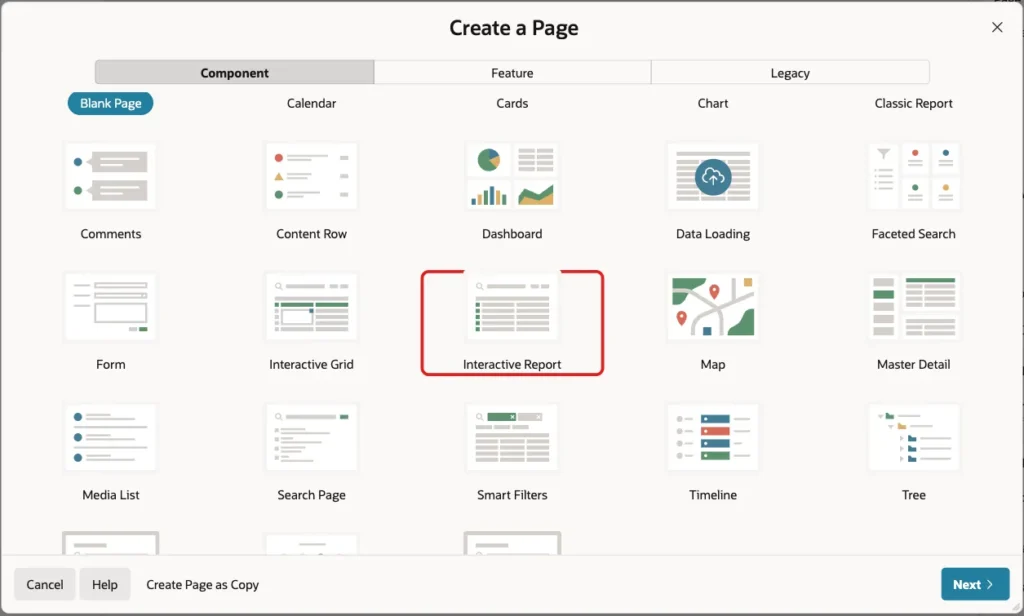
In App Builder, open the application and click Create Page. On the Component tab, click Interactive Report:
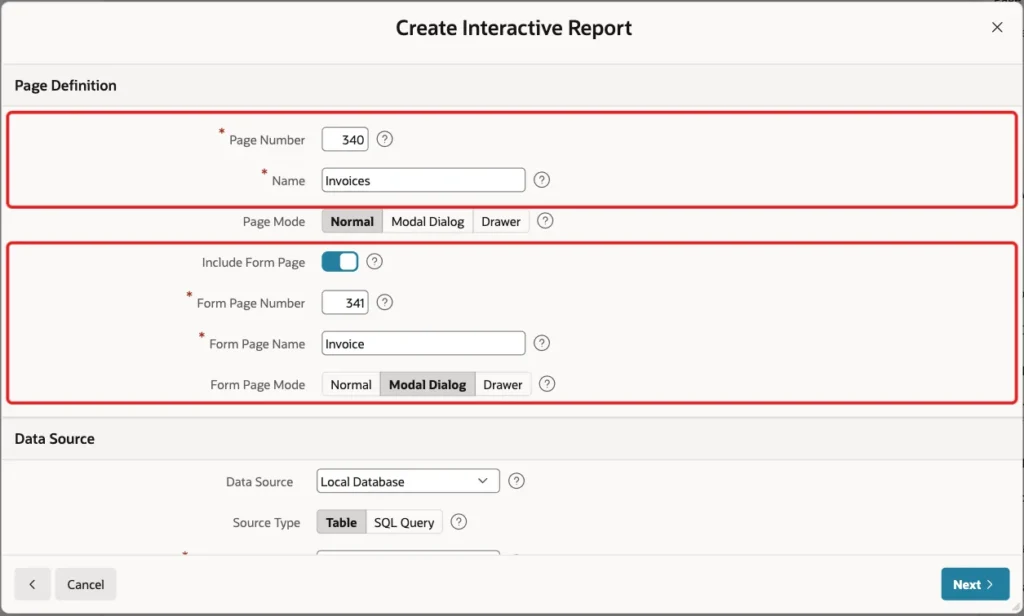
Enter Page Number 340 and Name Invoices. Turn on Include Form Page, enter Form Page Number 341 and Form Page Name Invoice, and set Form Page Mode to Modal Dialog:
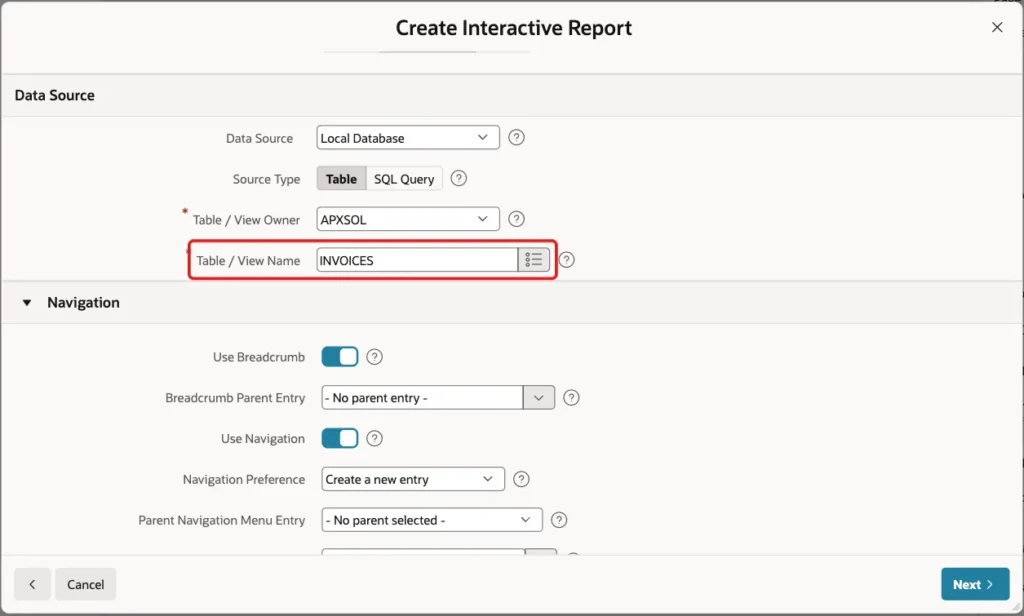
Scroll down to Data Source. Keep Source Type Table and enter INVOICES as the Table / View Name. Keep the Navigation settings, so the report page gets a menu entry, and click Next:
On the last screen, keep Primary Key Column 1 as INVOICE_ID and click Create Page:
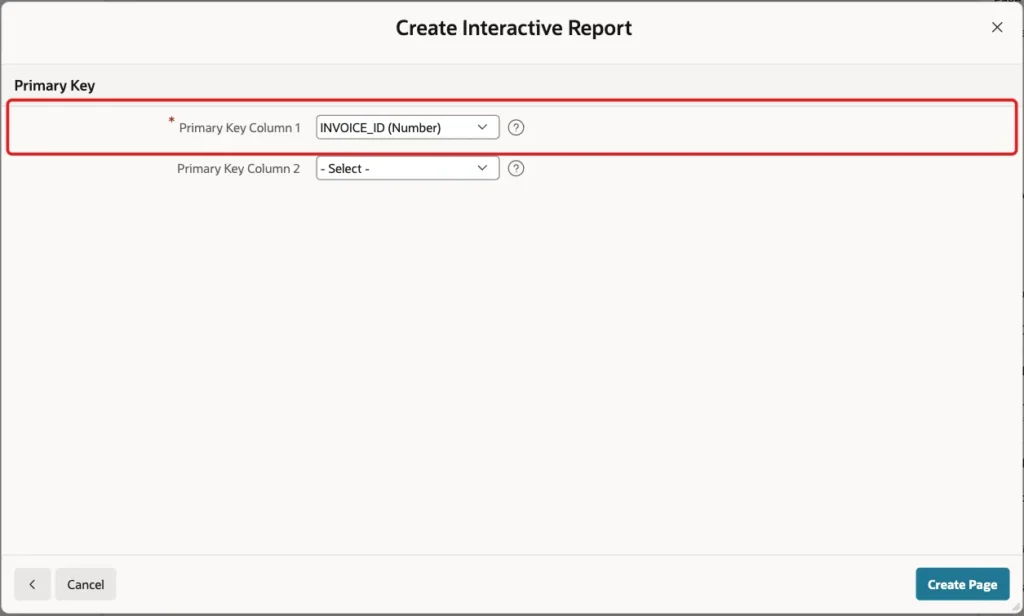
The wizard created page 340 with the report and page 341 with the form. It also created a list of values for the CUSTOMER_ID foreign key, so the form shows customer names in a select list.
Step 5: Make the Invoice Number Read-Only
Users should not type the invoice number. Open page 341 in Page Designer, select P341_INVOICE_NO, and set Identification, Type to Display Only:
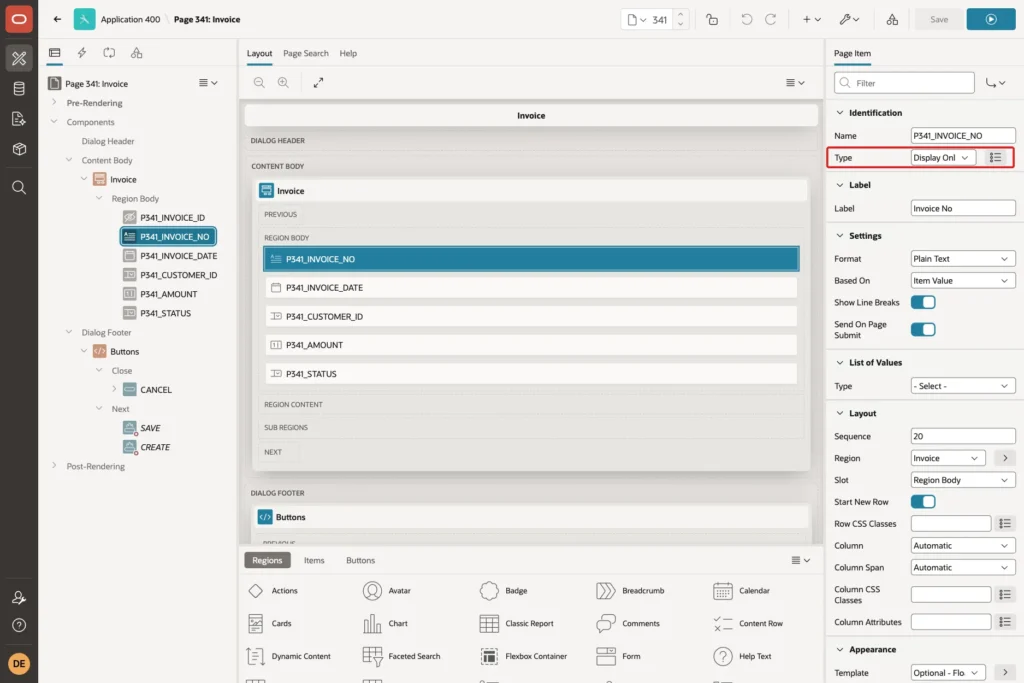
Also set Appearance, Template to Optional - Floating. A Display Only item has no Value Required setting, so the form no longer asks the user for a number. Keep Source, Query Only turned off: the form must still write this item to the INVOICE_NO column. The process in Step 7 fills it at save.
While you are on the form, change the label of P341_CUSTOMER_ID from Customer Id to Customer.
Step 6: Cancel Invoices Instead of Deleting Them
A deleted invoice would leave a gap, so the form should not offer Delete. Under Dialog Footer, right-click the DELETE button and choose Delete. Then select the Close Dialog process and change its Server-side Condition Value from CREATE,SAVE,DELETE to CREATE,SAVE.
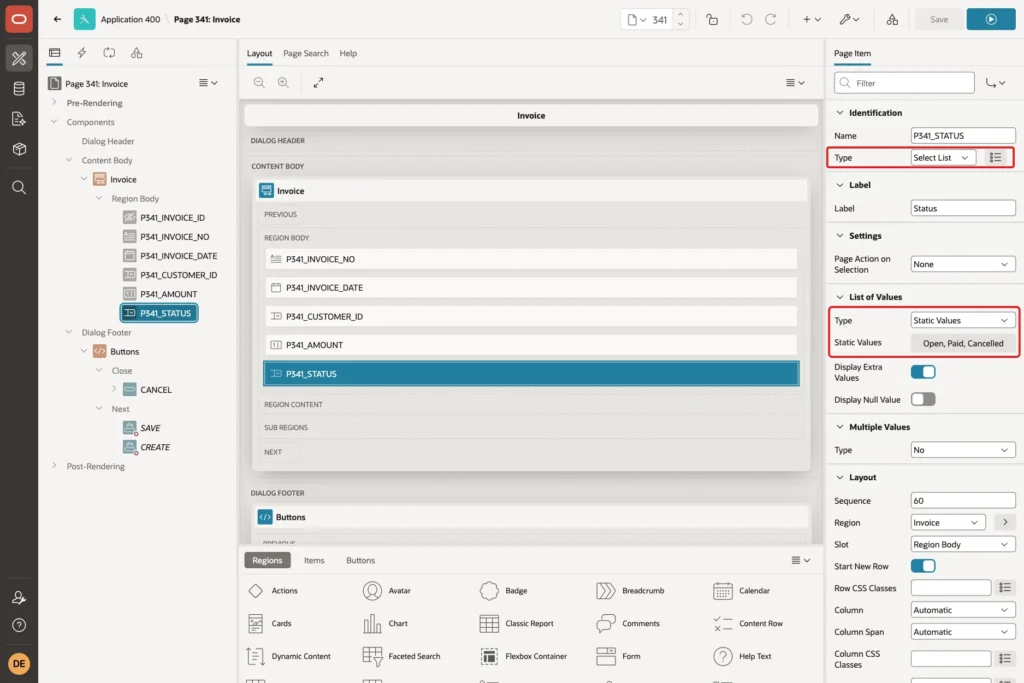
Users mark an invoice as cancelled with the status instead. Select P341_STATUS, set Type to Select List, set List of Values, Type to Static Values, and enter the values Open (OPEN), Paid (PAID) and Cancelled (CANCELLED). Turn off Display Null Value:
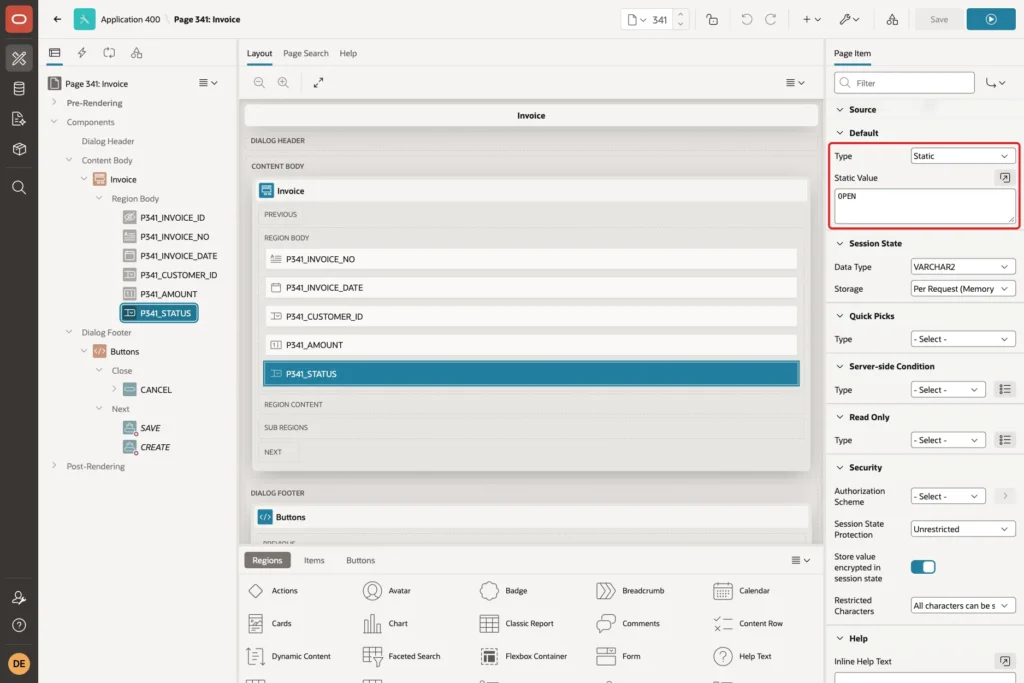
Scroll down to Default and set Type to Static and Static Value to OPEN:
Step 7: Assign the Number at Save
Open the Processing tab, right-click Processes and choose Create Process. Set Name to Assign Invoice Number and Type to Execute Code, and enter this PL/SQL Code:
Example:
:P341_INVOICE_NO := next_doc_no(
    p_doc_type => 'INV',
    p_doc_date => apex_session_state.get_timestamp('P341_INVOICE_DATE'));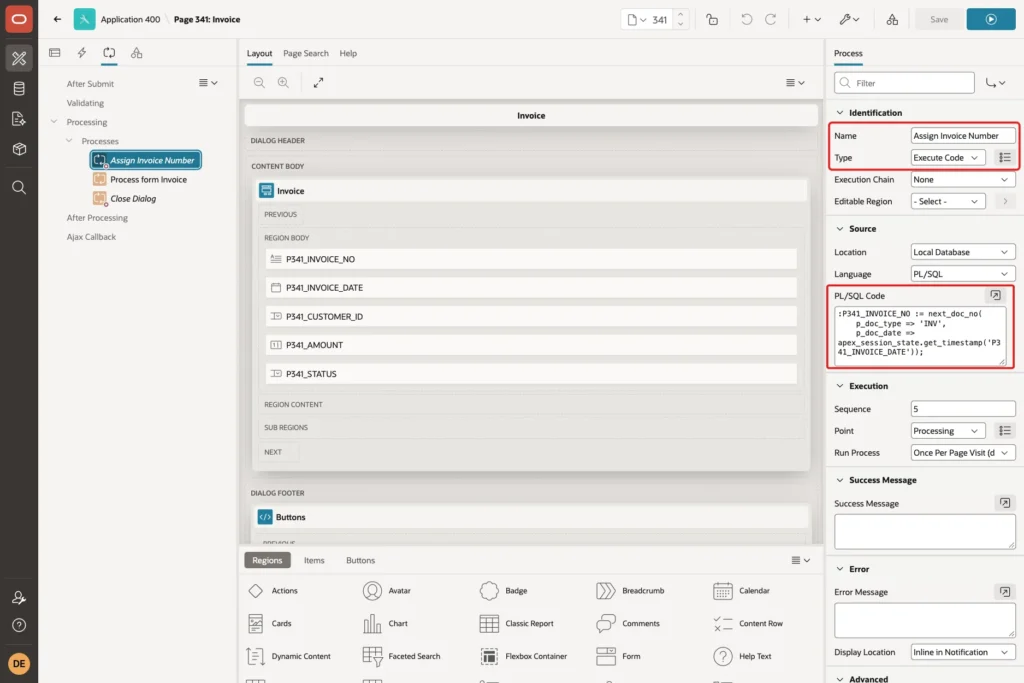
APEX_SESSION_STATE.GET_TIMESTAMP reads the date item and converts it with the item's format mask. So the year in the number comes from the invoice date, not from today's date.
Set Execution, Sequence to 5. Process form Invoice has sequence 10, so the new process runs first. Then go to Server-side Condition and set When Button Pressed to CREATE:
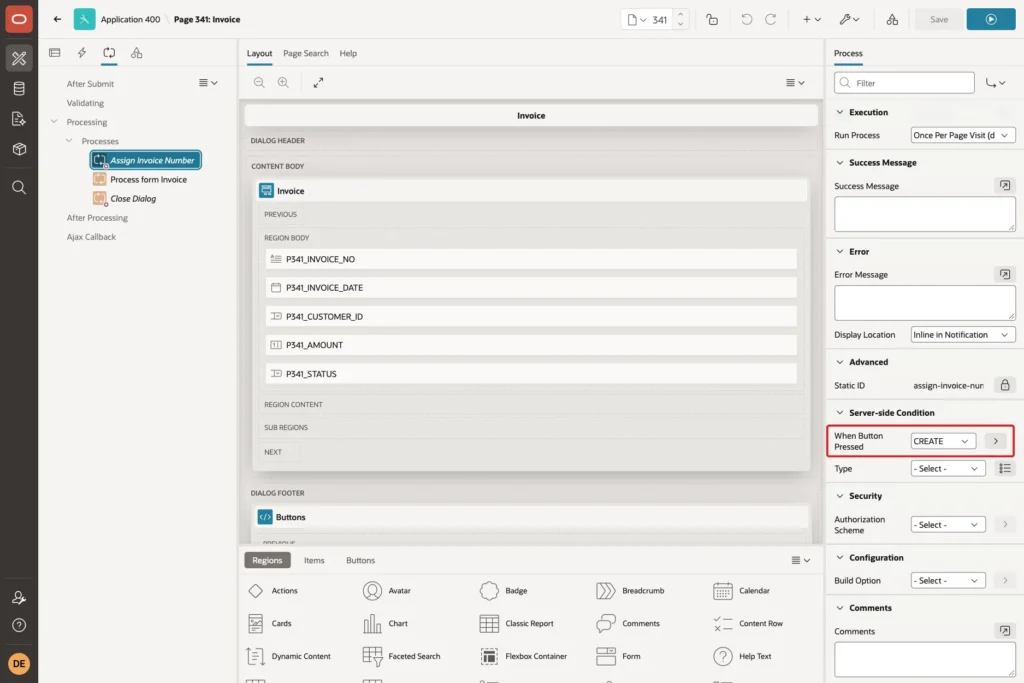
The process sets P341_INVOICE_NO in session state, and the form's Automatic Row Processing then inserts the row with that value. Both run in the same database transaction. Save the page.
Step 8: Test the Form
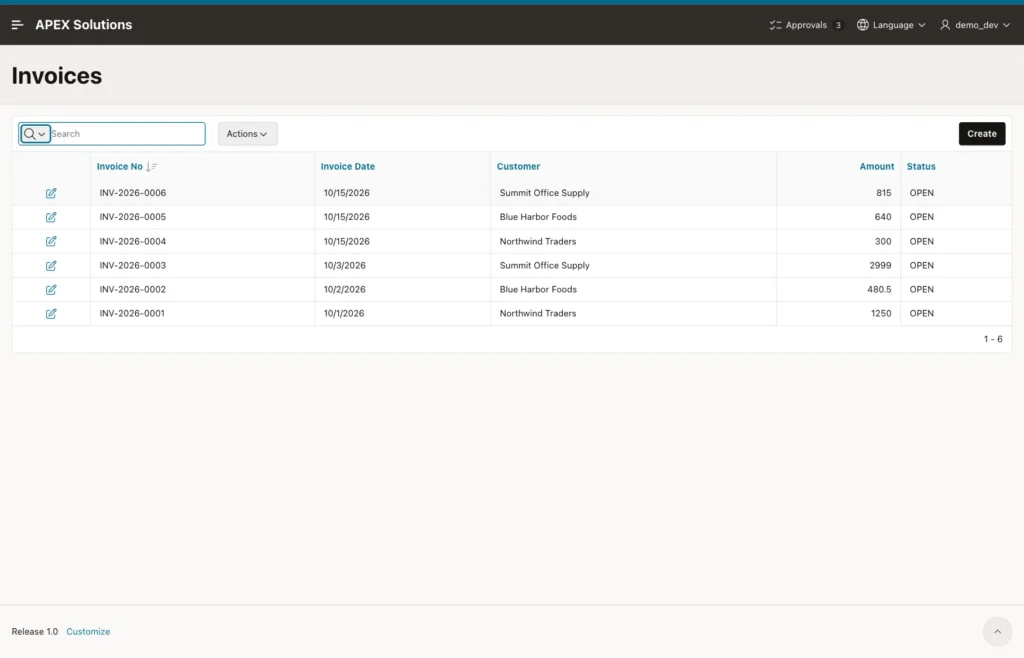
Run page 340. Click the Invoice No column heading and choose Sort Descending, so the newest number is at the top:
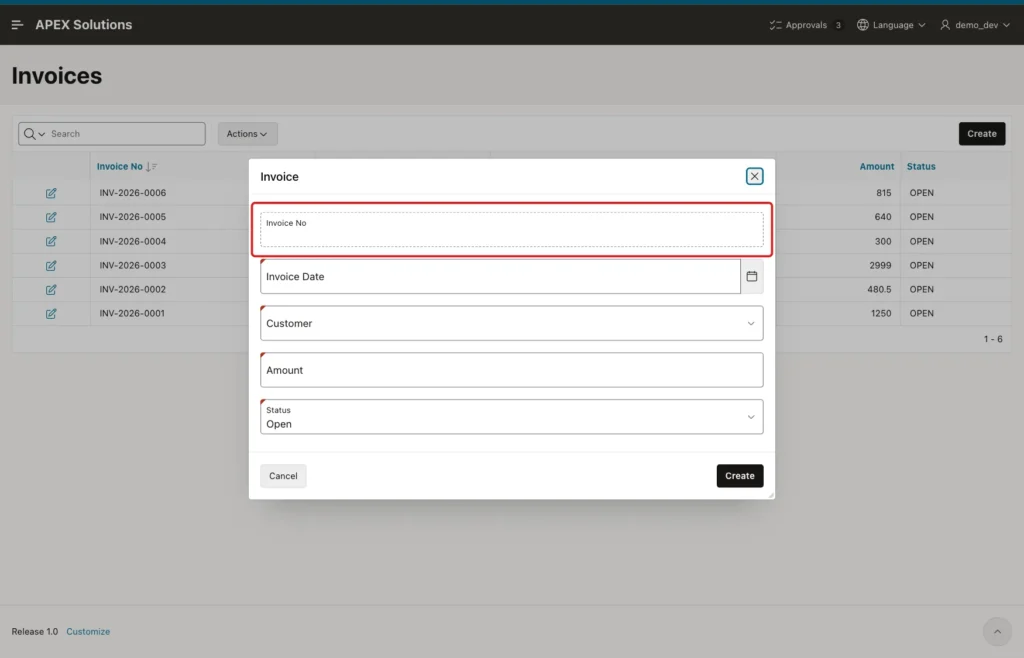
Click Create. The Invoice No field is empty, and Status is already Open:
First, test a failed save. Enter Invoice Date 10/15/2026, choose Northwind Traders, enter Amount 0 and click Create. The process takes the next number, but the insert fails on the check constraint:
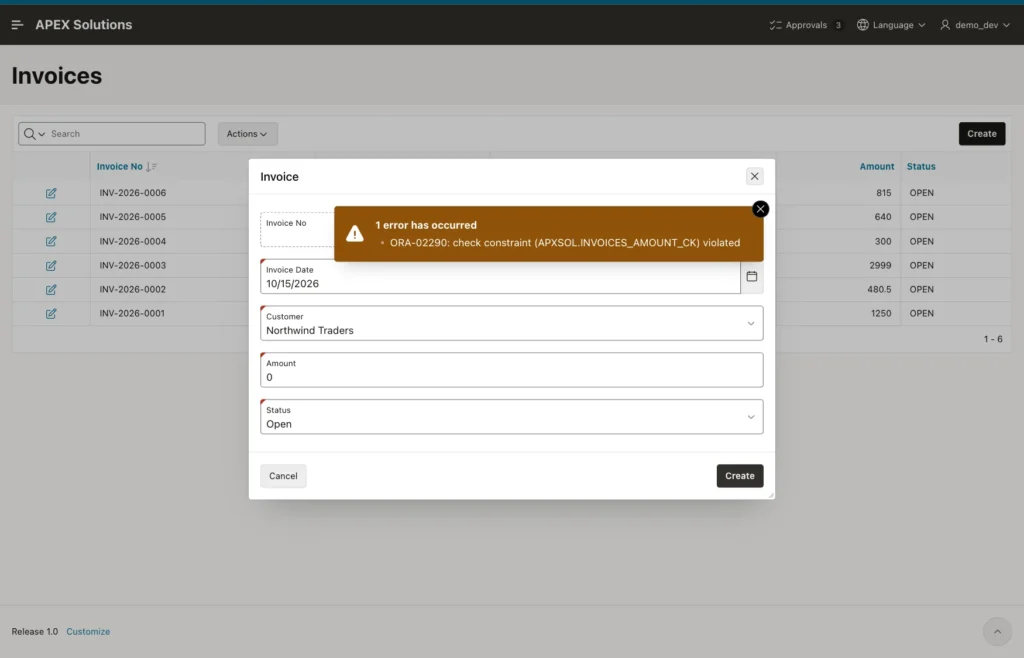
APEX rolled back the request, so the counter is still at 6:
Example:
select doc_type, doc_year, last_no
  from doc_counters;
Output:
DOC_TYPE       DOC_YEAR    LAST_NO
___________ ___________ __________
INV                2026          6
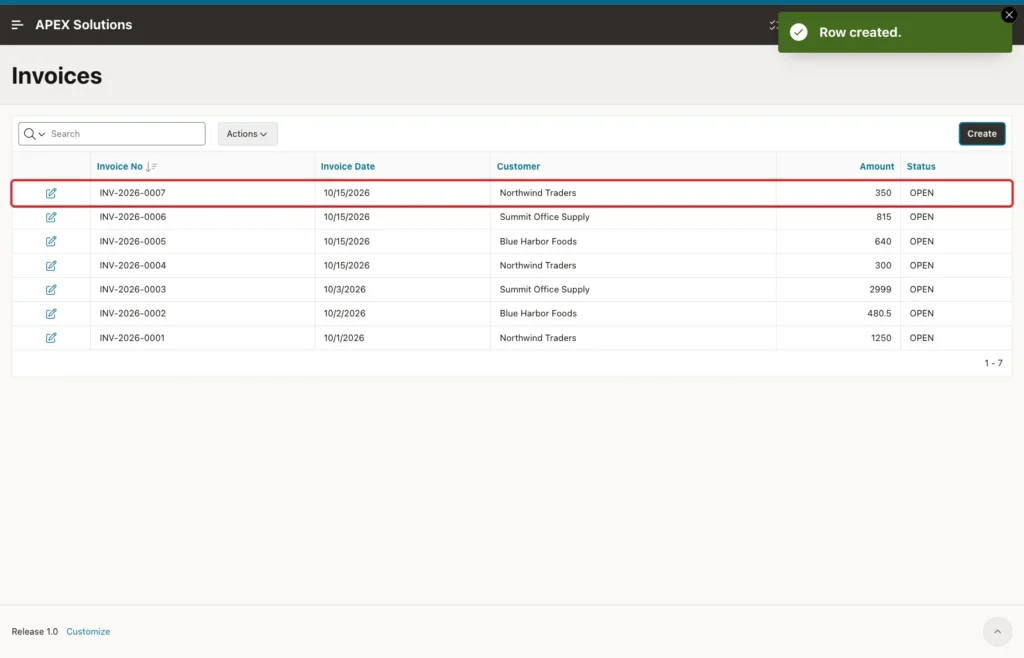
Now change Amount to 350 and click Create again. The dialog closes with Row created, and the new invoice gets INV-2026-0007, the next number with no gap:
Click the edit icon of INV-2026-0007. The number is shown read-only. Change Status to Paid and click Apply Changes:
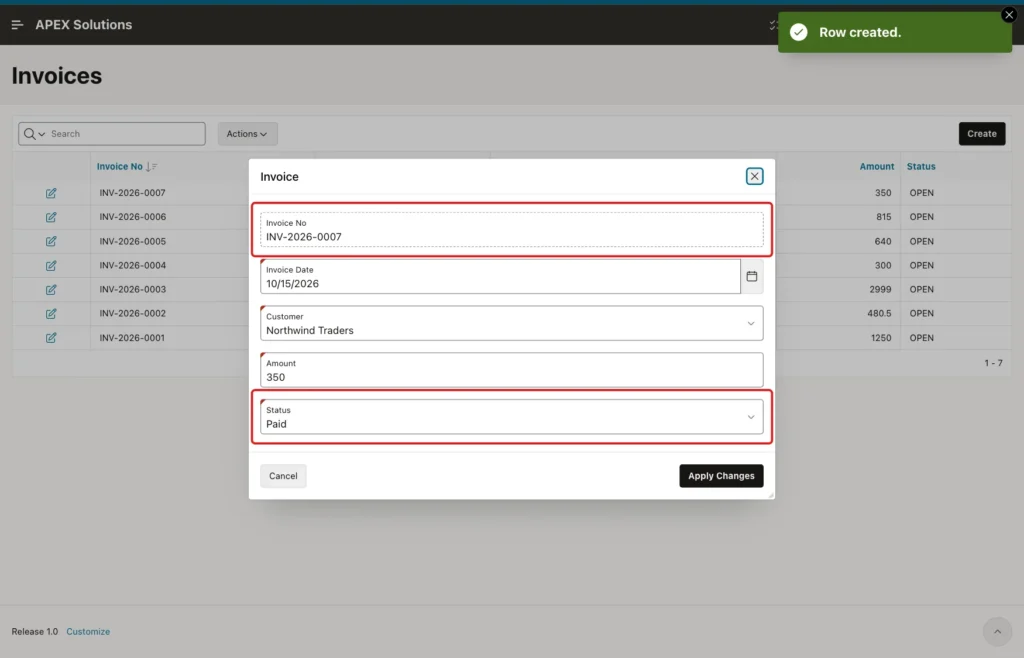
The report showed INV-2026-0007 with status PAID afterwards. The process did not run, because the SAVE button was pressed, not CREATE, so the number did not change.
Step 9: Test Two Users at the Same Time
The counter row lock makes concurrent saves wait for each other. To see it, run two database sessions. Session A takes a number and waits 15 seconds before it commits:
Example:
set serveroutput on
declare
  l_no invoices.invoice_no%type;
begin
  l_no := next_doc_no('INV');
  insert into invoices (invoice_no, customer_id, amount)
  values (l_no, 2, 640);
  dbms_output.put_line(to_char(systimestamp, 'HH24:MI:SS') || ' Session A got ' || l_no);
  dbms_session.sleep(15);
  commit;
  dbms_output.put_line(to_char(systimestamp, 'HH24:MI:SS') || ' Session A committed');
end;
/
Session B starts a few seconds later and asks for a number while A has not committed yet:
Example:
set serveroutput on
declare
  l_no invoices.invoice_no%type;
begin
  dbms_output.put_line(to_char(systimestamp, 'HH24:MI:SS') || ' Session B asks for a number');
  l_no := next_doc_no('INV');
  insert into invoices (invoice_no, customer_id, amount)
  values (l_no, 3, 815);
  commit;
  dbms_output.put_line(to_char(systimestamp, 'HH24:MI:SS') || ' Session B got ' || l_no);
end;
/
Output of session A:
02:56:53 Session A got INV-2026-0005
02:57:08 Session A committed

PL/SQL procedure successfully completed.
Output of session B:
02:56:59 Session B asks for a number
02:57:08 Session B got INV-2026-0006

PL/SQL procedure successfully completed.
Session B asked at 02:56:59 and waited until A committed at 02:57:08. Then it got INV-2026-0006. No duplicate and no gap.
The same test with the date 2027-01-04 checks the first number of a new year, where both sessions try to insert the counter row:
Example:
set serveroutput on
declare
  l_no invoices.invoice_no%type;
begin
  l_no := next_doc_no('INV', date '2027-01-04');
  insert into invoices (invoice_no, invoice_date, customer_id, amount)
  values (l_no, date '2027-01-04', 2, 640);
  dbms_output.put_line(to_char(systimestamp, 'HH24:MI:SS') || ' Session A got ' || l_no);
  dbms_session.sleep(15);
  commit;
  dbms_output.put_line(to_char(systimestamp, 'HH24:MI:SS') || ' Session A committed');
end;
/
Output of session A:
02:57:23 Session A got INV-2027-0001
02:57:38 Session A committed

PL/SQL procedure successfully completed.
Output of session B:
02:57:29 Session B asks for a number
02:57:38 Session B got INV-2027-0002

PL/SQL procedure successfully completed.
Session B waited on the unique index until A committed, got DUP_VAL_ON_INDEX inside the function, and then updated the new row to 2. In this example, the two 2027 test invoices and their counter row were deleted again afterwards.
Step 10: Check the Numbers in SQL
This query lists the invoices and compares the count with the highest number per year:
Example:
select invoice_id, invoice_no, amount, status
  from invoices
 order by invoice_no;

select extract(year from invoice_date) as doc_year,
       count(*) as invoices,
       max(to_number(substr(invoice_no, -4))) as highest_no
  from invoices
 group by extract(year from invoice_date);

select doc_type, doc_year, last_no
  from doc_counters;
Output:
   INVOICE_ID INVOICE_NO          AMOUNT STATUS
_____________ ________________ _________ _________
            1 INV-2026-0001         1250 OPEN
            2 INV-2026-0002        480.5 OPEN
            3 INV-2026-0003         2999 OPEN
            5 INV-2026-0004          300 OPEN
            6 INV-2026-0005          640 OPEN
            7 INV-2026-0006          815 OPEN
           22 INV-2026-0007          350 PAID

7 rows selected.

   DOC_YEAR    INVOICES    HIGHEST_NO
___________ ___________ _____________
       2026           7             7

DOC_TYPE       DOC_YEAR    LAST_NO
___________ ___________ __________
INV                2026          7
Seven invoices and a highest number of 7 means there is no gap in 2026. INVOICE_ID has gaps: 4 is missing, and it jumped from 7 to 22. Rolled-back and deleted test rows used some of these values, and Oracle does not reuse identity values. These are the gaps a sequence would have put into the invoice numbers.
Things to Know
- The counter row stays locked until the transaction commits or rolls back. Keep the work after the number short, because every other save of the same document type and year waits.
- Assign the number in a process that runs at save and in the same transaction as the insert, as in Step 7. Then a failed insert also gives the number back.
- The process runs only for the CREATE button, so editing an invoice never changes its number.
- The failed save showed the raw ORA-02290 message. Add a validation such as Amount greater than 0 for a friendlier message; validations run before processes, so no number is taken then.
- Deleting a numbered row creates a gap. This guide removes the Delete button and uses the status Cancelled instead.
- Rows inserted outside this form, for example in SQL scripts, must call NEXT_DOC_NO as well. The INVOICES_NO_UK constraint stops duplicates in any case.
Related Guides
Conclusion
To generate gap-free document numbers in Oracle APEX, keep the last number per document type and year in a counter table. Increase it with UPDATE ... RETURNING in a function, and call that function from a page process that runs just before the form's row processing, only for CREATE.
The tests showed that a failed save gives the number back, that a second session waits for the first one instead of getting a duplicate, and that a new year starts at 1. Use the identity column as the key, and show users only the counter-based number.
