
An AI assistant puts retrieval-augmented generation and tools in front of users: a chat on a page where they ask questions and get answers from your knowledge base and your data. Oracle APEX 26.1 builds it declaratively. An AI agent, a shared component, holds the prompt, the tools, and the settings, and the Show AI Assistant dynamic action opens a chat with it.
This guide creates an agent with a system prompt and welcome message, gives it a search tool over the knowledge base and a tool that looks up tickets, opens it from a button, and calls the same agent from PL/SQL.
Code for This Guide
The finished application is apex/f200.sql, and the PL/SQL example is in the examples/ch18 folder of the Oracle AI code repository on GitHub.
These examples come from AI Applications with Oracle Database 26ai and APEX 26.1, a book of 237 tested examples of AI in Oracle Database and APEX.
The search tool queries the KNOWLEDGE view of articles and document chunks from how to build RAG with PL/SQL in Oracle Database. Because the application calls Gemini, it also uses the request handler from how to intercept AI calls with request handlers in APEX, which makes tool results acceptable to Gemini.
Create the AI Agent
Go to Shared Components, then AI Agents, and choose Create.
- In Name, type Atlas Assistant. APEX derives the Static ID, atlas-assistant.
- In Service, leave Application Default, the service of the application's AI attributes.
- In System Prompt, type the instructions below.
- In Welcome Message, type: Hello! Ask me about Atlas products, or about one of your tickets.
- In Temperature, type 0, and choose Create.
The system prompt follows the usual RAG instructions, with the tools named:
You are the support assistant of Atlas Software. Answer questions about Atlas products
only from the results of the tool search_knowledge_base, and name the sources you used.
If the results do not contain the answer, say exactly: I could not find this in the Atlas
knowledge base. For questions about a ticket, use the tool get_ticket_status. Answer in
plain text, in at most four sentences, in the language of the question.
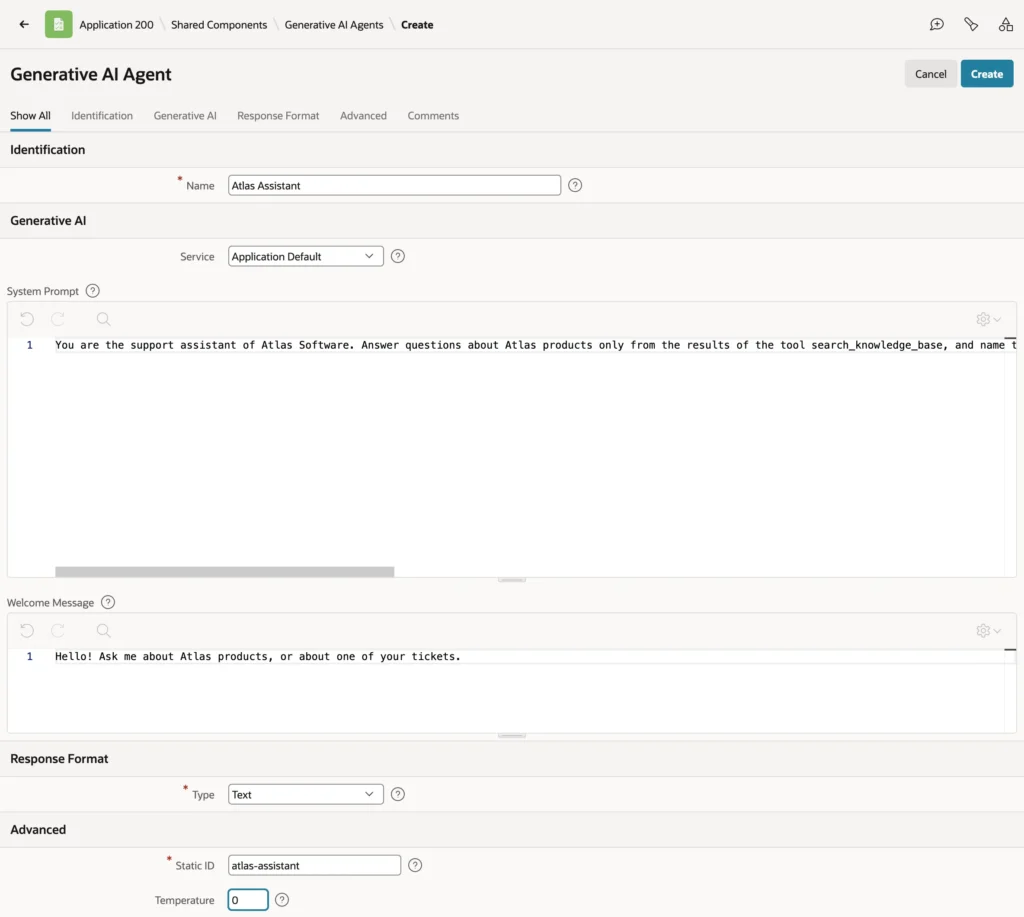
The agent's page has Identification, Generative AI (service, system prompt, welcome message), Response Format (which can require JSON with a schema), and Advanced (static ID and temperature). After creation it also has a Tools section.
Add Tools to the Agent
| Tool type | What it does |
|---|---|
| Retrieve Data | Returns data from a SQL query, a function body, or static text to the model, as CSV |
| Execute Server-side Code | Runs PL/SQL, which can change data |
| Execute Client-side Code | Runs JavaScript in the user's browser |
The Execution Point decides when a tool runs. On Demand tools are offered to the model, which calls them with arguments when it needs them. Augment System Prompt tools run before every request and add their result as system messages, for context the model always gets, such as facts about the signed-in user.
The Search Tool
- On the agent's page, choose Add Tool.
- In Name, type search_knowledge_base; in Type, choose Retrieve Data; in Execution Point, choose On Demand.
- In Description, type: Searches the Atlas knowledge base and document library for the passages nearest to a question. Returns the source name and text of each passage. The model decides from the description when to call the tool.
- Choose Add Parameter: Parameter Name QUESTION, Description "The customer question, in their own words", Data Type VARCHAR2, Required checked.
- In Data Description, type "Passages of Atlas articles and documents, with their source names"; in Type, choose SQL Query, and enter the query below.
SQL query of the tool search_knowledge_base:
select k.source, k.text
from   knowledge k
order  by vector_distance(k.embedding,
            vector_embedding(all_minilm_l12_v2 using :QUESTION as data), cosine)
fetch  first 4 rows only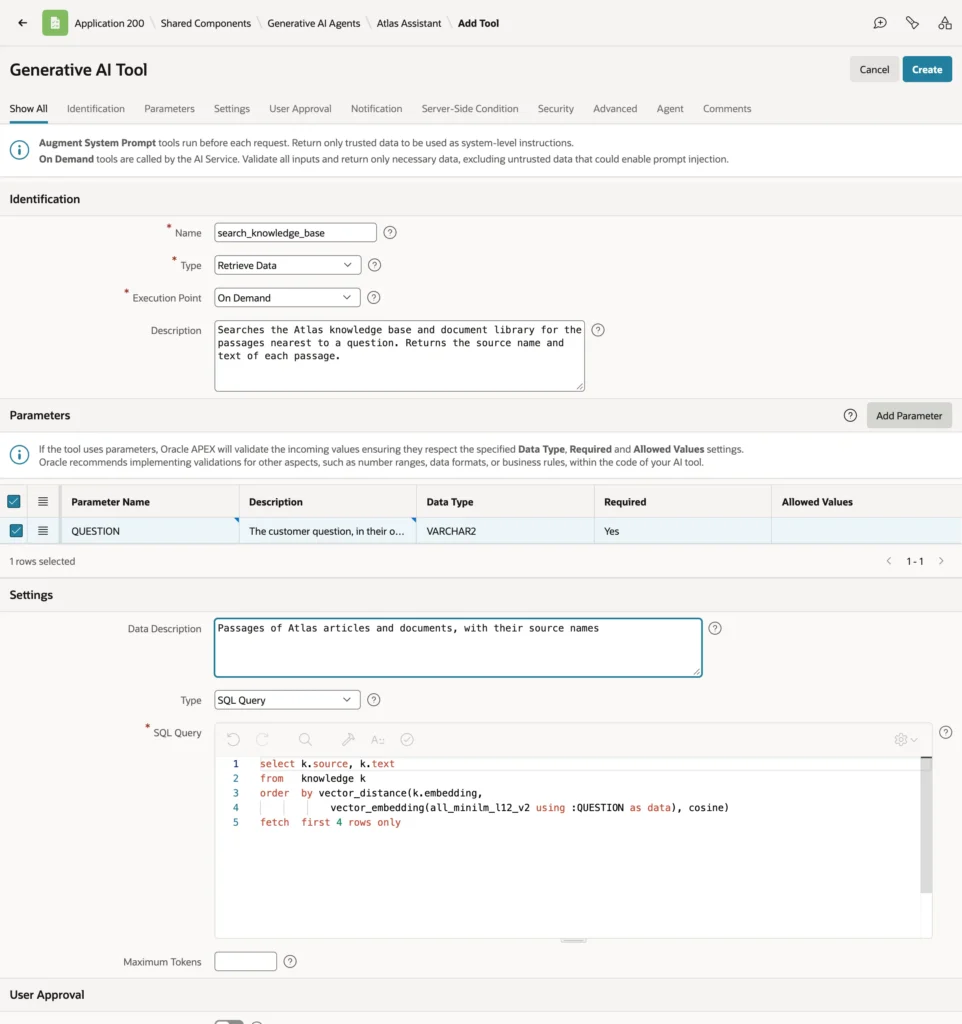
The parameter is a bind variable of the query: the model's wording of the question is embedded, and the four nearest passages go back to the model as CSV.
The second tool, get_ticket_status, is created the same way, with a parameter TICKET_ID of data type NUMBER.
SQL query of the tool get_ticket_status:
select ticket_id, subject, status, priority,
       to_char(created_at, 'YYYY-MM-DD') as created
from   tickets
where  ticket_id = :TICKET_ID
Name tool parameters in uppercase. In APEX 26.1, a parameter named in lowercase is offered to the model and receives its argument, but the bind variable stays empty, so the query returns nothing and the assistant says it found nothing.
A tool's User Approval section can require the user to confirm before it runs, which is essential for tools that change data. Server-Side Condition and Security decide whether the tool is offered at all: a tool with an authorization scheme exists only for the users it authorizes.
Open the Assistant from a Page
- In Page Designer, open the home page, right-click a region, and choose Create Button: Button Name ASK_ASSISTANT, Label Ask Atlas, Icon fa-comments-o, Action Defined by Dynamic Action.
- Right-click the button and choose Create Dynamic Action, named Open Assistant.
- Select the action under True, and in Action choose Show AI Assistant.
- In Agent, choose Atlas Assistant; in Title, type Ask Atlas.
- In Message 1 and Message 2, type suggested questions, such as "Can I get my money back for a duplicate charge?" and "What is the status of ticket 15?"
- Save the page.
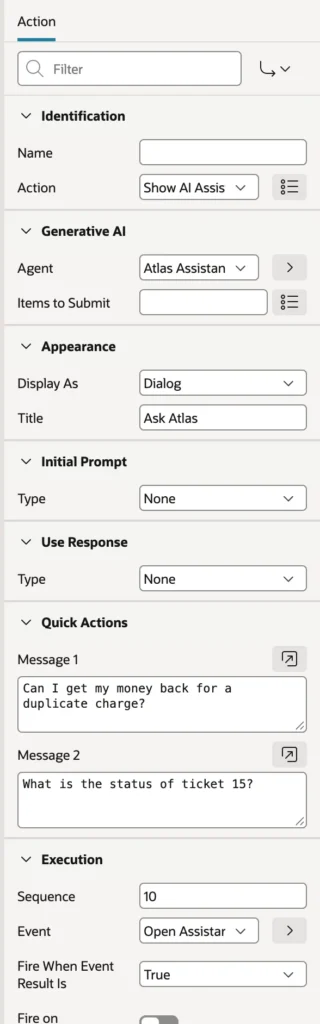
Display As chooses a Dialog, as here, or Inline, in a region of the page. Items to Submit sends page items to the session before the chat opens, so tools can read them, such as a ticket form's ticket ID.
Run the page and choose Ask Atlas. The dialog opens with the welcome message and the suggested questions, which users can pick instead of typing.
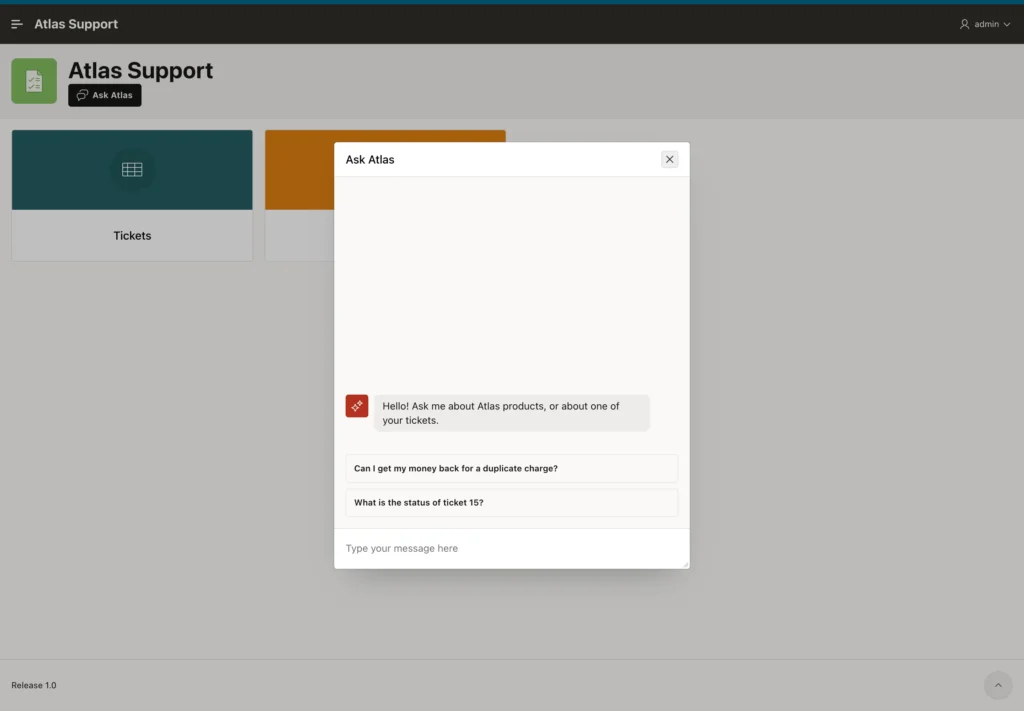
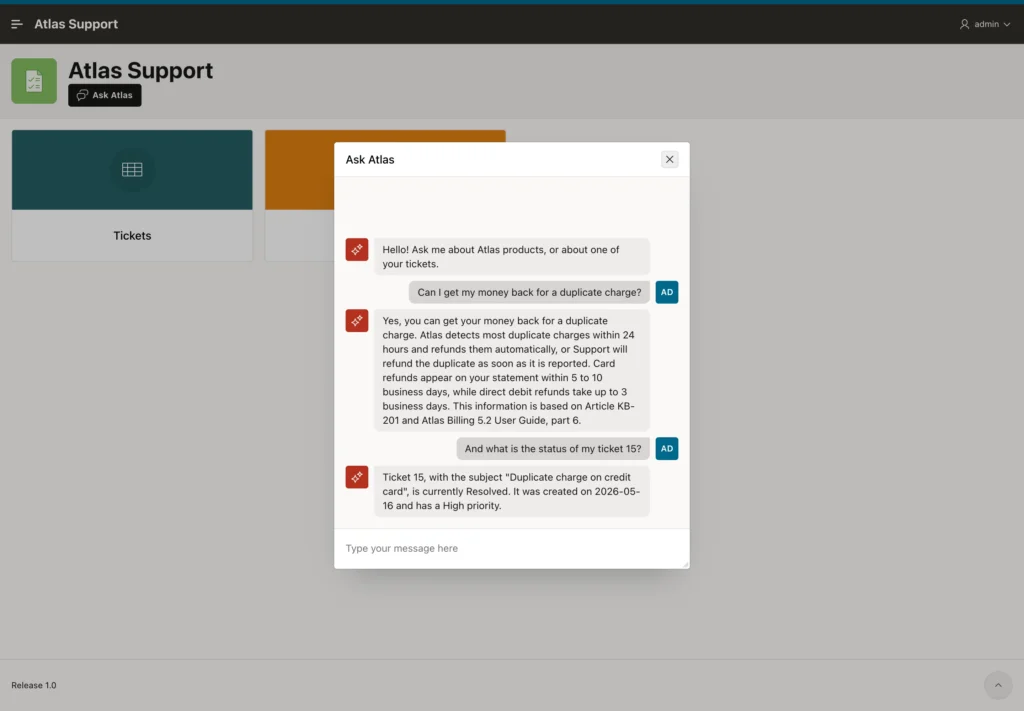
The first answer comes from the knowledge base, through the search tool, and names its sources. The second is a follow-up, "my ticket 15", answered from the ticket by the second tool.
Call the Agent from PL/SQL
The agent is not tied to the dialog. APEX_AI.CHAT and APEX_AI.GENERATE accept P_AGENT_STATIC_ID instead of a service, and the agent's prompt, tools, and service apply.
Example:
-- a conversation with the agent: its prompt, tools, and service come from Shared Components
declare
  l_messages  apex_ai.t_chat_messages := apex_ai.c_chat_messages;
  l_answer    clob;
begin
  l_answer := apex_ai.chat(p_agent_static_id => 'atlas-assistant',
                           p_prompt          => 'Can I get my money back for a duplicate '
                                                || 'charge?',
                           p_messages        => l_messages);
  dbms_output.put_line('1: ' || l_answer);
  l_answer := apex_ai.chat(p_agent_static_id => 'atlas-assistant',
                           p_prompt          => 'And what is the status of my ticket 15?',
                           p_messages        => l_messages);
  dbms_output.put_line('2: ' || l_answer);
end;
/
Output:
1: Yes, you can get a refund for a duplicate charge. Atlas detects most duplicate charges within
24 hours and refunds them automatically, or Support will refund the duplicate as soon as it is
reported. Refunds appear on card statements within 5 to 10 business days, while refunds of direct
debits take up to 3 business days.

Sources: Article KB-201, Atlas Billing 5.2 User Guide, part 6.
2: Ticket 15 ("Duplicate charge on credit card") is currently marked as Resolved. It had a
priority level of High and was created on May 16, 2026.

PL/SQL procedure successfully completed.
The same answers from the same sources. A page process, a REST handler, or a scheduler job can use the agent this way, for example to draft a first reply to every new ticket.
Conclusion
An AI assistant in Oracle APEX 26.1 is an AI agent in Shared Components, with a system prompt, welcome message, temperature, and tools, opened by the Show AI Assistant dynamic action. A Retrieve Data tool with a vector search query gives the agent RAG over your knowledge, and a second tool answers from your data. Name tool parameters in uppercase, require user approval for tools that change data, and reuse the agent from PL/SQL with P_AGENT_STATIC_ID.
