
Oracle APEX 26.1 has its own AI layer: services that call AI providers, agents with prompts and tools, assistants that chat on a page, and components that generate text and search by meaning. All of it starts with a Generative AI service, which tells APEX which provider to call, with which key and which model, and with the AI attributes of each application.
This guide explains where AI is configured in APEX, every setting of a Generative AI service, the eight AI providers APEX supports, and an application's AI attributes: its default service, consent message, and request and response handlers.
Code for This Guide
The finished sample application, Atlas Support (application 200), is apex/f200.sql in the Oracle AI code repository on GitHub. Import it into a workspace on the sample schema ATLAS to see every setting described here.
These examples come from AI Applications with Oracle Database 26ai and APEX 26.1, a book of 237 tested examples of AI in Oracle Database and APEX.
The application calls Google Gemini. The API key itself never appears in the application: APEX keeps it in a web credential that cannot be read back.
Three Levels of AI Configuration
| Level | What is configured | Where |
|---|---|---|
| Workspace | AI services, vector providers, web credentials | Workspace Utilities |
| Application | The default AI service, consent, request and response handlers; AI agents | Shared Components |
| Component | What a region, dynamic action, or process does with AI | Page Designer |
Generative AI Services
Services belong to the workspace, so every application in it can use them. To see them, go to Workspace Utilities, then Generative AI.
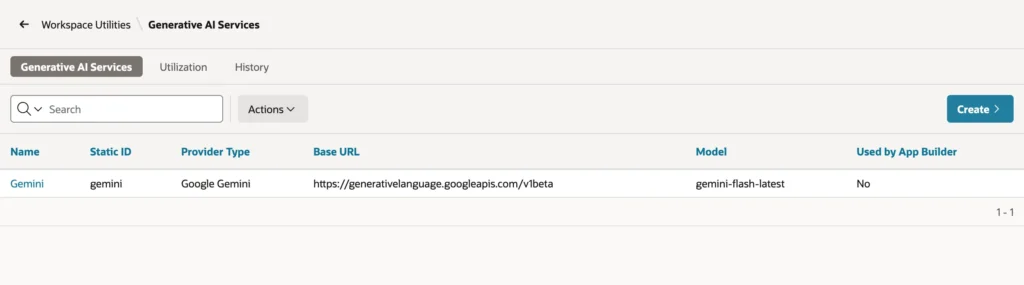
Choose a service to edit it.
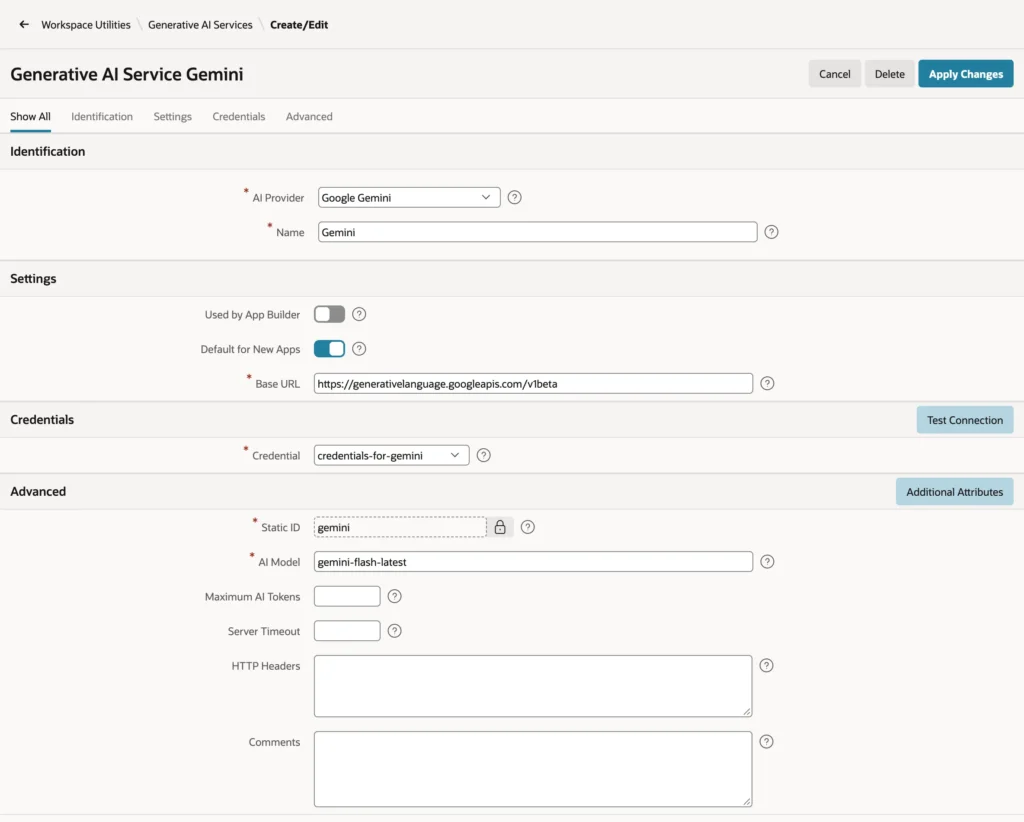
| Setting | What it does |
|---|---|
| AI Provider | The provider the service calls; it decides the format of requests |
| Name | The name developers see when they choose a service |
| Used by App Builder | Whether App Builder, SQL Workshop, and Data Reporter use this service for their own AI features; one service at most |
| Default for New Apps | Whether new applications get this service as their default |
| Base URL | The provider's REST endpoint; it must match the URL of the web credential |
| Credential | The web credential that holds the API key |
| Static ID | The name code uses for the service, such as gemini in APEX_AI calls |
| AI Model | The model the service calls, such as gemini-flash-latest |
| Maximum AI Tokens | The tokens APEX may use with this service per 24 hours; providers that do not report usage cannot be held to it |
| Server Timeout | The transfer timeout of a call, in seconds |
| HTTP Headers | Extra headers for every request, as name=value pairs |
| Additional Attributes | Provider-specific JSON added to every request |
Test Connection sends a short request with the service's settings and reports whether it succeeded. Set Maximum AI Tokens on every production service: it is APEX's daily budget for calls made through APEX.
For Gemini, choose Google Gemini as the provider, paste the key into API Key with Credential left at Create New, and replace the default model with gemini-flash-latest if the default has been retired. APEX stores the key as a web credential of type HTTP Header and sends it as x-goog-api-key on every call. To change the key later, open Workspace Utilities, then Web Credentials, and paste the new key into Credential Secret.
AI Providers
| AI Provider | Notes |
|---|---|
| OCI Generative AI Service | Oracle Cloud's models, with OCI credentials |
| OpenAI | OpenAI's models |
| Cohere | Cohere's models |
| Google Gemini | Google's Gemini models |
| Anthropic Claude | Anthropic's models |
| Mistral AI | Mistral's models |
| Ollama | A model running on your own hardware |
| Generic (OpenAI API Compatible) | Any provider or server that implements OpenAI's API |
Switching an application to another provider means creating a service for it and choosing it as the application's service. The components that use the service do not change.
The AI Attributes of an Application
Each application has its own AI settings: in Shared Components, choose AI Attributes in the Generative AI section.
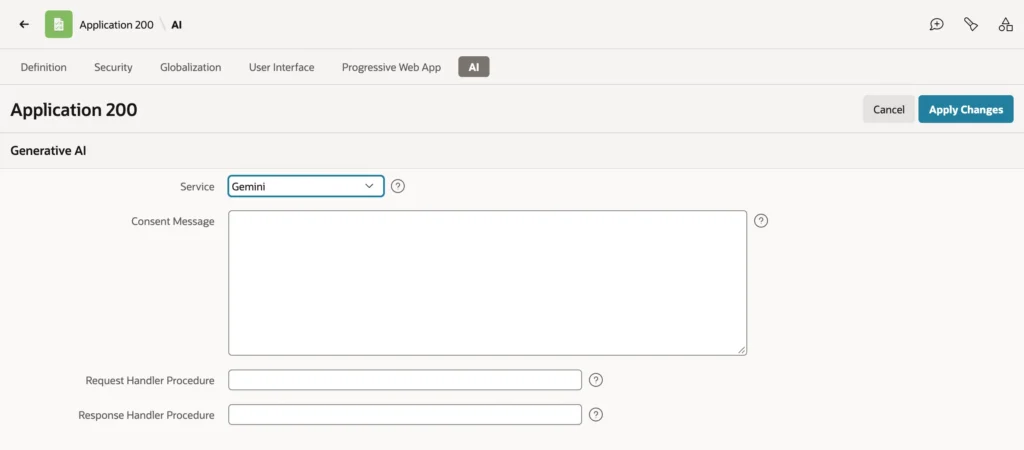
| Attribute | What it does |
|---|---|
| Service | The application's default AI service, used by every AI component that does not name its own |
| Consent Message | A message users must accept before using AI; APEX asks once and stores the answer as a preference |
| Request Handler Procedure | A procedure called before every request the application sends to an AI service |
| Response Handler Procedure | A procedure called after every response |
The Consent Message is how an application tells users that their questions go to an AI provider, and lets them decline. The APEX_AI package can set and clear consent in code, for users who agreed elsewhere.
The two handler procedures are one place that sees every AI call of the application, whatever component made it. A request handler can mask data, log requests, enforce policy, detect prompt injection, or change the request; a response handler can mask, log, or change the response. They have fixed interfaces.
Syntax:
procedure request_handler (
  p_param   in            apex_ai.t_chat_request_handler_param,
  p_result  in out nocopy apex_ai.t_chat_request_handler_result );

procedure response_handler (
  p_param   in            apex_ai.t_chat_response_handler_param,
  p_result  in out nocopy apex_ai.t_chat_response_handler_result );
P_RESULT.REQUEST holds the request, with the system prompt, messages, tools, and temperature, which a request handler may change. P_RESULT.RESPONSE holds the response, with its message and token counts.
The AI Agents entry of the same Shared Components section holds the prompts and tools of the application's assistants and agents. An older overview of these features is in generative AI in Oracle APEX: services, agents, and tools.
Conclusion
AI in Oracle APEX 26.1 is configured at three levels: Generative AI services and web credentials in the workspace, AI attributes and agents in each application, and AI behavior in each component. A service names the provider, base URL, credential, static ID, and model, with Maximum AI Tokens as a daily budget. Each application then chooses its default service, can require consent, and can route every AI call through one request handler and one response handler.
