
When something fails in an Oracle APEX application, the user often sees a raw database error such as "ORA-00001: unique constraint (FORMLAB.CUSTOMERS_EMAIL_UK) violated". The user does not understand it, and the developer never hears about it, so nobody knows what is going wrong in the application.
APEX has a setting for this at the application level: the Error Handling Function. It is one PL/SQL function that APEX calls for every error, on every page and in every dialog. This article uses it to:
- log every error to a table, with the user, the page, and the technical details,
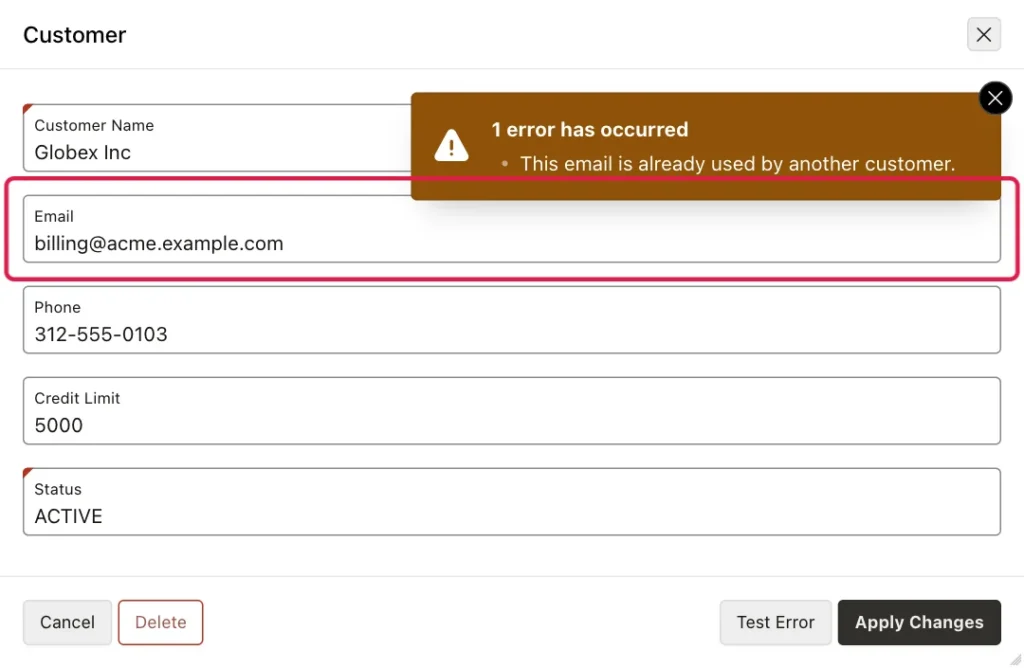
- show a clear message instead of a constraint error, such as "This email is already used by another customer.",
- show unexpected errors as "Something went wrong" with a reference number, so support can find the exact error in the log,
- and log JavaScript errors from the browser in the same table.
The demo is a small Customers application: a CUSTOMERS table with the columns CUSTOMER_ID, CUSTOMER_NAME, EMAIL, PHONE, CREDIT_LIMIT, and STATUS, a Customers report (page 2), and a Customer form in a dialog (page 3), created with the Create App wizard. The table has two rules: an email must be unique, and the credit limit cannot be negative.
alter table customers add constraint customers_email_uk unique (email);
alter table customers add constraint customers_credit_limit_ck check (credit_limit >= 0);
Step 1: Create the Error Log Table
Run this in your schema, in SQL Workshop, SQL Developer, or SQLcl:
create table error_log (
  log_id          number generated by default as identity primary key,
  logged_on       timestamp default systimestamp not null,
  app_user        varchar2(255),
  app_id          number,
  page_id         number,
  session_id      number,
  message         varchar2(4000),
  ora_sqlcode     number,
  ora_sqlerrm     varchar2(4000),
  component_type  varchar2(255),
  component_name  varchar2(4000),
  error_backtrace varchar2(4000),
  error_statement varchar2(4000)
);
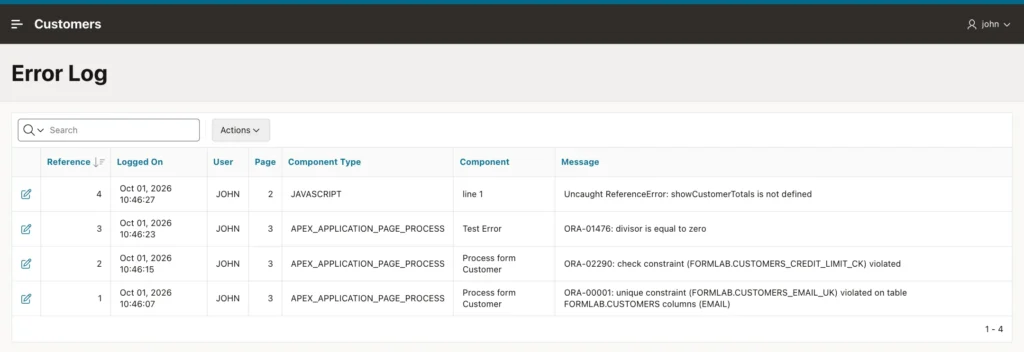
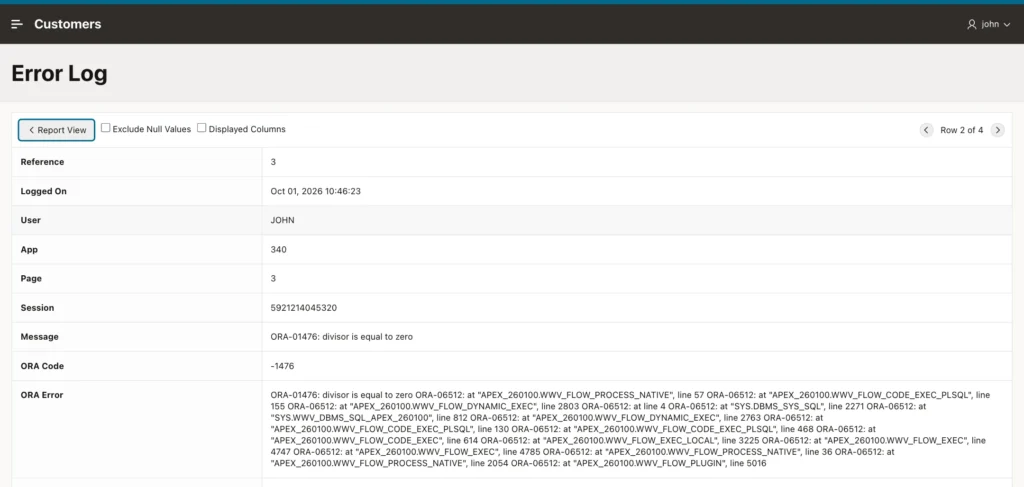
Each error becomes one row: when it happened, the APEX user, the application, page, and session, the error message and ORA error, the component that failed (for example a page process), and the PL/SQL backtrace. LOG_ID is the reference number the user sees.
Step 2: Create the Error Handling Function
APEX calls the error handling function with a record of type apex_error.t_error that describes the error, and shows the user whatever message the function returns. Create it in the same schema:
create or replace function app_error_handler (
  p_error in apex_error.t_error )
  return apex_error.t_error_result
is
  l_result apex_error.t_error_result;
  l_log_id error_log.log_id%type;

  -- saves the error in ERROR_LOG, in its own transaction,
  -- so the row stays even when the page's changes are rolled back
  function log_error return number is
    pragma autonomous_transaction;
    l_id error_log.log_id%type;
  begin
    insert into error_log (
      app_user, app_id, page_id, session_id, message, ora_sqlcode, ora_sqlerrm,
      component_type, component_name, error_backtrace, error_statement )
    values (
      v('APP_USER'), v('APP_ID'), v('APP_PAGE_ID'), v('APP_SESSION'),
      substr(p_error.message, 1, 4000), p_error.ora_sqlcode,
      substr(p_error.ora_sqlerrm, 1, 4000), p_error.component.type,
      substr(p_error.component.name, 1, 4000), substr(p_error.error_backtrace, 1, 4000),
      substr(p_error.error_statement, 1, 4000) )
    returning log_id into l_id;
    commit;
    return l_id;
  end log_error;
begin
  l_result := apex_error.init_error_result(p_error => p_error);

  -- 1. log every error
  l_log_id := log_error;

  -- 2. APEX's own messages (session expired, no access, ...): keep them
  if p_error.is_internal_error and p_error.is_common_runtime_error then
    null;

  -- 3. a broken constraint: a message the user understands
  elsif p_error.ora_sqlcode in (-1, -2290, -2291, -2292) then
    l_result.message := case apex_error.extract_constraint_name(p_error => p_error)
      when 'CUSTOMERS_EMAIL_UK'        then 'This email is already used by another customer.'
      when 'CUSTOMERS_CREDIT_LIMIT_CK' then 'Credit limit cannot be negative.'
      else 'The data could not be saved because it breaks a rule. Error reference: ' || l_log_id
    end;
    l_result.additional_info := null;

  -- 4. your own errors from raise_application_error(-20000 to -20999): show the text only
  elsif p_error.ora_sqlcode between -20999 and -20000 then
    l_result.message := apex_error.get_first_ora_error_text(p_error => p_error);
    l_result.additional_info := null;

  -- 5. any other database or internal error: unexpected, hide the details
  elsif p_error.ora_sqlcode is not null or p_error.is_internal_error then
    l_result.message := 'Something went wrong. Please contact support and quote error reference '
                        || l_log_id || '.';
    l_result.additional_info := null;
  end if;

  return l_result;
end app_error_handler;
/
Here is what it does, in order:
- LOG_ERROR saves every error in ERROR_LOG. It is an autonomous transaction, so the row is kept even when APEX rolls back the page's changes because of the error. It returns the new LOG_ID.
- APEX's own common messages, such as "Your session has expired", stay as they are.
- Constraint errors (unique, check, and foreign key) get a message the user understands. apex_error.extract_constraint_name returns the name of the constraint, and the CASE picks the message. For another constraint, add one WHEN line.
- Errors that you raise yourself with raise_application_error, for example in a process, show only your text, without the ORA-20001 prefix and the PL/SQL line numbers.
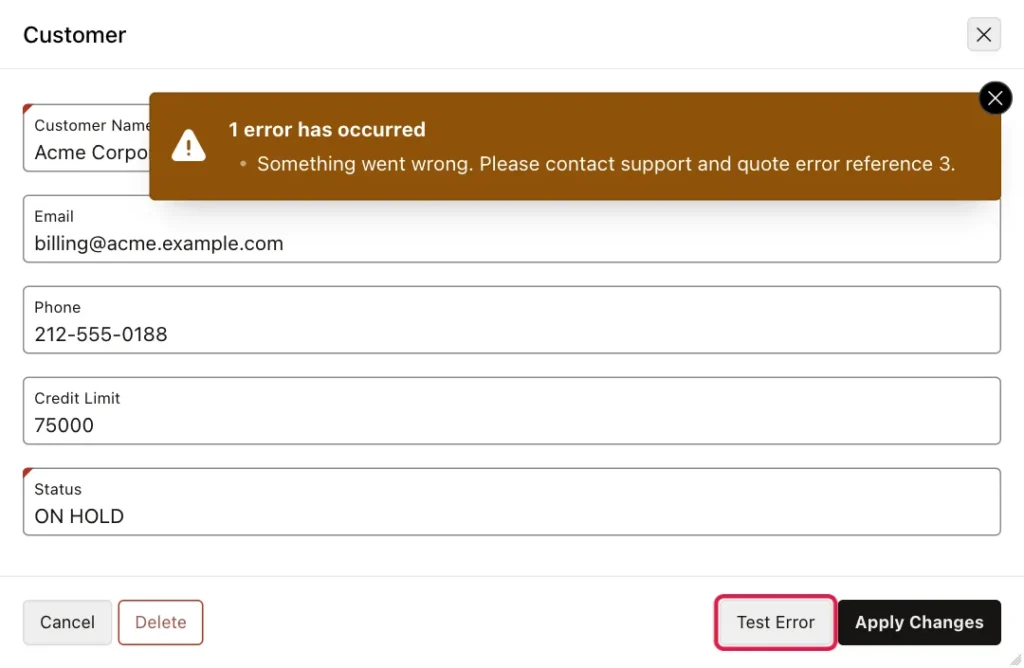
- Any other database error is unexpected. The user sees "Something went wrong" with the LOG_ID as the reference, and the technical details stay in the log.
Messages that APEX creates itself, such as "Customer Name must have some value", have no ORA error and are shown unchanged, but they are logged too.
Step 3: Set the Function for the Application
In App Builder, open your application, click Shared Components, then Application Definition. On the Definition tab, in the Error Handling section, enter the function name in Error Handling Function:
app_error_handler
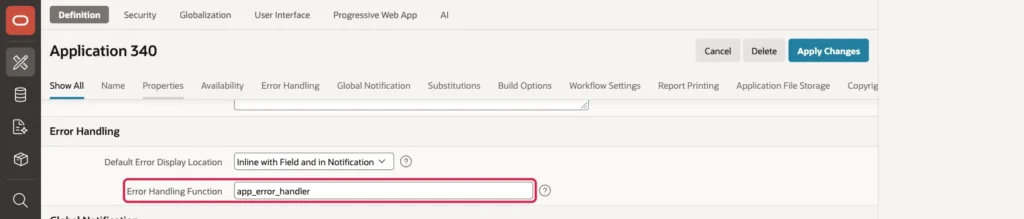
Click Apply Changes. From now on, every error of every page and dialog of this application goes through app_error_handler.
Step 4: Test It
Run the application and open the customer Globex Inc. Change its email to the email of another customer, billing@acme.example.com, and click Apply Changes. Instead of the ORA-00001 error, the user sees:
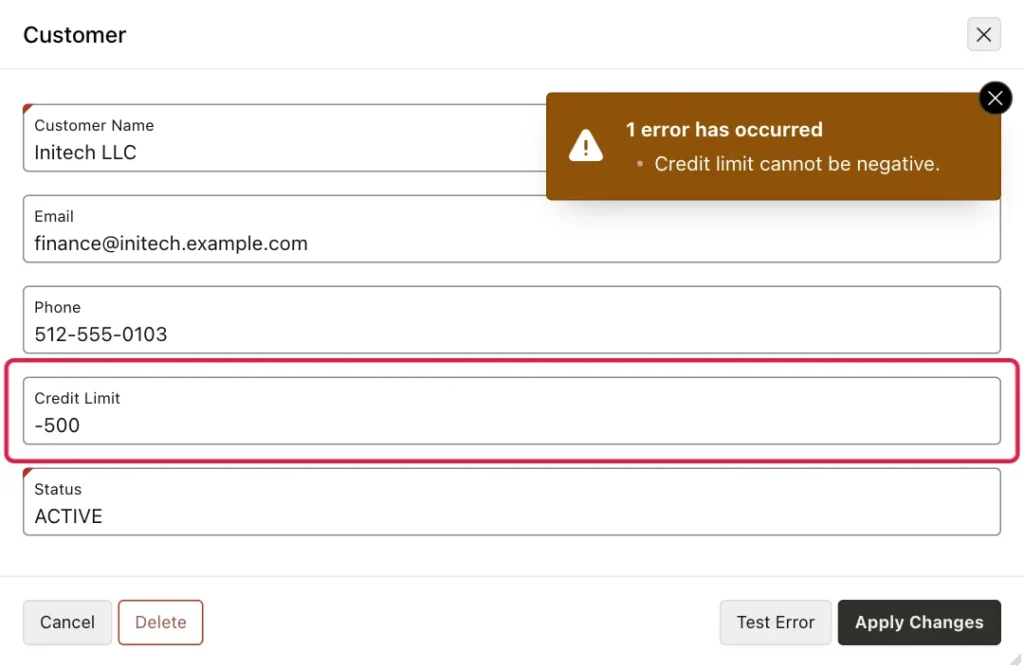
Enter a negative credit limit, such as -500, for another customer, and the check constraint gives its own message:
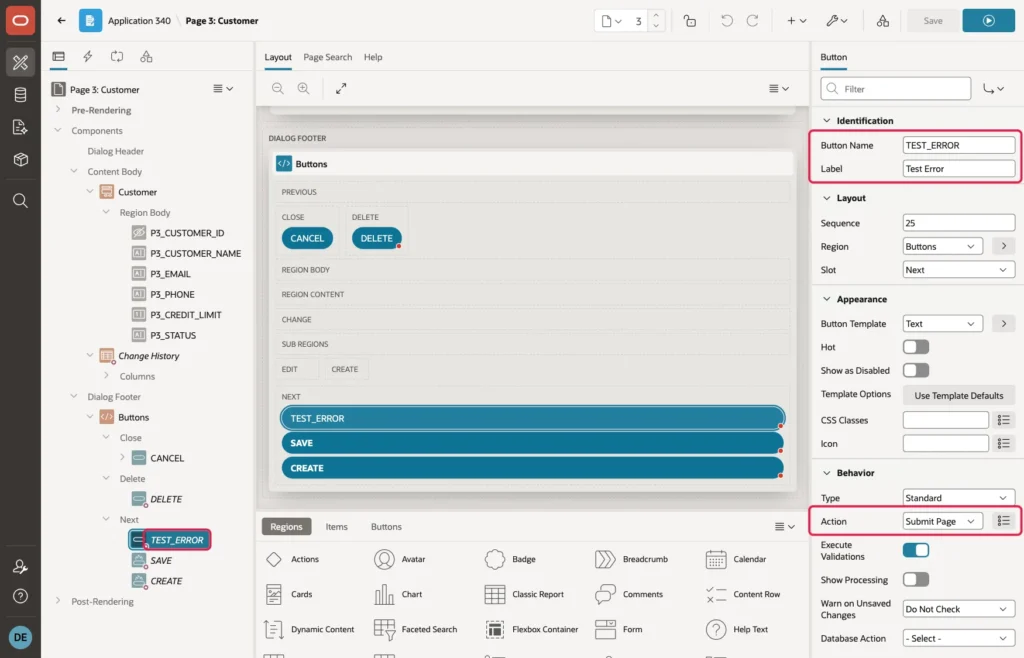
To see an unexpected error, add a temporary button and a process that fails to the Customer page. In Page Designer, create a button in the dialog footer and set Button Name to TEST_ERROR, Label to Test Error, and Action to Submit Page:
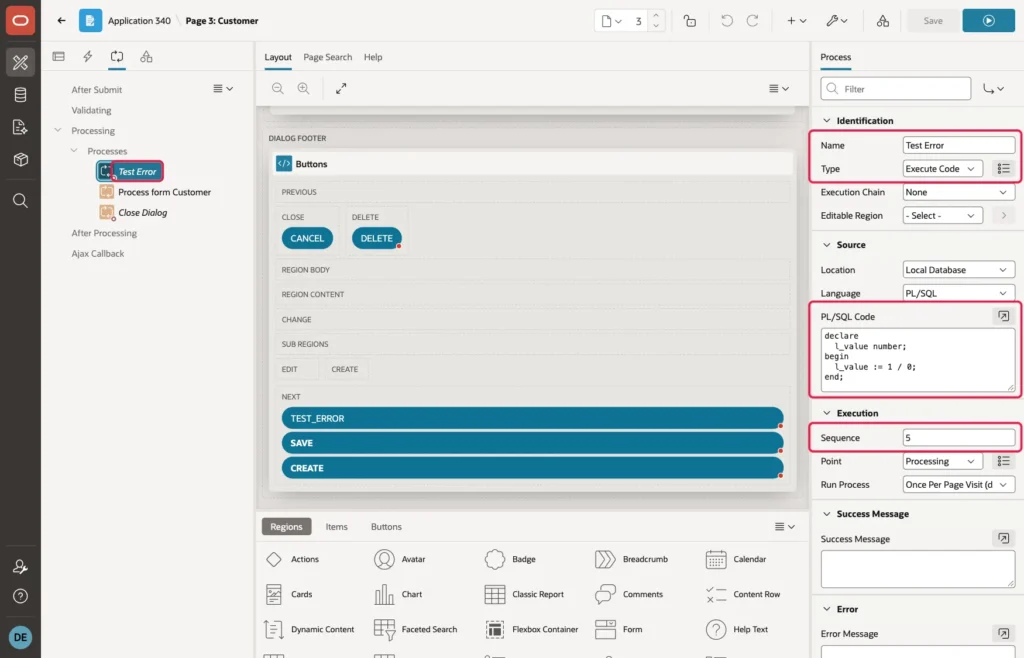
Then, in the Processing tab, create a process. Set Name to Test Error, Type to Execute Code, and Sequence to 5, so it runs before the form's process. As PL/SQL Code, enter this block, which divides by zero:
declare
  l_value number;
begin
  l_value := 1 / 0;
end;
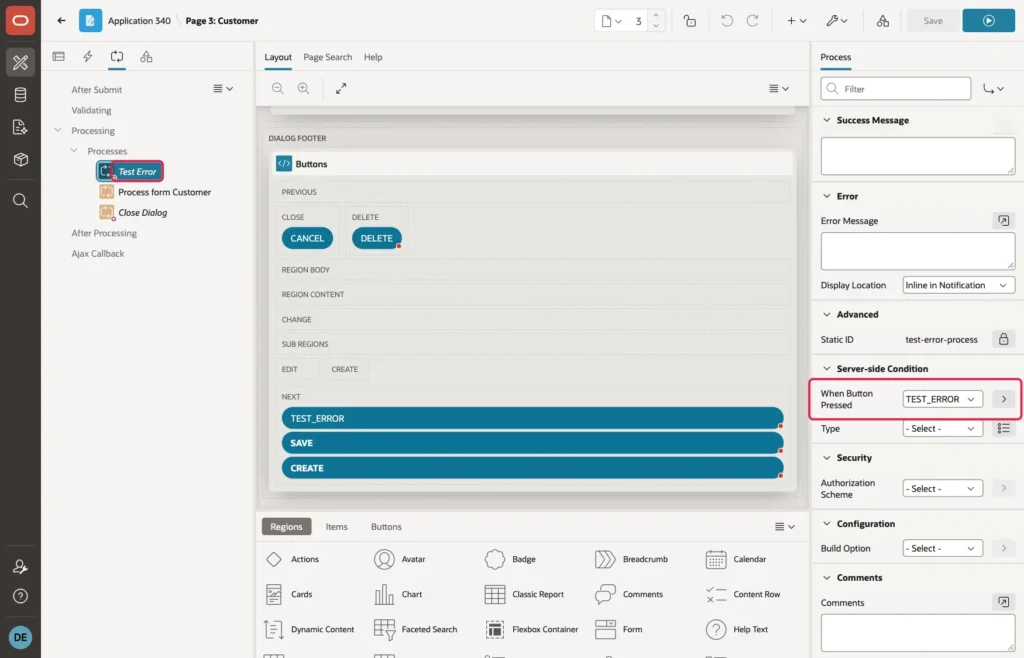
In the process's Server-side Condition, set When Button Pressed to TEST_ERROR, so it runs only for this button. Click Save.
Open a customer and click Test Error. The user sees no ORA error, only a short message with the reference number:
Delete the button and the process when you are done testing.
Step 5: Add an Error Log Page
To see the log in the application, create a page: in App Builder, click Create Page, choose Interactive Report, name it Error Log, select the table ERROR_LOG as the source, and add it to the navigation menu. In the report, sort by LOG_ID descending, so the newest error is at the top. With the user's reference number, you find the row right away:
Click the icon at the start of a row to see all columns of that error, including the full ORA error and the backtrace with the line that failed:
Step 6: Log JavaScript Errors Too
The error handling function runs on the server, so it never sees an error in the browser, such as a typo in a dynamic action's JavaScript. Two small pieces send those errors to the same table.
First, an Ajax Callback that writes a row. In Shared Components, Application Processes, click Create, name it LOG_JS_ERROR, set Process Point to Ajax Callback, and enter this code:
insert into error_log (app_user, app_id, page_id, session_id, message, component_type, component_name)
values (:APP_USER, :APP_ID, :APP_PAGE_ID, :APP_SESSION,
        substr(apex_application.g_x01, 1, 4000), 'JAVASCRIPT', substr(apex_application.g_x02, 1, 4000));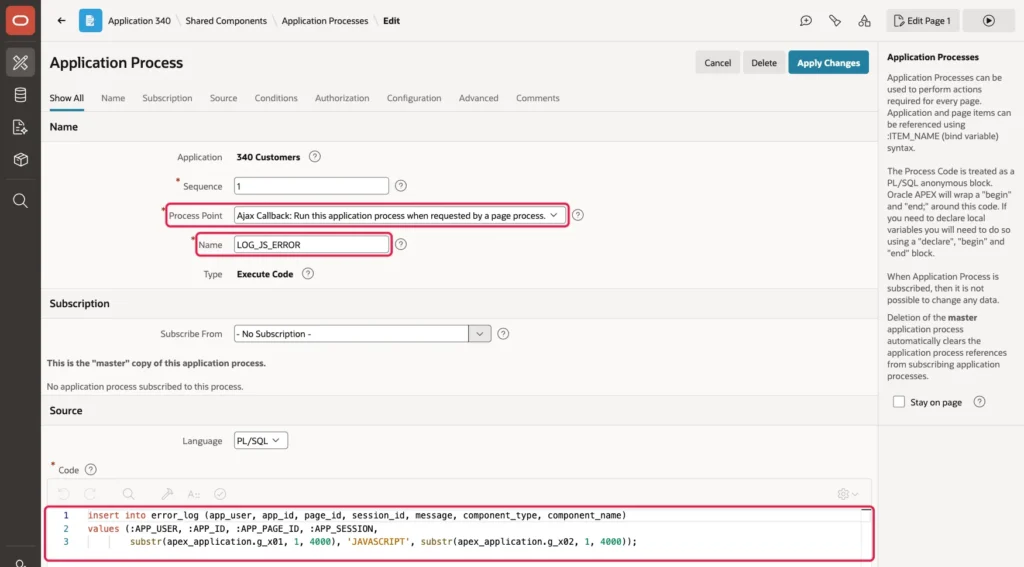
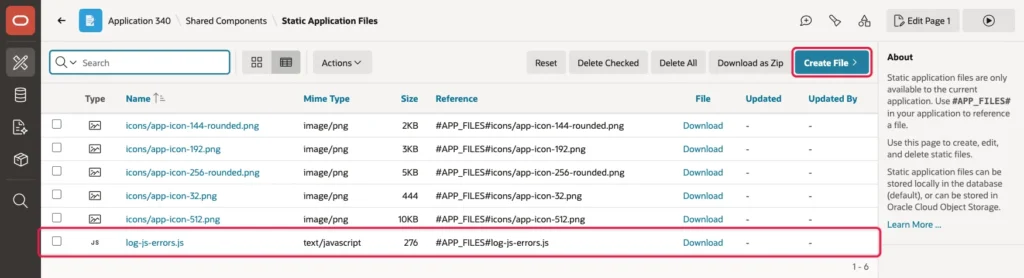
Second, a JavaScript file that calls it whenever an error happens on a page. Save this as log-js-errors.js:
// Sends every JavaScript error of the page to ERROR_LOG,
// through the Ajax Callback process LOG_JS_ERROR
window.addEventListener('error', function (e) {
  apex.server.process('LOG_JS_ERROR', {
    x01: e.message,
    x02: (e.filename || '') + ' line ' + e.lineno
  });
});
Upload the file in Shared Components, Static Application Files, Create File:
Then load it on every page. In Shared Components, User Interface Attributes, set JavaScript, File URLs to:
#APP_FILES#log-js-errors.js
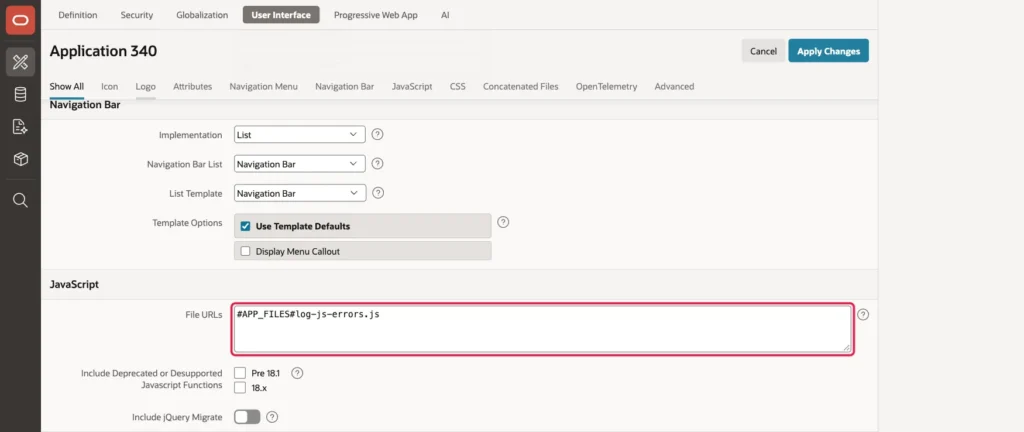
Click Apply Changes. To test it, open any page of the application, open the browser's developer console, and run a call to a function that does not exist:
setTimeout(function () { showCustomerTotals(); });The error "Uncaught ReferenceError: showCustomerTotals is not defined" appears in the Error Log with the type JAVASCRIPT, the user, and the page, as in the first row of the screenshot at the top of this article.
Good to Know
- Errors in a dynamic action with the action Execute Server-side Code also go through the error handling function, and the user sees the same messages.
- An Ajax Callback process that you call yourself with apex.server.process is different: if it fails, APEX rolls back and returns an empty response, without calling the error handling function. Catch the errors in such processes with an exception handler of their own.
- Validation messages, such as "Customer Name must have some value", are logged too, which shows where users struggle. To log only real errors, call log_error only when p_error.ora_sqlcode is not null or p_error.is_internal_error is true.
- Give your constraints names, like CUSTOMERS_EMAIL_UK. A system name such as SYS_C0017514 changes when the table is created again, and the CASE in the function would no longer match.
- A page can use a different function: in Page Designer, the page's own Error Handling Function attribute overrides the application's setting for that page.
- Protect the Error Log page with an authorization scheme for administrators, because it shows technical details.
- The log grows forever. A scheduled job that deletes rows older than, for example, 90 days keeps it small.
Summary
A table, one function of about 60 lines, and one setting in the Application Definition give an Oracle APEX application central error handling. Every error on every page and dialog is logged with the user and the details, constraint errors become clear messages, and unexpected errors show a reference number instead of an ORA error. With an Ajax Callback and a few lines of JavaScript, browser errors land in the same log, so one Error Log page shows everything that goes wrong in the application.
