
In an application of several open forms, the user chooses a patient in one form and opens the appointments form for that patient. Later the user chooses another patient and clicks Appointments again. If the appointments form is still open, it should not open a second copy, and it must not keep showing the first patient.
This guide shows how to handle that in Oracle Forms 14.1.2: open a form or bring the open one to the front with GO_FORM, and let the form catch up in its WHEN-FORM-NAVIGATE trigger.
Sample Form for This Guide
The examples and screenshots use the sample forms CW_PATIENTS, CW_APPOINTMENTS, and CW_BILLING from the Oracle Forms code repository on GitHub, with the PL/SQL library cw_lib.pll attached. Download them, open them in Forms Builder, and connect as CAREWELL to follow along.
| Form | File | What it shows |
|---|---|---|
| CW_PATIENTS | forms/ch40/cw_patients.fmb | Choosing a patient and opening the other forms |
| CW_APPOINTMENTS | forms/ch40/cw_appointments.fmb | A form that follows the chosen patient |
| CW_BILLING | forms/ch40/cw_billing.fmb | The same technique with a fallback when no patient is chosen |
The forms run against the CareWell Clinic sample schema, which you install first.
WHEN-NEW-FORM-INSTANCE Runs Only Once
WHEN-NEW-FORM-INSTANCE fires when a form starts. A form that is already open and only brought back to the front does not run it again. Instead, Forms fires WHEN-FORM-NAVIGATE in the form the user enters.
| Trigger | Fires when |
|---|---|
| WHEN-NEW-FORM-INSTANCE | The form starts |
| WHEN-FORM-NAVIGATE | The user moves into the form from another open form |
So a form that must follow choices made elsewhere calls the same procedure from both triggers.
Pass the Choice Through a Shared Package
The chosen patient is kept in a package variable of an attached library, CW_CTX.PATIENT_ID. Forms opened with SHARE_LIBRARY_DATA share one copy of it, so every open form sees the latest value. See how to pass values between forms in Oracle Forms for how shared library data compares with parameters and globals.
The Appointments button of the patients form passes the current patient.
Example (WHEN-BUTTON-PRESSED trigger on CTL.APPTS):
cw_nav.open_module('cw_appointments', :patients.patient_id);Open the Form or Go to It
OPEN_MODULE, in the library, records the patient, then checks with FIND_FORM whether the form is open. If not, it opens it with SHARE_LIBRARY_DATA; if it is, GO_FORM brings it to the front.
Example (library CW_LIB, package CW_NAV body):
package body cw_nav is
  procedure start_form(p_user varchar2) is
  begin
    if cw_sec.username is null then            -- not signed in: a form run on its own, for testing
      cw_sec.login(p_user);
    end if;
    cw_sec.apply_menu;
    set_window_property(forms_mdi_window, TITLE,
                        'CareWell Clinic - ' || cw_sec.full_name || ' (' || initcap(cw_sec.app_role) || ')');
  end start_form;

  procedure open_module(p_form varchar2, p_patient_id number default null) is
  begin
    if p_patient_id is not null then
      cw_ctx.patient_id := p_patient_id;       -- shared: every form sees the same package data
    end if;
    if id_null(find_form(upper(p_form))) then
      open_form(p_form, activate, no_session, share_library_data);
    else
      go_form(upper(p_form));                  -- open already: its WHEN-FORM-NAVIGATE catches up
    end if;
  end open_module;
end cw_nav;
An older article covers how to use FIND_FORM and GO_FORM in Oracle Forms on their own.
Catch Up in WHEN-FORM-NAVIGATE
The appointments form compares the patient it shows with the shared one, and queries again only if they differ.
Example (program unit LOAD_PATIENT):
-- shows the appointments of the current patient: when the form starts, and when the user comes back
-- to it after choosing another patient in CW_PATIENTS
procedure load_patient is
begin
  if cw_ctx.patient_id is null then
    message('Choose a patient in Patients first.');
  elsif :ctl.patient_id is null or :ctl.patient_id <> cw_ctx.patient_id then
    :ctl.patient_id := cw_ctx.patient_id;
    select first_name || ' ' || last_name || '  (' || mrn || ')' into :ctl.patient_name
      from patients where patient_id = :ctl.patient_id;
    go_block('APPOINTMENTS');
    execute_query;                       -- asks first whether to save changes for the previous patient
  end if;
end;
Both triggers call it: WHEN-NEW-FORM-INSTANCE after the form's startup code, and WHEN-FORM-NAVIGATE on its own.
Example (WHEN-FORM-NAVIGATE trigger):
load_patient;
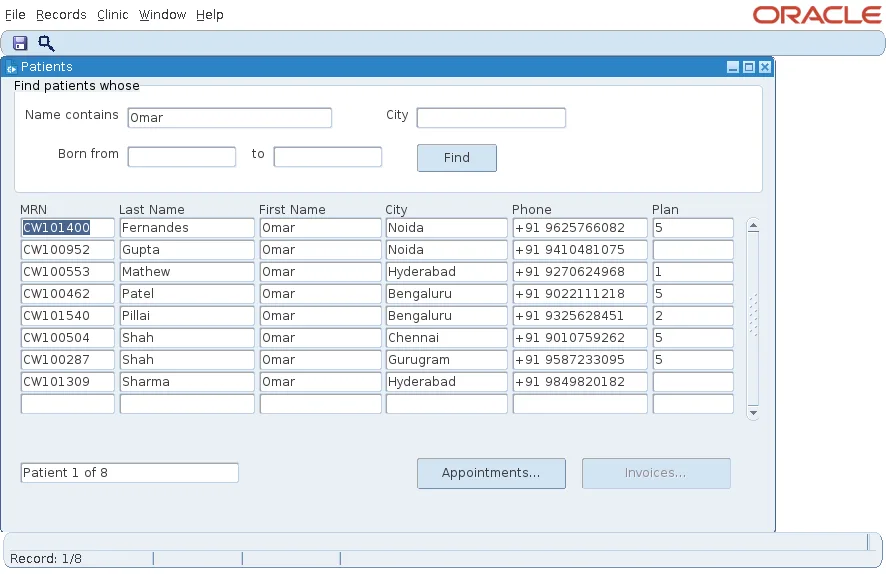
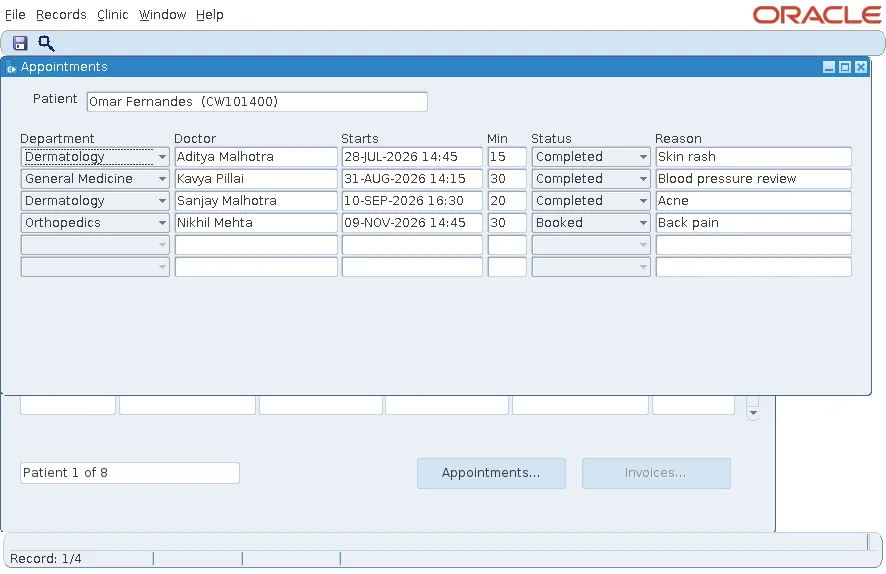
A search for Omar found eight patients, and Appointments opened the appointments of the first.
Unsaved Changes Are Protected
If the user changed an appointment of the previous patient and did not save, EXECUTE_QUERY in LOAD_PATIENT does not discard the change silently. Forms first asks whether to save it, as it does before any query that would replace changed records.
Handle No Choice at All
The billing form uses the same technique with a fallback. Opened from the dashboard with no patient chosen, it lists every invoice still to be paid; opened from the patients form, it lists that patient's invoices.
Example (program unit LOAD_INVOICES):
-- the invoices of the current patient, or, without one, every invoice still to be paid
procedure load_invoices is
begin
  if nvl(cw_ctx.patient_id, -1) = nvl(:ctl.patient_id, -1) and :system.mode = 'NORMAL'
     and :invoices.invoice_id is not null then
    return;                              -- already showing them
  end if;
  :ctl.patient_id := cw_ctx.patient_id;
  if :ctl.patient_id is null then
    :ctl.showing := 'Invoices to be paid';
    set_block_property('INVOICES', DEFAULT_WHERE, 'status in (''OPEN'', ''PARTIAL'')');
  else
    select 'Invoices of ' || first_name || ' ' || last_name into :ctl.showing
      from patients where patient_id = :ctl.patient_id;
    set_block_property('INVOICES', DEFAULT_WHERE, 'patient_id = :ctl.patient_id');
  end if;
  go_block('INVOICES');
  execute_query;
end;
The first test returns early when the form already shows the right invoices, so coming back to the form costs no query.
Conclusion
An open form does not run WHEN-NEW-FORM-INSTANCE again when the user returns to it, but it does run WHEN-FORM-NAVIGATE. Keep the user's current choice in a package shared with SHARE_LIBRARY_DATA, open a form or bring it back with FIND_FORM and GO_FORM, and call one load procedure from both triggers that queries again only when the choice has changed. One open form then follows the user.
