
Some buttons start work that takes a while, such as writing a reminder for every booked appointment. Without feedback, users cannot tell whether the form is working or stuck, and they click again.
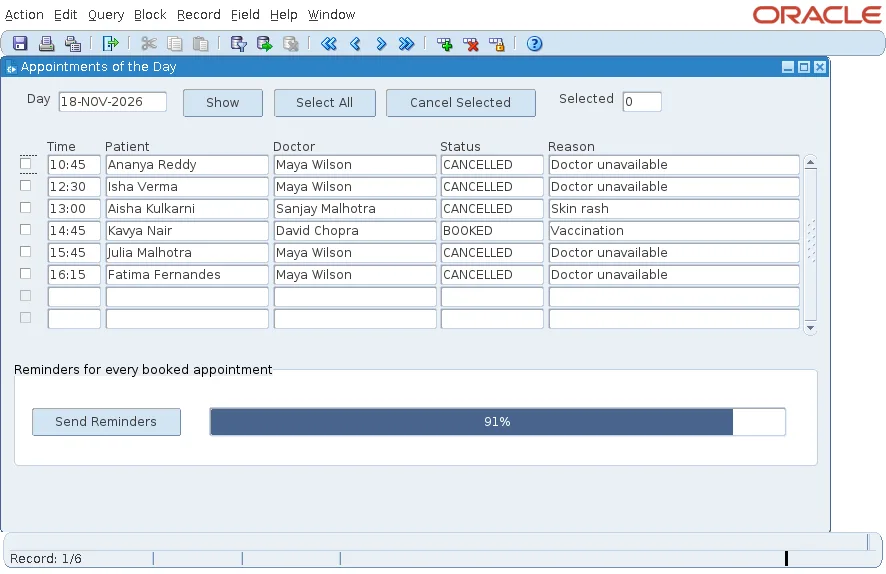
This guide shows how to show a progress bar in Oracle Forms 14.1.2 with the new Progress Bar style of display items, and why SYNCHRONIZE is needed to move it while a trigger runs.
Sample Form for This Guide
The examples and screenshots use the sample form CH39_DAY from the Oracle Forms code repository on GitHub. Download it, open it in Forms Builder, and connect as CAREWELL to follow along.
| Form | File | What it shows |
|---|---|---|
| CH39_DAY | forms/ch39/ch39_day.fmb | The progress bar of Send Reminders |
The forms run against the CareWell Clinic sample schema, which you install first.
Create the Progress Bar Item
Forms 14.1.2 draws a display item as a progress bar, a gauge, or a half-gauge, set by a property. Create a display item, CTL.PROGRESS, with these properties:
| Property | Value |
|---|---|
| Data Type | Number (required for this style) |
| Display Item UI Style | Progress Bar |
| Minimum UI Value | 0 |
| Maximum UI Value | 100 |
| Display as Percentage | Yes, to label the bar 91% rather than 91 |
| Animated | Optional: moves the bar to a new value gradually instead of jumping |
The code then only assigns a number between 0 and 100 to the item.
Update the Bar While the Work Runs
The Send Reminders button writes one line per booked future appointment to a file on the server, and moves the bar every ten rows.
Example (WHEN-BUTTON-PRESSED trigger on CTL.REMIND):
declare
  v_out   text_io.file_type;
  v_total pls_integer;
  v_done  pls_integer := 0;
begin
  select count(*) into v_total
    from appointments where status = 'BOOKED' and appt_start > sysdate;
  v_out := text_io.fopen('/work/transfer/out/reminders.txt', 'w');
  set_application_property(CURSOR_STYLE, 'BUSY');
  for r in (select a.appt_start, p.first_name, p.phone, d.last_name doctor
              from appointments a, patients p, doctors d
             where p.patient_id = a.patient_id and d.doctor_id = a.doctor_id
               and a.status = 'BOOKED' and a.appt_start > sysdate
             order by a.appt_start) loop
    text_io.put_line(v_out, r.phone || ': Dear ' || r.first_name || ', a reminder of your appointment with Dr '
                            || r.doctor || ' on ' || to_char(r.appt_start, 'DD-MON-YYYY "at" HH24:MI') || '.');
    dbms_session.sleep(0.02);           -- the lab's pause, so that the bar can be watched
    v_done := v_done + 1;
    if mod(v_done, 10) = 0 or v_done = v_total then
      :ctl.progress := round(100 * v_done / v_total);
      synchronize;                      -- show the new value now, not when the trigger ends
    end if;
  end loop;
  text_io.fclose(v_out);
  set_application_property(CURSOR_STYLE, 'DEFAULT');
  message(v_done || ' reminders written to /work/transfer/out/reminders.txt');
end;
The trigger wrote 274 reminders to the file.
Output (the first lines of reminders.txt):
+91 9017108208: Dear Aisha, a reminder of your appointment with Dr Mehta on 28-SEP-2026 at 12:45.
+91 9691057415: Dear James, a reminder of your appointment with Dr Bose on 28-SEP-2026 at 13:45.
The DBMS_SESSION.SLEEP call pauses 20 milliseconds per reminder only so the bar can be watched in a test. The real work is fast, and a real task does not need the pause.
Why SYNCHRONIZE Is Needed
A trigger runs on the Forms server, and the client normally shows the trigger's changes only when the trigger ends. That saves messages between the two, but it also means that without SYNCHRONIZE, the bar stood at 0% while the work ran and jumped to 100% at the end.
SYNCHRONIZE sends the current state to the client at once. With it, the bar moved every ten rows.
Update Every Few Rows, Not Every Row
Each SYNCHRONIZE is a round trip to the client. Calling it for every row would slow the work down, so the trigger updates the bar every ten rows and at the last row. For more on the cost of round trips, see how to reduce round trips to the Forms Server. An older article, using SYNCHRONIZE for form refresh in Oracle Forms, covers the built-in on its own.
Show the Busy Pointer
SET_APPLICATION_PROPERTY with CURSOR_STYLE set to BUSY shows the waiting pointer while the trigger runs, and DEFAULT restores it. Together with the bar, users see both that the form is working and how far it has come.
Conclusion
To show a progress bar in Oracle Forms 14.1.2, give a number display item the Display Item UI Style Progress Bar, a range of 0 to 100, and Display as Percentage. Assign the percentage as the work goes and call SYNCHRONIZE so the client shows it at once, every few rows rather than every row, with the busy pointer on while the trigger runs.
