
If you are running a hybrid cloud environment that straddles Oracle Cloud Infrastructure and Google Workspace, you have probably dealt with the painful reality of managing two separate identity lifecycles. You maintain users in Google Workspace for productivity tooling and then separately provision those same identities into OCI IAM for cloud resource access. When someone leaves your organization, you need to deprovision in two places. When someone changes teams, you update groups in two places. This is not just operationally painful. It is a security liability.
OCI IAM now supports a direct integration where it pulls user and group data from Google Workspace and uses that as the authoritative source. This article walks through how the synchronization works at the protocol level, how to configure the trust relationship between the two platforms, and what you need to know to tune the sync behavior for production use.
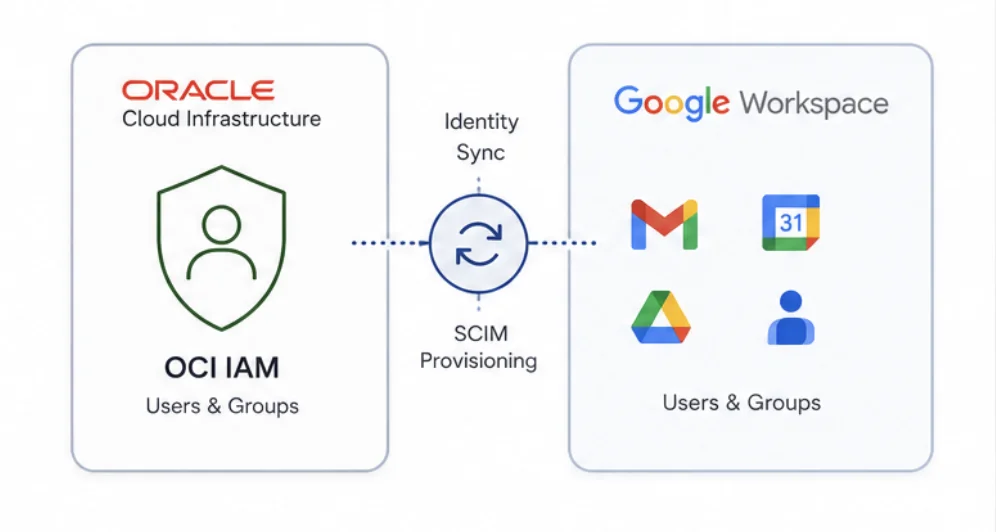
How the Integration Works at the Protocol Level
The integration uses SCIM 2.0 as the transport protocol for identity objects. SCIM (System for Cross-domain Identity Management) defines a standardized schema for representing users and groups and a REST API for create, read, update, and delete operations across identity domains. OCI IAM acts as the SCIM consumer in this architecture. Google Workspace is the SCIM provider.
What makes this integration architecturally sound from a security standpoint is the permission model on the Google side. The service account you configure in Google Cloud only needs read-level access to the Workspace directory. It does not need write access, admin delegation, or any privilege that would allow OCI to modify data within Google Workspace. This follows the principle of least privilege correctly. The integration never needs to create or delete users in the Google directory. It only reads from it and projects that identity data into OCI IAM.
The data flow is unidirectional in the default configuration: Google Workspace is read, and OCI IAM is written. You can flip this if you want OCI IAM to be the authoritative source, but for organizations where Workspace is the HR-connected system of record, the Google-to-OCI direction makes more operational sense.
Setting Up the Google Cloud Side
Before you configure anything in OCI, you need to prepare the Google Cloud project that will authorize the OCI IAM integration. You need a service account in your Google Cloud project with the Admin SDK API enabled. The service account must be granted domain-wide delegation in your Google Workspace Admin console so it can read the directory without acting as an individual user.
When you configure the OAuth scopes for the delegated service account, restrict the scope to read-only directory access. The two scopes you need are https://www.googleapis.com/auth/admin.directory.user.readonly and https://www.googleapis.com/auth/admin.directory.group.readonly. Do not grant broader scopes than these. Any additional scope increases the blast radius if the service account credentials are ever compromised.
After creating the service account, download the JSON key file. This key is what OCI IAM uses to authenticate against the Google APIs during each synchronization cycle. Treat this file like a private key. Rotate it on a schedule aligned with your secrets management policy, and store it in OCI Vault rather than in application configuration files.
Configuring the Integration in OCI IAM for Google Workspace
The configuration entry point is the OCI IAM Application Catalog. In your identity domain console, navigate to Integrated Applications, select Add Application, and search for "Google Workspace Authoritative Sync". This catalog entry provisions a pre-built integration template that handles the SCIM endpoint configuration and authentication handshake automatically.
During configuration, you provide the service account JSON key you downloaded from Google Cloud and specify the admin email address that the API impersonation will use. This email must belong to a super admin in your Google Workspace domain. The integration uses this identity to enumerate the directory via the Admin SDK.
The template also prompts you to configure the sync scope. This is where group-based filtering becomes critical for production deployments.
Group-Based Filtering and Why It Matters
By default, a full sync would pull every user and group from your Google Workspace domain into OCI IAM. For large enterprises, this creates an identity sprawl problem. You do not want service accounts, shared inboxes, and distribution lists polluting your OCI identity domain. You only want the groups that map to OCI resource consumers.
The integration supports group-level include filters. You specify which Google groups you want synchronized, and the engine resolves group membership transitively and pulls only those users. This means if you have a group called cloud-engineers@yourdomain.com and it contains nested subgroups, the sync will flatten and import all resolved members, not just direct members.
A practical filter configuration targets groups by their email identifiers. You would list the groups you want included, and the sync engine treats every user in those groups as in-scope. Users who belong to no included group are not synced, which keeps your OCI identity domain clean and auditable.
| Sync Mode | Scope | Use Case |
|---|---|---|
| Full sync, no filter | All users and groups in domain | Small orgs, flat directory structures |
| Group-filtered sync | Members of specified groups only | Large enterprises, strict IAM scoping |
| OCI as authoritative source | OCI pushes identity to Google | OCI-native orgs using Workspace as downstream |
Triggering Synchronization Programmatically
The integration exposes an API endpoint that lets you trigger a full synchronization without touching the OCI console. This is essential for teams that want sync events tied to operational workflows, such as triggering a sync immediately after an HR system offboarding event or as part of a CI/CD pipeline that provisions new team members.
You trigger synchronization using the OCI IAM REST API against the identity domain's application resource. The call authenticates using your OCI API signing key and targets the sync action endpoint on the integrated application resource. The sync job runs asynchronously, and you can poll the job status endpoint to confirm completion before proceeding with dependent provisioning steps.
For teams using the OCI CLI, the relevant command targets the identity-domains service and invokes the sync operation on the application by its OCID. The exact command follows the pattern of oci identity-domain application sync --application-id <app-ocid> --domain-id <domain-ocid>. You should verify the current CLI reference for your installed version since the subcommand path can vary across CLI releases.
Identity Attribute Mapping and Schema Considerations
When OCI IAM reads users from Google Workspace, it maps Google's directory schema fields to OCI IAM's SCIM user schema. The primary email address in Google Workspace maps to the userName attribute in OCI IAM. Given name and family name map to the standard SCIM name.givenName and name.familyName attributes.
Custom attributes in Google Workspace, such as department codes or cost center identifiers stored in custom schemas, do not map automatically. If your authorization model in OCI depends on these attributes, you need to configure custom attribute mappings manually within the integration template after initial setup. The mapping UI in the OCI IAM console lets you define source attribute paths using Google's Admin SDK field notation and target attribute paths using OCI IAM's SCIM schema extensions.
Deprovisioning Behavior and Lifecycle Management
Understanding how deletes propagate is critical before you go to production. When a user is removed from a Google group that is within your sync scope, and a subsequent sync runs, OCI IAM detects that the user no longer belongs to any in-scope group. Depending on your lifecycle policy configuration, the user can be deactivated or fully deleted in OCI IAM.
The safer default is deactivation rather than deletion. Deletion removes the user's OCI IAM record, which means any audit trail tied to that user identity is severed. Deactivation preserves the record but revokes access. You configure this behavior in the integration's provisioning policy settings within the OCI IAM console. For compliance-sensitive environments, set the orphaned user action to deactivate and schedule a separate periodic review process to handle hard deletes.
Monitoring Sync Health and Troubleshooting Failures
Every sync cycle generates a job log in OCI IAM that details the number of users and groups processed, any attribute mapping errors, and any objects that were skipped due to policy constraints. You can access these logs from the application's sync history tab in the OCI IAM console or pull them programmatically via the audit log API.
Common failure modes include expired service account credentials, revoked domain-wide delegation in Google Workspace, and API quota exhaustion on the Google Admin SDK side. The Google Admin SDK has a default read quota of 1,500 queries per 100 seconds per project. If you have a very large directory and run frequent full syncs, you may hit this limit. The mitigation is either to increase your Google Cloud project's Admin SDK quota through the Google Cloud console or to reduce full sync frequency and rely on incremental sync events for day-to-day changes.
Choosing the Authoritative Source
The integration supports bidirectional configuration. You can designate OCI IAM as the authoritative source, in which case OCI pushes identity lifecycle events to Google Workspace rather than pulling from it. This mode makes sense if your organization's primary identity lifecycle tooling is built on OCI or if you are using OCI IAM as the hub for a broader multicloud identity mesh that includes non-Google targets.
Most organizations that already run Google Workspace as their primary collaboration platform should keep Google Workspace as the authoritative source. The HR system feeds Google, Google feeds OCI, and any downstream cloud or SaaS application that trusts OCI IAM for authentication inherits the correct identity state automatically. This is the path of least resistance and the one that requires the fewest compensating controls to keep identity state consistent across systems.
See also: OCI Isolated Private Cloud: Architecture, Control Plane Design, and Air-Gap Engineering
Conclusion
Synchronizing Google Workspace identity into OCI IAM eliminates a whole class of operational risk that comes from managing parallel identity lifecycles. The integration is built on SCIM 2.0 and uses read-only service account access on the Google side, so the trust surface is minimal and well-defined. Group-based filters give you the scope control you need to keep your OCI identity domain clean. Programmatic sync triggers make it possible to integrate identity propagation into your existing automation workflows rather than depending on scheduled console operations.
The critical configuration decisions are the Google service account scope, the group filter list, and the deprovisioning behavior for orphaned users. Get those three right during initial setup, and the ongoing operational burden of cross-platform identity management drops substantially.
