
An Ask Your Data page lets anyone ask a question about the data in plain language and get an answer without knowing the tables: a sentence, the rows as a table, a chart when the rows are a series of numbers, and the SQL that produced them, so users can see what was counted and not only the result.
This guide builds that page in Oracle APEX 26.1 on top of a natural-language-to-SQL engine that already checks and runs generated queries as a read-only user. It logs every question, writes a one-sentence answer, renders any result as an escaped HTML table, draws a chart when it can, and compares the approach with the Natural Language Support of interactive reports.
Code for This Guide
The examples are in the examples/ch25 folder of the Oracle AI code repository on GitHub, each with its output, with one report check from examples/ch20. The finished page is in apex/f200.sql.
These examples come from AI Applications with Oracle Database 26ai and APEX 26.1, a book of 237 tested examples of AI in Oracle Database and APEX.
The engine is the ASK_DATA function, with its CHECK_SQL check and read-only ATLAS_READER schema, from how to run LLM-generated SQL safely in Oracle.
Log Every Question
AD_QUESTIONS keeps the question, the generated SQL, the rows as JSON, the row count, the error when there is no answer, and the sentence. AD_POINTS keeps the label and number of each point when an answer can be a chart.
Example:
-- every question asked of the data, with the generated SQL, the rows, and a sentence
create table ad_questions (
  question_id  number generated always as identity constraint ad_questions_pk primary key,
  asked_by     varchar2(255) not null,
  asked_at     timestamp default systimestamp not null,
  question     varchar2(1000) not null,
  sql_text     clob,
  result       json,
  row_count    number,
  error        varchar2(4000),
  answer       varchar2(2000)
);

-- the rows of an answer that a chart can show: a label and a number
create table ad_points (
  question_id  number not null constraint ad_points_question references ad_questions,
  seq          number not null,
  label        varchar2(200),
  value        number,
  constraint ad_points_pk primary key (question_id, seq)
);
Output:
Table AD_QUESTIONS created.

Table AD_POINTS created.
Answer in a Sentence, Keep Chart Points
AD_ASK calls ASK_DATA and logs the result. When there are rows, it asks the model for a one-sentence answer, and when every row is a label and a number, it stores the pairs as chart points.
Example:
-- answers a question with ASK_DATA, puts the rows into a sentence, and keeps the points of
-- a chart when the rows are pairs of a label and a number
create or replace function ad_ask (
  p_question in varchar2,
  p_user     in varchar2
) return number
is
  l_result json := ask_data(p_question);
  l_rows   json_array_t;
  l_row    json_object_t;
  l_keys   json_key_list;
  l_label  ad_points.label%type;
  l_value  ad_points.value%type;
  l_count  number;
  l_id     ad_questions.question_id%type;
  l_answer varchar2(2000);
begin
  insert into ad_questions (asked_by, question, sql_text, result, error)
  values (p_user, p_question,
          json_value(l_result, '$.sql' returning clob),
          json_query(l_result, '$.rows' returning json),
          json_value(l_result, '$.error' returning varchar2(4000)))
  returning question_id into l_id;

  if json_exists(l_result, '$.rows') then
    l_rows  := json_array_t(json_query(l_result, '$.rows' returning clob));
    l_count := l_rows.get_size;

    -- one sentence that answers the question from the rows
    l_answer := generate(
      'Question: ' || p_question || chr(10)
      || 'SQL: ' || json_value(l_result, '$.sql' returning clob) || chr(10)
      || 'Rows: ' || json_query(l_result, '$.rows' returning clob) || chr(10) || chr(10)
      || 'Answer the question in one sentence from the rows. If the SQL counted something '
      || 'narrower or broader than the question asked, say what it counted.',
      'GEMINI',
      json('{"generationConfig": {"thinkingConfig": {"thinkingBudget": 0}}}'));

    -- the points of a chart: rows of exactly two columns, the second a number
    for i in 0 .. l_rows.get_size - 1 loop
      l_row  := json_object_t(l_rows.get(i));
      l_keys := l_row.get_keys;
      exit when l_keys.count <> 2 or not l_row.get(l_keys(2)).is_number;
      l_label := l_row.get_string(l_keys(1));
      l_value := l_row.get_number(l_keys(2));
      insert into ad_points (question_id, seq, label, value)
      values (l_id, i + 1, l_label, l_value);
    end loop;
  end if;

  update ad_questions
  set    row_count = l_count,
         answer    = l_answer
  where  question_id = l_id;
  return l_id;
end;
/
Output:
Function AD_ASK compiled
The rows are JSON objects whose keys are the generated query's column names, which no code knows in advance. JSON_ARRAY_T holds the rows, JSON_OBJECT_T one row, and GET_KEYS its column names in order. Their methods are PL/SQL, not SQL: calling one inside a SQL statement fails with ORA-40573, so values go into variables before the INSERT.
The sentence's instructions ask the model to say when the SQL counted something narrower or broader than the question: a fluent sentence over the wrong count is worse than no sentence.
Example:
-- asks three questions of the data, and shows what was recorded
declare
  l_id number;
begin
  for q in (select column_value as question
            from   sys.odcivarchar2list(
                     'How many open tickets does each product have?',
                     'Which agent resolved the most tickets?',
                     'Delete the tickets that are closed.')) loop
    l_id := ad_ask(q.question, 'EMMA');
  end loop;
  for r in (select q.*, (select count(*) from ad_points p
                         where p.question_id = q.question_id) as points
            from   ad_questions q order by q.question_id) loop
    dbms_output.put_line('Question: ' || r.question);
    dbms_output.put_line('SQL: ' || r.sql_text);
    dbms_output.put_line('Rows: ' || r.row_count || ', chart points: ' || r.points);
    dbms_output.put_line('Answer: ' || nvl(r.answer, 'Error: ' || r.error));
    dbms_output.put_line('');
  end loop;
end;
/
Output:
Question: How many open tickets does each product have?
SQL: SELECT p.NAME, COUNT(t.TICKET_ID) AS OPEN_TICKETS FROM PRODUCTS p LEFT JOIN TICKETS t ON
     p.PRODUCT_ID = t.PRODUCT_ID AND t.STATUS = 'Open' GROUP BY p.NAME
Rows: 6, chart points: 6
Answer: Atlas Analytics has 11 open tickets, Atlas Billing has 12, Atlas CRM has 8, Atlas Connect
        has 8, Atlas Mobile has 6, and Atlas Sync has 8.

Question: Which agent resolved the most tickets?
SQL: SELECT AGENTS.NAME FROM AGENTS JOIN TICKETS ON AGENTS.AGENT_ID = TICKETS.AGENT_ID WHERE
     TICKETS.STATUS = 'Resolved' GROUP BY AGENTS.NAME ORDER BY COUNT(*) DESC FETCH FIRST 1 ROWS
     ONLY
Rows: 1, chart points: 0
Answer: Emma Lindqvist resolved the most tickets.

Question: Delete the tickets that are closed.
SQL: DELETE FROM TICKETS WHERE STATUS = 'Closed'
Rows: , chart points: 0
Answer: Error: not a query

PL/SQL procedure successfully completed.| Question | What happened |
|---|---|
| Open tickets by product | Six label-and-number rows, so six chart points. "Open" became the status Open only. |
| The agent who resolved the most tickets | One row, no chart. The SQL counted the status Resolved only, though resolved tickets are later closed, and this time the sentence did not say so. |
| Delete the closed tickets | CHECK_SQL refused the DELETE: "not a query". No rows and no harm. |
Does the narrower count matter? Counting both ways shows it.
Example:
-- the agents with the most tickets resolved, counting Resolved only and Resolved or Closed
select a.name,
       count(case when t.status = 'Resolved' then 1 end)              as resolved,
       count(case when t.status in ('Resolved', 'Closed') then 1 end) as resolved_or_closed
from   agents a join tickets t on t.agent_id = a.agent_id
group  by a.name
order  by resolved_or_closed desc
fetch  first 4 rows only;
Output:
NAME                 RESOLVED    RESOLVED_OR_CLOSED
_________________ ___________ _____________________
Emma Lindqvist             15                    42
Daniel Okafor              12                    34
Liam Chen                  12                    34
Arjun Mehta                11                    33
The same agent leads either way, so the answer holds, but the numbers do not: 15 tickets with the status Resolved, 42 resolved or closed. A user asking "how many" would get a third of the truth. That is why the page shows the SQL.
Render Any Result as a Table
APEX reports need their columns at design time, but a generated query's columns exist only at run time. AD_TABLE_HTML builds an HTML table from any answer, with headings from the column names and every value escaped with APEX_ESCAPE.HTML, using the CSS classes of APEX's own reports.
Example:
-- the rows of an answer as an HTML table, whatever its columns, every value escaped
create or replace function ad_table_html (p_question_id in number) return clob
is
  l_result json;
  l_rows   json_array_t;
  l_row    json_object_t;
  l_keys   json_key_list;
  l_value  json_element_t;
  l_html   clob;
begin
  select result into l_result from ad_questions where question_id = p_question_id;
  if l_result is null then
    return null;
  end if;
  l_rows := json_array_t(json_serialize(l_result));
  if l_rows.get_size = 0 then
    return '<p>No rows.</p>';
  end if;

  l_keys := json_object_t(l_rows.get(0)).get_keys;
  l_html := '<table class="t-Report-report"><tr>';
  for k in 1 .. l_keys.count loop
    l_html := l_html || '<th class="t-Report-colHead">' || apex_escape.html(initcap(
                replace(l_keys(k), '_', ' '))) || '</th>';
  end loop;
  l_html := l_html || '</tr>';

  for i in 0 .. l_rows.get_size - 1 loop
    l_row  := json_object_t(l_rows.get(i));
    l_html := l_html || '<tr>';
    for k in 1 .. l_keys.count loop
      l_value := l_row.get(l_keys(k));
      l_html  := l_html || '<td class="t-Report-cell">'
                 || case when l_value.is_null   then null
                         when l_value.is_string
                           then apex_escape.html(l_row.get_string(l_keys(k)))
                         else apex_escape.html(l_value.to_string) end
                 || '</td>';
    end loop;
    l_html := l_html || '</tr>';
  end loop;
  return l_html || '</table>';
end;
/
select ad_table_html(question_id) as html
from   ad_questions
where  question like 'Which agent%';
Output:
Function AD_TABLE_HTML compiled

HTML
__________________________________________________________________________________________________
<table class="t-Report-report"><tr><th class="t-Report-colHead">Name</th></tr><tr><td
class="t-Report-cell">Emma Lindqvist</td></tr></table>
Escaping matters as much here as for a model's answer: the values come from the database, but the query that chose them was written by a model.
Build the Page
Create a blank page 13, Ask Your Data, with the icon fa-table-search. In Page Designer:
- Create a region Your Question with a Textarea P13_QUESTION (Value Required), a Hot button ASK, and a hidden item P13_QUESTION_ID.
- Create a process Ask the Data for the button ASK, with the code :P13_QUESTION_ID := ad_ask(:P13_QUESTION, :APP_USER);
- Create a Dynamic Content region Answer, shown when P13_QUESTION_ID is not null, with the function body below.
Region source of the Answer region:
-- the sentence and the rows, or why there is no answer
for r in (select answer, error from ad_questions where question_id = :P13_QUESTION_ID) loop
  if r.error is not null then
    return '<p>The question could not be answered: ' || apex_escape.html(r.error) || '</p>';
  end if;
  return '<p>' || apex_escape.html(r.answer) || '</p>' || ad_table_html(:P13_QUESTION_ID);
end loop;
return null;
The Chart
Create a Chart region. Name its series Rows, with the SQL query below and the column mapping Label LABEL and Value VALUE. Give the region a Server-side Condition of type Rows returned with the query select 1 from ad_points where question_id = :P13_QUESTION_ID, so it appears only when the answer has points; place it after Answer, and turn off its legend.
SQL query of the chart series:
select label, value
from   ad_points
where  question_id = :P13_QUESTION_ID
order  by seq
The SQL and the History
Create a Dynamic Content region The SQL Behind the Answer, with the same condition as Answer, that shows the query in a pre element.
Region source of The SQL Behind the Answer:
-- the generated query, as it ran
for r in (select sql_text from ad_questions where question_id = :P13_QUESTION_ID) loop
  return '<pre>' || apex_escape.html(r.sql_text) || '</pre>';
end loop;
return null;
Finally, a Classic Report region Recent Questions shows each user their last ten questions and which were answered.
SQL query of the Recent Questions region:
select to_char(asked_at, 'YYYY-MM-DD HH24:MI') as "Asked",
       question as "Question",
       nvl(to_char(row_count), 'No answer') as "Rows"
from   ad_questions
where  asked_by = :APP_USER
order  by asked_at desc
fetch  first 10 rows only
The Page at Work
Asked how many tickets were created in each month of 2026, the page shows a sentence, a table, and a chart.
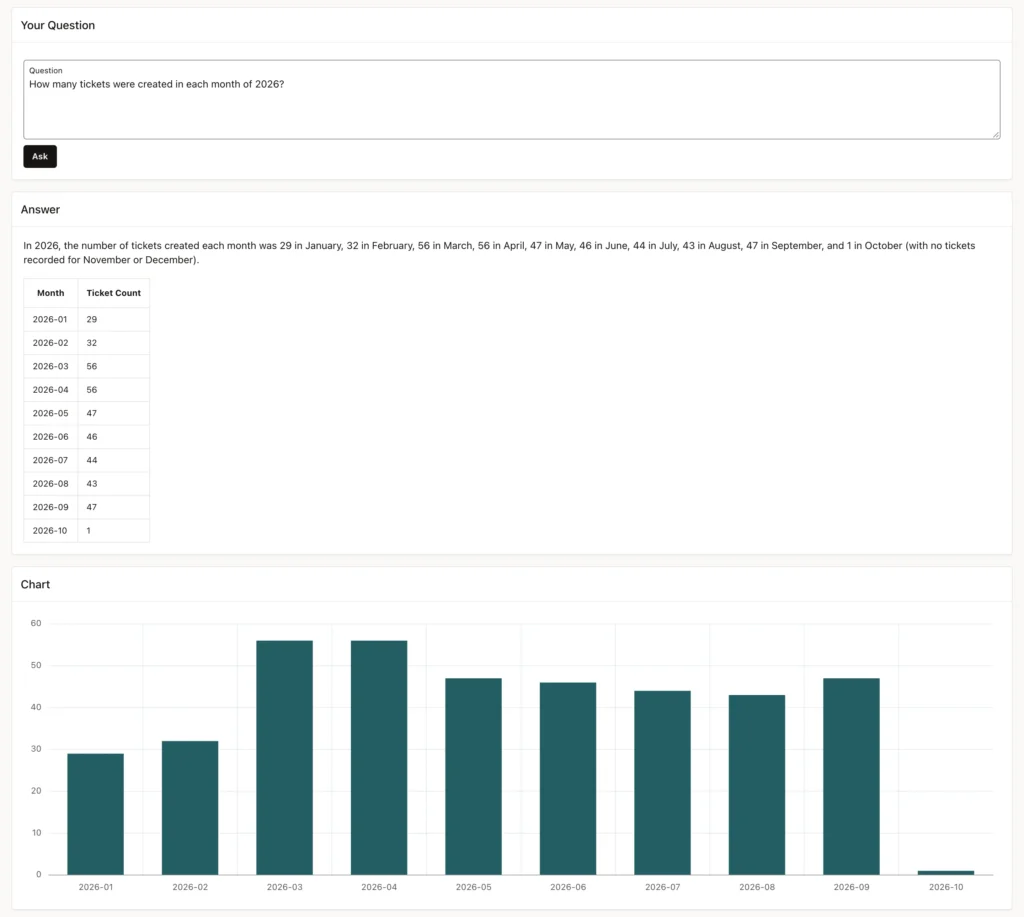
The generated query grouped tickets by month: ten months, from 29 in January to 56 in March and April, and 1 so far in October. Two columns, a label and a number, so the chart appears. The sentence adds that no tickets were recorded for November and December, which is true only because the year is not over: a sentence can be correct and still need reading.
Asked again which agent resolved the most tickets, the sentence this time says the SQL counted the status Resolved, and the SQL region shows the condition.
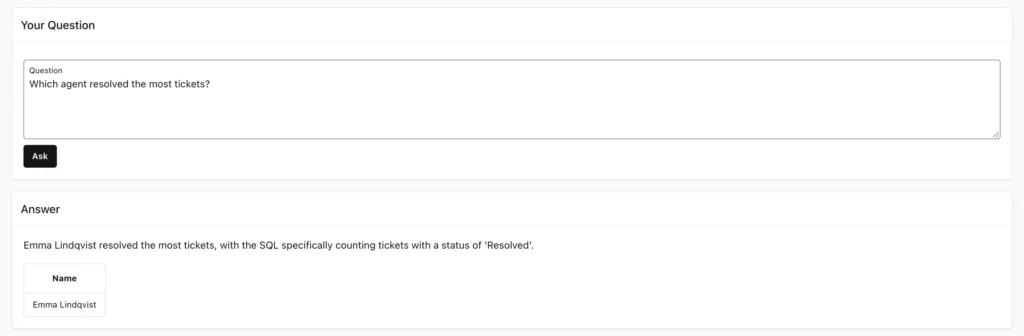
The same instruction was followed on the page and not in the earlier test: the explanation in the sentence helps, and the SQL on screen is the guarantee.
Compare with Natural Language Support in Reports
An interactive report can answer plain-language questions too. In Page Designer, select the report region, go to Attributes, and turn on Natural Language Support, leaving Default Search Mode at Search with AI.
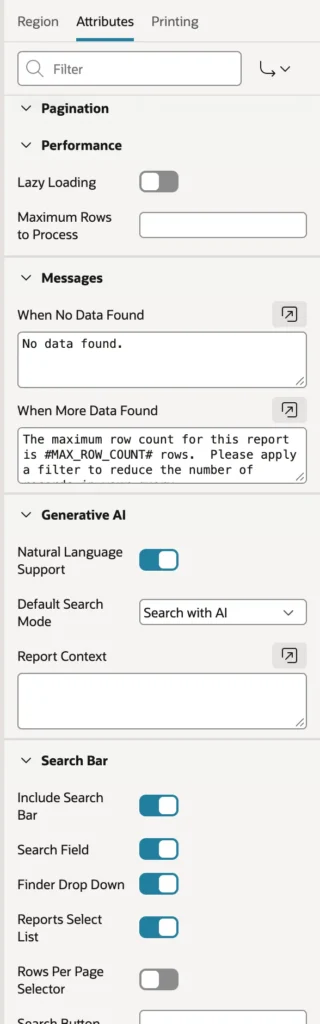
The search box then reads "Search or ask a question...", and an Assistant button joins the toolbar.
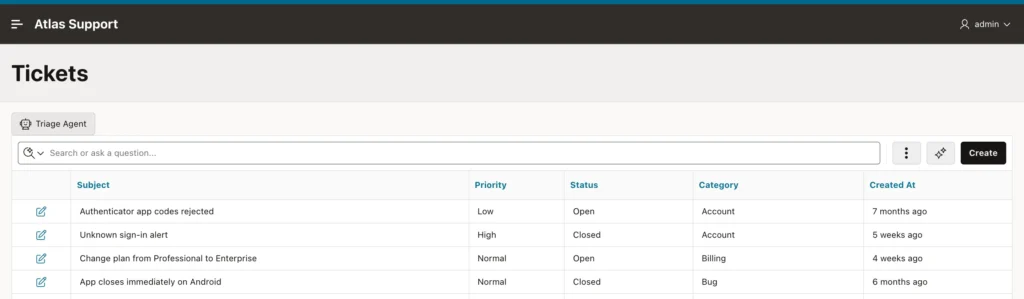
Typing "open billing tickets with high or urgent priority, newest first" applied three ordinary filters and a sort.
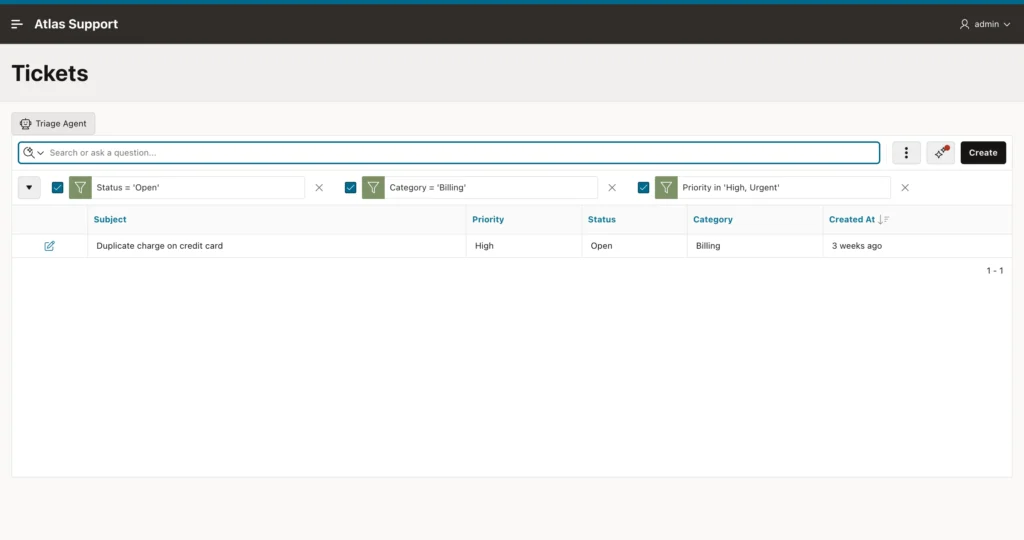
Because they are ordinary report settings, users see exactly what was understood, and can change, remove, or save them. The same filters in SQL return the same single ticket.
Example:
-- the filters the report applied, as SQL: the same single ticket
select ticket_id, subject, priority, status, category
from   tickets
where  status = 'Open' and category = 'Billing' and priority in ('High', 'Urgent')
order  by created_at desc;
Output:
   TICKET_ID SUBJECT                            PRIORITY    STATUS    CATEGORY
____________ __________________________________ ___________ _________ ___________
9 Duplicate charge on credit card High Open Billing| Natural Language Support | Ask Your Data | |
|---|---|---|
| Can answer | Filters and sorts of one report's columns | Any query over the tables listed for the model |
| What runs | The report's own query, with filters | A generated query, as a read-only user |
| What the user sees | The filters, which they can change | The SQL, a sentence, a table, and a chart |
| Can go wrong | A filter that misreads the question | A query that counts something else, or fails |
| Built with | One switch | Read-only guard rails and this page |
Use Natural Language Support where a report already shows what users need; use generated SQL for questions no report answers, behind a read-only user, a statement check, a row limit, a log, and the SQL on screen.
Conclusion
An Ask Your Data page in Oracle APEX wraps a checked, read-only natural-language-to-SQL engine: log each question with its SQL and rows, let the model write one sentence that says what was counted, render any result as an escaped HTML table with JSON_ARRAY_T and JSON_OBJECT_T, draw a chart when the rows are labels and numbers, and always show the SQL. For slicing an existing report, turn on Natural Language Support instead.
