
An AI assistant reads: it searches and looks things up. An agent acts: it changes data on a user's behalf. The model decides which tools to call, in what order, with which arguments, and the application runs them. That power needs controls: tools that validate their input, a user who approves every change, and a record of every action.
This guide builds a triage agent in Oracle APEX 26.1 that finds a customer's open ticket and changes its priority, with allowed values, business-rule checks in PL/SQL, user confirmation, and an audit table, then shows what happens when the user cancels, asks for something impossible, or calls the agent from PL/SQL.
Code for This Guide
The finished application is apex/f200.sql, and the SQL examples are in the examples/ch19 folder of the Oracle AI code repository on GitHub.
These examples come from AI Applications with Oracle Database 26ai and APEX 26.1, a book of 237 tested examples of AI in Oracle Database and APEX.
Agents, tools, and the Show AI Assistant dynamic action are introduced in how to add an AI assistant to an Oracle APEX page.
Create the Triage Agent
In Shared Components, AI Agents, create an agent named Atlas Triage Agent, with Temperature 0 and the system prompt below.
System prompt:
You help the support agents of Atlas Software manage tickets. Before you act, look up
the tickets with the tools; never guess a ticket number. To change the priority of a
ticket, use set_ticket_priority. Report what you did, or why you did nothing, in plain
text, in at most three sentences.
"Never guess a ticket number" matters: users say "their ticket about the integration", not "ticket 11". The agent must find the ticket first with a tool that looks up, and only then act with a tool that changes.
The Lookup Tool
list_open_tickets is a Retrieve Data tool with the parameter COMPANY.
SQL query of the tool list_open_tickets:
select t.ticket_id, t.subject, t.priority, t.status,
       to_char(t.created_at, 'YYYY-MM-DD') as created
from   tickets t join customers c on c.customer_id = t.customer_id
where  upper(c.company) = upper(:COMPANY)
and    t.status in ('Open', 'In Progress', 'Waiting')
order  by t.created_at
A Tool That Changes Data
An Execute Server-side Code tool runs PL/SQL, with its parameters as bind variables. APEX_AI.SET_TOOL_RESULT sets what the model is told and the notification the user sees; without it, the model is simply told "success". Every change is recorded first in an audit table.
Example:
-- every change an AI agent makes, with who approved it
create table ai_actions (
  action_id  number generated always as identity constraint ai_actions_pk primary key,
  done_at    timestamp default systimestamp not null,
  done_by    varchar2(255) not null,
  ticket_id  number not null,
  action     varchar2(30) not null,
  old_value  varchar2(100),
  new_value  varchar2(100)
);
Output:
Table AI_ACTIONS created.
On the agent's page, choose Add Tool:
- Name set_ticket_priority, Type Execute Server-side Code, Description "Changes the priority of an open support ticket."
- Two required parameters: TICKET_ID of type NUMBER, and PRIORITY of type VARCHAR2 with Allowed Values Low,Normal,High,Urgent.
- In PL/SQL Code, enter the code below.
- Under User Approval, turn on Requires Confirmation, with Confirmation Title "Change the priority", Confirmation Message "Set the priority of ticket &TICKET_ID. to &PRIORITY.?", and Approve Label "Change".
- Choose Create.
PL/SQL code of the tool set_ticket_priority:
declare
  l_old tickets.priority%type;
begin
  select priority into l_old
  from   tickets
  where  ticket_id = :TICKET_ID and status not in ('Resolved', 'Closed')
  for    update;

  update tickets set priority = :PRIORITY where ticket_id = :TICKET_ID;
  insert into ai_actions (done_by, ticket_id, action, old_value, new_value)
  values (:APP_USER, :TICKET_ID, 'Priority', l_old, :PRIORITY);
  apex_ai.set_tool_result(
    p_result               => 'The priority of ticket ' || :TICKET_ID || ' changed from '
                              || l_old || ' to ' || :PRIORITY || '.',
    p_notification_message => 'Ticket ' || :TICKET_ID || ' is now ' || :PRIORITY || '.');
exception
  when no_data_found then
    apex_ai.set_tool_result(
      p_result => 'Ticket ' || :TICKET_ID
                  || ' does not exist or is closed. Nothing was changed.');
end;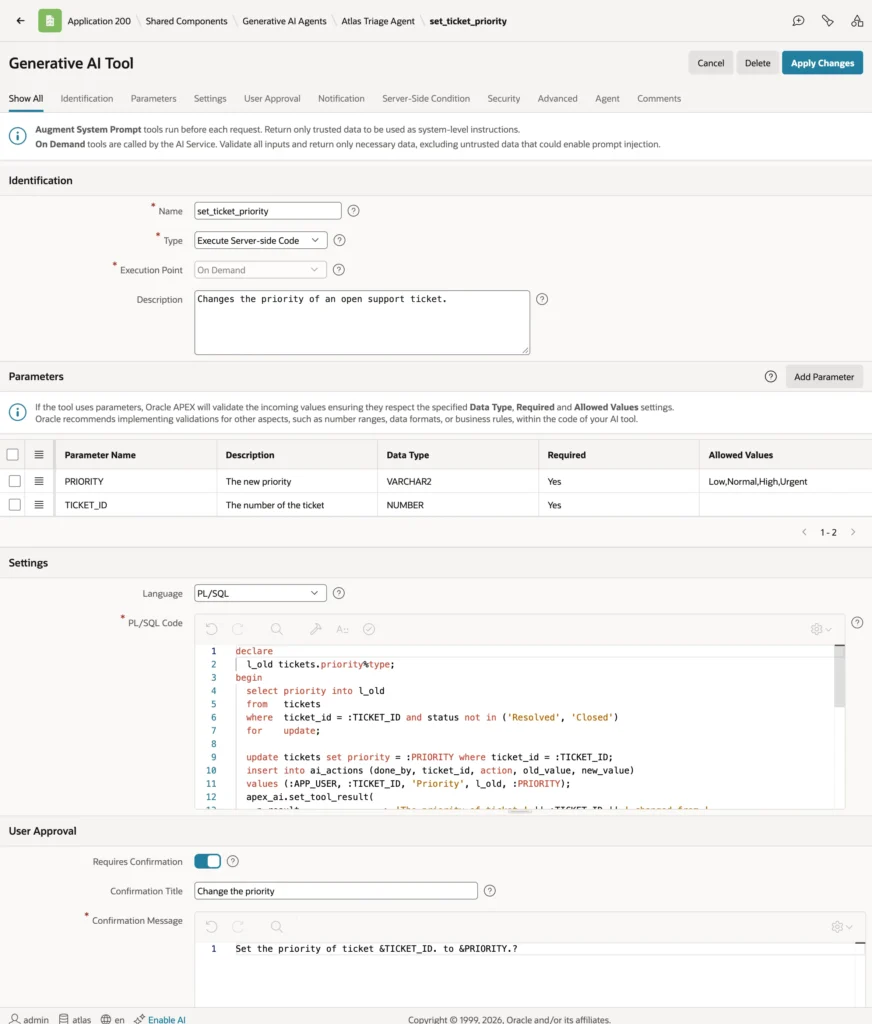
Each part of the tool limits what the model can do:
| Control | Effect |
|---|---|
| Allowed Values, data type, Required | APEX validates every argument before the code runs: the model cannot set the priority to "Critical" or to a SQL fragment. |
| Business rules in the code | Only open tickets change, and a missing ticket is reported to the model in words it can pass on, not as an exception. |
| Requires Confirmation | The user sees what the agent is about to do, with the arguments substituted, and the tool runs only if they approve. |
| Audit row | Every change is recorded with :APP_USER, the user who approved it. |
Set the notification with SET_TOOL_RESULT rather than the tool's Message property: the property is static text, and substitutions such as &TICKET_ID. work only in the confirmation message.
The Agent at Work
Put the agent on the Tickets page with a button and a Show AI Assistant action. A support agent asks in their own words: "Kestrel Health says their integration stopped receiving events. Raise the priority of their open ticket about it to High."
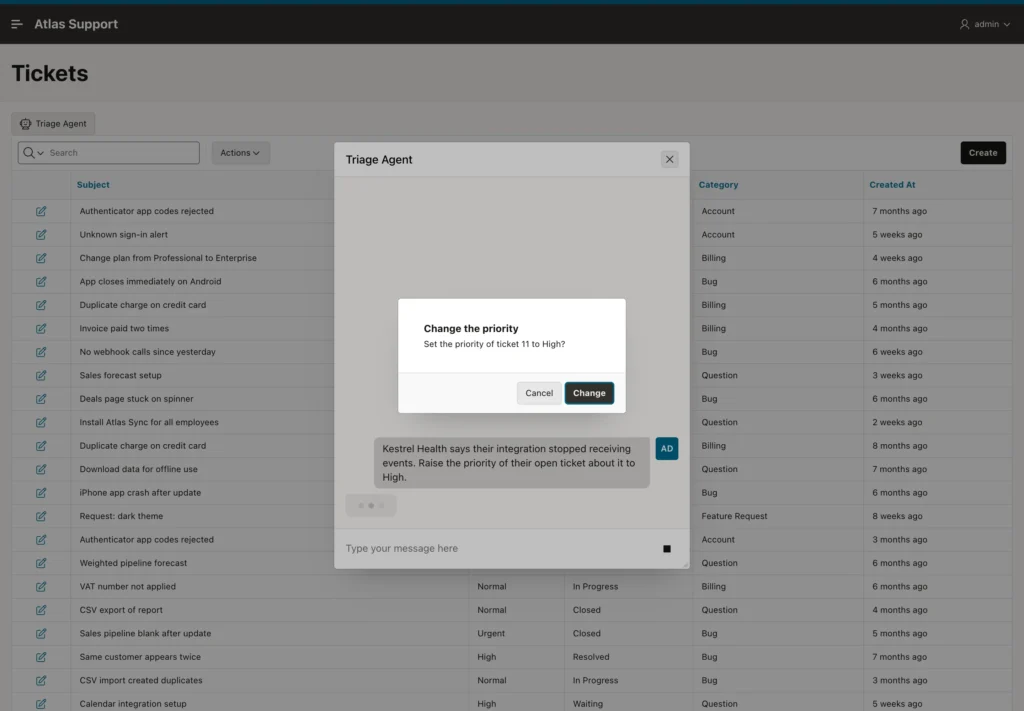
The agent called list_open_tickets for the customer, found ticket 11, "Integration stopped receiving events", among their three open tickets, and called set_ticket_priority with 11 and High, which APEX paused to confirm. The user chooses Change.
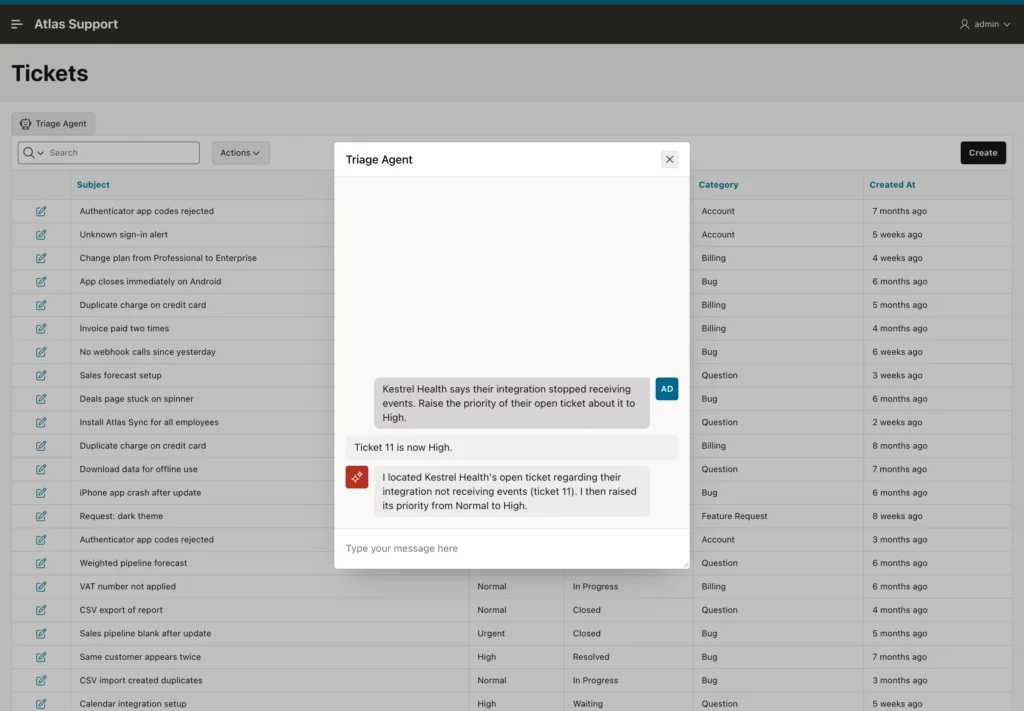
The audit trail records the change and who approved it.
Example:
-- what the agent changed, when, and with whose approval
select action_id, to_char(done_at, 'YYYY-MM-DD HH24:MI') as done_at, done_by,
       ticket_id, action, old_value, new_value
from   ai_actions
order  by action_id;
Output:
   ACTION_ID DONE_AT             DONE_BY       TICKET_ID ACTION      OLD_VALUE    NEW_VALUE
____________ ___________________ __________ ____________ ___________ ____________ ____________
           3 2026-10-02 10:49    ADMIN                11 Priority    Normal       High
Cancelled or Impossible Requests
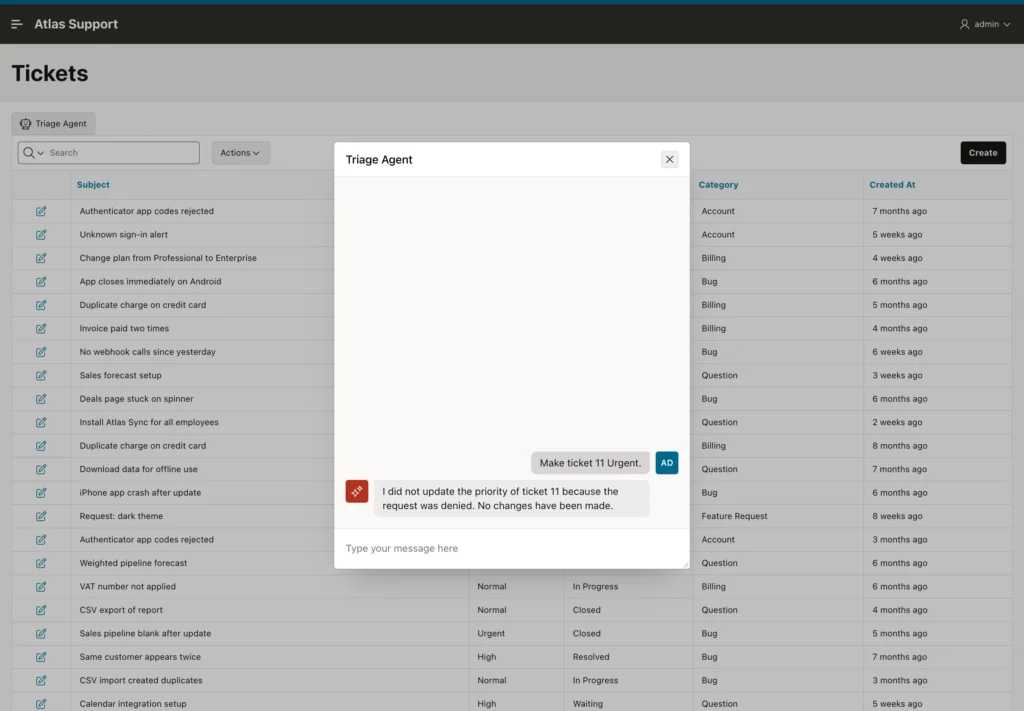
When the user asked the agent to make ticket 11 Urgent and chose Cancel in the confirmation, the tool did not run, and the agent replied that the request was denied and nothing was changed.
Asked to "Delete all tickets of Kestrel Health", the agent answered that it has no tool to delete tickets, and did nothing. An agent can do only what its tools do: the set of tools is the agent's permissions. Give an agent the narrowest tools that serve its purpose, such as set_ticket_priority rather than execute_sql, and neither the model's mistakes nor a prompt injection can reach further.
Agents Outside a Page
This example asks the same agent to raise the priority from PL/SQL.
Example:
-- a tool that requires confirmation, called where no one can confirm
declare
  l_answer clob;
begin
  l_answer := apex_ai.generate(
    p_agent_static_id => 'atlas-triage-agent',
    p_prompt => 'Kestrel Health says their integration stopped receiving events. '
                || 'Raise the priority of their open ticket about it to High.');
  dbms_output.put_line(l_answer);
end;
/

select ticket_id, priority from tickets where ticket_id = 11;
select count(*) as actions from ai_actions;
Output:
declare
*
ERROR at line 1:
ORA-20950: Tools requiring confirmation are not supported in this context.
ORA-06512: at "APEX_260100.WWV_FLOW_AI", line 5800
ORA-06512: at "APEX_260100.WWV_FLOW_AI", line 4109
ORA-06512: at "APEX_260100.WWV_FLOW_AI", line 4554
ORA-06512: at "APEX_260100.WWV_FLOW_AI_API", line 197
ORA-06512: at line 4

   TICKET_ID PRIORITY
____________ ___________
          11 High

   ACTIONS
__________
         1
APEX refuses with ORA-20950: outside a page nobody can see a confirmation, so APEX will not run an agent that has a tool requiring one, even for a request that would not use it. Nothing changed. For background work, such as a job that triages new tickets, define a separate agent whose tools do not change data, or change data in PL/SQL that you control.
Conclusion
An AI agent in Oracle APEX 26.1 acts through Execute Server-side Code tools whose parameters arrive as bind variables. Validate arguments with data types and Allowed Values, enforce business rules in the code, report outcomes with APEX_AI.SET_TOOL_RESULT, require user confirmation for every change, and audit each action with :APP_USER. Keep tools narrow, because the tools are the agent's permissions, and expect APEX to refuse confirmed tools where no user can confirm.
