
An APEX application makes AI calls from many places: assistants, agents, dynamic actions, processes, and PL/SQL. A request handler procedure, set once in the application's AI attributes, sees every one of them before it leaves the database. It can redact personal data, log what is sent, enforce policy, or repair a request the provider would reject.
This guide writes a request handler for Oracle APEX 26.1 that does three jobs at once: it fixes how tool results reach Gemini, redacts every message, and logs every message as sent. It then applies the handler to the whole application.
Code for This Guide
The examples are files 08 to 11 in the examples/ch17 folder of the Oracle AI code repository on GitHub, each with its output. They use application 200 of the sample workspace, apex/f200.sql.
These examples come from AI Applications with Oracle Database 26ai and APEX 26.1, a book of 237 tested examples of AI in Oracle Database and APEX.
The handler calls a REDACT function that masks email addresses and phone numbers, defined in examples/ch27/02-redact.sql. The ticket tool and the session setup come from how to call AI from PL/SQL with the APEX_AI package.
The Handler Interface
A request handler has a fixed signature. P_RESULT.REQUEST holds the request, with its system prompt, messages, tools, and temperature, and the handler may change any of it before APEX sends it.
Syntax:
procedure request_handler (
  p_param   in            apex_ai.t_chat_request_handler_param,
  p_result  in out nocopy apex_ai.t_chat_request_handler_result );
Write the Handler
ATLAS_AI_REQUEST_HANDLER does three things to every request:
- It turns each tool result into a user message that states the result, and leaves out the model's tool-call turn: a form every provider accepts. APEX 26.1 otherwise sends tool results to Gemini with the role function, which Gemini rejects.
- It redacts every message with REDACT.
- It logs every message as sent, in AI_REQUEST_LOG, in an autonomous transaction.
Example:
create table ai_request_log (
  logged_at  timestamp default systimestamp,
  message    clob
);

-- called before every AI request of Atlas Support:
-- 1. tool results go to Gemini as user messages, with the tool-call turn left out
-- 2. every message is redacted, and logged as sent
create or replace procedure atlas_ai_request_handler (
  p_param   in            apex_ai.t_chat_request_handler_param,
  p_result  in out nocopy apex_ai.t_chat_request_handler_result)
is
  l_in   apex_ai.t_chat_messages := p_result.request.messages;
  l_out  apex_ai.t_chat_messages;
  i      pls_integer := l_in.first;

  procedure log_message (p_message in clob) is
    pragma autonomous_transaction;
  begin
    insert into ai_request_log (message) values (p_message);
    commit;
  end;
begin
  while i is not null loop
    if l_in(i).chat_role = apex_ai.c_role_tool then
      l_out(l_out.count + 1).chat_role := apex_ai.c_role_user;
      l_out(l_out.count).message := 'Result of the tool call: ' || l_in(i).tool.content;
    elsif l_in(i).tool_calls is null or l_in(i).tool_calls.count = 0 then
      l_out(l_out.count + 1) := l_in(i);
    end if;
    i := l_in.next(i);
  end loop;

  for j in 1 .. l_out.count loop
    l_out(j).message := redact(l_out(j).message);
    log_message(l_out(j).message);
  end loop;
  p_result.request.messages := l_out;
end;
/
Output:
Table AI_REQUEST_LOG created.

Procedure ATLAS_AI_REQUEST_HANDLER compiled
Test It on One Call
APEX_AI.GENERATE accepts a handler for a single call through P_REQUEST_HANDLER_PROCEDURE. The same tool call that failed without it now works.
Example:
-- the same call, with the request handler
declare
  l_answer clob;
begin
  l_answer := apex_ai.generate(
    p_prompt        => 'What is the status of ticket 15, and what was it about?',
    p_system_prompt => 'You are the support assistant of Atlas Software. '
                       || 'Answer in one sentence of plain text.',
    p_request_handler_procedure => 'atlas_ai_request_handler',
    p_tools         => atlas_tools);
  dbms_output.put_line(l_answer);
end;
/
Output:
Ticket 15 is resolved and was about a duplicate charge on a credit card.

PL/SQL procedure successfully completed.
The model called the tool, read its result, and answered from it.
Apply It to the Whole Application
In Shared Components, open AI Attributes, enter ATLAS_AI_REQUEST_HANDLER in Request Handler Procedure, and choose Apply Changes.
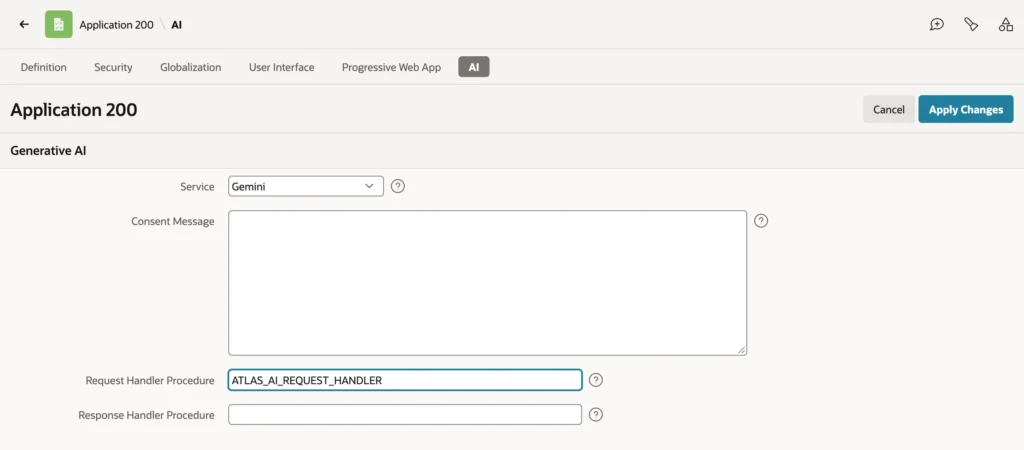
Every AI call of the application now goes through the handler, including calls that do not name it.
Example:
-- with the handler in the application's AI Attributes, every call uses it
declare
  l_answer clob;
begin
  l_answer := apex_ai.generate(
    p_prompt        => 'Is ticket 9 still open?',
    p_system_prompt => 'You are the support assistant of Atlas Software. '
                       || 'Answer in one sentence of plain text.',
    p_tools         => atlas_tools);
  dbms_output.put_line(l_answer);
end;
/
Output:
Yes, ticket 9 is currently open.

PL/SQL procedure successfully completed.
See What Reached the Provider
This example sends contact details, then reads the log to see what actually left the database.
Example:
-- every call of the application is redacted before it is sent
declare
  l_answer clob;
begin
  l_answer := apex_ai.generate(
    p_prompt => 'Repeat my contact details: olivia.walker@northwind.example, '
                || '+44 20 7946 0958.');
  dbms_output.put_line('Answer: ' || l_answer);
end;
/

select message as what_was_sent from ai_request_log order by logged_at;
Output:
Answer: Here are the contact details you provided:

* **Email:** [e-mail]
* **Phone:** [phone]

*(Note: If you intended to share specific contact details, please provide them and I will be happy
to repeat or format them for you!)*

PL/SQL procedure successfully completed.

WHAT_WAS_SENT
________________________________________________
Repeat my contact details: [e-mail], [phone].
The email address and phone number never reached Gemini; the model only ever saw the placeholders. Every AI feature of the application, assistants, agents, and AI in forms included, is redacted and logged the same way by one procedure.
What Else Handlers Can Do
| Handler | Uses |
|---|---|
| Request handler | Mask data, log requests, enforce policy such as blocked topics, detect prompt injection, change the system prompt or temperature |
| Response handler | Mask or log responses, record token usage from P_RESULT.RESPONSE, or run tool calls itself with APEX_AI.SET_TOOL_RESULT |
Conclusion
A request handler procedure, set in an APEX application's AI attributes, runs before every AI call the application makes, so one procedure can repair provider incompatibilities, redact personal data, and log what was actually sent. Test it on a single call with P_REQUEST_HANDLER_PROCEDURE, then set it for the application, and read the log to confirm that sensitive values never leave the database.
