
Some users double-click every button. In an Oracle APEX form, a double-click on Create can send the page to the server twice, and both requests insert the record. The result is two identical rows, and nobody knows which one is the right one.
This happens in a form created by the Create App wizard in Oracle APEX 26.1. In the demo Customers application, a user entered Northwind Traders and double-clicked Create:
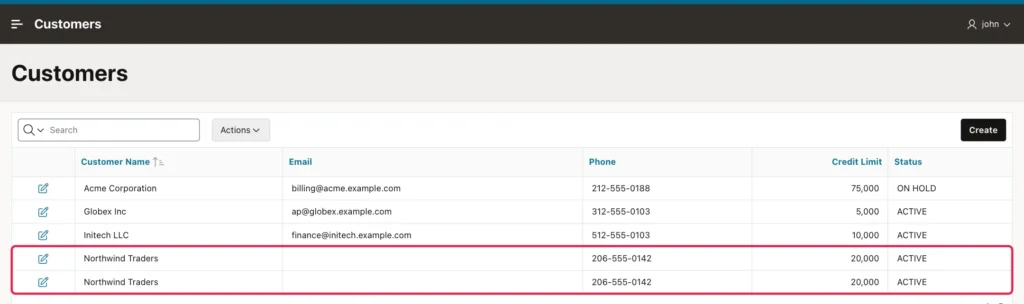
The fix is one dynamic action on the Global Page: it disables the buttons as soon as the page is submitted, on every page of the application at once. At the end, an optional database safety net is shown for the few tables where a duplicate would be really costly.
The Fix: Disable the Buttons While the Page Submits
The Global Page (page 0) shows its components on every page of the application, and that includes dynamic actions. If your application has no Global Page, create one with Create Page, Global Page.
Open page 0 in Page Designer and click the Dynamic Actions tab. Right-click Events, choose Create Dynamic Action, and set:
- Identification, Name: Disable buttons on submit
- When, Event: Before Page Submit
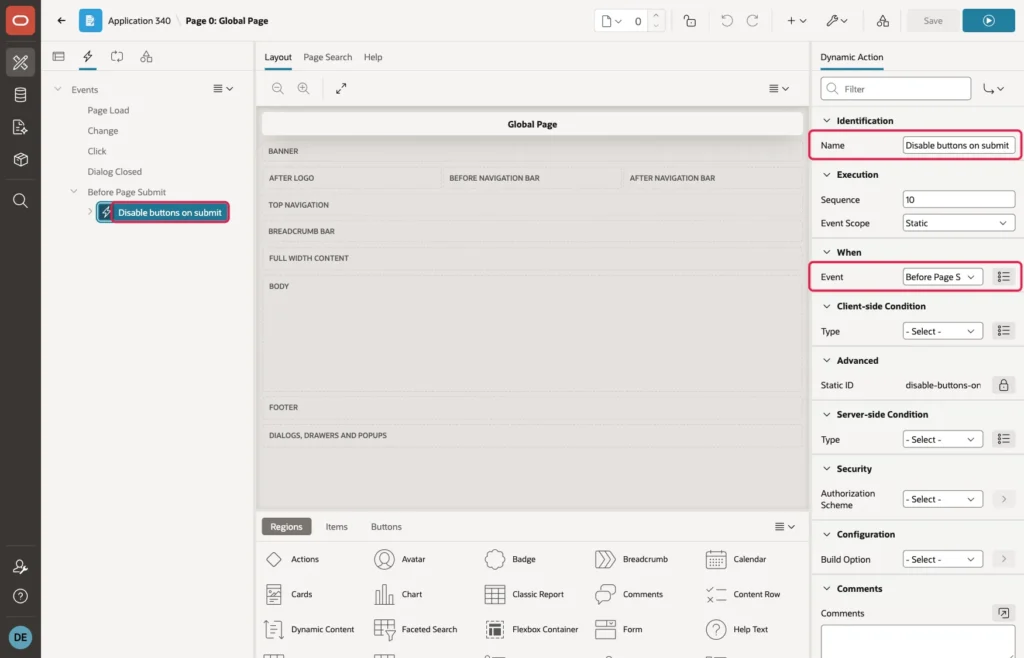
Select the True action, set Action to Execute JavaScript Code, and enter this code:
// The page is being submitted: disable all buttons, so a second click does nothing.
// Only when the form passes its checks, otherwise the user must still be able to fix it.
if (apex.page.validate()) {
  $('button').prop('disabled', true);
}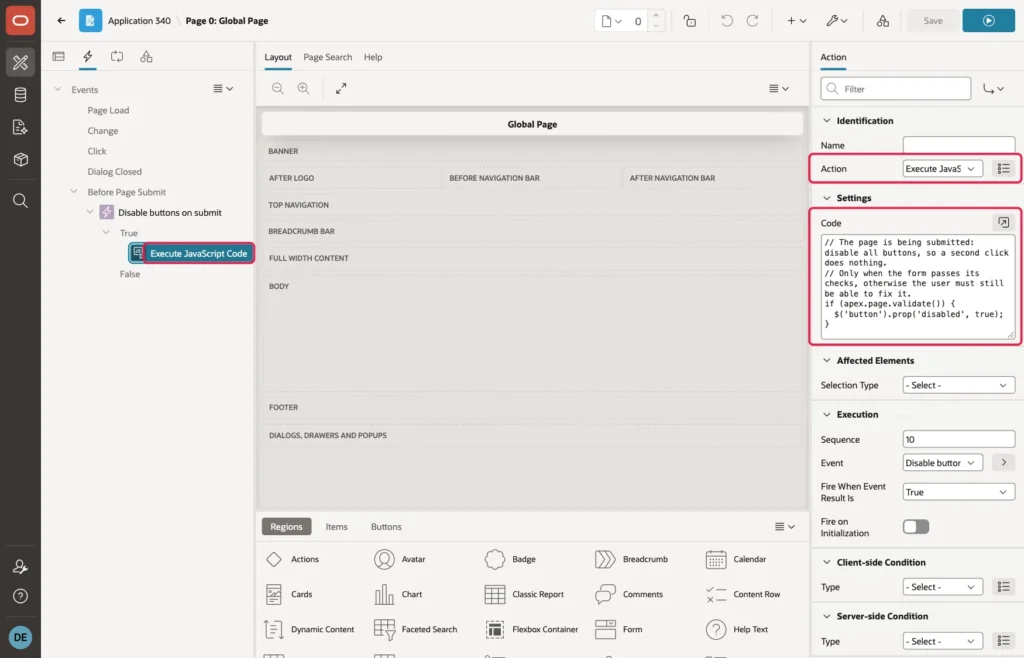
Click Save. Before Page Submit runs at the moment the user clicks a button that submits the page, before APEX checks the form in the browser, for example for empty required fields. If that check fails, the page is not submitted, and the user must still be able to correct the form and click again. That is why the code first calls apex.page.validate(), which runs the same check, and disables the buttons only when the form is valid.
Now, when the user clicks Create, the buttons are disabled right away until the server answers, so a second click does nothing:
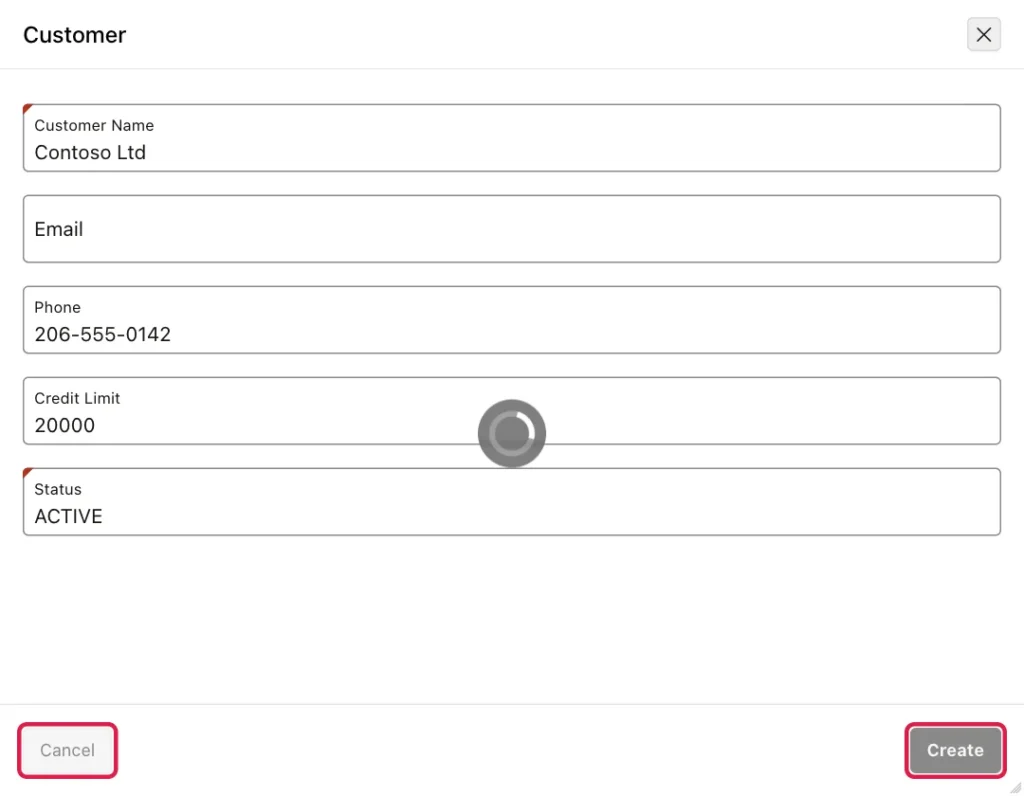
In the lab, a double-click on Create now saves exactly one customer, every time. A form with an empty required field still shows its error, and the buttons stay usable.
Optional: An Extra Safety Net for Critical Tables
The dynamic action above is enough for most applications, and you do not need anything else for your normal tables. It works in the browser, though, so it depends on JavaScript running on the page. For a few tables where a duplicate would be really costly, such as orders or payments, you can add an extra level of safety in the database: give each new form a one-time token, and let the database accept every token only once. Skip this section if you do not have such a table.
Add a column for the token with a unique constraint:
alter table customers add create_token varchar2(32);
alter table customers add constraint customers_create_token_uk unique (create_token);
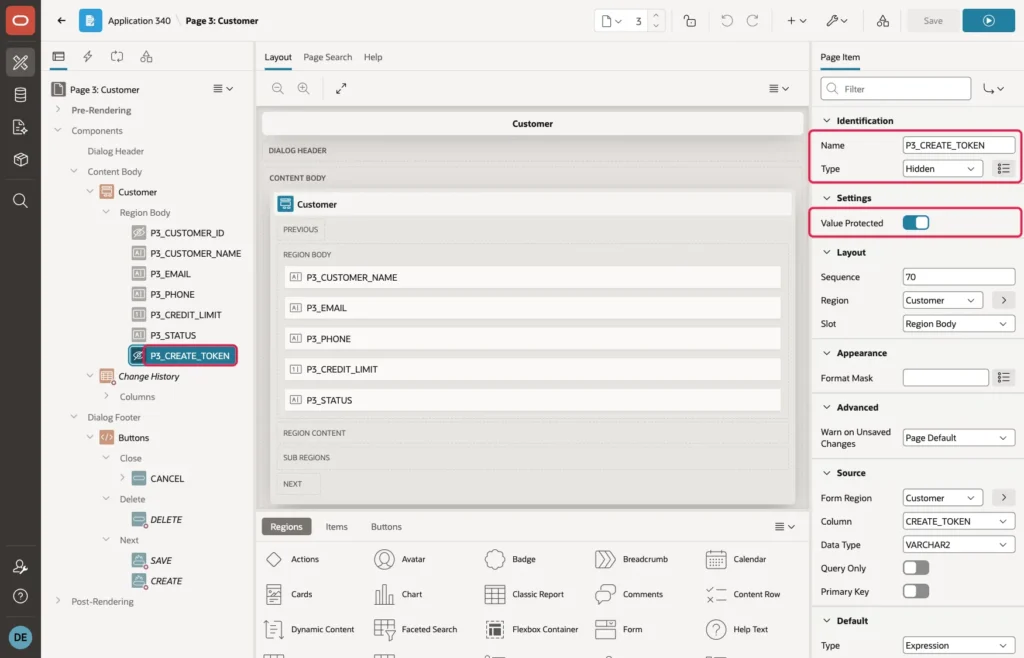
On the form page (page 3 in the demo), create a page item P3_CREATE_TOKEN in the Customer form region and set its Type to Hidden. Keep Value Protected on, so the token cannot be changed in the browser:
Then set:
- Source, Form Region: Customer, and Column: CREATE_TOKEN, so the form saves the token with the record
- Default, Type: Expression, Language: PL/SQL, and PL/SQL Expression: sys_guid()
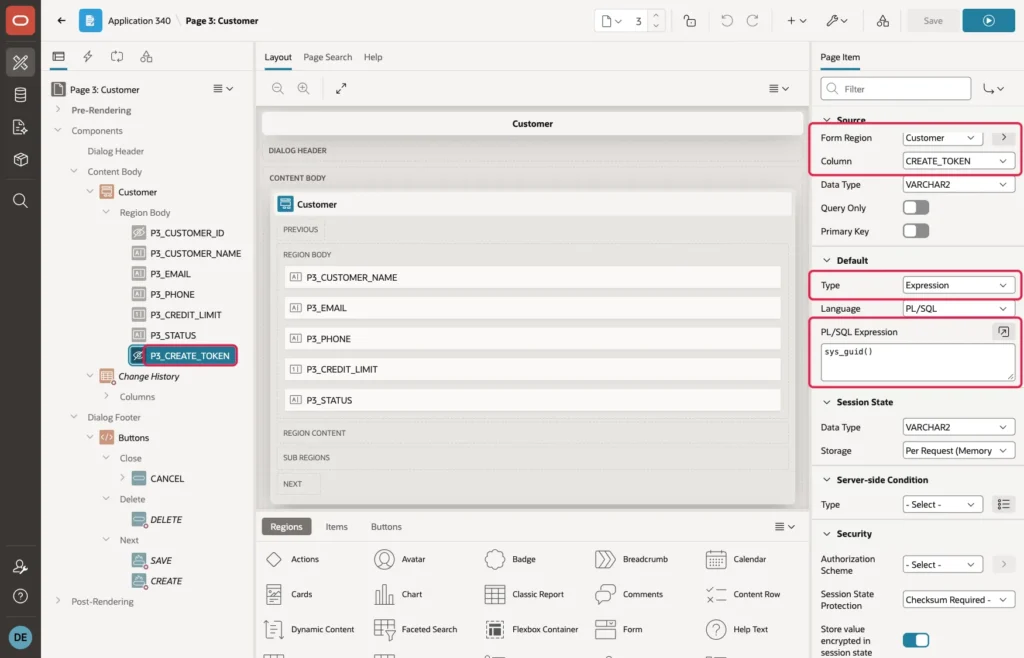
Click Save. Every time the form opens for a new customer, sys_guid() gives the token a new unique value. If the same form is submitted twice, both requests carry the same token. The first insert saves it, and the second insert breaks the unique constraint CUSTOMERS_CREATE_TOKEN_UK, so the database rejects it and APEX rolls it back.
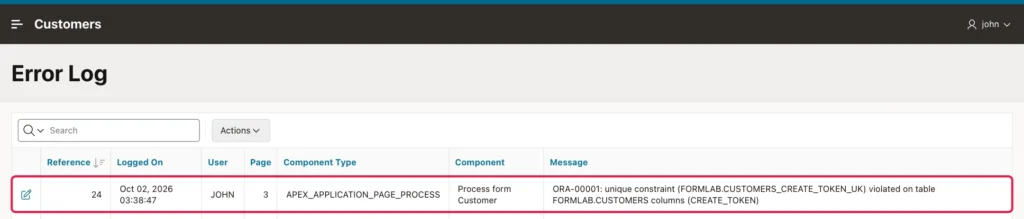
To test the safety net alone, I switched off the dynamic action and double-clicked Create for Fabrikam Inc. The table has one Fabrikam Inc, and the Error Log page from the article on handling all errors in one place shows the second insert that the database stopped:
Good to Know
- A double-click on Apply Changes for an existing record only saves the same values twice, and with the dynamic action in place, it is sent only once anyway.
- If a table already has a real unique key, such as a unique email, that key also stops duplicates in the database. The optional token is only for critical tables where two records may legally look the same, like two payments of the same amount.
- If you use the token, existing records keep an empty token, which a unique constraint allows. If a user ever sees the constraint error, give it a clear text in your error handling function, for example a WHEN line for CUSTOMERS_CREATE_TOKEN_UK with the message "This customer has already been saved."
- Before Page Submit runs only for buttons that submit the page. A button that runs server-side code through a dynamic action does not submit the page. For such a button, add a Disable action for the button as the first action of its dynamic action, and an Enable action as the last one.
Summary
A double-click on Create can insert the same record twice in Oracle APEX. One dynamic action on the Global Page, with the event Before Page Submit and a few lines of JavaScript, disables the buttons on every page while the page is submitting, but only after the form passes its checks. That is all most applications need. For a few critical tables, a hidden token item with sys_guid() and a unique constraint on its column add an optional second level of safety in the database.
