
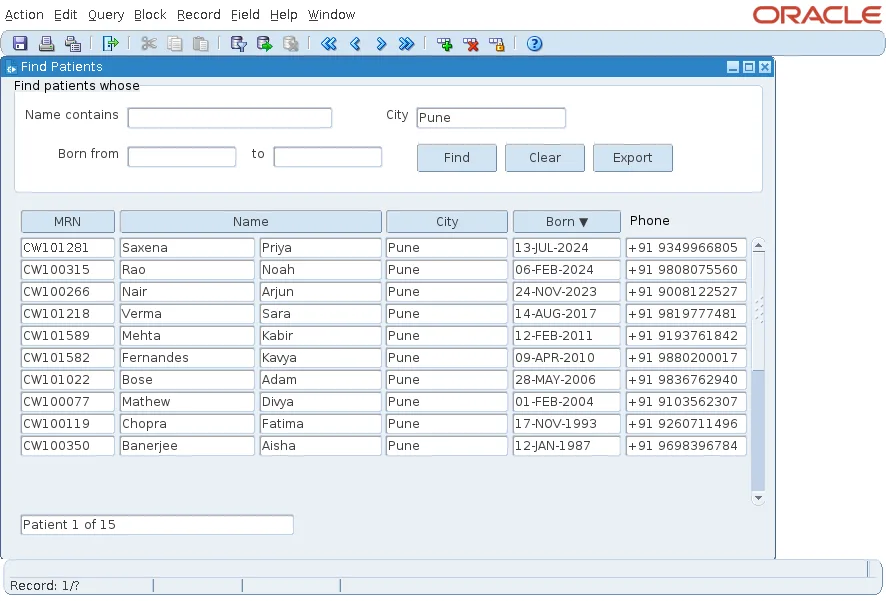
After a query, the Oracle Forms status line shows Record: 1/? until the user scrolls to the last record, because Forms fetches rows only as they are needed. Users would rather see "Patient 1 of 15" straight away.
This guide shows how to count the records of a query before it runs in Oracle Forms 14.1.2, with COUNT_QUERY and QUERY_HITS, and how to show the current position in a counter item.
Sample Form for This Guide
The examples and screenshots use the sample form CH39_FIND from the Oracle Forms code repository on GitHub. Download it, open it in Forms Builder, and connect as CAREWELL to follow along.
| Form | File | What it shows |
|---|---|---|
| CH39_FIND | forms/ch39/ch39_find.fmb | The Patient 1 of 15 counter |
The forms run against the CareWell Clinic sample schema, which you install first.
Count Before the Query
COUNT_QUERY counts the rows that the block's next query would return, using the block's current WHERE clause, without fetching them. It leaves the number in the block property QUERY_HITS.
Put the count just before EXECUTE_QUERY, in the procedure that queries the block. These are the lines from the search procedure of the sample form.
Count the rows, then query:
  go_block('PATIENTS');
  :system.message_level := '25';         -- hide FRM-40355, the message of COUNT_QUERY (level 25)
  count_query;
  :system.message_level := '0';
  :ctl.total := get_block_property('PATIENTS', QUERY_HITS);
  execute_query;
The total goes into CTL.TOTAL, an item of the control block that sits on no canvas.
Hide the Count Message
COUNT_QUERY reports its result as a message.
Output:
FRM-40355: Query will retrieve 15 records
A counter makes that message redundant. FRM-40355 has severity level 25, so setting :SYSTEM.MESSAGE_LEVEL to 25 around the call hides it, and setting it back to 0 restores normal messages. In a test, a first version that set the level to 5 still showed the message: the level must be at least the message's own severity.
Message levels and other ways to manage messages are covered in how to handle errors in Oracle Forms using ON-ERROR.
Show the Position in Each Record
WHEN-NEW-RECORD-INSTANCE fires every time the cursor enters a record, which makes it the place to update the counter.
Example (WHEN-NEW-RECORD-INSTANCE trigger on block PATIENTS):
if :patients.patient_id is null then
  :ctl.counter := null;
else
  :ctl.counter := 'Patient ' || :system.cursor_record || ' of ' || :ctl.total;
end if;
:SYSTEM.CURSOR_RECORD is the number of the current record. An empty record, such as the one after the last, clears the counter.
What the Count Costs
- A second query. COUNT_QUERY runs SELECT COUNT(*) with the same WHERE clause. That is worth it for a search screen, but not for a block that users page through one record at a time.
- A snapshot. The count is taken when the user searches, so rows added by other users afterwards are not counted until the next search.
- No recount on sorting. Changing the order with ORDER_BY does not change the number of rows, so the counter stays right without counting again.
Conclusion
To show a record count before the user scrolls, call COUNT_QUERY just before EXECUTE_QUERY, read the total from QUERY_HITS, and hide FRM-40355 by raising :SYSTEM.MESSAGE_LEVEL to 25 around the call. Update the counter in WHEN-NEW-RECORD-INSTANCE from :SYSTEM.CURSOR_RECORD. The price is one extra COUNT(*) query per search.
