
The form module's properties decide how the whole form behaves: its title and menu, where the cursor starts, how much the user can change before Forms validates, and how queries and transactions work. You set them in the Property Palette at design time, but many can also be read, and some changed, while the form runs.
This guide walks through the properties of the form module in Oracle Forms 14.1.2, then shows how to read them with GET_FORM_PROPERTY, change them with SET_FORM_PROPERTY, and look up a form with FIND_FORM.
Sample Form for This Guide
The examples and screenshots use the sample form CH06_MODULE from the Oracle Forms code repository on GitHub. Download it, open it in Forms Builder, and connect as CAREWELL to follow along.
| Form | File | What it shows |
|---|---|---|
| CH06_MODULE | forms/ch06/ch06_module.fmb | A form that lists its own properties with GET_FORM_PROPERTY |
The forms run against the CareWell Clinic sample schema, which you install first.
Quick Reference
| Built-in | Purpose |
|---|---|
| GET_FORM_PROPERTY | Returns a property of a running form, as text. |
| SET_FORM_PROPERTY | Changes a property of a running form until it closes. |
| FIND_FORM | Returns the internal ID of an open form. |
The Properties of the Form Module
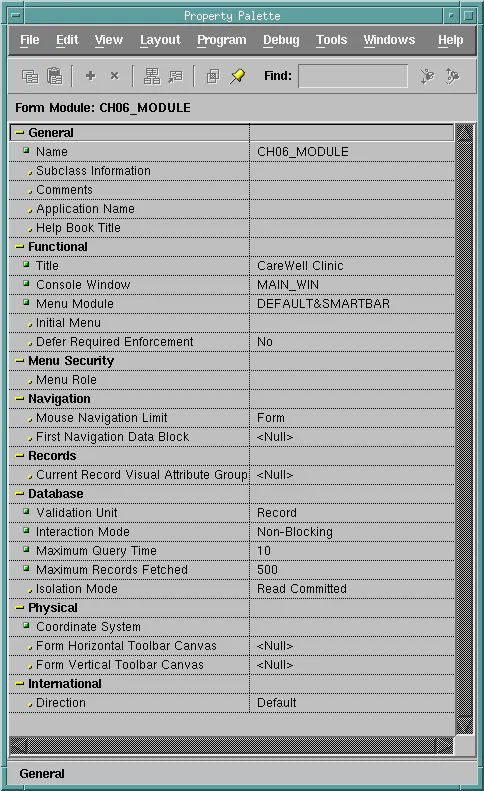
Select the form module in the Object Navigator and press F4 to see its properties. They set how the whole form behaves, and blocks and items can override some of them.
General, Functional, and Menu Security
- Name is the module name. Application Name, Help Book Title, and Comments are notes for tools and help systems and do not change what the form does.
- Title is the title of the form.
- Console Window is the window that shows the console, the message line and status line at the bottom of the form. A new form names WINDOW1. If you rename that window, set this property to the new name, or to <Null> for a form without a console.
- Menu Module names the menu the form shows. DEFAULT&SMARTBAR, the default, is the built-in menu with the toolbar, DEFAULT is the menu without the toolbar, and any other value is the file of your own menu module. Initial Menu names the menu of that module to show first.
- Defer Required Enforcement decides when Forms checks items whose Required property is set. With No, the default, the user cannot leave an empty required item. With Yes, the check waits until the record is validated, so the user can fill the items in any order.
- Menu Role is used only with menu security.
Navigation and Records
- Mouse Navigation Limit sets how far the user can go with a click: anywhere in the form (the default), only within the current block or record, or not out of the current item.
- First Navigation Data Block is the block the cursor goes to when the form starts, if not the first block in the navigator.
- Current Record Visual Attribute Group names the colors and font that mark the current record in every block.
Database
| Property | What it controls |
|---|---|
| Validation Unit | How much the user can change before Forms validates: an item, a record, a block, or the whole form. The default validates each item as the user leaves it. |
| Interaction Mode | Blocking by default: while a query fetches rows, the form does not respond. With Non-Blocking, the user can interact with the form during a long query, and cancel it. |
| Maximum Query Time, Maximum Records Fetched | Stop a query that runs too long (in seconds) or fetches too many rows. They apply only to blocks whose Query All Records property is set, and blocks have properties of the same names that override them. |
| Isolation Mode | Read Committed by default. With Serializable, a transaction sees the data as it was when it began, and fails with ORA-08177 if it tries to change a row another user changed in the meantime. |
Physical and International
Coordinate System is the unit of every position and size in the form: points (the default), pixels, inches, centimeters, or character cells. Change it before you draw anything, because changing it later converts every coordinate and can shift objects slightly.
Form Horizontal Toolbar Canvas and Form Vertical Toolbar Canvas name toolbar canvases shown in the application window rather than a form window. Direction sets the direction of text and layout: left to right, right to left, or taken from the session's language.
Read Form Properties with GET_FORM_PROPERTY
GET_FORM_PROPERTY returns a property of a running form, as text. Its first parameter is the form's module name, usually :SYSTEM.CURRENT_FORM, the name of the form in which the code runs, or its ID from FIND_FORM.
Syntax:
get_form_property(formmodule_name varchar2 | formmodule_id formmodule,
                  property number) return varchar2
The properties include those of the Property Palette, such as VALIDATION_UNIT, INTERACTION_MODE, ISOLATION_MODE, MAX_QUERY_TIME, MAX_RECORDS_FETCHED, DEFER_REQUIRED_ENFORCEMENT, COORDINATE_SYSTEM, and DIRECTION. Others exist only at run time:
- FORM_NAME, and FILE_NAME, the file the form was run from.
- FIRST_BLOCK and LAST_BLOCK.
- CURSOR_MODE and SAVEPOINT_MODE, which describe how the form works with the database.
- MODULE_NLS_LANG, the language and character set of the session.
Example: List the Properties When the Form Starts
The form CH06_MODULE lists its properties when it starts, one per record of a block called PROPS that is not based on a table. Its WHEN-NEW-FORM-INSTANCE trigger calls a small procedure, declared in the trigger itself, for each property.
Example (WHEN-NEW-FORM-INSTANCE trigger on the form):
declare
  frm varchar2(30) := :system.current_form;

  procedure show(p_property varchar2, p_value varchar2) is
  begin
    if :props.property is not null then
      create_record;                        -- a new row for each property after the first
    end if;
    :props.property := p_property;
    :props.value    := p_value;
  end;
begin
  go_block('PROPS');
  show('FORM_NAME',              get_form_property(frm, form_name));
  show('FILE_NAME',              get_form_property(frm, file_name));
  show('FIRST_NAVIGATION_BLOCK', get_form_property(frm, first_navigation_block));
  show('VALIDATION_UNIT',        get_form_property(frm, validation_unit));
  show('INTERACTION_MODE',       get_form_property(frm, interaction_mode));
  show('ISOLATION_MODE',         get_form_property(frm, isolation_mode));
  show('MAX_QUERY_TIME',         get_form_property(frm, max_query_time));
  show('MAX_RECORDS_FETCHED',    get_form_property(frm, max_records_fetched));
  show('CURSOR_MODE',            get_form_property(frm, cursor_mode));
  show('SAVEPOINT_MODE',         get_form_property(frm, savepoint_mode));
  show('COORDINATE_SYSTEM',      get_form_property(frm, coordinate_system));
  show('MODULE_NLS_LANG',        get_form_property(frm, module_nls_lang));
  first_record;
end;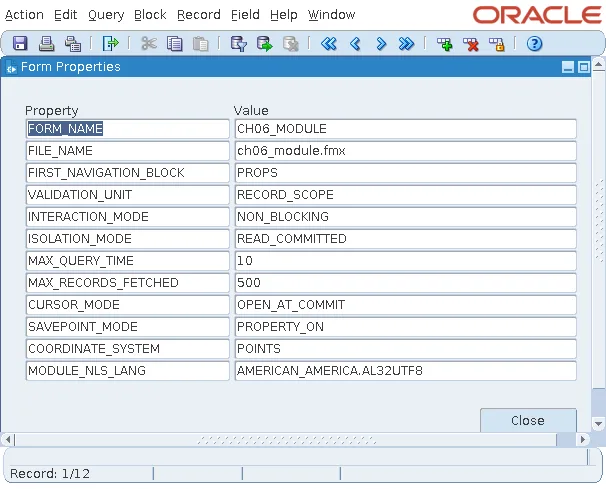
The settings made in the Property Palette come back as the constants SET_FORM_PROPERTY takes, such as RECORD_SCOPE and NON_BLOCKING. FILE_NAME is the runnable file, found through the Forms path.
The PROPS block has one navigable item, PROPERTY, a text item the user cannot change. That matters: GO_BLOCK fails with FRM-40106: No navigable items in destination block when a block has none, and a form must have at least one item the cursor can go to, or it cannot start.
Change Form Properties with SET_FORM_PROPERTY
SET_FORM_PROPERTY changes a property of a running form. The change lasts until the form closes, and the module keeps its design-time value.
Syntax:
set_form_property(formmodule_name varchar2 | formmodule_id formmodule,
property number, value number)| Property | Values |
|---|---|
| VALIDATION_UNIT | FORM_SCOPE, BLOCK_SCOPE, RECORD_SCOPE, ITEM_SCOPE, or DEFAULT_SCOPE |
| INTERACTION_MODE | BLOCKING or NON_BLOCKING |
| DEFER_REQUIRED_ENFORCEMENT | PROPERTY_TRUE or PROPERTY_FALSE |
| VALIDATION | PROPERTY_FALSE turns off Forms validation altogether |
| Others | FIRST_NAVIGATION_BLOCK, CURRENT_RECORD_ATTRIBUTE, CURSOR_MODE, SAVEPOINT_MODE, DIRECTION, the colors of the current row, and the two row banding colors, PINSTRIPE1_COLOR and PINSTRIPE2_COLOR |
Setting VALIDATION to PROPERTY_FALSE is useful while code fills many items that would otherwise each be validated. Turn it back on with PROPERTY_TRUE as soon as the code is done.
Look Up a Form with FIND_FORM
FIND_FORM returns the internal ID of an open form, of type FORMMODULE. Built-ins that take a form's name also take its ID, and looking the ID up once is faster when you call several of them. ID_NULL tells you whether the form exists.
Syntax:
find_form(formmodule_name varchar2) return formmodule
Forms has a FIND_ function for every kind of object, such as FIND_BLOCK, FIND_ITEM, and FIND_WINDOW, and the same pattern of GET_ and SET_ built-ins for their properties. For FIND_FORM together with GO_FORM, see FIND_FORM and GO_FORM in Oracle Forms, and for application-wide values, GET_APPLICATION_PROPERTY.
The form module itself is covered in how to create modules in Oracle Forms.
Conclusion
The form module's properties set its title, console, menu, navigation, validation unit, interaction mode, query limits, isolation mode, and coordinate system. At run time, GET_FORM_PROPERTY reads them, along with run-time values such as FILE_NAME and CURSOR_MODE, SET_FORM_PROPERTY changes some of them for the rest of the session, including turning validation off while code fills items, and FIND_FORM returns a form's ID so you can call several built-ins efficiently.
