
Nobody uses one page. They open an order from a report, save it, jump to the customer, come back, and expect to land where they started. That movement is made of three things: buttons that start it, branches that decide where a submitted page goes next, and URLs that carry users and their values between pages.
Get these right and an application feels obvious. Get them wrong and users end up on the wrong page with the previous record's data still on screen. This guide covers all three, including the menu buttons and trigger actions added in Oracle APEX 26.1.
Buttons
A button's properties divide neatly into what it looks like and what it does.
Identification holds the button name and label, and the name matters more than it appears: when a button submits the page, its name becomes the page's request, which processes, branches, and conditions all test. Name buttons in capitals after what they do, because you will be typing those names into conditions for the rest of the project.
Layout puts the button in a region slot. Region templates provide slots named Create, Change, Delete, Edit, Close, Help, Previous, and Next, each positioned where users already expect that kind of button. Using the right slot is free design work.
Appearance sets the template, which is Text, Icon, or Text with Icon, plus Hot for the page's primary action, an icon, and template options for size and spacing. One hot button per page is the rule. Two hot buttons mean neither stands out.
What a Button Does
| Action | Behavior |
|---|---|
| Submit Page | Submits with the button name as the request. Execute Validations decides whether validations run, and Database Action tells form processes whether this is an insert, update, or delete |
| Redirect to Page or URL | Navigates without submitting, with the target built in the Link Builder |
| Defined by Dynamic Action | Does nothing on its own, leaving the click to a dynamic action |
| Trigger Action | Runs a list of actions directly, new in 26.1 |
Two more settings are worth a habit. Warn on Unsaved Changes should be off for Cancel buttons and on for everything that navigates away from an edited form. And Requires Confirmation, with a message and a style, belongs on anything destructive. The generated Delete button uses the danger style, and your own delete buttons should too, because red is doing real work there. For lighter feedback, alert messages cover the rest.
Menu Buttons
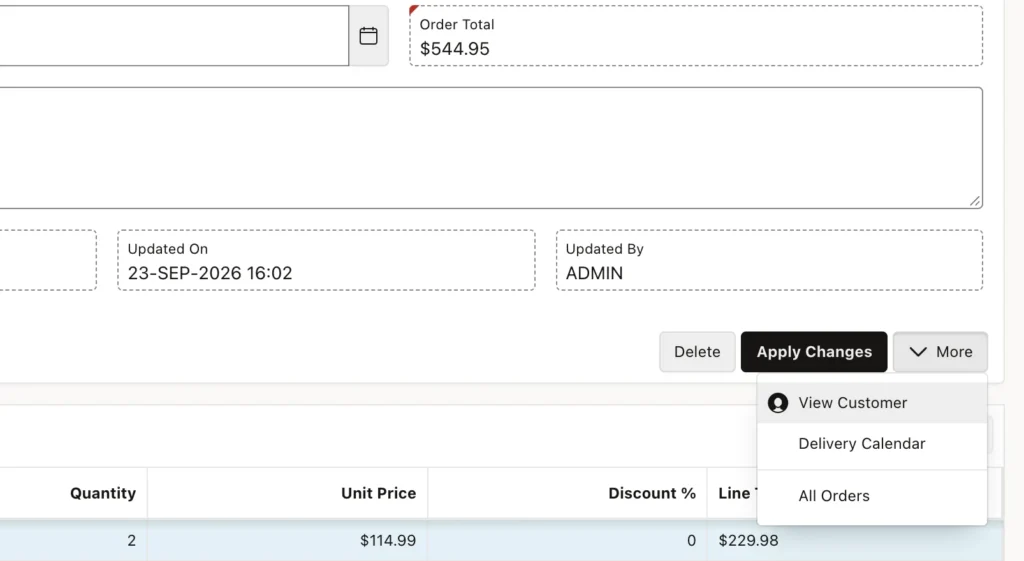
Pages accumulate buttons. A form that started with Save and Cancel ends up with six, and the toolbar turns into a wall. A menu button collapses several related actions under one label, and in APEX 26.1 it is fully declarative, where before it needed a list and a custom template.
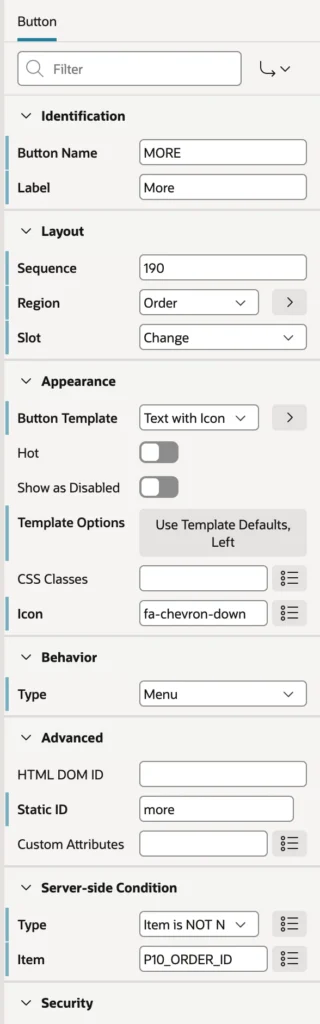
- Create a button, label it, and place it in a slot.
- Set Behavior Type to Menu. APEX adds a Menus node with a first entry.
- Choose Text with Icon and a chevron icon, so it looks like a menu rather than a button.
- Add a server-side condition if the menu only makes sense for saved records.
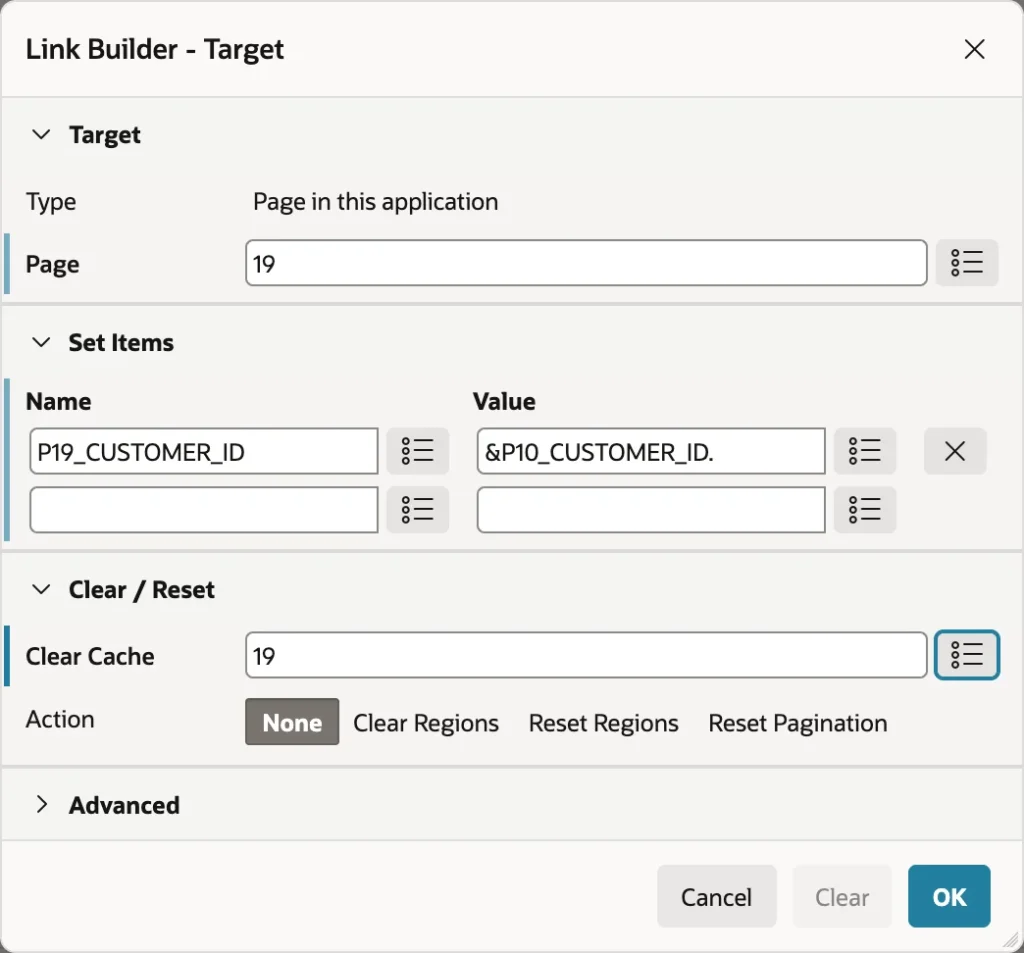
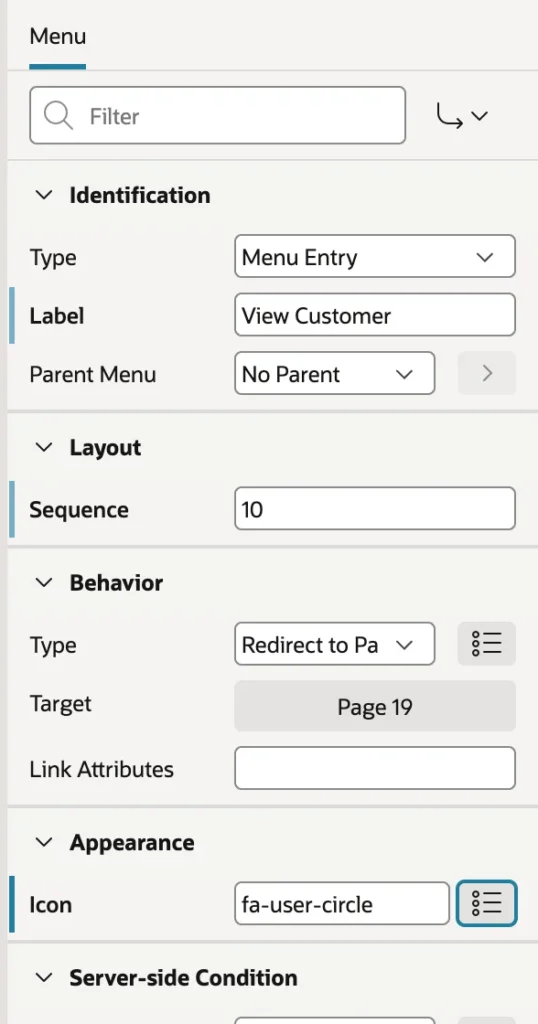
Each entry is a menu entry, a sub-menu, or a separator, and each can link to a page, another application, a URL, or trigger an action. Entries also take their own authorization scheme, so the same menu shows three items to a clerk and six to an administrator without a second button.
Trigger Actions
Sometimes a button should just do something: run a little PL/SQL, refresh a region, show a message. Before 26.1 that meant creating the button, setting it to Defined by Dynamic Action, then building a dynamic action elsewhere in the tree to catch the click. Trigger Action collapses that into one place.
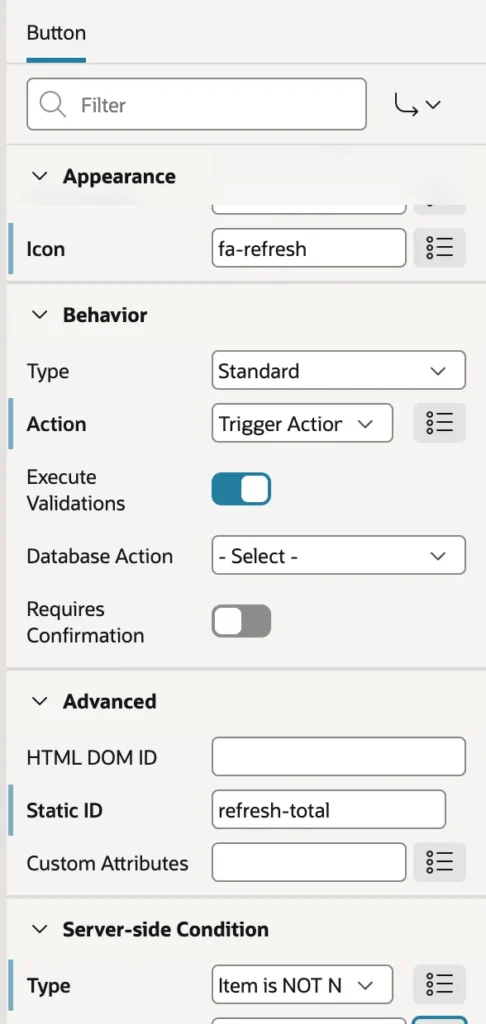
Set the action to Trigger Action and a Triggered Actions node appears beneath the button, holding the same action types dynamic actions use: Execute Server-side Code, Refresh, Set Value, Show Success Message, Confirm, and the rest.
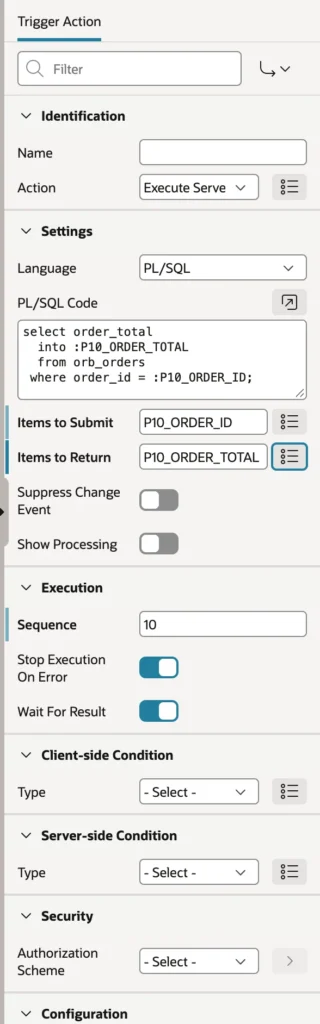
select order_total
  into :P10_ORDER_TOTAL
  from orb_orders
 where order_id = :P10_ORDER_ID;
Two properties make this work, and forgetting either produces a silent nothing. Items to Submit sends the values the code needs to the server. Items to Return brings the changed values back to the page. Add a second triggered action showing a success message, and one click now runs server code and reports the result without submitting the page.
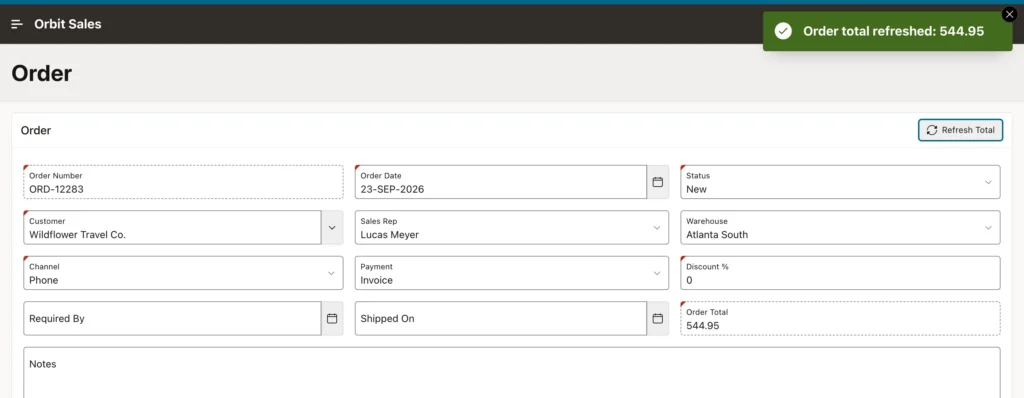
Expect one small surprise. A value refreshed this way arrives as a raw number, without the item's display format, because the PL/SQL wrote it straight into session state. Either return a formatted string with to_char or refresh the whole region instead.
Branches
When a page is submitted and its processing finishes, branches decide what the user sees next. They are evaluated in sequence order, and the first one whose condition is true wins, which makes sequence numbers a design decision rather than a formality.
- Point is usually After Processing. Before Header is the interesting alternative, redirecting users away before a page is ever shown, which is how you enforce "you cannot open this without a customer selected".
- Type is normally Page or URL (Redirect), where the browser is genuinely redirected. Variants compute the target from an item or a function.
- The Show Only types display another page inside the same request without changing the URL, which means a browser refresh submits everything again. It is rarely what you want.
- Server-side Condition is most often When Button Pressed, which is how one page sends Create and Save to different places.
A page with no branch for the current request simply shows itself again, which is why wizards always add one.
URLs
A friendly URL reads as the workspace path, the application alias, and the page alias, followed by the values being set, the pages to clear, the session, and a checksum.
/ords/r/apexbook/orbit-sales/order
    ?p10_order_id=2282
    &clear=10
    &session=12105731197602
    &cs=3KwI4Z_9aGVj4aHQvF_0ydw4m_M
Friendly URLs are on by default for new applications. Older applications and older code use the f?p form, where the same parts are positional and separated by colons: application, page, session, request, debug, clear cache, item names, and item values. APEX reads both and builds whichever the application is set to use.
Never Build a URL by Hand
String-concatenating a URL means getting the format, the session, and the checksum right yourself, and the checksum is not something you can compute. Let APEX build it.
apex_page.get_url(
    p_page   => 10,
    p_items  => 'P10_ORDER_ID',
    p_values => :P8_ORDER_ID )
In link targets the Link Builder does the same job, and in templates and HTML expressions the substitution strings for the application ID and session supply the parts. Where values contain characters that need care, the rules for escaping parameters between pages still apply.
Checksums
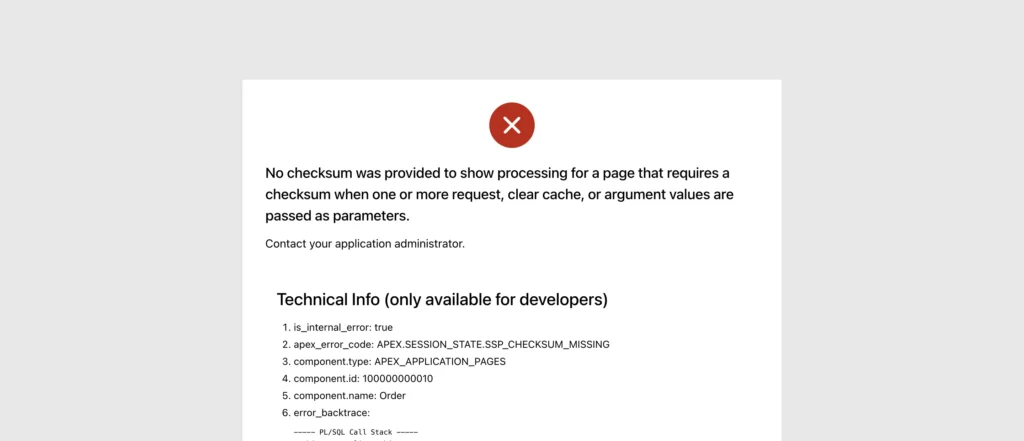
That cs parameter is a checksum of the URL's values, computed with a secret only the server knows. Any page whose Page Access Protection is set to require checksums rejects a URL whose values do not match.
This is the mechanism behind a familiar error. Change a record ID in the address bar and APEX refuses the request rather than showing someone else's data, and that refusal is the same family as the session state protection violation. Every URL APEX builds carries a valid checksum automatically, which is the other reason never to assemble one yourself.
Request, Clear Cache, and Items
Three URL parts do most of the work in day-to-day navigation. Request carries a value that processes and conditions can test, like a button name, so a link can tell the target page what it is meant to do. Clear Cache empties a page's items before it is shown, and accepts a page number, a comma-separated list, RP to reset pagination, or APP for the whole application. Items sets values on arrival, provided the target's items permit it.
Clear Cache is the one people leave out. A form opened without it shows the last record's values, which looks like a caching bug and is actually a missing parameter.
Dialogs
A link, button, or branch pointing at a modal page opens it as a dialog over the current page, with no extra configuration. What matters is the round trip back.
The Close Dialog process, or the Close Dialog dynamic action, closes it, and its Items to Return names the values that travel back to the caller. The calling page then receives a Dialog Closed event, which a dynamic action can use to refresh the report behind it or to read the returned values. That is the whole pattern behind edit-in-a-drawer screens, and it is worth knowing in both directions, because a report that does not refresh after an edit is the most common complaint users raise about APEX applications.
Conclusion
Navigation is the part of an application people notice only when it is wrong. Buttons carry a name that becomes the page's request, sit in region slots designed for their purpose, and either submit, redirect, delegate to a dynamic action, or in APEX 26.1 run a list of triggered actions on the spot, with Items to Submit and Items to Return moving values to the server and back. Menu buttons gather related destinations under one label with separators, sub-menus, and per-entry authorization, so a toolbar stops growing. Branches decide the next page in sequence order with the first true condition winning, and a redirect is almost always the right type. URLs carry item values, clear-cache instructions, the session, and a checksum that makes tampering fail rather than succeed, which is why every link should come from the Link Builder or apex_page.get_url rather than string concatenation. Finish with the dialog round trip, returning values and refreshing the caller, and the whole application starts to feel like one piece rather than a collection of pages.
