
Spy apps are designed to be invisible. They hide their icons, disguise themselves as "System Update" or "Device Health," and quietly copy your messages, location, photos, and calls to someone else — often a person you know.
This kind of software is called stalkerware, and it's more common than most people think: security vendors detect it on tens of thousands of devices every year, and the real number is almost certainly higher.
The good news: stalkerware leaves traces. In this guide, you'll learn how to check if your phone has a hidden spy app — step by step, for both iPhone and Android — and how to remove it without putting yourself at risk.
Before You Start: A Critical Safety Note
If you suspect the spy app was installed by a partner, ex-partner, or family member, read this first:
- Removing stalkerware alerts the person monitoring you. Many spy apps notify the installer the moment they're deleted or the phone is reset. If you're in an abusive situation, that can escalate danger.
- Don't investigate on the monitored phone if you can avoid it. Use a friend's device or a public computer to research and reach out for help.
- Preserve evidence first. Photos of the app, screenshots of settings, and the phone itself may matter for a police report or restraining order.
- Get expert support. Organizations like the Coalition Against Stalkerware and domestic violence hotlines have safety-planning experience for exactly this situation.
If it's safe to proceed, continue with the steps below.
Signs a Spy App May Be Hiding on Your Phone
Spy apps run constantly — recording, tracking, and uploading. That activity produces side effects:
- Battery drains noticeably faster than it used to
- The phone runs warm even when idle
- Data usage has spiked with no change in your habits
- The phone lights up or makes noises when you're not using it
- It takes longer to shut down (the app is finishing an upload)
- Someone knows things they shouldn't — your location, conversations, or plans
One of these alone proves nothing. Several together — especially the last one — justify a careful check. For the broader list of compromise indicators, see these warning signs that apply to any hack, not just stalkerware.
How to Check for Spy Apps on Android (Step by Step)
Android's openness makes it the most common stalkerware target. Work through these steps in order.
Step 1: Check Google Play Protect — and Whether It's Been Disabled
Open the Play Store → profile icon → Play Protect. Run a scan.
Just as important: check that Play Protect is turned on. Stalkerware installers almost always disable it. If you find it switched off and you didn't do it, treat that as a red flag in itself.
Step 2: Review Every Installed App — Including System Apps
Go to Settings → Apps → See all apps, then tap the three-dot menu and choose Show system apps.
Look for:
- Apps you don't remember installing
- Generic, official-sounding names: "System Service," "Device Health," "WiFi Sync," "Update Service"
- Duplicate apps (two "Settings" icons, for example)
- Apps with no icon or a blank name
Tap anything suspicious and check its storage and battery usage — a "system tool" consuming significant battery and data is suspect. Don't uninstall yet; finish the checks first (and re-read the safety note above).
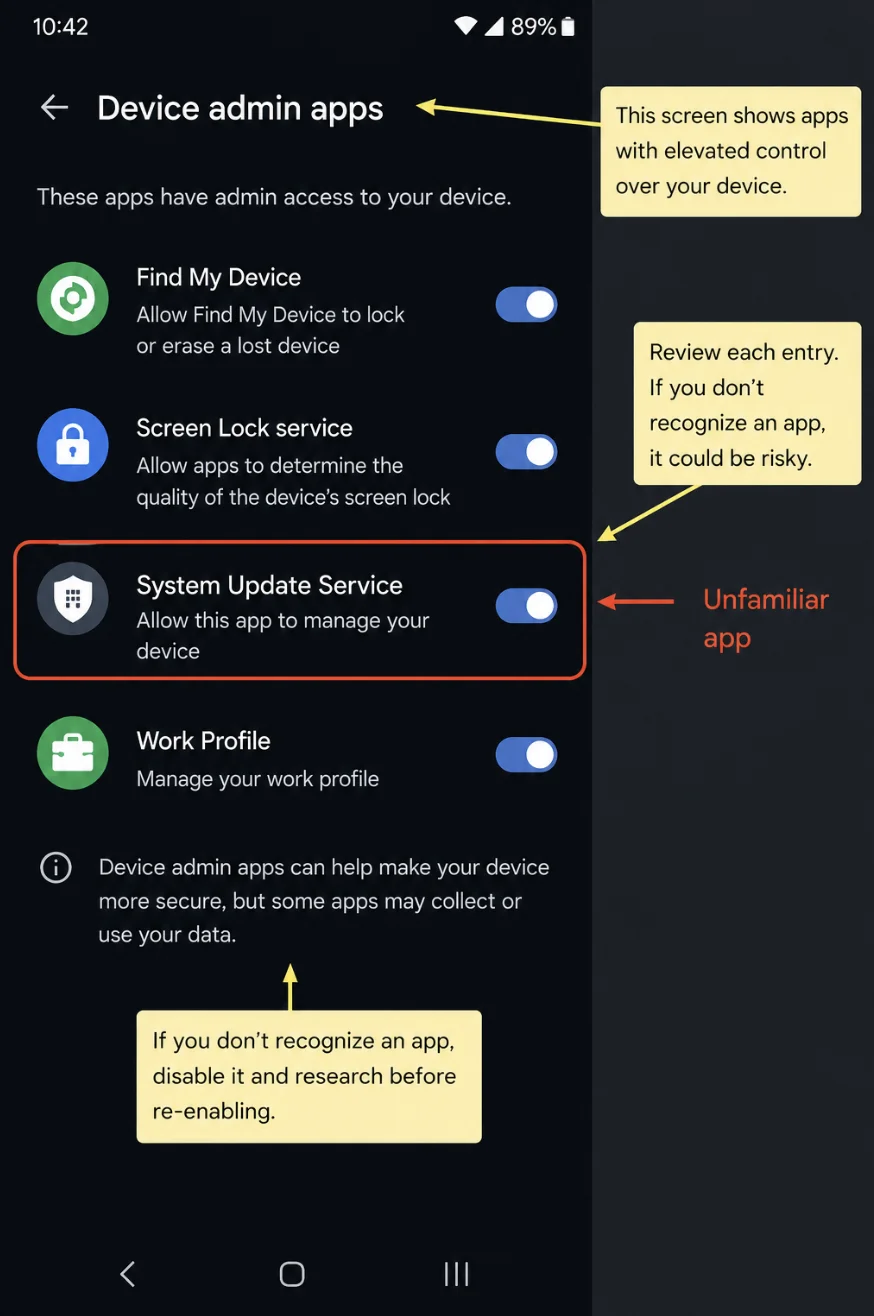
Step 3: Check Device Admin Apps
Go to Settings → Security → Device admin apps (location varies slightly by manufacturer).
Stalkerware registers itself as a device administrator so it can't be uninstalled easily and can resist removal. Legitimate entries here are rare — typically "Find My Device" and a work profile if your employer manages your phone. Anything else deserves scrutiny.
Step 4: Check Accessibility Services
Go to Settings → Accessibility → Installed services (or "Downloaded apps").
Accessibility services can read your screen, capture keystrokes, and interact with other apps — which is exactly why spy apps abuse them. If an app you don't recognize has accessibility access, that's one of the strongest stalkerware indicators on Android.
Step 5: Check for Sideloading and Unknown Sources
Go to Settings → Apps → Special app access → Install unknown apps.
Stalkerware usually isn't in the Play Store — it gets sideloaded from a website while someone has physical access to your phone. If a browser or file manager has "install unknown apps" permission you didn't grant, someone may have used it.
Step 6: Review Permission Usage
Go to Settings → Privacy → Permission manager and review which apps can access your location, camera, microphone, and SMS.
On Android 12+, also check the Privacy Dashboard to see when each permission was used. A calculator app that accessed your microphone at 2 a.m. is not a calculator.
How to Check for Spy Apps on iPhone (Step by Step)
Full spy apps are harder to install on iPhone — but not impossible and attackers have iPhone-specific tricks that don't need malware at all.
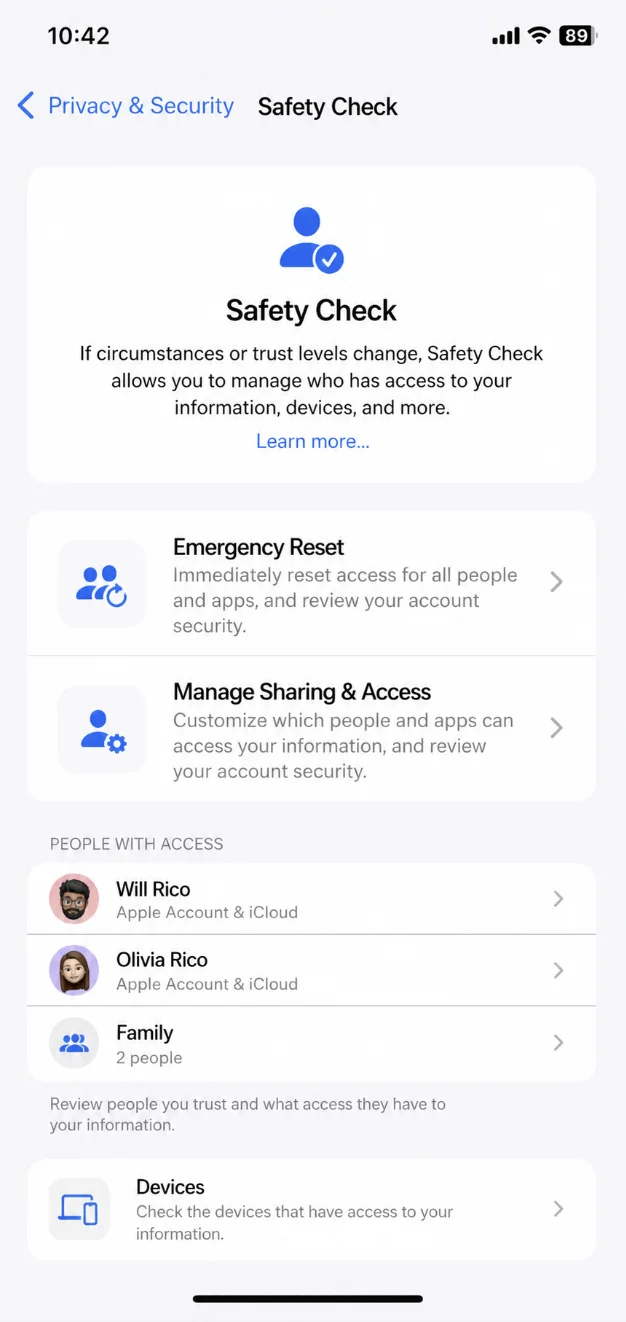
Step 1: Run Apple's Built-In Safety Check
Go to Settings → Privacy & Security → Safety Check (iOS 16 and later).
Apple built this feature specifically for stalkerware situations. It shows you exactly what you're sharing and with whom, and the "Emergency Reset" option revokes all sharing at once. Start here.
Step 2: Check for Unknown Configuration Profiles
Go to Settings → General → VPN & Device Management.
Configuration profiles can route your traffic through someone else's server or enforce hidden settings. Unless your employer or school installed one you know about, this screen should be empty. Delete any profile you can't explain.
Step 3: Check Who Has Access to Your Apple ID
Go to Settings → [your name] and review:
- Devices list — every device signed in to your Apple account can potentially see your messages, photos, and location. Remove anything you don't recognize.
- Family Sharing — check whether location sharing is on and who can see it.
An attacker with your Apple ID password doesn't need a spy app at all — they can read your synced data from their own device. If anything looks off, change your Apple ID password immediately and enable two-factor authentication.
Step 4: Check Location Sharing and Find My
Go to Settings → [your name] → Find My → Share My Location to see exactly who receives your location. Also check Settings → Privacy & Security → Location Services → Share My Location.
This is the most common "spying" method on iPhone — no malware, just a sharing setting silently enabled while someone held your unlocked phone.
Step 5: Check the App Privacy Report
Go to Settings → Privacy & Security → App Privacy Report.
This logs which apps accessed your camera, microphone, location, and contacts — and what domains they contacted. Look for apps accessing sensors at times you weren't using them.
Step 6: Check for a Jailbreak
Full-featured iPhone spy apps generally require a jailbroken device. Signs of a jailbreak include an app called Cydia or Sileo on your phone, unfamiliar apps Apple wouldn't allow, or unexplained instability. If your phone was jailbroken without your knowledge, a factory reset and iOS reinstall is the reliable fix.
Quick Checks That Apply to Any Phone
- Battery usage: Settings → Battery — look for unfamiliar apps high on the list
- Data usage: look for apps uploading far more than they should
- Call forwarding: dial
*#21#and*#004#to check whether calls and messages are being diverted — here's what to dial and how to read the results - Account sessions: review the security page of your Google or Apple account for unfamiliar logins
- Run a reputable mobile security scanner (Malwarebytes, Norton, Bitdefender) — many now detect stalkerware specifically
How to Remove a Spy App Once You Find It
Re-read the safety note first if another person is involved — removal notifies the installer. When you're ready:
- Document everything — screenshots of the app, its permissions, and any associated phone numbers or emails
- Revoke its powers first — remove device admin rights (Android) and accessibility access, so it can't fight the uninstall
- Uninstall the app, then restart the phone and confirm it hasn't reappeared
- Change your passwords from a different, clean device — start with your Google/Apple ID and email
- Re-secure your accounts — sign out all sessions, enable two-factor authentication, and remove unknown devices
- If anything persists, factory reset — back up only photos and documents (not apps or settings), erase the phone, and set it up as new
- Set a new lock screen PIN the other person has never known, and disable biometric unlock for anyone else's fingerprints or face
How to Prevent Spy Apps From Coming Back
| Habit | Why It Matters |
|---|---|
| Strong PIN + never share it | Nearly all stalkerware needs physical access to install |
| Don't leave your phone unlocked and unattended | Installation takes under five minutes |
| Keep Play Protect / iOS updates on | Both now detect and warn about known stalkerware |
| Review permissions monthly | New location/mic access is your early warning |
| Protect your Google/Apple account with 2FA | Account access spies without any app at all |
FAQ
Rarely. Consumer stalkerware requires physical access to install — usually just a few minutes with your unlocked phone. The exception is account-based spying: someone who knows your Apple ID or Google password can monitor synced data remotely, which is why changing those passwords matters as much as scanning for apps.
They use generic names like "System Service," "Device Health," "WiFi Manager," or "Update Service," hide their icons from the app drawer, and sometimes mimic built-in apps. On Android, they register as device administrators and accessibility services to resist removal — which is exactly where the steps above look.
Yes — a factory reset removes virtually all consumer stalkerware on both iPhone and Android. Two caveats: restoring a full backup can reinstall the spy app along with everything else (set up as new instead), and if the spying is account-based, you must also change your Apple ID or Google password or the monitoring continues on the fresh phone.
Increasingly, yes. Major mobile security apps (Malwarebytes, Norton, Bitdefender, Kaspersky) now flag known stalkerware, and Google Play Protect warns about it on Android. Detection isn't perfect — new or repackaged variants can slip through — so combine a scan with the manual checks in this guide.
In most countries, yes. Installing monitoring software on an adult's phone without consent typically violates wiretapping, computer misuse, or stalking laws. If you find stalkerware and believe you know who installed it, document the evidence before removing anything and consider reporting it to the police.
Conclusion: Trust the Process, Not the Panic
Spy apps are built to hide, but they can't erase their footprint: battery drain, strange permissions, device admin entries, accessibility access, and sharing settings you never enabled. Work through the steps for your platform methodically — Play Protect, app list, device admin, and accessibility on Android; Safety Check, profiles, and Apple ID devices on iPhone.
And remember the order of operations if another person may be involved: safety plan first, evidence second, removal last. If you only do one thing today, set a new lock screen PIN that nobody else knows — it blocks the way nearly every spy app gets installed in the first place.
