
You polish your resume, click "Submit," and then… silence. No rejection, no interview, nothing. Before you blame your experience, understand the software sitting between you and the recruiter: the Applicant Tracking System (ATS).
More than 97% of Fortune 500 companies and the vast majority of mid-size employers run every application through an ATS. Yet most advice about "beating the bots" is based on myths — auto-rejecting robots, secret scores, resumes shredded for using the wrong font.
This guide explains how ATS works for resumes, step by step: what the system actually does with your file, how parsing and keyword ranking decide whether a recruiter ever sees you, and what you can do about it. Once you know how the machine reads, the fixes are surprisingly simple.
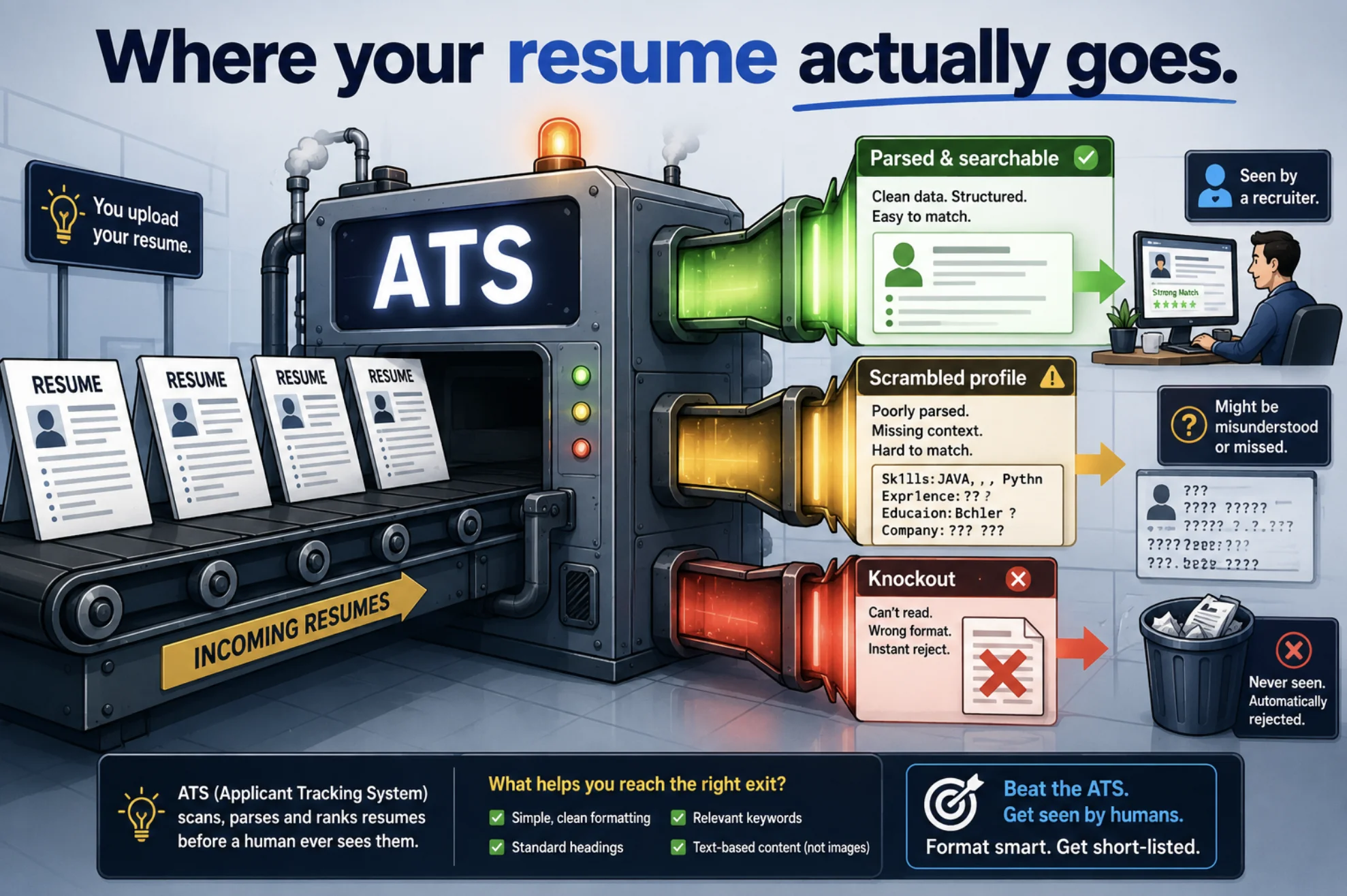
What Is an Applicant Tracking System?
An ATS is recruiting software that manages the entire hiring pipeline. Think of it as a database plus workflow tool: it collects applications, extracts the contents of each resume into structured fields, stores every candidate, and lets recruiters search, filter, rank, and track them from "Applied" to "Hired."
Popular systems you've almost certainly been processed by include Workday, Greenhouse, Lever, iCIMS, Taleo, SAP SuccessFactors, and Ashby. Each parses and ranks a little differently, but the core pipeline is the same everywhere.
What an ATS is not is an AI judge reading your resume and deciding your fate. In most companies it's closer to a searchable filing cabinet — and the biggest risk isn't being rejected by it, it's being stored in a way no search ever finds.
Key takeaway: The ATS rarely rejects you. It parses you, stores you, and waits for a recruiter's search. You lose when your resume parses badly or doesn't contain the terms recruiters search for.
How ATS Works for Resumes: The 6-Step Pipeline
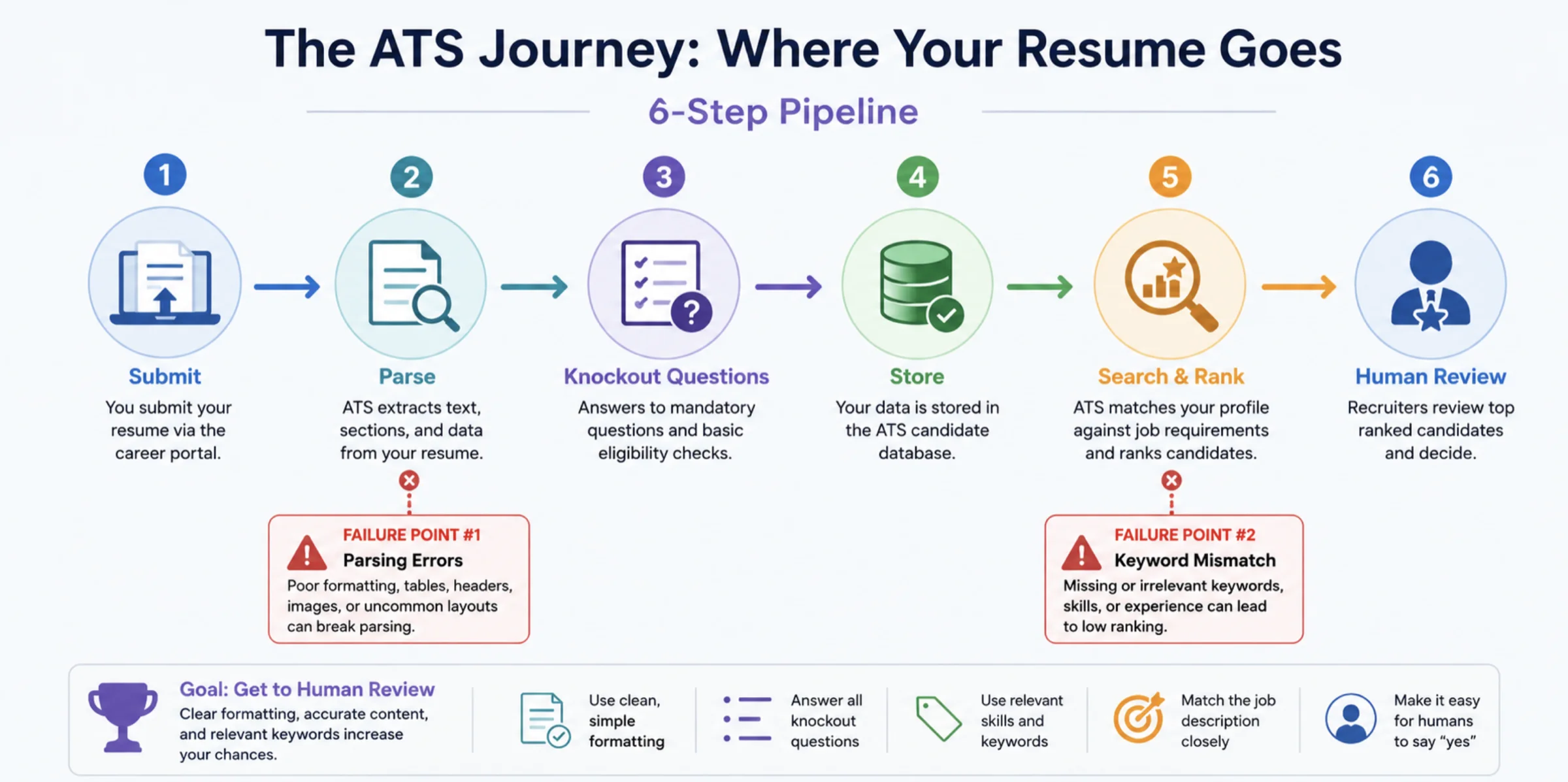
Here is the journey your resume takes inside virtually every applicant tracking system.
Step 1: Submission
You upload your resume and fill out the application form. Both enter the system together — and the form answers often matter more than people think, because they feed the only true auto-filters (more on that in Step 3).
Step 2: Parsing
The ATS runs your file through a resume parser that converts the document into structured data: name, contact details, work history (employer, title, dates), education, and skills. This is pure text extraction and pattern matching — if your layout confuses the parser, fields come out empty or scrambled, and that broken record is what recruiters see.
Step 3: Knockout Questions
Many postings include screening questions: "Are you authorized to work in this country?", "Do you have 3+ years of experience with X?" These are the only place most systems auto-reject. A disqualifying answer can archive your application instantly, no human involved. Answer honestly — but know that this filter comes from the form, not from scanning your resume.
Step 4: Storage and Profile Creation
Your parsed data becomes a candidate profile in the database, attached to the job requisition. Everything from this point on — searches, rankings, notes, interview feedback — happens against this profile, not your original PDF (though recruiters can open the original).
Step 5: Search and Ranking
This is the step that decides your fate. Recruiters query the database the way you'd search a library catalog: by job title, skills, tools, locations, and Boolean combinations pulled straight from the job description. Many systems also compute a match score between your profile and the posting. Resumes containing the exact terms rank high; resumes that describe the same skills in different words often don't surface at all.
Step 6: Human Review
The candidates who parse cleanly and match the search finally get skimmed by a recruiter — typically for 6–8 seconds on the first pass. Only now do your accomplishments, clarity, and formatting-for-humans matter. The ATS got you to the desk; your content gets you the interview.
| Stage | What the system does | Where candidates get lost |
|---|---|---|
| Submission | Accepts resume + form answers | Wrong file type won't upload or parse |
| Parsing | Extracts fields into a profile | Columns, tables, graphics scramble the data |
| Knockouts | Applies yes/no auto-filters | Disqualifying form answers |
| Storage | Creates a searchable record | Garbled profiles are effectively invisible |
| Search & ranking | Matches keywords, scores fit | Missing the exact terms recruiters search |
| Human review | Recruiter skims the shortlist | Duties instead of measurable impact |
How ATS Parsing Reads Your Resume
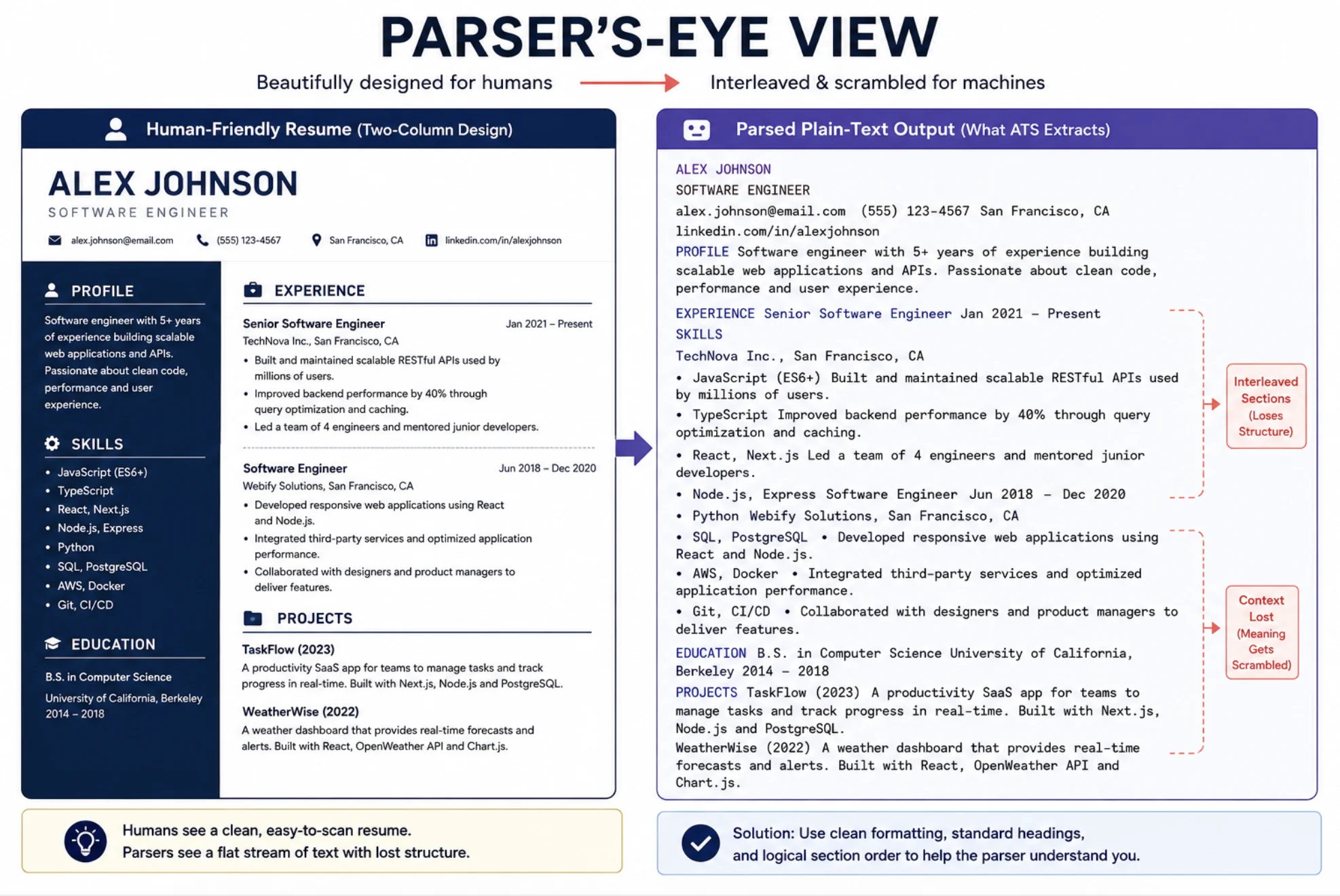
Understanding how ATS reads your resume explains most "black hole" applications. The parser works in three passes:
- Text extraction. It pulls raw text from your file. Image-based PDFs, scanned documents, and text flattened into graphics yield nothing to extract.
- Section identification. It looks for standard headings — Work Experience, Education, Skills, Certifications — to map content into fields. Creative headings like "My Journey" break the mapping.
- Entity extraction. Within each section it identifies employers, job titles, and date ranges to build your timeline. Inconsistent date formats or titles buried in dense paragraphs cause gaps.
The classic failure is layout. Many parsers read left to right, top to bottom, so a two-column template gets interleaved into nonsense — your skills sidebar spliced mid-sentence into your job history. Tables, text boxes, icons, and content in headers/footers fail the same way.
The 60-second test: select all the text in your resume, copy it, and paste it into a plain text editor. If it comes out in the right order with nothing missing, a parser will read it fine. If it's jumbled, simplify the layout.
How ATS Ranking and Keyword Matching Work
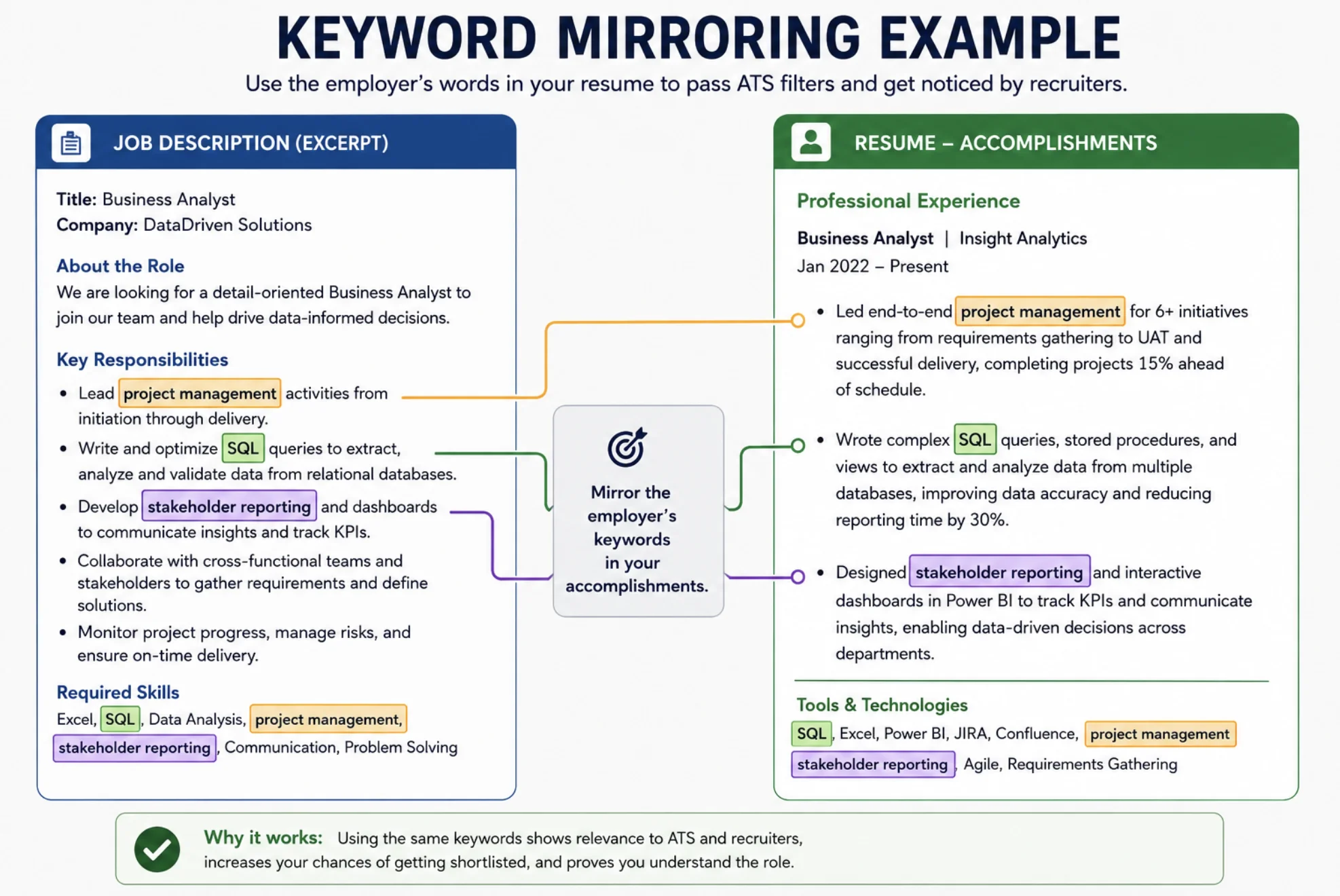
Parsing gets you stored correctly; keywords get you found. When a recruiter opens a requisition with 400 applicants, they don't read all 400 profiles — they search and sort.
Their search terms come from the job description: the job title, hard skills, tools, and certifications. Older systems match those terms literally. Newer, AI-assisted systems (and recruiters themselves) are better with synonyms, but exact matches still rank highest and are the only safe bet.
To rank well without gaming anything:
- Mirror the posting's exact phrasing. If it says "project management," don't rely on "led cross-functional initiatives" alone — use the phrase.
- Include both the acronym and the full term — "SEO (search engine optimization)," "CI/CD (continuous integration/continuous delivery)" — because you can't know which one gets searched.
- Put keywords in context. "Reduced AWS costs 30% by right-sizing EC2 fleets" matches the search and survives the human skim. A naked keyword list does neither.
- Match the job title where honest. If the posting says "Data Analyst" and your last role was functionally that under a quirkier internal title, clarify it: "Business Insights Associate (Data Analyst)."
- Never stuff or hide keywords. White-on-white text and keyword walls are caught by recruiters and flagged by modern tools — it ends applications, not advances them.
What the system weighs varies by product, but title match, skills overlap, years of experience, and recency of each skill are common ranking signals. Tailoring your software engineer resume — or any resume — to each posting's language is the single highest-leverage habit.
ATS Myths vs. Reality
| Myth | Reality |
|---|---|
| "The ATS auto-rejects 75% of resumes." | No credible source supports this number. Most systems reject nothing automatically except knockout answers. Resumes are filtered by search behavior, not deletion. |
| "One typo and the bot bins you." | Parsers don't judge quality. Typos hurt with humans, not machines. |
| "Fancy design shows effort." | Design elements are the top cause of parsing failure. Machines want plain structure; save the flair for a portfolio. |
| "PDFs can't be read by ATS." | Modern systems read text-based PDFs fine. Only image-based or design-tool-flattened PDFs fail. When unsure, .docx is the most conservative choice. |
| "Beating the ATS is about tricks." | It's about being easy to parse and using the true, exact terms for skills you actually have. |
The kernel of truth behind the fear: a Harvard Business School study found most employers admit their filters screen out qualified candidates. But the fix isn't tricking software — it's formatting for parsers and speaking the job description's language.
How to Get Your Resume Through the ATS: Quick Checklist
- Use a single-column, top-to-bottom layout — no tables, text boxes, columns, or graphics
- Submit a text-based PDF or .docx (never a scan or image)
- Keep standard section headings: Work Experience, Skills, Education, Certifications
- Put your contact info in the body, not the header/footer
- Mirror keywords from each job description — exact phrasing, acronym + full term
- Use a consistent date format (e.g., "Jan 2023 – Present") on every role
- Run the copy-paste plain-text test before submitting
- Keep it a resume, not an academic CV — if you're unsure of the difference, this resume vs CV breakdown settles it
FAQ
Does an ATS automatically reject resumes?
Rarely. The only true auto-rejections in most systems come from knockout questions on the application form (work authorization, minimum experience). Resumes usually aren't rejected — they're just never surfaced, because they parsed badly or lacked the keywords a recruiter searched for.
How do I know if my resume passed the ATS?
You can't see inside an employer's system, but you can test the inputs: paste your resume into a plain text editor to check it parses in order, and compare your wording against the job description for the exact skills and title terms. Tools like Jobscan simulate this match against a specific posting.
What file format is best for ATS — PDF or Word?
A text-based PDF (one where you can select the text) works with virtually all modern systems and preserves your layout. A .docx file is the most universally parseable and the safest choice for older or unknown systems. Never submit image-only PDFs, scans, or .png/.jpg files.
How long does an ATS keep my resume?
Most companies retain candidate profiles for one to two years or more (subject to local data laws), and recruiters routinely search past applicants when new roles open. A cleanly parsed, keyword-rich profile can generate interviews from jobs you never applied to.
Do all companies use an ATS?
Nearly all large ones — over 97% of Fortune 500 companies — and most mid-size employers. Small businesses may review applications by hand, but if you applied through a careers portal or a big job board, an ATS almost certainly processed your resume.
Conclusion: The ATS Is a Filter You Can Pass on Purpose
An ATS isn't a hostile robot — it's a database with a picky reading habit. It parses your resume into fields, stores it, filters on your form answers, and serves it up when a recruiter's search matches your words. Every "black hole" application traces back to one of two fixable failures: a layout the parser couldn't read, or wording the search couldn't match.
Format for the machine, write for the human, and mirror each job description's language honestly. Do those three things and the ATS stops being a wall — it becomes the thing that puts your resume on the recruiter's screen.
