
If you recently upgraded to Oracle APEX 26.1, you may have noticed a new HTML DOM ID property alongside Static ID in Page Designer. Nothing was removed, Oracle simply separated these concepts and gave them clearer names to better reflect their purpose.
Oracle APEX 26.1 introduced a highly logical naming change to how elements are identified. If you regularly work with regions, buttons, or interactive reports, understanding this shift is crucial for writing accurate JavaScript code. Let's break down exactly what changed, why Oracle did it, and how it impacts your daily development workflow.
The Big Change: Meet the "HTML DOM ID"
In older versions of Oracle APEX, developers relied on the Static ID property to assign a custom identifier to a component. This identifier was then injected directly into the HTML markup as the element's actual ID attribute.
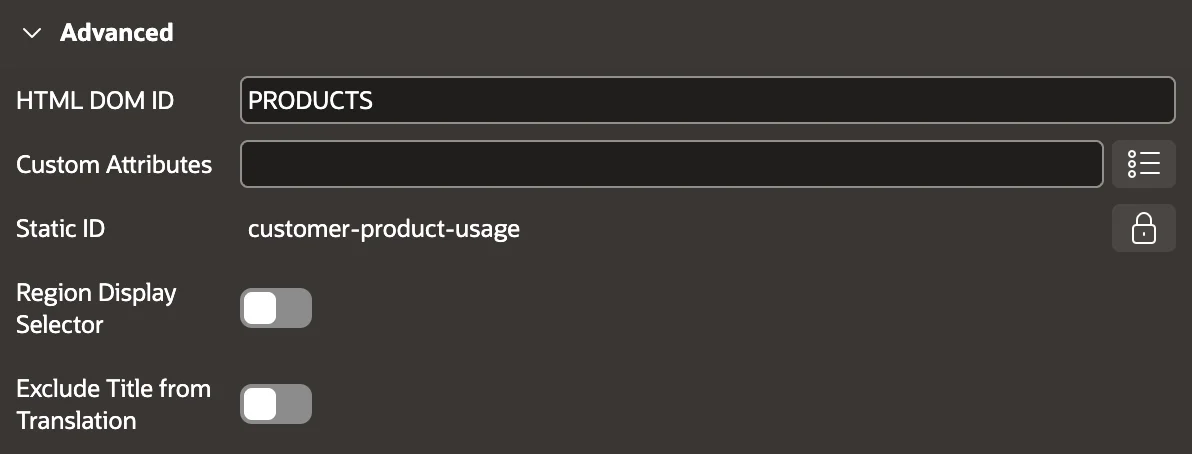 in Oracle APEX." class="wp-image-22369"/>
It worked perfectly, but let's be honest: the term "Static ID" was a bit confusing because the content itself wasn't necessarily static.
In Oracle APEX 26.1, Oracle fixed this by officially renaming the existing Static ID property to HTML DOM ID.
This rename applies to:
- Regions
- Buttons
- Interactive Grids
- Interactive Report Columns
The underlying behavior hasn't changed a bit. The only difference is the label inside the Page Designer property editor.
💡 The Takeaway: A good name prevents bad assumptions. Calling it HTML DOM ID immediately tells you exactly where that value ends up—in the browser's Document Object Model.
Why Make the Change Now?
This change was made specifically to better reflect its purpose in the DOM and to avoid overlapping with the newly introduced Static ID used in APEXlang application exports.
To prevent developers from pulling their hair out over two completely different concepts sharing the same name, Oracle wisely rebranded the DOM-related property.
The Plot Twist: "Static ID" Isn't Dead
Here is where you need to pay close attention. The term "Static ID" hasn't disappeared from APEX; it was simply reassigned.
If you build Interactive Grids or Interactive Reports, you know that users can save custom report configurations. Previously, the identifier for these saved reports was known as the Alias.
In APEX 26.1, the Alias for saved reports in Interactive Grid and Interactive Report is now officially known as the Static ID.
The APEX 26.1 Swap at a Glance:
- 🏷️ Old Static ID (on regions, buttons, IG, and IR columns) ➡️ Now called HTML DOM ID.
- 🏷️ Old Alias (for IR/IG saved reports) ➡️ Now called Static ID.
Keep this distinction in mind, especially when reading older documentation!
How This Impacts Your JavaScript
If you write JavaScript code or jQuery to manipulate APEX pages, the HTML DOM ID is the exact value you need to target specific regions.
When you write a selector like $("#my_report_region"), you are targeting whatever text you typed into the HTML DOM ID field. If you are following a tutorial that instructs you to "set the Static ID," you now know they actually mean "set the HTML DOM ID."
Real-World Example
Let's say you are adding a custom download button to an interactive report. To trigger the native download dialog, your JavaScript relies entirely on targeting the DOM element by its ID:
// Targeting the interactive report's action menu
$("#my_report_html_dom_id_actions_menu").menu("find", "irDownload").action();
In this snippet, the APEX engine automatically appends _actions_menu to the HTML DOM ID you assigned to your report region. If that field is left blank in Page Designer, your jQuery selector will fail silently.
Where to Find it in Page Designer
Locating the new field takes just a few clicks:
- Open your page in Page Designer.
- Select your desired region, button, or column.
- Look at the property editor on the right and scroll down to the Advanced section.
- You will find the HTML DOM ID field right where the old Static ID used to live.
If you are looking for the new Static ID field for saved report configurations, you'll find that in the report attributes section under the saved report definition.
Final Thoughts
The shift from Static ID to HTML DOM ID in Oracle APEX 26.1 is a massive win for clarity. It removes ambiguity for anyone writing client-side code and properly accommodates the new APEXlang export features.
Next time you are debugging a broken jQuery selector, double-check your HTML DOM ID, and remember to mentally translate "Static ID" in older tutorials to keep your development moving fast!
