
For over two decades, an Oracle APEX application has lived inside the database as metadata you could only realistically touch through the App Builder. The export was a giant f100.sql file — fine for deployment, nearly useless for code review, diffing, or letting an AI assistant work on your app.
Oracle APEX 26.1, released in May 2026, changes that with APEXlang: an open, declarative specification language that represents your entire application as a package of human-readable .apx text files. You can export it, store it in Git, diff it, validate it, edit it in VS Code, and import it back — and so can an AI agent.
This guide covers everything you need to start working with APEXlang: what it is, the anatomy of .apx files, Static IDs, the export/import/validate workflow with SQLcl and VS Code, how it powers AI-assisted development, and the limitations you should know before adopting it.
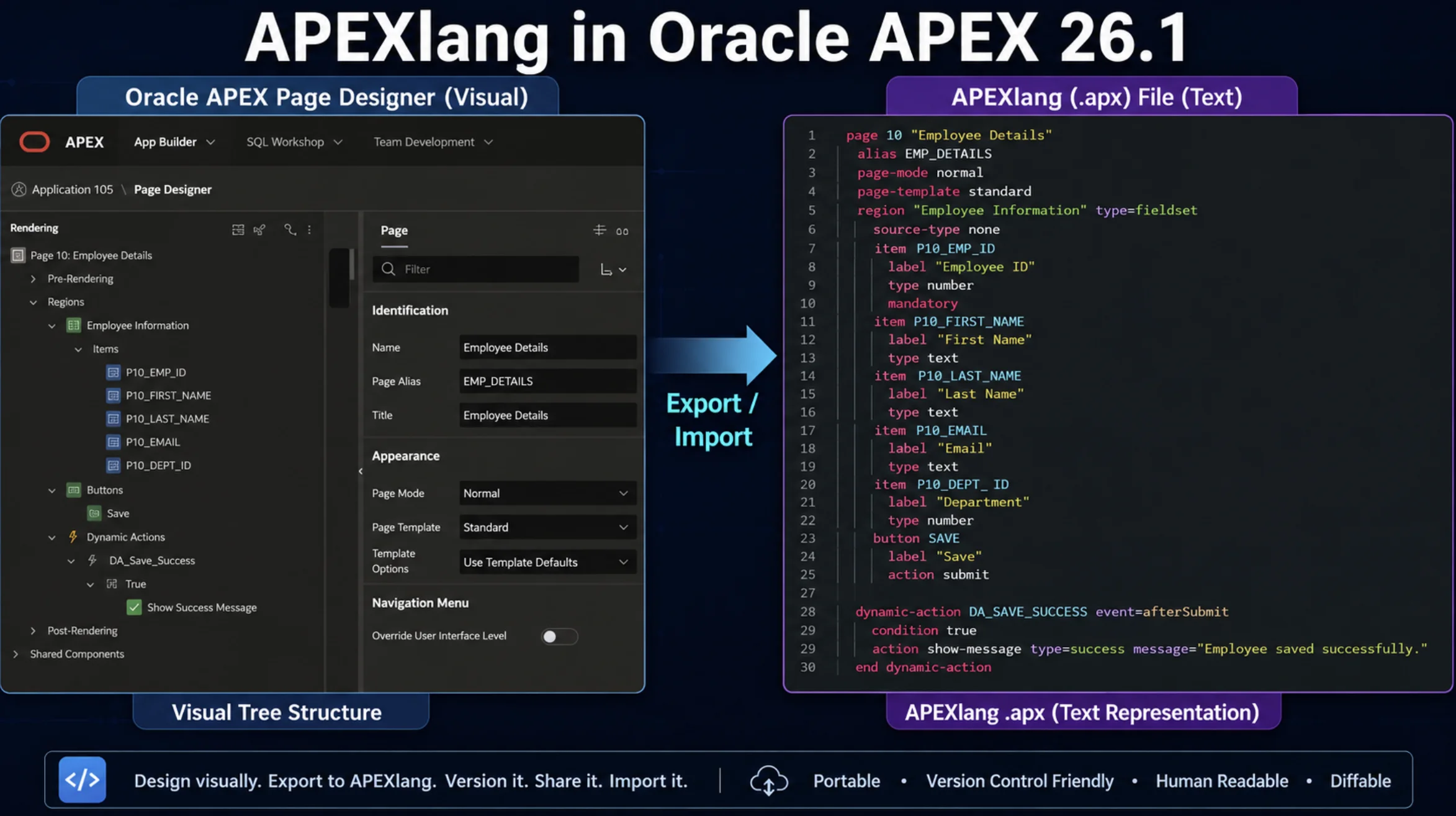
What Is APEXlang?
APEXlang is Oracle's Open Application Specification Language for APEX. Instead of a monolithic SQL export, your application becomes a structured folder of .apx files — one for application-level settings, one per page, and separate files for shared components like LOVs, lists, and authentication schemes.
The design goal is captured in one idea from the APEX team: APEXlang expresses application intent, not raw implementation code. It extends the declarative nature of APEX into a text format that both developers and large language models can read, review, and modify.
When stored in source control, the .apx files become the source of truth for your application. You can keep building visually in App Builder and export to APEXlang for versioning — or flip the model entirely and author changes in text, validate them, and import them back.
Why this matters compared to the classic SQL export:
- Readable — components appear as named blocks that mirror the Page Designer tree, not as
wwv_flow_impAPI calls. - Versionable — clean Git diffs, thanks to stable Static IDs instead of environment-specific numeric IDs.
- Validatable — SQLcl can validate an APEXlang package before it ever touches the database.
- AI-ready — a supported way for AI agents to generate and modify APEX applications that the platform can validate and govern.
APEXlang arrives alongside other AI-focused 26.1 features — AI Agents with AI Tools, natural language support for Interactive Reports, and a new Data Reporter — but APEXlang is the foundation the rest builds on. Before trying it, confirm your APEX version is 26.1 or later.
The Anatomy of an APEXlang Export
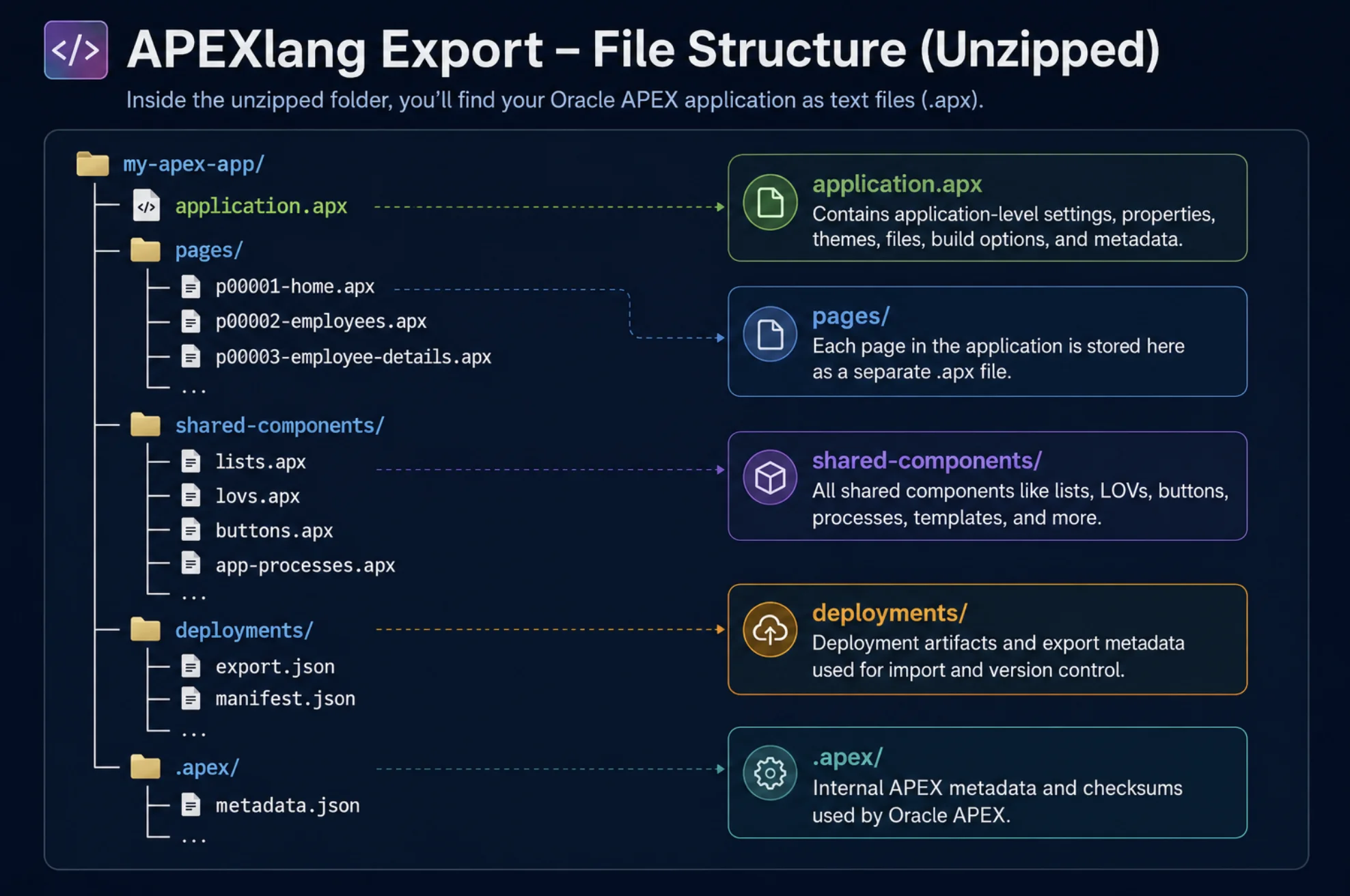
Exporting an application in APEXlang format produces a zip file named after the application alias (for example, employees.zip) with a structure that mirrors how you already think about an APEX app:
employees/
├── application.apx              -- App-level settings, authentication, theme, CSS/JS
├── pages/
│   ├── p00001-home.apx
│   └── p00003-employee.apx
├── shared-components/
│   ├── lovs.apx
│   ├── lists.apx
│   ├── authentications.apx
│   └── app-processes.apx
├── supporting-objects/          -- Install, upgrade, and deinstall scripts
├── deployments/
│   └── default.json             -- App ID and environment configuration
└── .apex/
    └── apexlang.json            -- Meta-metadata version (do not edit)
Page filenames combine the page number and alias (p00003-employee.apx), and the compiler enforces that the filename matches the content — the same alias you already use for friendly URLs.
Block-Based Declarative Syntax
Components are expressed as nested blocks that read like the Page Designer tree. An application block looks like this:
app EMPLOYEES (
    name: "Employees"
    version: "1.0"

    authentication {
        ...
    }
)
A page defines its properties and appearance:
page 3 (
    name: "Employee"
    alias: "EMPLOYEE"

    appearance {
        pageMode: modalDialog
        dialogTemplate: @/drawer
    }
)
Pages contain nested blocks for regions, items, buttons, dynamic actions, validations, processes, and branches — everything you would see in Page Designer, in text form.
Embedded Code Blocks
APEXlang structures the declarative layer, but it does not remove code from APEX. Your SQL, PL/SQL, JavaScript, CSS, and HTML stay exactly where you expect them, embedded in fenced blocks with language indicators:
region eventsCalendar (
    name: "Events Calendar"
    type: calendar

    source {
        sqlQuery:
            ```sql
            select e.event_id,
                   e.event_name,
                   e.event_date
              from eba_ca_events e
            ```
    }
)
The fences use indicators like ```sql, ```plsql, ```javascript-browser, ```html, and ```css, so a region's SQL query or a process body is instantly recognizable — and syntax-highlighted in supporting editors.
The Reference System
APEXlang uses three reference styles you will see everywhere:
| Reference | Example | Meaning |
|---|---|---|
@identifier | @authentication-scheme | Reference to a component in the same application |
@/identifier | @/standard, @/drawer | Reference to a global or Universal Theme component |
| APEX syntax | :P50_ID, &APP_ID. | Bind variables and substitution strings, unchanged |
Because bind variables and substitutions work exactly as before, existing APEX knowledge transfers directly into the new format.
Static IDs: The Backbone of APEXlang
APEXlang needs a stable, human-readable identifier for every component — numeric internal IDs differ between instances, which is what made diffing classic exports so noisy. In 26.1, every component carries a unique Static ID, and it becomes the canonical identifier in APEXlang files.
Key behaviors to understand:
- Auto-generated on upgrade. Components without a Static ID get a readable one derived from the component name when your instance upgrades or the app is imported.
- Locked by default. Static IDs are read-only in Page Designer to prevent accidental changes; use the Unlock/Lock icon to edit one deliberately.
- Universal coverage. All shared components, page components, templates, and even plug-in attributes now support them. Plug-ins get a camel-case APEXlang Name (a plug-in called "My Custom Region" becomes
myCustomRegion).
Treat Static IDs as permanent identifiers. Renaming one after the fact means updating every reference in your code and losing diff correlation across versions — the same discipline you apply to primary keys.
Working with APEXlang: Export, Validate, Import
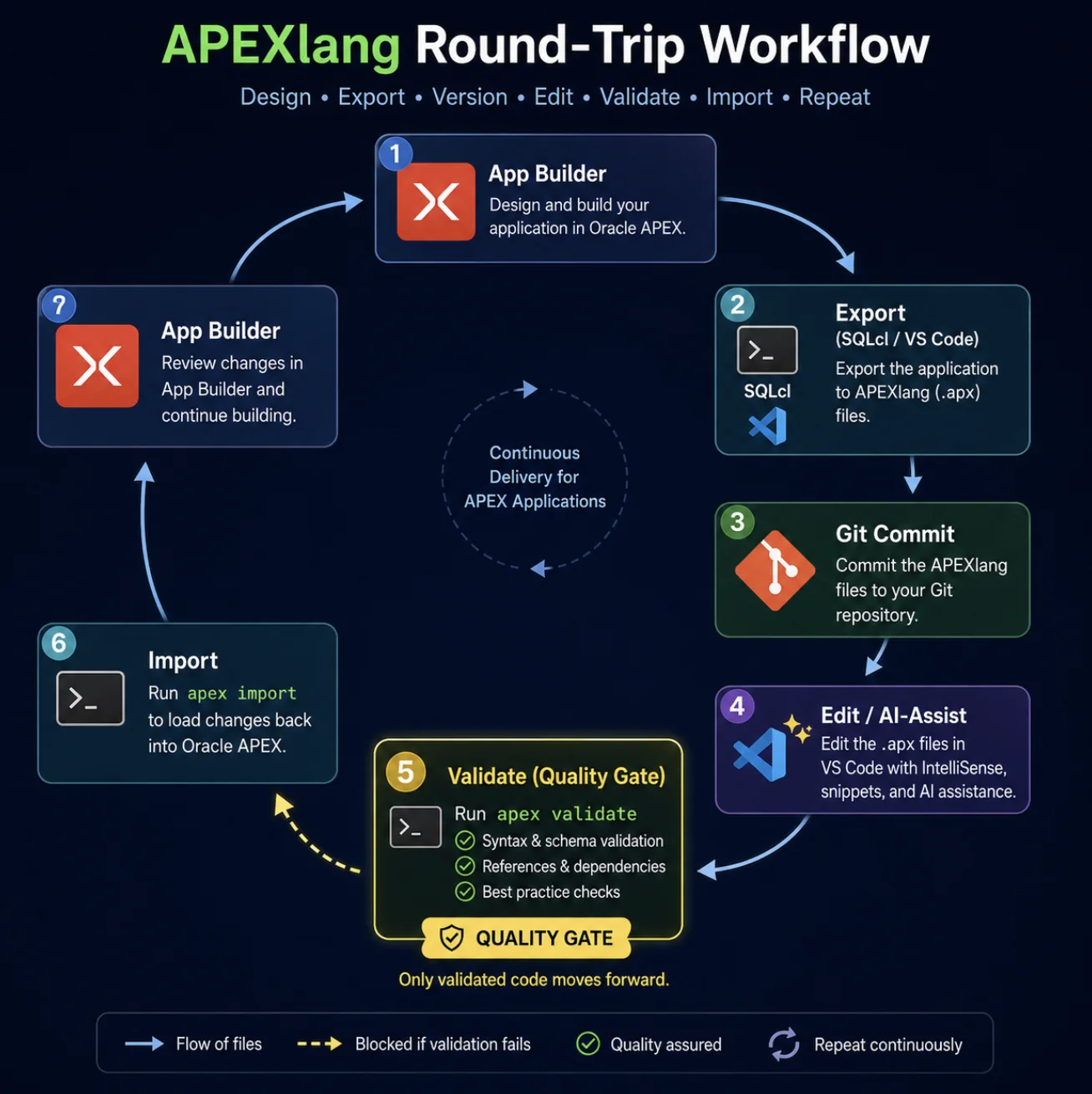
Here is the complete round-trip workflow using App Builder, SQLcl, and VS Code.
Step 1: Export
You have three options:
- App Builder — on the Export page, choose the APEXlang format. Four export types are available: Standard (recommended for source control), Runtime (developer metadata omitted, build status Run Only), Full (includes workflow, task, and Data Reporter data), and Custom.
- SQLcl — one command:
apex export -applicationid 104 -exptype apexlang- VS Code — in Oracle SQL Developer for VS Code, right-click the application under your connection's APEX folder, select Export, and choose a target directory.
Step 2: Edit
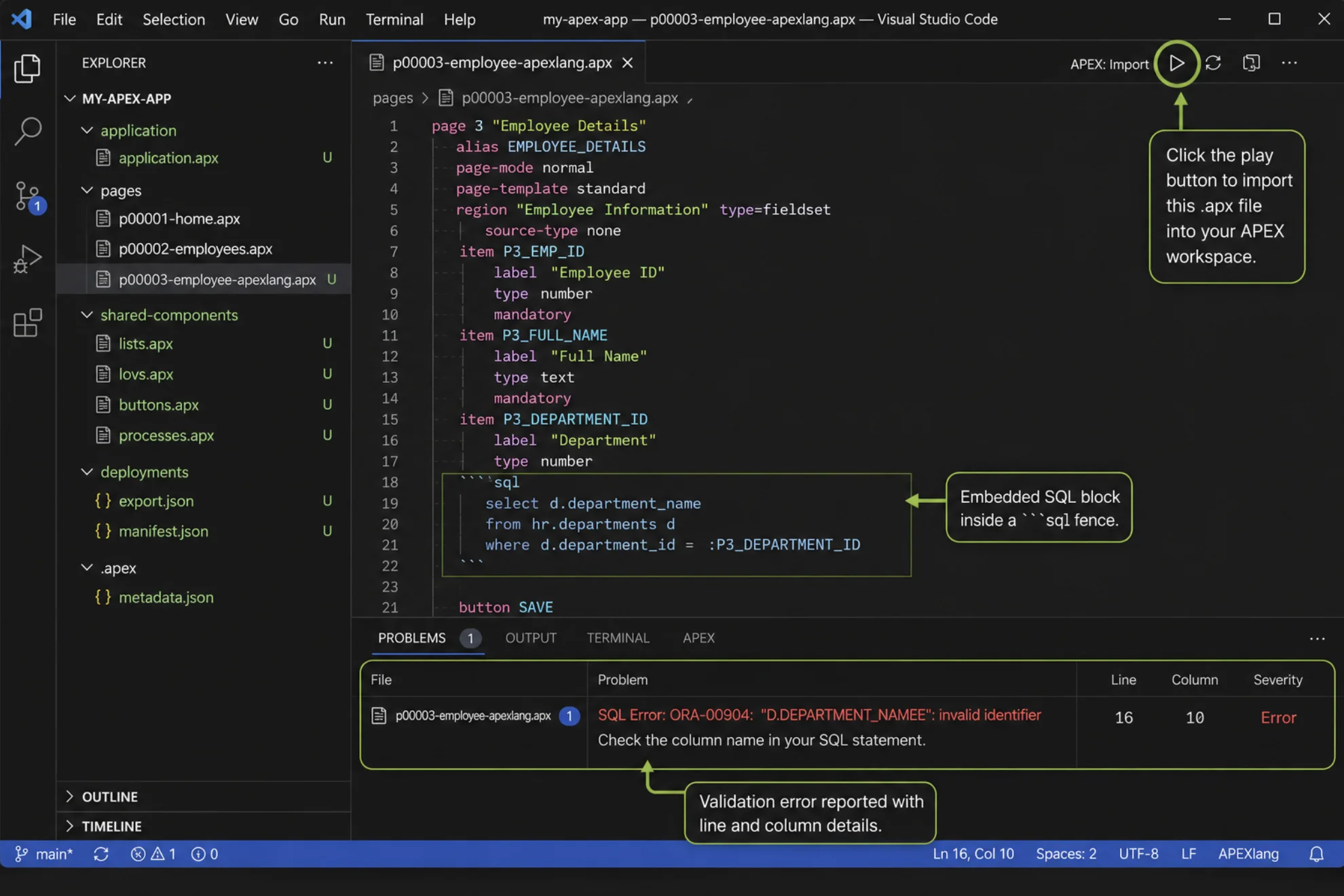
Unzip the export and open it in any editor. The first-class experience is Oracle SQL Developer for VS Code (search "Oracle APEX" in the marketplace), which gives you:
- Syntax highlighting for
.apxfiles - Code completion with Ctrl+Space
- Proactive validation errors in the Problems panel
- One-click import back into the Builder via the play button
- Embedded SQLcl for headless and automated workflows
Because the format is plain text, standard Git workflows finally work: branch, edit, diff, merge, and code-review APEX changes like any other codebase. If Builder and text edits diverge, you resolve conflicts with your favorite diff/merge tool before re-importing.
Step 3: Validate
SQLcl can validate an APEXlang package before import — even without a database connection:
apex validate -input /path/to/employeesValidation errors report the file path, line, column, error type, and suggested valid values. This is the hook for CI/CD: reject a pull request automatically if the APEXlang source doesn't validate.
Step 4: Import
apex import -input /path/to/employeesImport validates automatically before proceeding, and a new error page in 26.1 surfaces any errors and warnings. Two requirements to know:
- At least one workspace schema must be REST-enabled (you may hit this on your first import).
- APEXlang import is full-application only — single-page import still requires the SQL format.
Bonus: The APEXlang View in Page Designer
You don't have to export anything to start learning the syntax. Page Designer in 26.1 includes an APEXlang View that shows a read-only snapshot of the current page in APEXlang format — and displays APEXlang diffs when comparing working copies. It is the fastest way to build fluency with the format using pages you already know.
APEXlang and AI-Assisted Development
APEXlang exists because generative AI needed it. LLMs are excellent at producing structured text and terrible at clicking through Page Designer. By giving AI a supported, validatable text format, Oracle turned APEX into a platform AI agents can safely build on.
What this unlocks in practice:
- AI-authored changes with guardrails. An AI assistant (Claude, Codex, and others integrate with the VS Code extension) edits
.apxfiles; SQLcl validation catches anything invalid before it reaches your workspace; you review the diff like any pull request. - Application Lock. A new 26.1 option prevents App Builder changes and allows modifications through APEXlang only — turning your Git repository into the enforced source of truth.
- Natural language page creation. The Create Page wizard accepts descriptions like "create a report on EBA_PROJECTS" and suggests the page name, type, and data source.
- AI Agents and AI Tools. Agents reason over user requests and act through approved tools — retrieving data, running PL/SQL, or executing client-side JavaScript — with declarative guardrails such as user-approval dialogs for sensitive operations.
The developer's role shifts rather than shrinks: you spend less time assembling components and more time on data modeling, architecture, server-side conditions, security, and reviewing what the AI produced. Expertise moves from construction to governance.
Limitations and Gotchas in 26.1
APEXlang is a first release, and a few sharp edges are worth knowing before you commit a team to it:
- No single-page import. APEXlang works at full-application scope. Page-level import still needs the SQL format.
- Runtime data is not exported. Public and private report settings, subscriptions, and workflow/task instances are not included in APEXlang exports in 26.1.
- Never edit
.apex/apexlang.json. ThemmdVersioninside is the meta-metadata version; leave it unchanged until a future APEX release exports a new value. - Import replaces the Builder version. If developers changed the app in Builder while you edited APEXlang externally, importing overwrites their work. Export from Builder first, merge both versions in a diff tool, then import the unified result.
- REST-enabled schema required. First-time APEXlang imports need a REST-enabled parsing schema in the workspace.
None of these block adoption — but they shape the workflow. Keep your existing automated backups running while your team transitions to Git-based source control.
Best Practices for Adopting APEXlang
- Start with the APEXlang View. Read your existing pages in the new format before editing anything.
- Commit Standard exports to Git. Make the repository the source of truth and export after every meaningful Builder change.
- Validate in CI. Run
apex validateon every pull request so broken source never reaches an instance. - Treat Static IDs as permanent. Set meaningful ones on new components; never rename them casually.
- Pick one editing surface per change. Either Builder or text for a given piece of work — merge deliberately when both were touched.
- Introduce AI gradually. Let an assistant draft changes in
.apxfiles, but keep human review of the diff and validation as non-negotiable gates.
FAQ
What is APEXlang in Oracle APEX 26.1?
APEXlang is an open, declarative specification language that represents an entire Oracle APEX application as human-readable .apx text files. Introduced in APEX 26.1 (May 2026), it enables source control, diffing, validation, and AI-assisted development in a way the classic SQL export never could.
Does APEXlang replace the SQL export format?
No. The SQL format (f100.sql) still exists and is still required for some tasks, such as single-page imports and runtime data like saved report settings. APEXlang is the recommended format for source control and AI workflows.
Do I need to rewrite my applications to use APEXlang?
No. Any existing application can be exported to APEXlang from App Builder, SQLcl (apex export -exptype apexlang), or VS Code. On upgrade to 26.1, APEX automatically assigns readable Static IDs to components that lack them.
Can I edit .apx files by hand and import them back?
Yes — that is the core workflow. Edit in any text editor (Oracle SQL Developer for VS Code adds highlighting, completion, and validation), run apex validate to check the package, then apex import to load it. Note that import replaces the current Builder version of the application.
Is APEXlang required to use the AI features in APEX 26.1?
Not for end-user features like natural language Interactive Reports or AI Agents. But APEXlang is the foundation for AI-assisted application development — it is the supported format through which AI agents and tools like Claude or Codex can generate and modify APEX applications under validation and governance.
Conclusion
APEXlang is the most significant change to how Oracle APEX applications are built, stored, and shared since the platform's creation. By turning applications into readable, versionable, validatable text, APEX 26.1 finally gives low-code development first-class citizenship in Git workflows, code review, CI/CD, and the AI-assisted future.
Start small: open the APEXlang View on a page you know well, export one application, and put it in a repository. Within a sprint you will be reviewing APEX changes in pull requests like the rest of your stack. For more hands-on guides, browse the full library of APEX tutorials on this site.
Disclaimer: The images in this article are illustrative mockups created for demonstration purposes. They are intended to help explain APEXlang concepts and workflows and may not exactly match the appearance or functionality of Oracle APEX, SQLcl, or Visual Studio Code. Product names and trademarks belong to their respective owners.
