
Imagine launching a massive application update without any stress or downtime. You simply flip a digital switch, and your users see the new changes instantly thanks to a feature flag in software development. If something goes wrong, you just flip the switch back, and everything returns to normal.
A feature flag allows you to turn specific code functionality on or off without deploying new code. You can test new ideas safely in a live environment. It gives you complete control over what your users experience and when they experience it.
In this guide, you will learn exactly how these toggles work and why they are essential. You will discover the different types of flags and how to implement them effectively. By the end, you will know how to manage releases like a true professional.
What is a Feature Flag in Software Development?
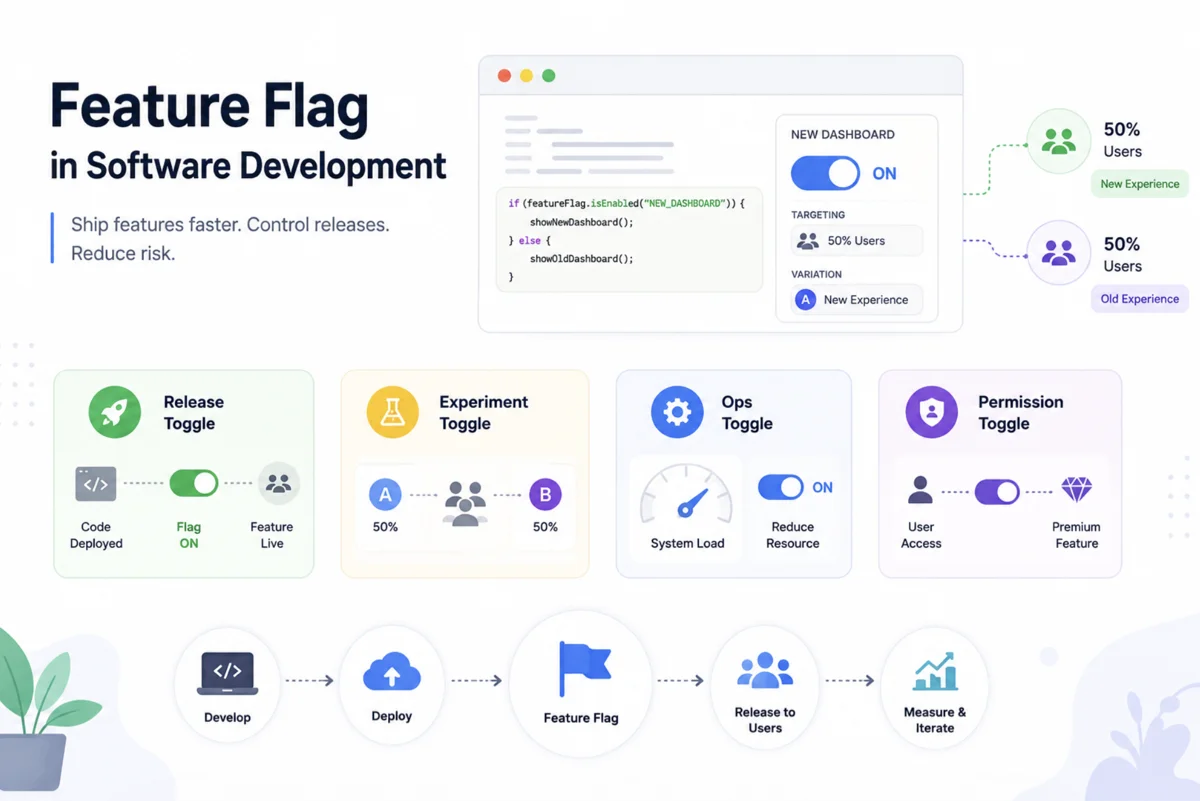
A feature flag in software development is a powerful technique that modifies system behavior without changing code. You wrap your new code in a conditional statement. If the flag is enabled, the code runs, but if disabled, the system ignores the code entirely.
This concept is also known as a feature toggle or a feature switch. It separates code deployment from feature release. You can deploy incomplete code to your production server safely because it remains hidden behind the flag.
Deployment and release are two different things, and feature flags allow you to decouple them completely.
When your marketing team is ready for the big launch, you simply enable the toggle in your dashboard. Your users immediately gain access to the new capabilities. There is no need for a stressful midnight deployment window.
Why You Need Feature Toggles for Continuous Delivery
Continuous delivery is all about moving fast and getting your work to users quickly. Feature toggles act as a safety net during this rapid process. You can merge your code into the main branch every day without worrying about breaking the application.
If a new release causes unexpected bugs, you do not need to roll back the entire deployment. You just turn off the specific feature flag that caused the issue. Your application instantly stabilizes while your team investigates the problem in a safe environment.
This approach significantly reduces the risk associated with software updates. It allows your developers to sleep soundly knowing they have an instant kill switch. You gain the confidence to innovate and release more frequently.
Types of Feature Flags
Not all flags serve the same purpose in your codebase. You need to understand the different categories to use them effectively. Here is a breakdown of the four main types you will encounter.
| Flag Type | Primary Purpose | Typical Lifespan |
|---|---|---|
| Release Toggles | Hide incomplete features from users | Days to weeks |
| Experiment Toggles | Perform A/B testing on different groups | Weeks to months |
| Ops Toggles | Control system behavior under heavy load | Months to years |
| Permission Toggles | Grant premium access to specific users | Years to permanent |
Release Management Toggles
Release management toggles are your standard tool for deploying new code safely. You use them to hide work in progress from your end users. Once the feature is fully tested and ready, you turn the toggle on globally.
These flags should not stay in your codebase forever. You must remove them once the feature is stable and permanently enabled. Keeping them too long creates unnecessary clutter in your application.
Experimentation and A/B Testing
Experiment toggles help you make data-driven decisions about your product. You can show a new checkout flow to half of your users and the old flow to the rest. You then measure which version performs better before making a final decision.
Great products are not built on assumptions, they are built on continuous experimentation and user feedback.
This type of feature flag in software development relies on user routing. You need a system that consistently shows the same variation to the same user. Otherwise, your users will have a confusing and disjointed experience.
How to Implement a Feature Flag
Implementing your first toggle is much easier than you might think. You do not need a massive enterprise system to get started. You can begin with a simple configuration file or a database table.
The logic usually involves a simple conditional statement checking the status of the flag. If the toggle returns true, you execute the new path. If it returns false, you stick to the legacy behavior.
Here is a basic example of how you might write a feature flag in your code:
function processPayment(user, order) {
  if (featureFlags.isEnabled("NEW_PAYMENT_GATEWAY")) {
    return processWithStripe(user, order);
  } else {
    return processWithLegacySystem(user, order);
  }
}
As your application grows, you will likely want to upgrade to a dedicated feature management platform. These tools give you a visual dashboard to manage your flags without touching the code. They also handle complex targeting rules for specific user segments.
Best Practices for Feature Management
Using toggles introduces new complexities to your workflow. You must follow strict guidelines to prevent your codebase from becoming a tangled mess. Here are the most critical practices you should adopt.
- Use descriptive names for your flags so anyone can understand their purpose instantly.
- Set a clear expiration date for every temporary toggle you create.
- Centralize your flag configurations rather than scattering them throughout different files.
- Create a dedicated cleanup sprint to remove outdated toggles from your system.
- Ensure your default flag state always points to the safest, most stable path.
Following these rules ensures your team stays organized and efficient. It prevents dead code from accumulating over time. A clean codebase is much easier to maintain and debug.
Managing Technical Debt from Toggles
Every feature flag in software development introduces a small amount of technical debt. You are essentially maintaining two different versions of your application simultaneously. This complexity increases your testing burden and makes your code harder to read.
You must treat flag removal as a mandatory step in your development lifecycle. A feature is not truly complete until the toggle is deleted from the source code. You should integrate this cleanup process directly into your agile boards and sprint planning.
A feature toggle is a temporary bridge, not a permanent foundation for your application.
If you ignore this cleanup, your application will eventually slow down. Developers will struggle to understand which code paths are actually active in production. Regular maintenance is the only way to keep your system healthy and agile.
Feature Flag vs Feature Branching
Many teams struggle to decide between using toggles and relying on source control branches. Both methods help isolate unfinished work, but they operate very differently. You need to understand the trade-offs to choose the right approach for your team.
| Aspect | Feature Flags | Feature Branching |
|---|---|---|
| Integration Frequency | Daily or multiple times a day | Only when the feature is complete |
| Merge Conflicts | Very rare and easy to resolve | Common and highly complex |
| Production Testing | Possible and highly encouraged | Impossible until fully merged |
| Rollback Speed | Instantaneous via a dashboard switch | Slow, requires a new code deployment |
Branching forces your developers to work in isolation for long periods. When they finally try to merge their work, they often face massive conflicts with the main codebase. This integration hell delays releases and frustrates everyone involved.
Using a feature flag in software development eliminates this integration nightmare entirely. Your team merges code continuously while keeping the unfinished parts hidden. This modern approach is the backbone of highly productive engineering teams.
Real World Scenarios and Use Cases
You might wonder how large technology companies use these toggles in practice. A classic example is a major website redesign. Instead of switching everyone to the new design at once, they use a flag to slowly migrate users over several weeks.
Another common scenario involves third-party API integrations. If an external service goes down, you can use an operational flag to disable that specific integration temporarily. Your application continues to function normally while the external vendor fixes the outage.
You can also use permission toggles to manage subscription tiers. Free users might see a basic dashboard, while paying users see advanced analytics. The underlying code is identical, but the feature flag controls the visibility based on the user profile.
Choosing the Right Tool for Your Team
Starting with a simple configuration file is fine for small projects. However, as your team expands, you will need a robust feature management platform. You have many excellent options available on the market today.
Look for a tool that offers real-time updates without requiring an application restart. You want a clear audit log so you can see exactly who changed a flag and when they did it. Granular user targeting is also essential for running controlled experiments.
The right management tool turns feature flags from a technical hack into a strategic business advantage.
Take the time to evaluate different platforms and find one that fits your workflow. A good tool will pay for itself quickly by reducing downtime and improving your release cadence. It empowers your product managers to take control of feature rollouts.
Conclusion
Mastering the feature flag in software development is a massive step forward for your engineering practices. You gain the ability to separate code deployment from product release. This separation eliminates the stress and risk traditionally associated with launch days.
You now understand the different types of toggles and how they fit into your workflow. You know that disciplined cleanup is required to prevent technical debt from accumulating. By following the best practices outlined in this guide, you can maintain a clean, efficient codebase.
Start implementing these techniques today and watch your team velocity increase. You will deliver better software, run smarter experiments, and provide a flawless experience for your users. The power to control your software is quite literally at your fingertips.
