
If you have been writing code for any length of time, you have probably stared at an old file and thought, "Who wrote this mess?" Then you realized it was you, six months ago. That moment of recognition is exactly where refactoring in software engineering begins.
Refactoring is not about adding features or fixing bugs. It is about improving the internal structure of your code without changing what it actually does. Think of it like renovating a house. The rooms are in the same place, but the plumbing, wiring, and layout work far better after the work is done.
In this guide, you will learn what code refactoring really means, why it is one of the most valuable skills a developer can build, and how to do it safely and effectively in real-world projects.
What Is Code Refactoring?
Refactoring is the process of restructuring existing source code without altering its external behavior. You are not adding new functionality. You are not patching a bug. You are improving the design, readability, and maintainability of the code that already exists.
Martin Fowler, one of the leading voices in software design, puts it well: "Refactoring is a disciplined technique for restructuring an existing body of code, altering its internal structure without changing its external behavior."
The goal is to make your codebase easier to understand, cheaper to maintain, and safer to extend in the future. Done right, refactoring pays dividends every time someone touches that code again.
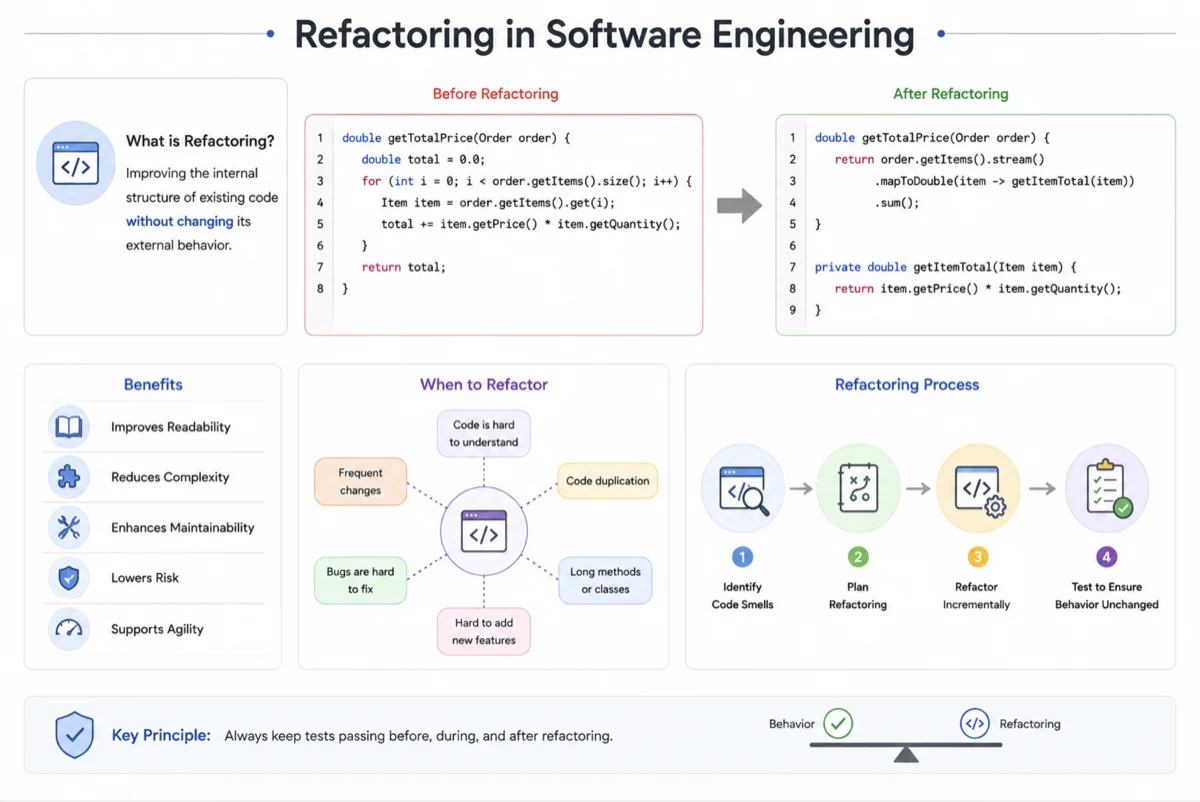
Refactoring vs. Rewriting: What Is the Difference?
A lot of developers confuse refactoring with rewriting. They are not the same thing. Rewriting means throwing away the old code and starting from scratch. Refactoring means working with what you have and improving it incrementally.
Rewrites are risky. You lose tested behavior, institutional knowledge, and often end up recreating the same problems in a shinier package. Refactoring, on the other hand, keeps the system running while you improve it step by step.
| Aspect | Refactoring | Rewriting |
|---|---|---|
| External behavior | Unchanged | May change |
| Risk level | Lower (incremental) | Higher (wholesale change) |
| Time investment | Ongoing, smaller chunks | Large upfront effort |
| Test coverage required | Essential | Built from scratch |
| Knowledge preservation | High | Often lost |
Why Code Refactoring Matters in Software Engineering
Code does not stay clean on its own. As teams grow, deadlines pile up, and features get added in a hurry, the quality of a codebase tends to degrade. Developers call this accumulation of quick fixes and poor design decisions "technical debt."
Left unchecked, technical debt slows your team down. What used to take a day starts taking a week. New developers spend more time understanding old code than writing new features. Bugs become harder to isolate because the code is so tangled.
Regular refactoring is how you pay down that debt before it becomes crippling.
The Hidden Costs of Skipping Refactoring
When teams skip refactoring, the costs are real even if they are hard to measure directly. Velocity drops as codebases become harder to work with. Onboarding new engineers takes longer because the code is difficult to understand. Bug rates often climb as fragile, poorly structured code becomes harder to change safely.
- Longer development cycles due to hard-to-navigate code
- Higher bug introduction rates when making changes
- Slower onboarding for new team members
- Increased anxiety around deploying changes
- Lower team morale from constantly fighting the codebase
Ward Cunningham, who coined the term "technical debt," described the problem this way: "Shipping first-time code is like going into debt. A little debt speeds development so long as it is paid back promptly with a refactor."
Common Code Smells That Signal the Need for Refactoring
Before you can refactor, you need to recognize when your code needs it. Developers use the term "code smell" to describe patterns that suggest a deeper problem. A smell does not mean your code is broken. It means something could be improved.
The Most Common Code Smells
Here are some of the most frequently encountered code smells you should watch for in any software engineering project:
- Long methods that try to do too many things at once
- Duplicate code spread across multiple places in the codebase
- Large classes that have grown far beyond a single responsibility
- Long parameter lists that make function calls hard to read
- Deeply nested conditionals that create hard-to-follow logic
- Magic numbers and hardcoded strings with no context
- Dead code that is never called but still clutters the file
- Feature envy, where one class constantly reaches into another
- Divergent change, where a single class changes for many different reasons
- Shotgun surgery, where one change forces you to edit many unrelated files
You do not need all of these to be present before you start refactoring. Even one or two of these patterns in a critical part of your system can be a good reason to clean things up.
Core Refactoring Techniques Every Developer Should Know
Refactoring is not just a vague intention to "clean things up." It is a set of specific, named techniques you can apply deliberately. Knowing these by name helps you communicate clearly with your team and choose the right tool for each situation.
Extract Method
If a section of code inside a method can stand on its own, pull it out into a new method with a descriptive name. This is one of the most common and impactful refactoring moves you can make. It reduces method length, improves readability, and often reveals reuse opportunities.
// Before: everything packed into one method
function processOrder(order) {
  // validate order
  if (!order.items || order.items.length === 0) {
    throw new Error("Order has no items");
  }
  if (!order.customer) {
    throw new Error("No customer attached to order");
  }

  // calculate total
  let total = 0;
  for (const item of order.items) {
    total += item.price * item.quantity;
  }

  // send confirmation
  sendEmail(order.customer.email, `Your total is $${total}`);
}

// After: each concern lives in its own method
function processOrder(order) {
  validateOrder(order);
  const total = calculateTotal(order.items);
  sendConfirmation(order.customer, total);
}

function validateOrder(order) {
  if (!order.items || order.items.length === 0) {
    throw new Error("Order has no items");
  }
  if (!order.customer) {
    throw new Error("No customer attached to order");
  }
}

function calculateTotal(items) {
  return items.reduce((sum, item) => sum + item.price * item.quantity, 0);
}

function sendConfirmation(customer, total) {
  sendEmail(customer.email, `Your total is $${total}`);
}
Rename Variable or Method
Names matter more than most developers realize. A variable named d tells you nothing. A variable named daysUntilDeadline tells you everything. Renaming is a small change with an outsized impact on long-term readability.
Modern IDEs can rename across your entire codebase in seconds, so there is almost no cost to doing this and a significant benefit to code clarity.
Replace Magic Numbers with Named Constants
A number sitting alone in your code with no explanation is called a magic number. It is impossible to understand without context. Replace it with a named constant that makes the intent obvious.
// Before
if (user.age >= 18) { ... }

// After
const LEGAL_DRINKING_AGE = 18;
if (user.age >= LEGAL_DRINKING_AGE) { ... }
Decompose Conditional
Complex if/else blocks are one of the biggest sources of confusion in code. You can simplify them by extracting the condition into a method with a meaningful name. This turns cryptic logic into something readable at a glance.
Introduce Parameter Object
When a method takes too many parameters, consider grouping related ones into an object. This reduces the function signature, makes calling the method cleaner, and opens the door for adding behavior to the parameter object later.
Move Method or Field
If a method or field is used more heavily by another class than by the one that owns it, consider moving it. This improves cohesion and reduces coupling between classes, both of which are hallmarks of clean software design.
Replace Conditional with Polymorphism
A long chain of if/else if or switch statements based on object type is often a sign that inheritance or polymorphism could simplify things. Instead of asking what type something is, let the object handle its own behavior through overriding.
Inline Variable
Sometimes a variable adds no clarity and just creates noise. If a variable is used once and its value is already obvious from the expression that creates it, inline the expression and remove the variable. Less is often more.
How to Refactor Safely: A Step-by-Step Approach
Refactoring without a safety net is how you break things. The foundation of safe refactoring is a solid suite of automated tests. If you do not have tests, your first job is writing them before you touch a single line of production code.
Step 1: Ensure Test Coverage
Before refactoring anything, confirm that the behavior you are about to change is covered by automated tests. Unit tests, integration tests, or end-to-end tests all work. The key is that they will catch unintended changes in behavior.
If tests do not exist, write characterization tests. These are tests that document what the code currently does, without judgment about whether it should work that way. They become your safety net.
Step 2: Make One Small Change at a Time
Do not try to refactor an entire class in one sitting. Make one small, targeted change. Run the tests. If they pass, commit. If they fail, you know exactly what caused the problem because you only changed one thing.
This incremental approach keeps you in control. It also means that even if you need to stop mid-refactor, your codebase is still working.
Step 3: Use Your IDE
Modern IDEs like IntelliJ IDEA, Visual Studio, and VS Code have built-in refactoring tools. Rename a symbol, and it updates across every file. Extract a method, and the tool handles the parameter wiring for you. Use these tools whenever possible. Manual refactoring introduces human error. Automated refactoring is faster and safer.
Step 4: Review and Commit Often
Commit your refactoring changes separately from feature changes. This makes your version history much easier to understand. A reviewer can look at a refactoring commit and evaluate it on its own merits without untangling it from new functionality.
Step 5: Do Not Refactor and Add Features at the Same Time
This is one of the most common mistakes developers make. Mixing refactoring with feature work makes it very hard to know whether a test failure was caused by the refactor or the new code. Keep them separate. Refactor first, then add the feature, or add the feature first, then clean up.
Refactoring and Technical Debt: Understanding the Connection
Every software project accumulates technical debt over time. Some of it is intentional. You take a shortcut to meet a deadline, knowing you will clean it up later. Some of it is unintentional, the result of evolving requirements, team turnover, or simply not knowing a better way at the time.
Refactoring is the primary tool for managing and reducing technical debt. It is not a one-time cleanup. It is an ongoing discipline built into how your team works every day.
Types of Technical Debt
| Type | Description | Refactoring Approach |
|---|---|---|
| Deliberate (prudent) | A known shortcut taken consciously to ship faster | Schedule and address it in the next sprint |
| Deliberate (reckless) | Shortcuts taken carelessly or without considering the future | Prioritize and pay down before it spreads |
| Inadvertent (prudent) | Better design patterns discovered only after the fact | Refactor when the area needs to change anyway |
| Inadvertent (reckless) | Poor practices due to inexperience or ignorance | Education plus targeted cleanup sprints |
When Should You Refactor?
Refactoring does not need a dedicated sprint or a formal project. The most effective teams build it into their everyday workflow. Here are the most natural moments to refactor:
The Rule of Three
When you do something once, just do it. When you do it a second time, note the duplication. When you do it a third time, refactor. This rule, popularized by Fowler, keeps you from over-engineering early while also preventing duplicated logic from spreading unchecked.
Before Adding a Feature
If the area of code you need to modify is messy, clean it up first before adding the new behavior. This makes the feature easier to add and leaves the codebase better than you found it. It also reduces the risk of introducing bugs in tangled code.
When Fixing a Bug
Bugs often hide in complex, poorly structured code. When you go in to fix a bug, take a few extra minutes to clean up the surrounding code. You will probably understand the bug better for it, and the fix will be safer to make.
During Code Review
Code review is a great time to spot refactoring opportunities. If a reviewer has to ask what a method does, that is a signal the name could be clearer. If a method is too long to review easily, that is a signal it should be broken down.
Refactoring in Different Software Engineering Contexts
The principles of refactoring apply across languages and paradigms, but the specific techniques vary depending on what you are working with.
Refactoring Legacy Code
Legacy code is often the hardest to refactor because it typically has little to no test coverage. The classic approach, described in Michael Feathers' essential book "Working Effectively with Legacy Code," is to write characterization tests before making any changes. These tests pin down the existing behavior so you can refactor with confidence.
With legacy codebases, small wins matter. You may not be able to clean up an entire module in one go. But if every developer leaves each file slightly better than they found it, the codebase improves steadily over time. This approach is sometimes called the Boy Scout Rule: always leave the code cleaner than you found it.
Refactoring in Agile and Continuous Integration Environments
In agile teams using continuous integration, refactoring fits naturally into the workflow. Small, frequent commits mean refactoring changes are small, safe, and easy to review. CI pipelines run automated tests on every commit, catching regressions immediately.
Teams that practice test-driven development (TDD) tend to refactor naturally as part of their cycle. The TDD rhythm of Red, Green, Refactor means you write a failing test, make it pass, then clean up the code. Refactoring is baked into the process from the start.
Refactoring in Object-Oriented vs. Functional Codebases
In object-oriented programming, many refactoring patterns focus on class relationships, inheritance hierarchies, and encapsulation. In functional programming, refactoring often centers on composing smaller, purer functions and eliminating side effects. The goals are the same, clean, readable, maintainable code, but the specific moves look different.
Refactoring Tools and IDE Support
You do not have to refactor by hand. Modern development environments have powerful built-in support for the most common refactoring operations. Here is a quick overview of what is available across popular platforms:
| IDE / Editor | Key Refactoring Features |
|---|---|
| IntelliJ IDEA / WebStorm | Extract method, rename, move, inline, safe delete, change signature |
| Visual Studio (C# / .NET) | Extract method, rename, encapsulate field, introduce variable, move type |
| VS Code | Rename symbol, extract to function/constant, move to new file (via extensions) |
| Eclipse | Rename, extract method, pull up, push down, extract interface |
| PyCharm | Extract function/variable, rename, move, inline, change signature |
| Xcode | Rename, extract to method, convert to computed property |
Beyond IDEs, tools like SonarQube, CodeClimate, and ESLint can automatically detect code smells and flag areas that need attention. Making these part of your CI pipeline means your team gets early warnings before technical debt has a chance to pile up.
Measuring the Impact of Refactoring
One challenge with refactoring is that its benefits are often invisible to stakeholders. No new features shipped. No bugs fixed. Just "the code is cleaner." Measuring the impact helps you make the case for investing in code quality.
Metrics Worth Tracking
- Cyclomatic complexity: measures how many independent paths exist through your code. Lower is generally better.
- Code coverage: the percentage of your codebase covered by automated tests. This should go up, not down, over time.
- Cognitive complexity: how hard the code is for a human to understand, distinct from cyclomatic complexity.
- Duplicate code percentage: how much of your codebase is repeated elsewhere. Tools like SonarQube surface this automatically.
- Mean time to change (MTTC): how long it takes your team to make a given type of change. Refactored codebases have lower MTTCs.
- Defect density: the number of bugs per unit of code. Well-refactored code tends to have fewer defects.
Tracking these over time gives you concrete evidence that refactoring is paying off. Share these metrics with your team and your stakeholders. Code quality is not just a developer concern. It directly affects delivery speed and product reliability.
Common Refactoring Mistakes to Avoid
Even experienced developers make mistakes when refactoring. Knowing the most common pitfalls helps you stay on the right track.
Refactoring Without Tests
This is the single most dangerous thing you can do. Without tests, you have no way to know if your changes have broken something. Never refactor production code without a safety net in place. Writing tests first is not optional. It is the foundation.
Trying to Do Too Much at Once
Large, sweeping refactors are hard to review, hard to debug, and easy to abandon halfway through. Keep your refactoring sessions small and focused. A two-hour session that cleans up one class is far more productive than a week-long effort that never gets finished.
Changing Behavior While Refactoring
This is the line that separates refactoring from rewriting. If you are improving the structure of the code, the observable behavior must stay exactly the same. If you notice a bug while refactoring, note it and fix it separately. Mixing the two makes both jobs harder.
Neglecting to Update Tests After Refactoring
When you rename a method or restructure a class, your tests may need to be updated to reflect the new structure. That is fine and expected. Just make sure your tests still meaningfully test the behavior and do not just pass because you removed the assertion that was failing.
Refactoring Code That Is About to Be Deleted
Not all code deserves to be cleaned up. If a module is going to be replaced or removed in the near future, investing time in refactoring it is wasteful. Focus your energy where it will have lasting impact.
Building a Refactoring Culture on Your Team
Individual refactoring habits matter, but the biggest impact comes from building a culture where the whole team treats code quality as a shared responsibility.
Make Refactoring Part of Your Definition of Done
If your team uses a Definition of Done for user stories or tickets, consider adding code quality checkpoints to it. Before a ticket is closed, ask: did we leave this code in better shape than we found it? Is it clearly named, well-tested, and free of obvious smells?
Encourage Refactoring in Code Reviews
Code review is one of the best places to spot and address code smells before they are merged. Train your reviewers to look not just for correctness but for clarity, simplicity, and maintainability. Make it safe to suggest improvements without it feeling like personal criticism.
Allocate Time for Cleanup
Teams that never allocate time for cleanup end up drowning in technical debt. Whether you build it into each sprint, run periodic cleanup weeks, or use a rotation system, the important thing is that refactoring happens on a schedule, not just when things get bad enough to slow you down.
As Robert C. Martin (Uncle Bob) puts it: "The only way to go fast is to go well." Speed and quality are not opposites in software engineering. Clean, well-refactored code is the fastest code to work with over the long run.
Conclusion
Refactoring in software engineering is not a luxury or a nice-to-have. It is a professional discipline that separates teams that stay fast over time from teams that gradually grind to a halt under the weight of their own technical debt.
When you refactor consistently, you keep your codebase readable, maintainable, and a pleasure to work in. You reduce bugs, speed up onboarding, and make every future feature easier to build. You invest in the long-term health of your software and your team.
Start small. Pick one method that is too long, one variable name that means nothing, one piece of duplicated logic. Clean it up, run your tests, commit. Do it again tomorrow. Over time, those small improvements compound into a codebase that your whole team is proud of. That is what refactoring is really about.
