
When you write code with a team, combining everyone's work can become a massive headache. You might spend days manually fixing conflicts instead of building new features. Continuous integration solves this exact problem by automating the entire merging process.
This practice requires you to commit your code changes to a shared repository frequently. Every time you push a change, an automated system instantly tests and verifies your work. This ensures your software remains completely stable no matter how many people contribute.
In this guide, you will learn exactly how to build a robust continuous integration pipeline. You will discover how it fits perfectly into both Agile and DevOps methodologies. By the end, you will understand how to choose the right continuous integration tools for your projects.
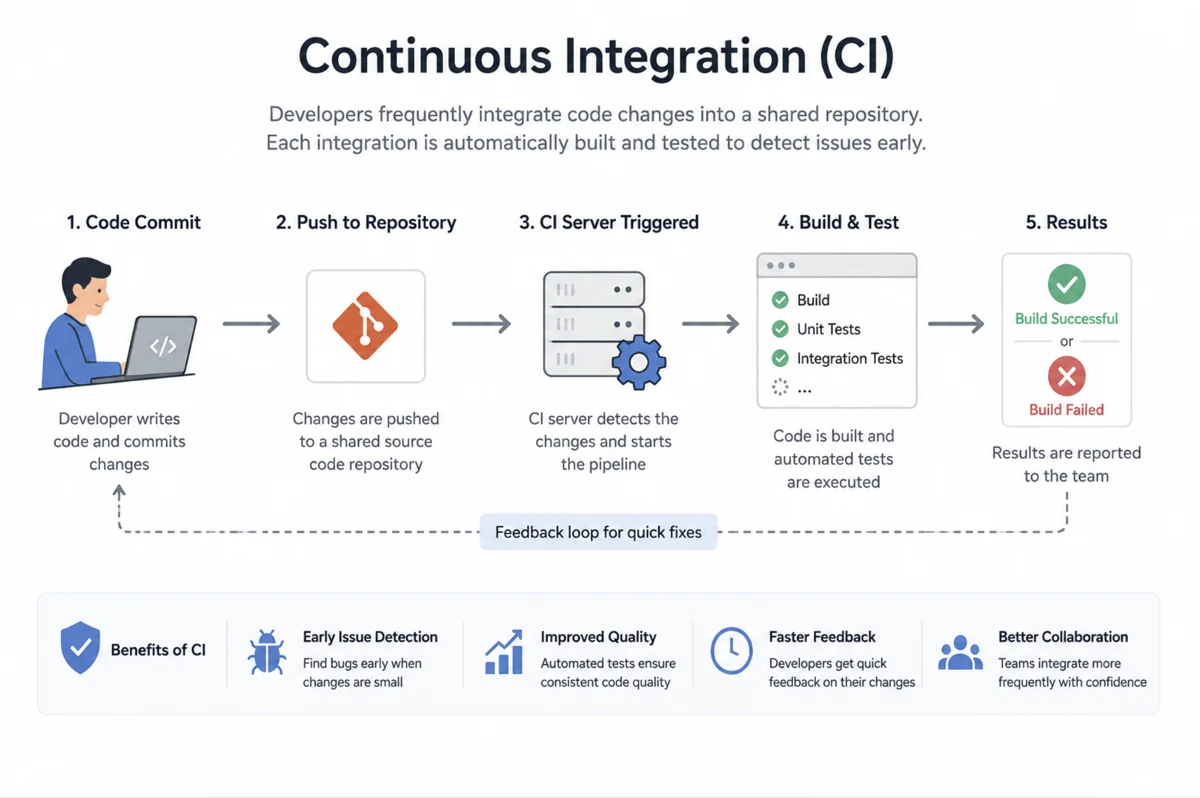
What is a Continuous Integration Pipeline?
A continuous integration pipeline is simply an automated sequence of steps that your code must pass. Think of it as a strict quality-control assembly line in a factory. Your code enters at one end, gets rigorously tested, and emerges clean at the other.
Before compiling, the pipeline often runs code linters to enforce strict style guidelines. This ensures your entire team writes code that looks completely uniform. Consistent code is always much easier to read and maintain over a long period of time.
The moment you push your code, the pipeline wakes up and grabs your changes. It immediately compiles your application to make sure there are no basic syntax errors. If the build fails, the pipeline halts and alerts you instantly so you can fix it.
Once the code compiles, the pipeline runs your entire suite of automated tests. This includes unit tests, integration tests, and security scans to verify complete functionality. Only when every single test passes does your code get merged into the main branch.A well-built pipeline catches mistakes before they ever reach your users.
The Role of Continuous Integration in Agile
Agile development is all about moving fast and delivering working software in short cycles. You cannot maintain this speed if you are constantly stuck fixing broken code branches. Continuous integration is the engine that actually allows Agile teams to sprint successfully.
When you practice Agile, you break your work into tiny, manageable pieces. You commit these small changes multiple times a day instead of waiting for a massive weekly release. The automated testing ensures that these rapid-fire updates never break the existing functionality.
This creates a constant feedback loop for you and your development team. You know immediately if your latest feature caused an unexpected problem elsewhere in the application. You can fix the issue while the code is still fresh in your mind.
During your sprint retrospectives, you can review your pipeline performance metrics. You can easily identify which tests are taking too long or failing too often. This data helps you continuously improve your actual development process and become more efficient.
Understanding Continuous Integration in DevOps
DevOps culture focuses on breaking down the invisible walls between developers and operations teams. You cannot achieve true DevOps without a solid continuous integration strategy in place. It acts as the shared source of truth for both sides of the aisle.
By automating the build and test phases, you remove human error from the equation. Operations teams no longer have to guess if a new release is stable enough to run. They can look at the pipeline results and know with absolute certainty.
Many DevOps teams also use their pipelines to test their infrastructure configurations. You can run automated checks against your server setup scripts just like normal application code. This guarantees that your deployment environments remain perfectly consistent across your entire network.
This shared visibility builds immense trust across your entire organization. Developers feel confident pushing code, and operations teams feel confident running it. The continuous integration process becomes the heartbeat of your entire DevOps culture.
Continuous Integration and Continuous Delivery
People often confuse these two concepts, but they actually represent two distinct phases of a larger journey. Continuous integration handles everything up to the point where your code is merged and tested. Continuous delivery takes over right after that process finishes successfully.
With continuous delivery, your tested code is automatically packaged and prepared for release. The system places the deployment-ready artifact into a staging environment that mimics your production servers. However, a human still has to press a button to push it live to real users.
These two practices work together seamlessly to create a predictable release schedule. You never have to scramble on deployment day because the package has already been tested thoroughly. You simply approve the release when the business is ready to launch the new features.
Because every package is properly versioned, continuous delivery makes rolling back incredibly simple. If a new release causes unexpected issues, you just deploy the previous artifact. This safety net allows your team to innovate without fear of breaking production servers.
Comparing the Two Phases
It helps to visualize exactly where one practice ends and the other begins. The table below breaks down the key differences between these two critical phases.
| Feature | Continuous Integration | Continuous Delivery |
|---|---|---|
| Primary Goal | Merge and test code automatically | Prepare code for release automatically |
| Output | A verified code commit | A deployable software package |
| Human Action | Requires developers to push code | Requires a human to approve the final release |
| Environment | Runs in a dedicated build server | Pushes to a staging or pre-production server |
Taking the Next Step with Continuous Deployment
Continuous deployment takes the automation process to its absolute logical conclusion. It completely removes the need for any human intervention during the release phase. If your code passes all the automated tests, it goes straight to your users automatically.
This requires an incredibly robust and trustworthy continuous integration pipeline to function properly. You must have absolute faith that your automated tests will catch every possible bug. If a bad piece of code slips through, it will instantly impact your live application.
To make continuous deployment safer, many teams rely heavily on feature flags. You can deploy new code to production, but keep the feature hidden from real users. You simply flip a switch to turn it on when you are completely ready.
When you achieve this level of automation, you can release dozens of updates every single day. Your users receive new features and bug fixes the moment you finish typing the code. It is the ultimate goal for many modern software engineering teams.
Real-World Continuous Integration Examples
Imagine you are building an online shopping cart for a massive retail website. You write a new piece of code to handle promotional discount codes. You push this code to the repository and go grab a cup of coffee.
While you are away, the automated pipeline runs thousands of tests against your new feature. It discovers that your discount code logic actually breaks the shipping cost calculator. The pipeline immediately rejects your merge and sends an alert directly to your phone.
You return to your desk, see the exact line of code that failed, and fix it instantly. You push the correction, the pipeline passes, and the code merges cleanly. You just prevented a major financial disaster without any manual testing effort.
Essential Continuous Integration Tools
You cannot build these automated workflows without the right software platforms. The market offers a massive variety of continuous integration tools to suit different project needs. You have to evaluate them based on your team size and hosting preferences.
Some tools run entirely in the cloud and require zero infrastructure management on your end. Other tools must be installed directly on your own private servers for maximum security and control. You will find that most modern tools integrate seamlessly with popular version control systems.
The best platforms offer massive ecosystems of pre-built plugins and extensions. You rarely have to write custom scripts for standard tasks like sending notifications or uploading files. You simply drop the appropriate plugin into your configuration and move forward.
When you evaluate these platforms, look closely at how they handle parallel testing. Being able to run multiple test suites simultaneously will drastically speed up your pipeline. You should also check how easily they handle complex deployment environments.
Setting Up Continuous Integration GitHub
If you store your code on GitHub, you already have access to a powerful automation platform. Continuous integration GitHub workflows allow you to run your pipelines directly alongside your code repositories. You do not need to connect any third-party services to get started.
You configure these workflows by writing simple configuration files in your repository. You define exactly which tests should run whenever someone opens a new pull request. The platform spins up temporary virtual machines to execute these commands in total isolation.
This tight integration makes it incredibly easy for open-source projects and enterprise teams alike. You can see the exact status of your pipeline directly inside your code review screens. It creates a frictionless experience for anyone trying to contribute to your project.
Conclusion
Implementing a continuous integration pipeline is no longer optional for serious software projects. It is an absolute necessity if you want to deliver high-quality code at a rapid pace. By automating your testing and merging, you eliminate the most frustrating parts of development.
You have seen how perfectly this practice aligns with Agile and DevOps methodologies. You understand the clear differences between continuous delivery and continuous deployment. You also know that selecting the right continuous integration tools is critical to your success.
Take the time to evaluate your current development workflow today. Start by automating just one single test suite and slowly build out your pipeline from there. Your future self will definitely appreciate the effort when you never have to deal with merge conflicts again.
