
Two kinds of administrator keep Oracle APEX running. A workspace administrator manages one workspace: its developers and users, which features are available, and what the activity looks like. An instance administrator manages the whole installation, including the settings every application depends on.
Most developers meet these settings only when something does not work: email that never arrives, a REST call that fails, an AI service the database cannot reach. This guide covers both roles, and the specific settings behind those symptoms.
Every query, trigger, and snippet in this article runs against the Orbit Outfitters sample schema: customers, products, orders, stores, and about 2,300 orders of sample data. Install it once and you can follow along in your own workspace.
git clone https://github.com/devvinish/orb_tables.git
-- then, as your schema:
@orbit/install.sql
Workspace Administration
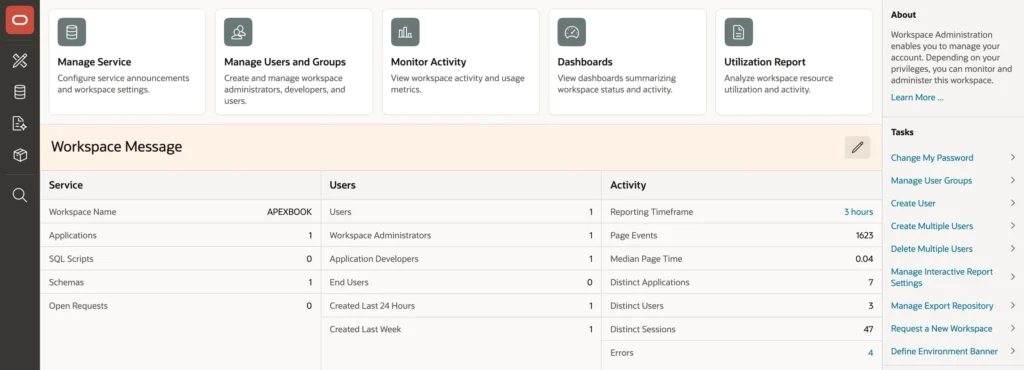
- Manage Service: service requests to the instance administrator, workspace preferences, the workspace message, an environment banner, and extension links in the builder's menu.
- Manage Users and Groups: the workspace's accounts, split into workspace administrators, developers, and end users, plus user groups for authorization schemes.
- Monitor Activity and Dashboards: page views, errors, sessions, and per-application activity.
- Utilization Report: the workspace's storage and activity.
The environment banner is a small feature worth switching on immediately. It colors the builder in a test or production workspace, which is the cheapest possible defense against editing the wrong environment because two browser tabs look identical.
Note also what end users are: accounts that can sign in only to applications using Oracle APEX Accounts authentication. They are not developers, and they are not database users.
Workspace Preferences
| Preference | Controls |
|---|---|
| Account Login Control | Whether accounts expire and lock, how many failures are allowed, and password lifetime |
| App Builder and SQL Workshop | Whether each is available at all |
| PL/SQL Editing, RESTful Services, Team Development | Those features, plus the workspace's REST path prefix |
| New in 26.1, a workspace can use its own SMTP credentials instead of the instance's | |
| Session Timeout | Maximum session length and idle time, within the instance's limits |
Disabling SQL Workshop in production workspaces is common practice and worth the small inconvenience. Nobody should be running ad hoc SQL against production through a web page, and turning it off removes that possibility entirely rather than relying on everyone's restraint.
Instance Administration
The instance administrator signs in to Administration Services with the ADMIN account of the INTERNAL workspace, created during installation. On oracleapex.com and Oracle's cloud services, Oracle holds this role and these settings are not available to you.
- Manage Requests: approve or deny workspace and service requests.
- Manage Instance: the instance settings below, feature configuration, messages, logs, and the install and upgrade logs, a new screen in 26.1.
- Manage Workspaces: create, edit, and remove workspaces, assign schemas, import and export.
- Monitor Activity: activity across every workspace.
Instance Settings
These are the settings that earlier parts of the series quietly depended on. All of them can also be set in PL/SQL, which is how a script configures a new environment rather than somebody clicking through screens and forgetting one.
- Email: the SMTP host, port, TLS mode, and credentials for all mail, plus whether workspaces may use their own credentials. Report subscriptions and automation emails need this.
- Wallet: the Oracle wallet holding certificates for the HTTPS sites APEX calls, which covers REST data sources, AI services, and SMTP with TLS. Oracle AI Database 26ai can use the operating system's certificate store instead.
- Report Printing: the instance's print server.
- Security: HTTPS requirements, session timeouts, password rules, whether public users may upload files, persistent authentication, SAML sign-in, and new in 26.1 whether the builder shows links to external websites, which matters for environments with no internet access.
- Feature Configuration: the builder's optional features, including the authentication used by Data Reporter.
- Workspace Provisioning: whether new workspaces are requested and approved, or created immediately.
Network Access
Here is the one that generates the most confused bug reports. The APEX engine's own schema makes every network call on behalf of every application: email, REST data sources, AI services, push notifications, print servers. Your application's code is not what reaches out, so it is not the schema that needs permission.
begin
    dbms_network_acl_admin.append_host_ace(
        host       => 'smtp.orbit-outfitters.example',
        lower_port => 587,
        upper_port => 587,
        ace        => xs$ace_type(
                          privilege_list => xs$name_list('connect'),
                          principal_name => 'APEX_260100',
                          principal_type => xs_acl.ptype_db));
end;
A development machine is usually set up with access to every host, which is fine there and wrong anywhere shared. On a production server, add one grant per host the applications actually use, then remove the wildcard grant. A dictionary view lists what is currently granted, which is the first thing to check when a REST source or an AI service times out for no apparent reason.
Language Packs
APEX's own texts, both in the builder and the framework messages inside applications, are translated by language packs rather than by your application's translations. That is why a fully translated application can still show its error heading in English.
The packs ship with the installation files. Connecting to the pluggable database as a privileged user with a UTF-8 client character set and running the load script for a language installs it, and a matching unload script removes it again.
Conclusion
Administration in APEX splits cleanly, and knowing which half owns a setting saves a great deal of time. A workspace administrator manages accounts and groups, decides which features that workspace has, sets session limits and account locking, and watches the activity, with two choices worth making deliberately: an environment banner so nobody edits production by accident, and SQL Workshop switched off where ad hoc SQL has no business running. An instance administrator owns everything shared, most importantly the SMTP server that all email depends on, the wallet holding certificates for every HTTPS call, the security and session settings, and the network ACLs. That last one deserves remembering, because every outbound call is made by the APEX engine's schema rather than yours, so a missing grant looks like a broken integration rather than a permissions problem. Configure instance settings from a script where you can, so a new environment is reproducible, and install a language pack when APEX's own messages should match the language your application already speaks.
