
A plug-in adds a component type to Oracle APEX that developers then use exactly like a built-in one: it appears in the Type list, and its settings appear in the Property Editor. That sounds like a large undertaking, and for some plug-in types it is.
The simplest kind is not. A template component plug-in is HTML with placeholders, no code at all, and APEX handles the data, the escaping, and the properties. This guide builds one that shows a product's stock as a bar, then covers what the other types add.
Every query, trigger, and snippet in this article runs against the Orbit Outfitters sample schema: customers, products, orders, stores, and about 2,300 orders of sample data. Install it once and you can follow along in your own workspace.
git clone https://github.com/devvinish/orb_tables.git
-- then, as your schema:
@orbit/install.sql
The Plug-in Types
| Type | Adds |
|---|---|
| Region, Item, Dynamic Action, Process | New components of those kinds, written in PL/SQL plus JavaScript and CSS |
| Authentication and Authorization Scheme Type | New ways to sign users in and check their rights |
| REST Data Source | An adapter for REST APIs the built-in types do not understand |
| Generative AI Tool | A reusable tool for AI agents |
| Template Component | HTML with placeholders and template directives, and no code |
Start with a template component. If the thing you want is a way to display data rather than a new behavior, you probably never need to leave this type.
The Stock Level Plug-in
Warehouse staff want to see at a glance whether a product needs reordering. HTML already has an element for precisely this: a meter draws a bar for a value between a minimum and a maximum, and colors it differently when the value falls below a low mark.
Choosing that element over a styled div is not just tidiness. It needs no JavaScript and no inline styles, so it works under a strict content security policy, and screen readers announce it as a meter with its value rather than as an anonymous coloured box.
<meter class="orbit-stock" min="0" max="#MAXIMUM#" low="#LOW#" optimum="#MAXIMUM#" value="#VALUE#" title="#VALUE# in stock">#VALUE#</meter>
<span class="orbit-stock-value">#VALUE#</span>
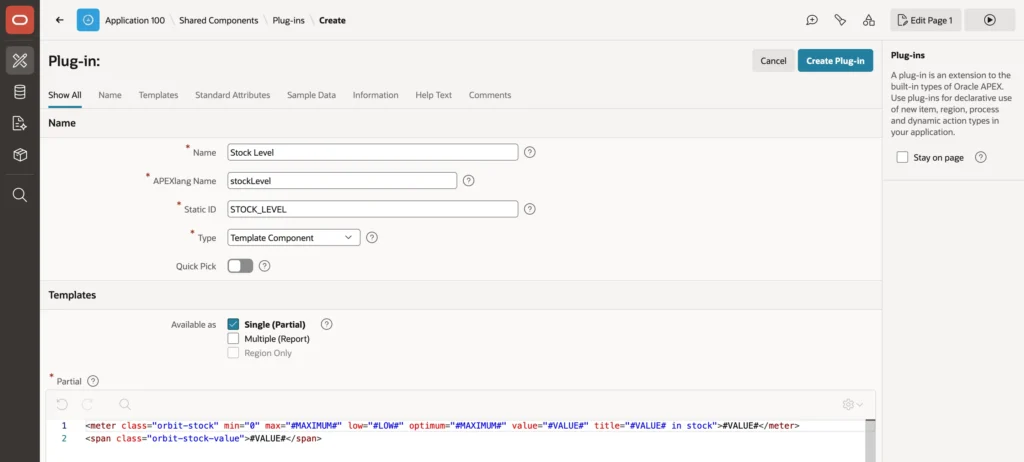
- In Shared Components, Plug-ins, click Create, keep From Scratch, and click Next.
- Enter a name. APEX derives the APEXlang name and static ID from it.
- Keep the type Template Component, and under Available as check only Single (Partial).
- Enter the partial template and create the plug-in.
Available as decides where the plug-in can be used. Single renders one record, as a region or as an interactive report column. Multiple renders many records with row and container templates, like the built-in Content Row. Region Only restricts it to regions.
Leave Default Escape Mode on HTML. It escapes every value before it replaces a placeholder, which is what stops data containing markup from injecting anything into your page.
Custom Attributes Come Free
After creation, the plug-in's page lists custom attributes that APEX created by reading your template: one per placeholder, of type Session State Value, meaning a developer maps each to a column of the component's query.
That is the whole appeal of this plug-in type. You wrote three placeholders and got three properties in the Property Editor without defining any of them. Change the template later and Synchronize from Templates repeats the detection, while Add Attribute covers anything else you need, such as a static text or a list of values.
The same page manages Files for CSS and JavaScript the plug-in should load, plus slots and action positions for template components that host buttons and other components.
Using It
The plug-in now appears in Page Designer's Type list under Application Components, where it behaves like any other region type.
select orb_sales.stock_on_hand(product_id) as stock_on_hand,
       reorder_level,
       4 * reorder_level                   as stock_target
  from orb_products
 where product_id = :P12_PRODUCT_ID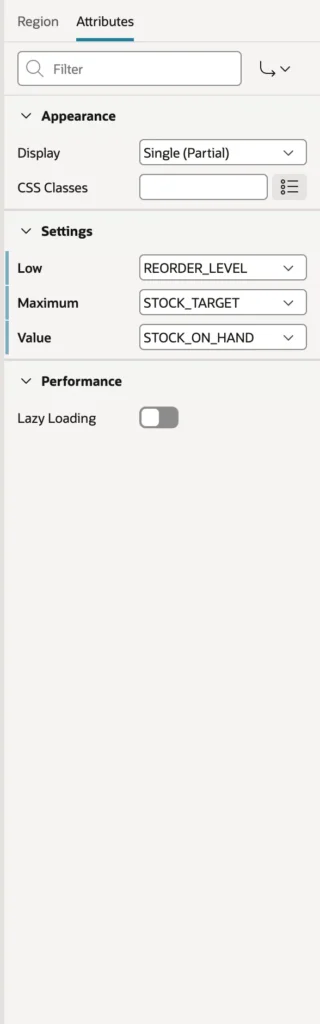
Create a region of the new type, give it that query, and map the attributes to the columns on the Attributes tab. Setting the bar's full length to four times the reorder level is a small judgment call that makes the display readable: an absolute maximum would make every fast-moving product look empty.


The rendered page contains exactly your template with the values filled in, and nothing else. No wrapper divs, no generated classes, no framework markup to fight with in CSS.
In an interactive report the same plug-in becomes a column type, with its attributes mapped to other columns of the report's query, so every row draws its own bar. Classic report columns do not offer template components, so there you either use the plug-in as a region or switch the report to an interactive one.
Going Further
Template components are HTML only. The other types add code.
- An item or region plug-in implements a render function in PL/SQL that writes the HTML, and optionally an Ajax function answering requests from its own JavaScript. Custom attributes reach those functions as parameters.
- A dynamic action plug-in implements a JavaScript function that APEX calls when the action fires.
- A process plug-in implements an execution function in PL/SQL.
Write that PL/SQL in a database package and have the plug-in name it, rather than pasting the code into the plug-in itself. A package can be compiled, versioned, and tested like any other code, while code living inside a plug-in definition can only be edited through the builder and reviewed by exporting it.
To share a plug-in, export it from its page or put it in a component group that other applications subscribe to. The plug-ins in Oracle's sample applications and from the APEX community are worth reading as complete examples.
Conclusion
Extending APEX does not have to start with PL/SQL callbacks. A template component plug-in is HTML with placeholders, and APEX turns those placeholders into properties in the Property Editor, maps them to columns of your query, and escapes every value on the way in. That is enough for most display problems, and choosing native HTML elements such as a meter gets you accessibility and content security policy compliance for free rather than as extra work. Decide early whether the component renders one record or many, keep the default HTML escaping, and let Synchronize from Templates rebuild the attributes whenever the template changes. When you do need behavior rather than markup, the region, item, dynamic action, and process types add render, Ajax, and execution functions, and those belong in a database package the plug-in merely names, so the code stays testable and reviewable like the rest of your application.
