
Sooner or later somebody asks for the application in another language. What follows is usually more interesting than swapping words, because language changes dates, numbers, and currency symbols too, and some of those changes are not what you want.
Oracle APEX separates the two jobs. Globalization makes an application work correctly for any language and region, formatting dates and numbers the way users expect and handling time zones and text direction. Translation replaces the texts. This guide covers both, including the text message-based translation that is the default in APEX 26.1.
Every query, trigger, and snippet in this article runs against the Orbit Outfitters sample schema: customers, products, orders, stores, and about 2,300 orders of sample data. Install it once and you can follow along in your own workspace.
git clone https://github.com/devvinish/orb_tables.git
-- then, as your schema:
@orbit/install.sql
Globalization Attributes
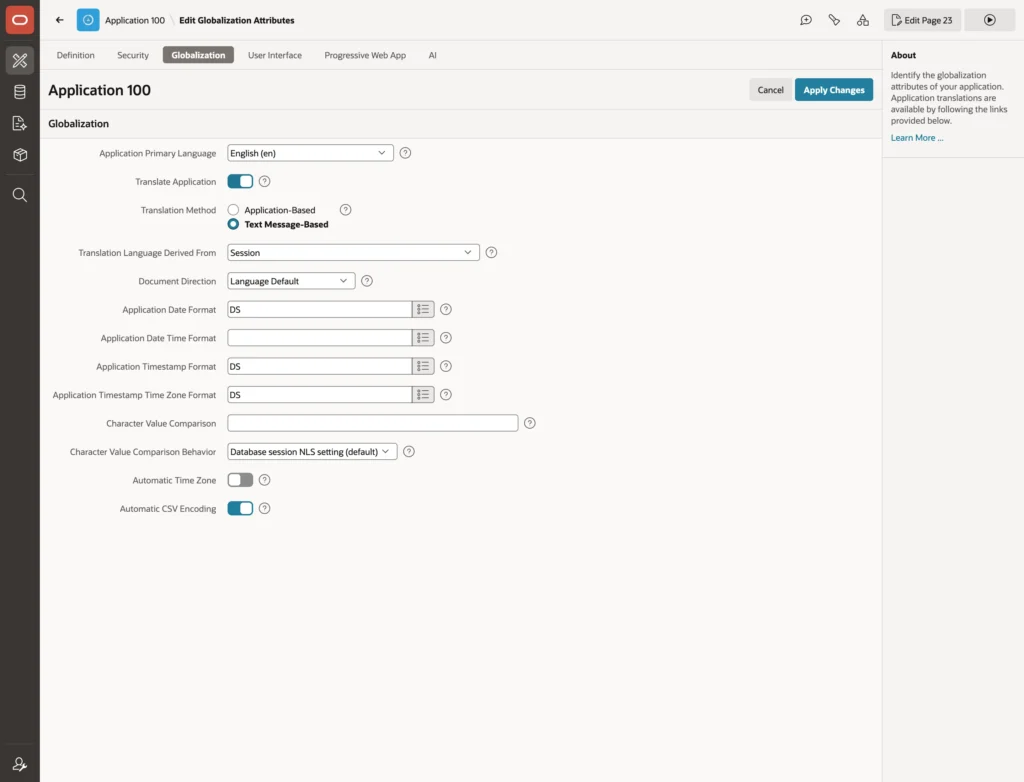
- Application Primary Language: the language you develop in.
- Translate Application and Translation Method: whether translation is on, and which of the two methods is used.
- Translation Language Derived From: how each session picks its language, from the session itself, the browser, a user preference, or an application item.
- Document Direction: left to right, right to left, or the language's default.
- The date, date time, and timestamp formats used by items and columns with no mask of their own.
- Character Value Comparison: the session's linguistic sort and comparison rules, such as case-insensitive comparison.
- Automatic Time Zone and Automatic CSV Encoding: take the browser's time zone, and write CSV downloads in the encoding the user's language expects.
Why Language Changes Your Numbers
The format masks in those attributes are Oracle format masks, and their output depends on the session's language and territory, which APEX sets per request from the application's language. The same mask that renders a date as 9/23/2026 in English renders it as 23.09.2026 in German.
Number masks work the same way. The group and decimal separator characters follow the territory, and the currency characters insert the territory's currency symbol. The mask FML999G999G990D00 shows a dollar amount in the United States and a euro amount in Germany.
Read that last sentence again, because it contains a real bug waiting to happen. An order total of eleven thousand dollars is still dollars when a German colleague reads it, but that mask will cheerfully display it with a euro sign. Use the currency masks for amounts in the user's own currency. For amounts in a fixed currency, put the symbol in the mask as a literal, or store the currency alongside the amount and display both.
Dates have a gentler version of the same trade-off. An explicit mask such as DD-MON-YYYY gives the same layout everywhere, with only the month abbreviation translated. Leave the mask empty, or use the short and long date masks, when dates should follow each user's conventions.
Two Ways to Translate
| Method | How it works |
|---|---|
| Application-Based | The traditional way. APEX builds a translated copy of the application per language: seed the repository, export XLIFF, translate, import, publish. Every change repeats the cycle |
| Text Message-Based | New in 26.1 and the default. Texts become text messages, one per text and language, substituted as pages render. No copies, no publishing step |
The difference in practice is that translation stops being a build step. A corrected German label appears the moment it is saved, rather than after somebody remembers to seed, translate, and publish again. Existing applications on the old method keep working, but new ones should use text messages.
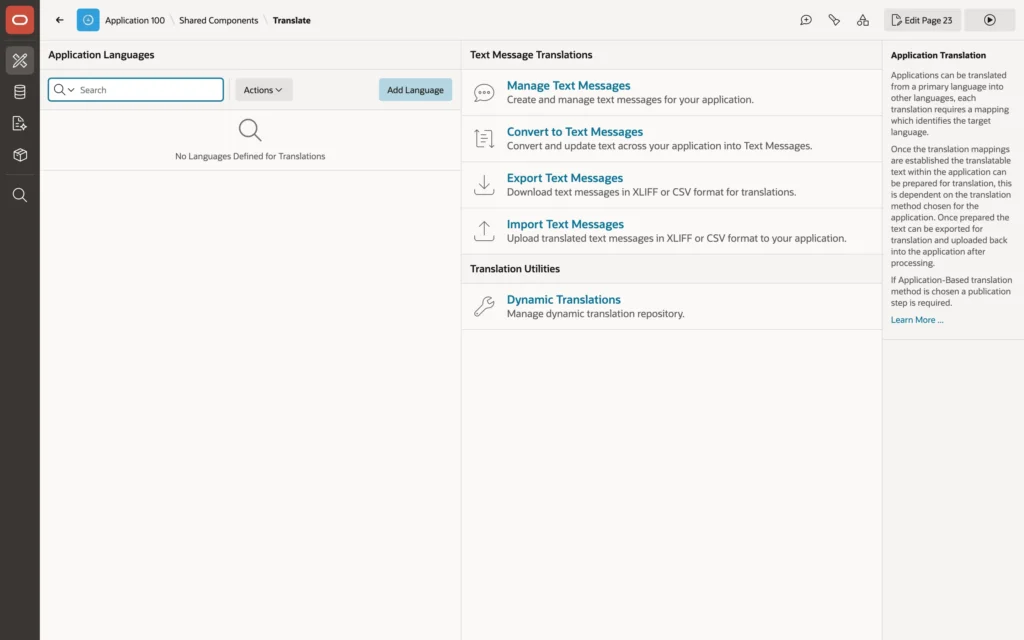
Translating an Application
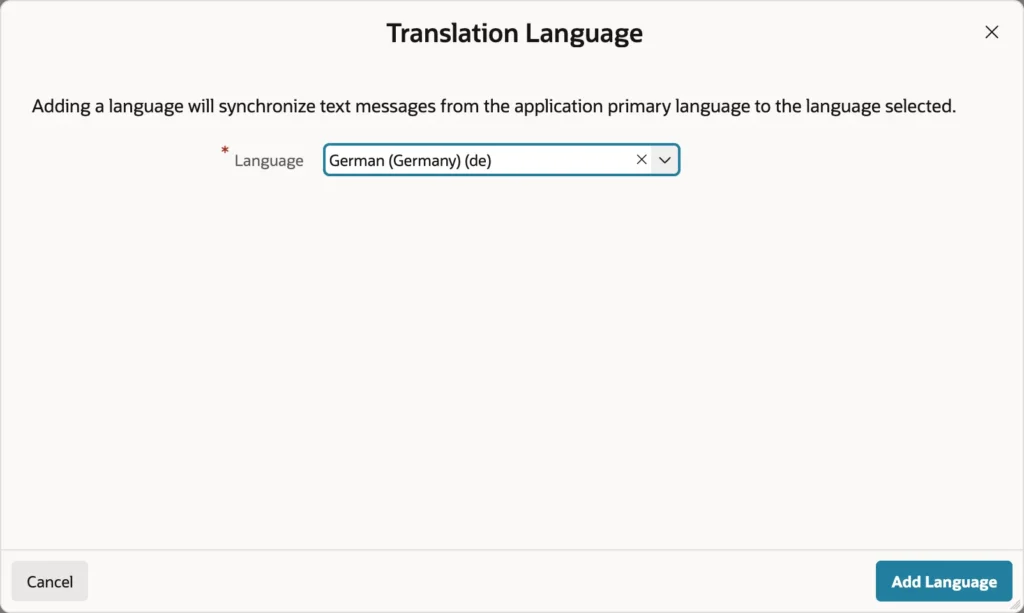
Adding a language copies every text message of the primary language into the new one, where each waits for its translation. Nothing is translated yet, but the structure exists.
Converting Texts to Messages
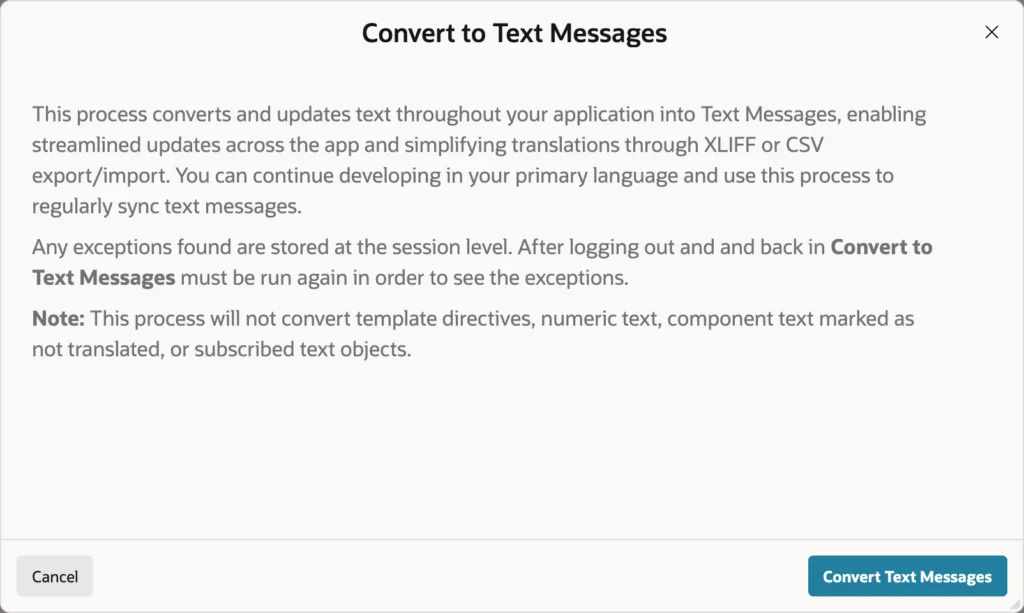
Until now the application's texts are properties of components: page titles, region titles, labels, button text, navigation entries, report headings, validation messages, help text. Convert to Text Messages creates a message for each translatable text in every language and replaces the property with a reference to it.
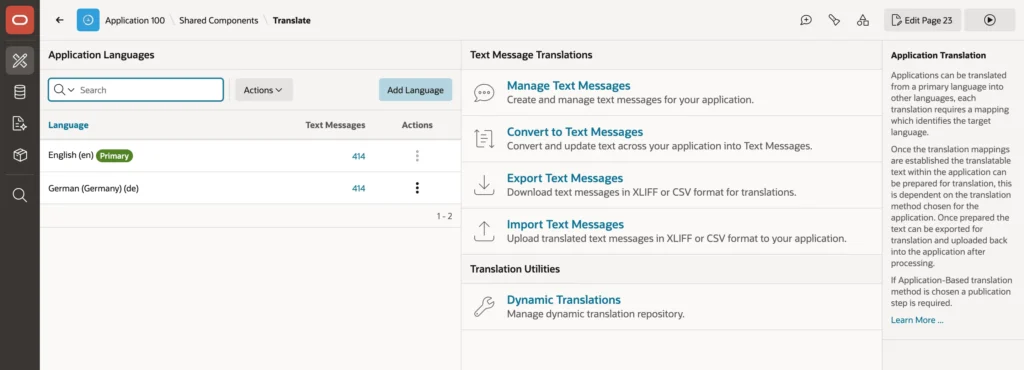
You keep developing in English. To change a converted text you edit its message rather than the component, and new components you add later get plain text until you run the conversion again, which is safe to repeat.
The conversion deliberately skips a few things: template directives, numbers, texts from subscribed components, and components with translation switched off. It also leaves APEX's own texts alone, such as Search, Actions, and Rows, which are handled separately.
Exporting, Translating, Importing
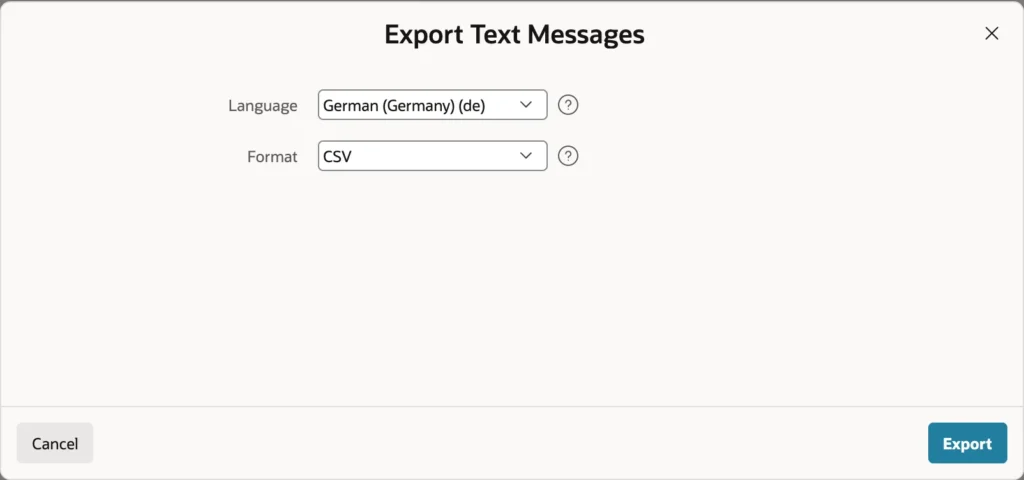
name,source,target,source language,target language,comment
DELIVERY_CALENDAR,Delivery Calendar,Delivery Calendar,en,de,
DISCOUNT_,Discount %,Discount %,en,de,
ORDER_P10ORDERNUMBER,Order %P10_ORDER_NUMBER,Order %P10_ORDER_NUMBER,en,de,
Each row carries the message's static ID, the English source, and a target that starts as a copy of the source. Translators change the targets and leave everything else alone.
name,source,target,source language,target language,comment
DELIVERY_CALENDAR,Delivery Calendar,Lieferkalender,en,de,
DISCOUNT_,Discount %,Rabatt %,en,de,
ORDER_P10ORDERNUMBER,Order %P10_ORDER_NUMBER,Bestellung %P10_ORDER_NUMBER,en,de,
Notice what happened to the substitution string in that third row. Substitutions are exported as placeholders, and translators must keep them intact while being free to move them where their grammar requires. That freedom is the entire reason placeholders exist rather than sentence fragments glued together in code.
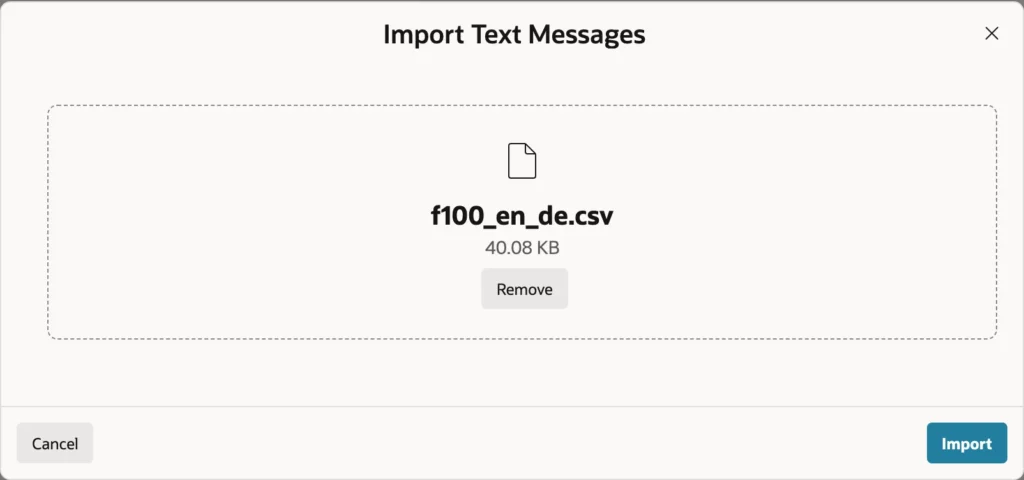
HTML texts are exported whole, tags included, and the translator works on the text between them. If you send CSV to somebody who will open it in a spreadsheet, insist on UTF-8, because the German umlauts and sharp s are exactly the characters other encodings destroy. Professional translators generally prefer XLIFF anyway, since their tools read it directly and it carries the state of each translation.
Running in Another Language
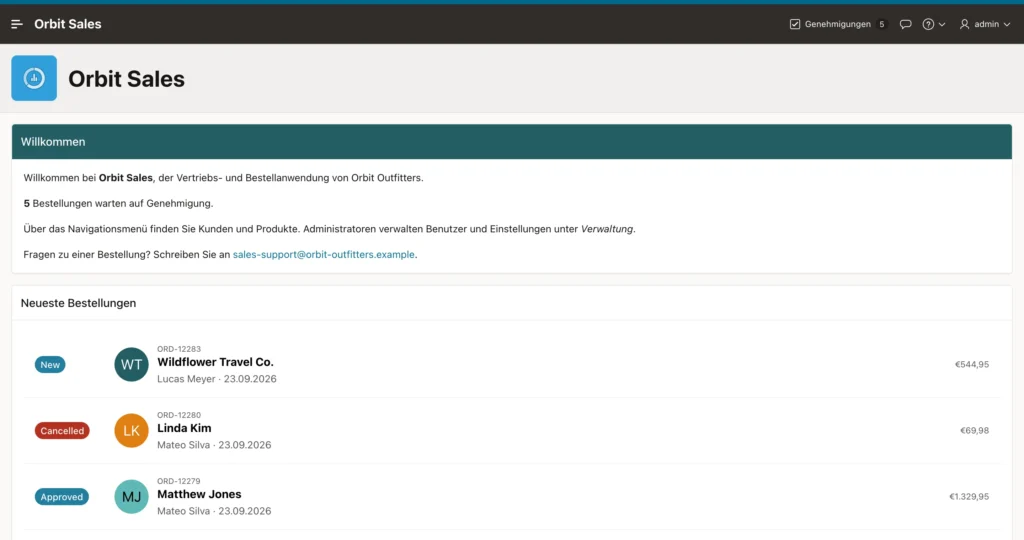
With the language derived from the session, adding a language request parameter to any URL switches the session, and it stays switched until changed again. In PL/SQL there is a matching call, and the Developer Toolbar's session overrides do it without touching the URL, which is the quickest way to test.
Real applications offer the choice in the interface, usually as a navigation bar list with one entry per language, each linking to the current page with the language parameter set.
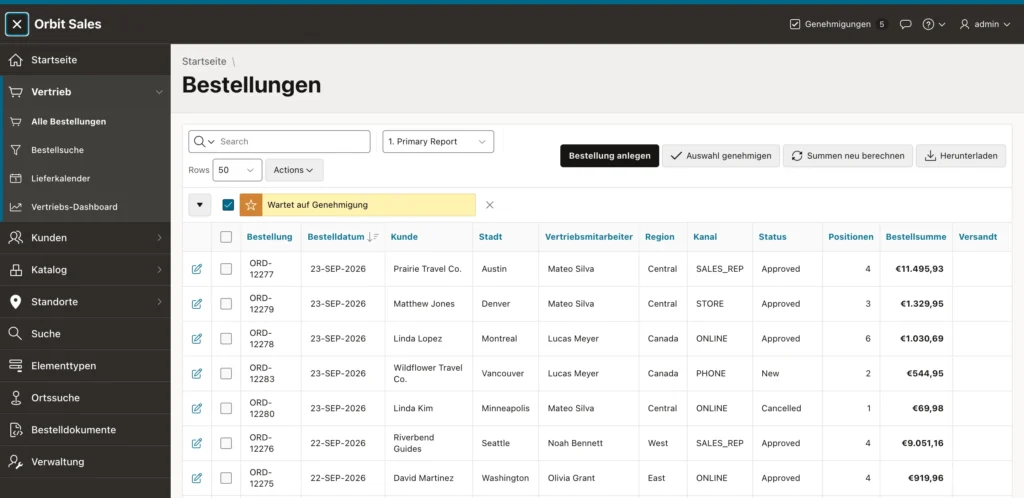
Now look at what did not translate, because this is where the work actually is.
- APEX's own texts, such as Search, Actions, and Rows, come from language packs that an instance administrator installs per language. Without the German pack they stay English.
- Data does not translate. A status stored as Approved is still Approved, because translation touches the application, not the tables.
- A column with an explicit date mask keeps its layout, while dates following the application mask switch to local convention.
- Currency follows the territory, so dollar totals appear with a euro sign unless the mask carries the symbol as a literal.
Translating Data
For values in the database there are three approaches, in rough order of flexibility. A translated lookup table with a row per value and language, read using the session language, handles anything. A static list of values is translated like any other component text, so items and columns using it show translated display values. And dynamic translations store pairs of texts per language for a function to look up, which suits short lists coming from queries.
Text Messages in Code
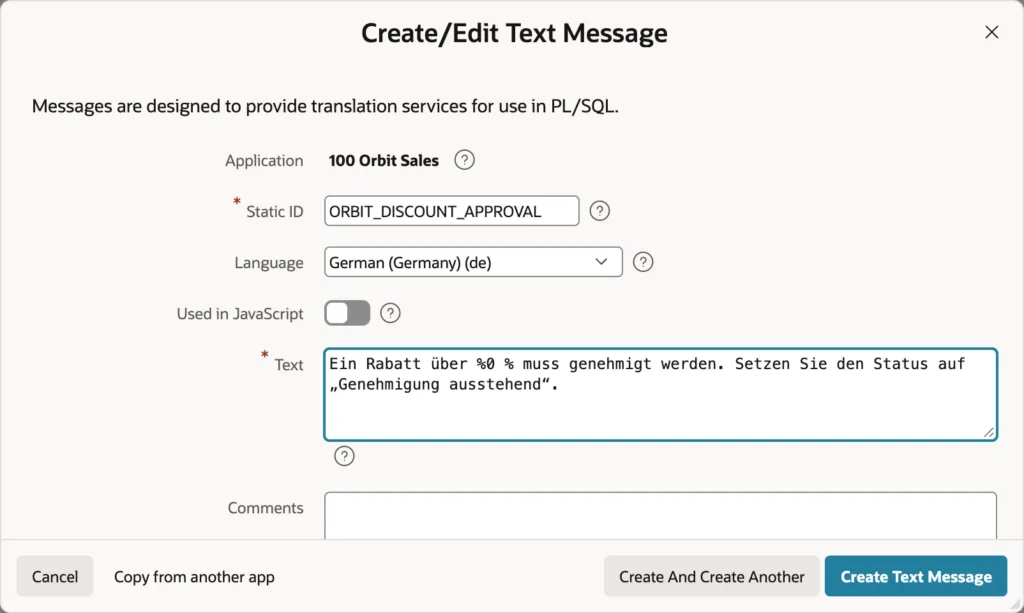
Texts your code produces are not component properties, so the conversion cannot find them. Create the messages yourself, one per language under the same static ID, and read them with the language API.
begin
    if to_number(:P10_DISCOUNT_PCT) > orb_sales.c_approval_discount_pct
       and :P10_STATUS = 'NEW'
    then
        return apex_lang.message(
                   p_name => 'ORBIT_DISCOUNT_APPROVAL',
                   p0     => orb_sales.c_approval_discount_pct);
    end if;
    return null;
end;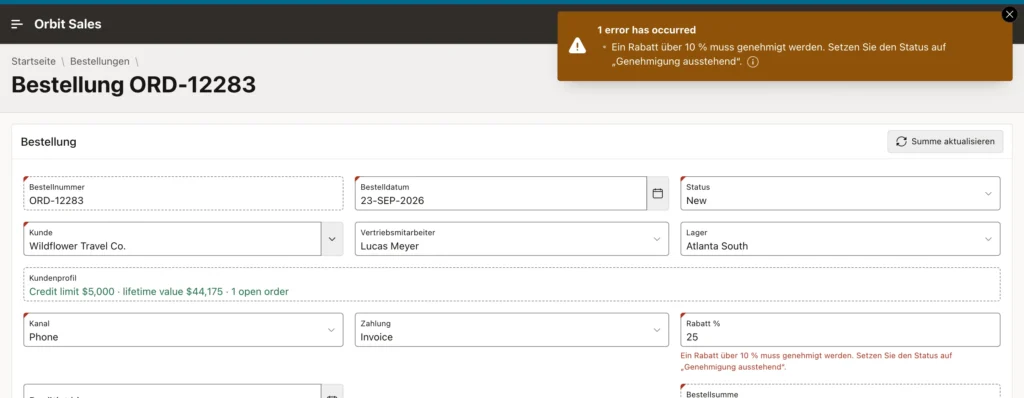
The call returns the message in the session's language, falling back to the primary language when a translation is missing, and substitutes numbered parameters into the text. Passing the threshold as a parameter rather than concatenating it is what lets each language place the number where its grammar wants it.
Text messages have three more uses worth knowing.
- A substitution reference inserts a message into any text that accepts substitutions, which is the same syntax the conversion generates.
- Switching on Used in JavaScript makes a message available to the browser API, including a version that fills in placeholders. Leave it off otherwise, because those messages are sent with every page.
- A message whose static ID matches an APEX message name overrides that message for your application, which is how you translate a few framework texts without waiting for a language pack.
One habit keeps a translated application honest. After a round of development, run the conversion again, export, and look for rows whose target still equals the source. Those are the texts nobody has translated yet, and a dictionary view lists messages per language if you would rather check in SQL.
Conclusion
Globalization and translation are separate problems and it pays to treat them that way. The globalization attributes decide the primary language, how each session picks its language, text direction, default formats, comparison rules, and time zone handling, and the session's language and territory then drive every Oracle format mask in the application. That is convenient for dates and dangerous for money, since a currency mask follows the reader's territory rather than the amount's actual currency, so fixed currencies need the symbol as a literal. Translation itself is far lighter than it used to be: text messages replace the old cycle of seeding, exporting, importing, and publishing a translated copy, so a corrected label is live as soon as it is saved. Convert the texts, add a language, export CSV or XLIFF, and keep the placeholders intact. Then budget time for what conversion cannot reach, namely APEX's own texts which need language packs, data which needs lookup tables or dynamic translations, and messages from your own code which need apex_lang.message with numbered parameters.
