
Database constraints are non-negotiable and they are also unreadable. A check constraint will faithfully stop a negative quantity, and then tell your user something like ORA-02290 with a constraint name attached. Nobody outside the development team can act on that.
Validations in Oracle APEX sit between the user and the save, checking submitted data and explaining problems in the user's own language. They also handle rules a constraint cannot express, like a required date that must not fall before the order date. This guide covers when validations run, every type available, validating interactive grid rows, and where error messages land.
When Validations Run
Submitting a page with a button whose Execute Validations is on starts a fixed sequence, and knowing it explains most surprises.
- Submitted values are saved into session state.
- After Submit computations run.
- Items marked Value Required are checked.
- Validations run, in sequence order.
- Only if nothing failed do processes and branches run.
When any validation fails, processing stops, the page redisplays with the user's values intact, and every error message appears at once. That last detail is a deliberate kindness: users fix all their problems in one pass instead of discovering them one submit at a time.
Note what this implies for a Delete button. It is generated with Execute Validations off, because validating a row that is about to disappear only produces obstacles.
Validation Types
Validations live in the Validating node of the Processing tree. Right-click and create one, then pick the type that fits.
| Type | Fails when |
|---|---|
| Expression | A SQL or PL/SQL Boolean expression is false |
| Function Body (returning Boolean) | The function returns false |
| Function Body (returning Error Text) | The function returns text, which becomes the message |
| PL/SQL Error | The code raises an error, whose message is shown |
| Rows returned / No Rows returned | A query returns nothing, or returns something |
| Item is NOT NULL, NOT zero, and variants | The item is empty or zero |
| Item is numeric, a valid date, a valid timestamp | The value cannot be converted |
| Item comparisons and character checks | The comparison or character rule fails |
| Item matches Regular Expression | The value does not match the pattern |
Every validation also carries an error message, where a hash-delimited LABEL placeholder is replaced by the associated item's label, a display location, an associated item or column that the message points at, an Always Execute switch for running even after an earlier failure on the same item, and a server-side condition, most often When Button Pressed.
A Rule Across Two Fields
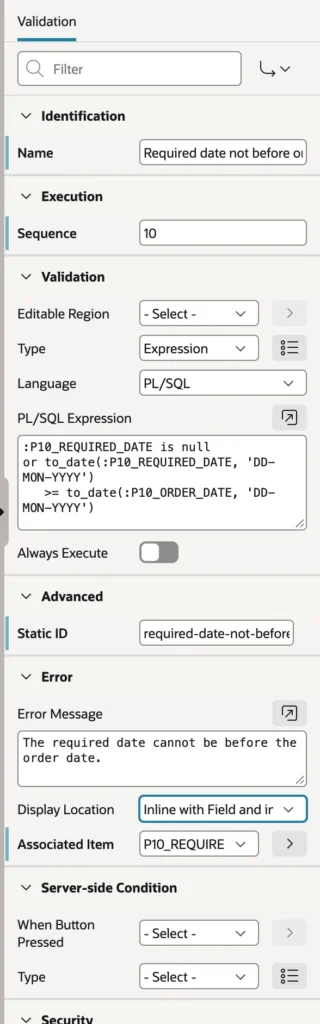
Constraints work on one row's columns, but a rule like "the required date cannot precede the order date" is about two values a user just typed. An Expression validation handles it.
:P10_REQUIRED_DATE is null
or to_date(:P10_REQUIRED_DATE, 'DD-MON-YYYY')
   >= to_date(:P10_ORDER_DATE, 'DD-MON-YYYY')
Two things in that expression are worth copying into your own work. The null check comes first, because an empty optional field is not an error, and the dates are converted with to_date using the item's format mask. Session state stores everything as text, so comparing two date items without converting them compares strings, which produces results that look random until you realize what is happening.
A Rule That Writes Its Own Message
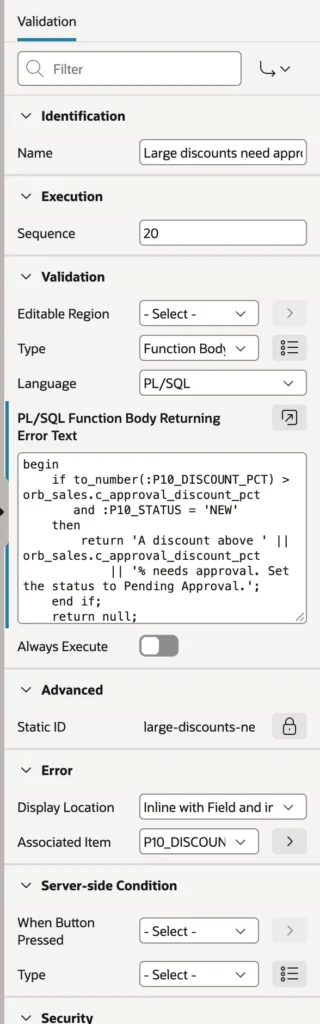
Sometimes the message should contain the threshold that was breached, or the rule depends on more than one condition. A Function Body returning Error Text does both: return null and the data is valid, return text and that text becomes the error.
begin
    if to_number(:P10_DISCOUNT_PCT) > orb_sales.c_approval_discount_pct
       and :P10_STATUS = 'NEW'
    then
        return 'A discount above ' || orb_sales.c_approval_discount_pct
            || '% needs approval. Set the status to Pending Approval.';
    end if;
    return null;
end;
The detail that makes this maintainable is reading the threshold from a package constant rather than typing 10 into the validation. The same constant governs the database procedure that submits an order, so the rule exists once and the form and the database can never disagree about it. Hard-code the number here and you have created a bug that waits until someone changes the policy.
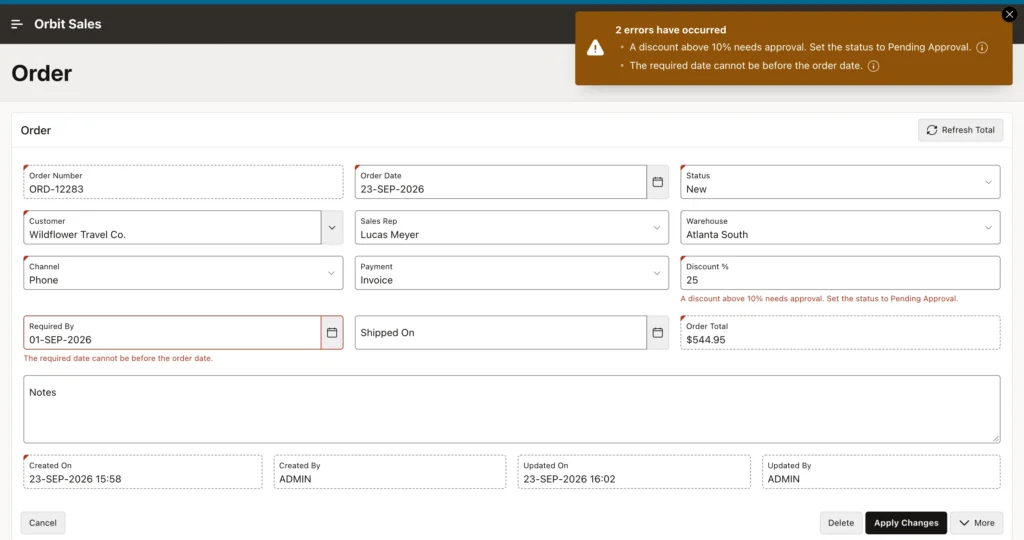
Break both rules at once and you see the payoff: a notification listing both problems, each message repeated beneath its field, the fields outlined, and nothing saved. One trip, both fixes.
Validating Interactive Grid Rows
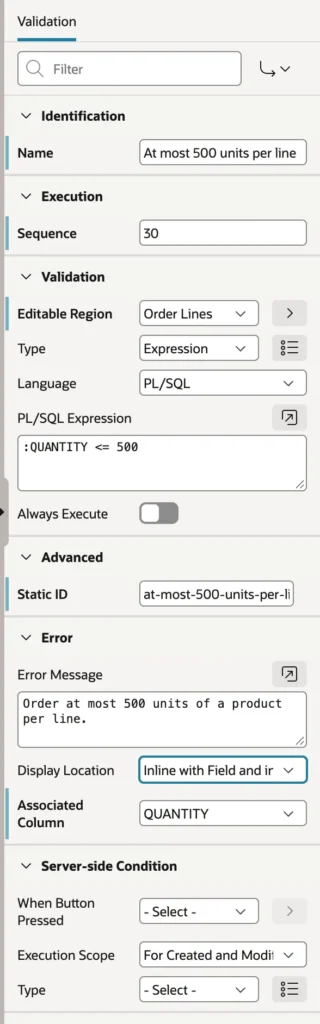
Grid rows need checking too, and the mechanism is neat once you know the trick. Set the validation's Editable Region to the grid, and bind variables named after the grid's columns refer to the row being validated, with the validation running once for every inserted or updated row.
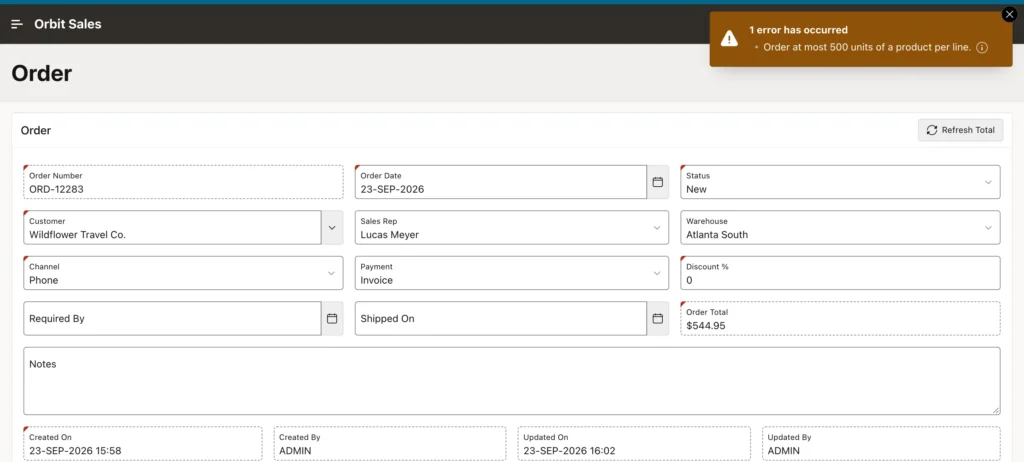
Watch what happens to the rest of the page when one line fails. The header changes are not saved either, because all of a page's validations run before any of its processes. That is the behavior you want: a half-saved order with valid header and rejected lines would be worse than no save at all. For error text built in PL/SQL elsewhere, the same thinking applies as with custom error messages from a process.
Required Values
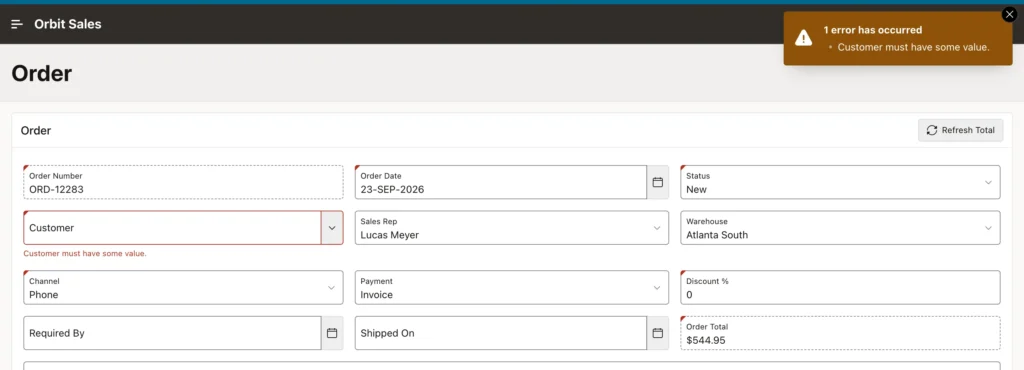
The simplest check is a property, not a validation. Switch on an item's Value Required and APEX checks it before your validations run, with a standard message built from the item's label.
Items also check what they can in the browser while the user types: a number field refuses letters, a date picker refuses impossible dates, a maximum length simply stops accepting characters. That keeps many mistakes from ever reaching the server, and it is why restricting input to integers by hand is rarely necessary any more.
Browser checks are a convenience, never a defense. They can be bypassed by anyone willing to open developer tools, and only the server can enforce a business rule. Keep both.
Where Error Messages Appear
| Display Location | Shows the message |
|---|---|
| Inline with Field and in Notification | Below the item and at the top of the page. The default, and usually right |
| Inline with Field | Below the item only |
| Inline in Notification | At the top only, for messages about the page as a whole |
| On Error Page | On a separate page with a link back. Rarely appropriate |
Pick Inline in Notification when a message has no single field to point at, such as a rule about the combination of everything on the page. Anything tied to one field belongs beside that field, because an error the user has to hunt for is half an error message.
The page's own error handling settings control the notification heading, and an application-level error handling function can rewrite raw database errors into sentences, which is the safety net for the constraint violations your validations did not anticipate.
Constraints and Validations Together
These are not competing options. Constraints defend the data no matter how it arrives, including through REST services, scripts, and the next application somebody builds on the same schema. Validations exist so that people using your pages get told what to do in plain words.
Where a rule matters enough to have a constraint, write a validation with matching logic as well. The constraint is the guarantee, the validation is the conversation.
Conclusion
Validations are the layer where your application stops being a form over a table and starts behaving like something that understands the business. They run after a submit and before any process, so a failure means nothing is saved and every message appears at once. Use the declarative item checks for simple rules, Expression validations for comparisons between fields, and Function Body returning Error Text when the message should carry a value or the logic needs room to breathe, ideally reading its thresholds from the same package constants the database uses so the two can never drift apart. Remember that session state holds everything as text, so date and number comparisons need converting first. Grid rows are validated by naming the editable region and referring to columns as bind variables, with a failure anywhere blocking the whole save. Set Value Required for the obvious checks, let the browser catch what it can while never trusting it to, put each message where its field is, and keep every database constraint in place behind all of it.
