
HTTP has no memory. Every request arrives as a stranger, which is why plain web programming spends so much effort passing values around. Oracle APEX solves this with session state: a per-user memory, held in the database, that remembers the value of every item for as long as the session lasts.
It is the reason a customer chosen on one page is still chosen when the user comes back, and the reason a bind variable in a report query knows which customer to show. This guide covers what session state holds, how values get in, the three ways to read them out, and the settings that decide how long they stay.
What Session State Holds
When someone signs in, APEX creates a session identified by the number carried in every URL. For that session it stores the value of every page item that has been set, every application item, collections, and a few internals.
Values are stored as text, with the BOOLEAN type introduced in 26.1 as the exception. They belong to the session, so two users never see each other's values, while one user with two browser tabs of the same session shares values between those tabs. That last detail explains a bug report you will eventually receive: someone opened two tabs, changed a filter in one, and watched the other behave oddly.
How Long a Value Lives
| Storage | Means |
|---|---|
| Per Session (Persistent) | The value stays until the session ends or something clears it. The default for items outside a form region |
| Per Request (Memory Only) | The value lives only while the page is processed, and is never saved. The default for form region items, which are re-read from the table anyway |
This single property explains most "why is the old value still there" questions. A search field with per-session storage keeps its text when the user returns, which may be helpful or maddening depending on the page.
How Values Get In
- Page submit: every item's value is sent to the server and saved before any validation or process runs.
- URLs: links and redirects set items on arrival.
- Source and default: when a page renders, each item's source or default fills it.
- Computations, covered below.
- Processes and code: PL/SQL assigns an item directly with a bind variable, or through apex_util.set_session_state.
- Ajax: dynamic actions, region refreshes, and trigger actions send the items named in Items to Submit and receive those in Items to Return.
That last point deserves emphasis, because it is behind the single most common APEX puzzle. A value the user has typed but not submitted exists only in the browser. A report that refreshes by Ajax sees the old value unless the item is listed in the region's Page Items to Submit. When a filter "doesn't work", this is almost always why.
Reading Session State
The same value is read three different ways depending on where you are standing.
Bind Variables, in SQL and PL/SQL
select order_number, order_total
  from orb_orders
 where customer_id = :P19_CUSTOMER_ID
A colon and the item name. Bind variables are both faster and safer than the alternative: the statement is parsed once and reused for every value, and the value is data rather than part of the SQL text, so it cannot inject SQL. Use them in every query, condition, and process, and never concatenate an item value into a statement.
Functions, in Stored PL/SQL
Inside a package in the database, bind variables to page items are not available, so APEX provides functions instead.
l_customer_id := nv('P19_CUSTOMER_ID');   -- as a number
l_name        := v('P19_CUSTOMER_NAME');  -- as text
l_active      := apex_session_state.get_boolean('P12_IS_ACTIVE');
One performance warning worth carrying around: calling v() inside a query, row by row, is slow. Pass values into packaged code as parameters and keep bind variables in the queries themselves.
Substitution Strings, in HTML and Text
In HTML, templates, messages, labels, page titles, and link targets, an item is written as an ampersand, its name, and a period. APEX replaces it with the value as the page renders, escaping HTML characters by default.
Report columns and region templates use a related form, a column name between hash signs, which substitutes the value from the current row rather than from session state. Mixing the two up is a common early mistake, and the symptom is a literal ampersand or hash sign appearing on screen.
Escaping Substitutions
| Modifier | Escapes the value for |
|---|---|
| !HTML | HTML text |
| !ATTR | An HTML attribute value |
| !JS | A JavaScript string |
| !STRIPHTML | Plain text, with HTML tags removed |
| !RAW | Nothing at all |
Choose the modifier that matches where the value lands. A name dropped into a title attribute needs !ATTR, and a value assigned to a JavaScript variable needs !JS, because HTML escaping does not protect either context.
Reserve !RAW for text you control, such as a translated message. Using it on data a user can type is how a customer name containing a script tag becomes an attack, which is the same lesson that applies to escaping values passed between pages.
Built-in Substitution Strings
| Name | Value |
|---|---|
| APP_ID and APP_ALIAS | The application's ID and alias |
| APP_PAGE_ID and APP_PAGE_ALIAS | The current page's number and alias |
| APP_SESSION | The session ID |
| APP_USER | The signed-in user's name |
| REQUEST | The request of the current submission, usually a button name |
| DEBUG | YES when debugging is on |
| BROWSER_LANGUAGE | The browser's preferred language |
| APP_FILES, WORKSPACE_FILES, THEME_FILES | Static file locations, written between hash signs |
APP_USER is the one you will reach for constantly: filtering a report to the current user's records, stamping audit columns, and driving authorization checks. All of these work as bind variables in SQL and as substitution strings in text.
Computations
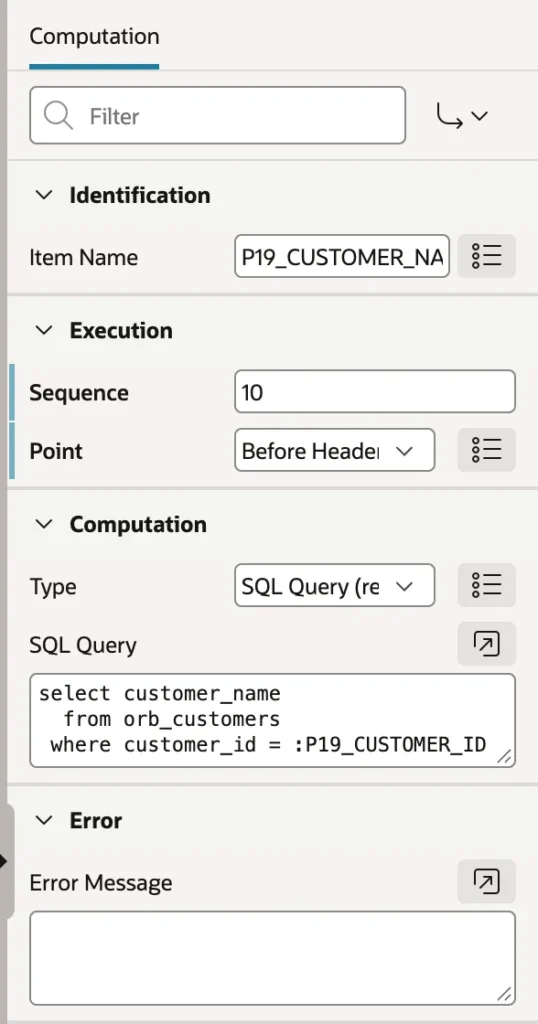
A computation sets an item's value at a chosen point in page processing. The classic use is deriving a display value from an ID, such as putting the customer's name in the page title when all the page has is the customer ID.
select customer_name
  from orb_customers
 where customer_id = :P19_CUSTOMER_ID
Create a hidden item, add a computation at the Before Header point, and set the page title to a substitution of that item. The point matters: Before Header runs before the title is rendered, so the substitution finds a value. Put the same computation later and the title comes out empty, which is a five-minute mystery with a one-word answer.
The available points are New Session, Before Header, After Header, Before Regions, After Regions, Before Footer, After Footer, and After Submit. A computation's type can be a static value, another item, a SQL query returning one or more values, a PL/SQL expression or function body, or a user preference. Computations can also be defined application-wide in Shared Components.
Computations and defaults are easy to confuse. A default applies only when an item has no value, so it is a starting point. A computation applies every time its point is reached, so it is a derivation. Use defaults for what a new record starts with, and computations for values that must always follow from something else.
Inspecting Session State
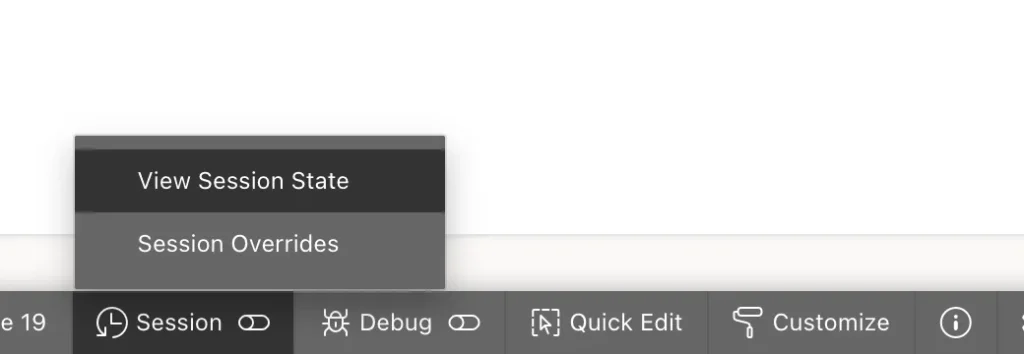
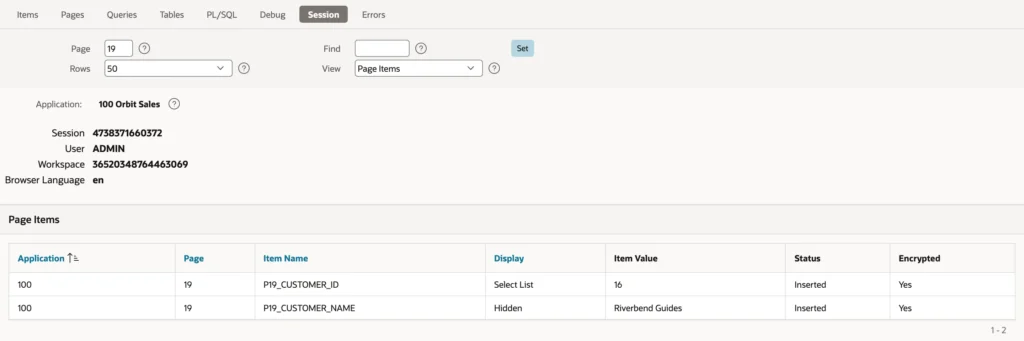
When something is not behaving, look before you guess. View Session State lists the current page's items with their values, and the View list switches to application items, the entire session, collections, and background executions. You can also inspect another page's items without navigating there.
This one screen answers most debugging questions on the spot: whether the item holds what you assume, whether a computation ran, and whether a submitted value actually arrived. Session Overrides sits in the same menu and lets you try the application in another language, text direction, or time zone for your session only, which is how translations get tested.
Clearing Session State
Remembered values are a feature until they are a bug. A form that opens showing the previous record, or a search field still holding last week's text, is session state doing exactly what it was told.
- Clear Cache in a link or branch: a page number, a comma-separated list, RP to reset pagination, or APP for the whole application. This is why links into a form clear that form's page.
- The Clear Session State process, which can clear the current page, other pages, or everything.
- PL/SQL: apex_util.clear_page_cache for one page, apex_util.clear_app_cache for the application, or setting a single item to null.
- The end of the session, by sign-out or timeout.
Knowing how to clear a page's cache properly is worth more than it sounds, because the alternative is users reporting ghosts.
Conclusion
Session state is what turns a series of stateless requests into an application that remembers. It holds item values per user session in the database, with each item's storage property deciding whether a value persists across page views or lives only for one request. Values arrive by submit, by URL, from sources, defaults, computations, processes, and Ajax, and the Ajax case is the one to remember, because a region that refreshes without listing an item in Page Items to Submit will faithfully read the previous value. Read values as bind variables in SQL and PL/SQL, where they are both fast and injection-proof, as v, nv, or APEX_SESSION_STATE inside stored code, and as substitution strings in anything that renders as text, choosing the escape modifier that matches the context rather than trusting the default. Add computations where a value must always be derived rather than merely defaulted, clear session state deliberately when a page should start fresh, and when something looks wrong, open View Session State and find out what is actually stored before changing a line of code.
