
Welcome to the next evolution of database programming. You can now build dynamic AI agents directly within your code, eliminating the need to rely entirely on static configurations. Creating an AI agent in PL/SQL gives you complete control over how your application handles complex user queries.
This programmatic approach allows you to assemble tools at runtime. You no longer need to navigate the APEX Builder to define every AI interaction; instead, everything happens seamlessly behind the scenes in your scripts.
Before writing your first callback procedure, your workspace must be properly configured. To learn how to enable AI in Oracle APEX, please refer to this complete guide. Once your service is active, you are ready to start coding.
Why Programmatic Ad-Hoc Agents Matter
You might wonder why you should write code when declarative options exist. While declarative tools are fantastic for predefined, application-wide features, they can introduce friction when you have dynamic tool requirements that change based on runtime conditions.
Sometimes, you just want to call a language model with a quick, tool-augmented prompt directly from a script. Setting up a shared component for a one-off task adds unnecessary overhead to your workflow. Writing an ad hoc agent solves this problem entirely.
"The true power of a PL/SQL AI agent lies in its ability to adapt to runtime conditions instantly, giving developers ultimate flexibility."
Comparing Your Implementation Options
Understanding when to use each method is crucial for scalable database programming. Let's look at a quick comparison between the two primary methods available to you.
| Feature | Shared Component AI Agents | PL/SQL Ad-Hoc Agents |
|---|---|---|
| Authoring Experience | Declarative via the APEX Builder | Programmatic inline code |
| Tool Composition | Static sets defined at design time | Dynamically assembled at runtime |
| Client-Side Support | Fully supported with UI integration | Not supported, strictly backend processing |
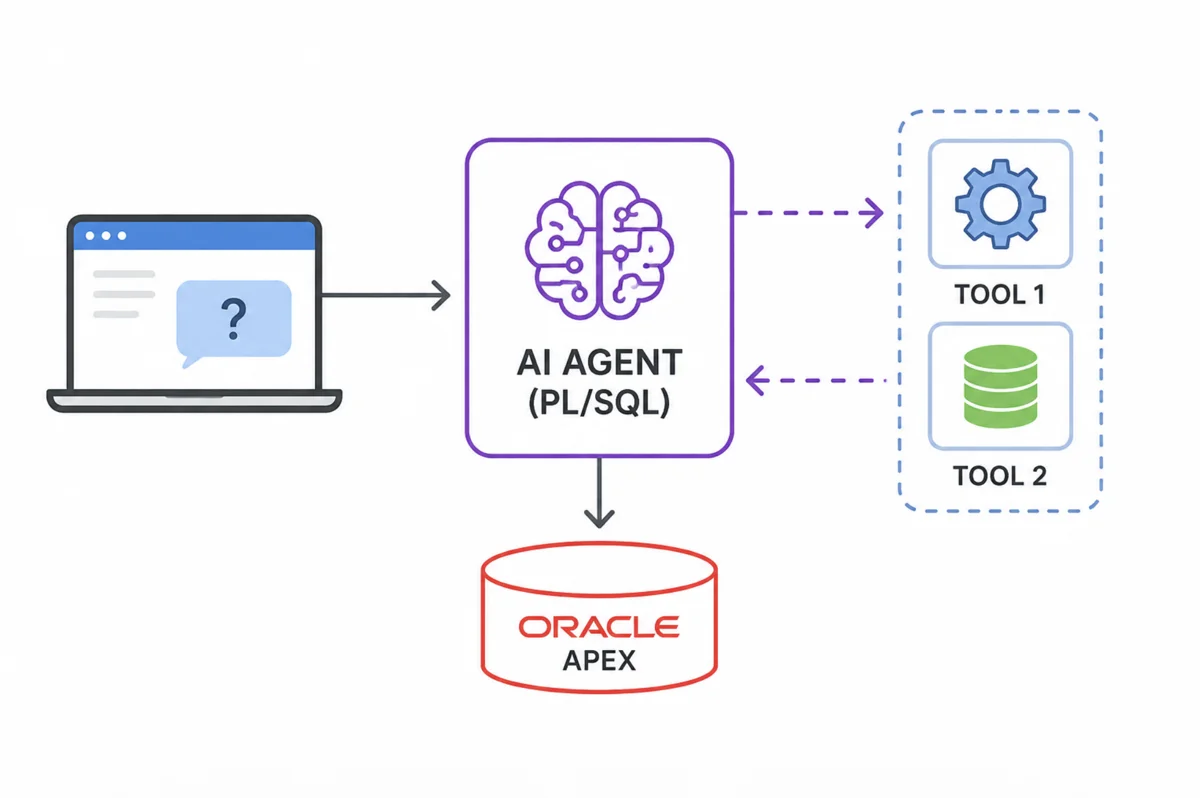
Building Your First AI Agent in PL/SQL
The core concept of an ad hoc agent is straightforward. When executing the generate procedure, you simply pass an inline collection of tool definitions, and APEX handles the entire agentic loop for you automatically.
Let's look at a practical example using the classic employee table. Suppose you want to give the language model the ability to look up an employee and find everyone else who works in their specific department.
Step One: Defining the Tool Callbacks
The simplest pattern is to assign one callback procedure to each tool. These procedures must strictly follow a predefined signature, allowing APEX to call the correct one based on the decisions made by the language model.
Here is the code to define the two necessary tools. Notice how the JSON parameters are extracted into local variables before running the query to ensure smooth execution.
create or replace procedure find_employee_proc (
    p_param     in              apex_ai.t_tool_exec_param,
    p_result    in out nocopy   apex_ai.t_tool_exec_result )
as
    l_emp_name varchar2(100);
begin
    l_emp_name := p_param.args_json.get_string( 'employee_name' );

    select json_object (
               'empno'  value e.empno,
               'ename'  value e.ename,
               'job'    value e.job,
               'deptno' value e.deptno )
      into p_result.result
      from emp e
     where upper( e.ename ) like '%' || upper( l_emp_name ) || '%'
       and rownum = 1;
exception
    when no_data_found then
        p_result.result := json_object( 'error' value 'Employee not found.' );
end find_employee_proc;
/

create or replace procedure get_dept_roster_proc (
    p_param     in              apex_ai.t_tool_exec_param,
    p_result    in out nocopy   apex_ai.t_tool_exec_result )
as
    l_deptno number;
begin
    l_deptno := p_param.args_json.get_number( 'deptno' );

    select json_arrayagg (
               json_object (
                   'ename' value e.ename,
                   'job'   value e.job,
                   'sal'   value e.sal ) )
      into p_result.result
      from emp e
     where e.deptno = l_deptno;
end get_dept_roster_proc;
/
Step Two: Executing the Agentic Loop
With your procedures compiled, you can now trigger the model. You declare your tools directly within the execution block, meaning they exist only for the duration of that specific call.
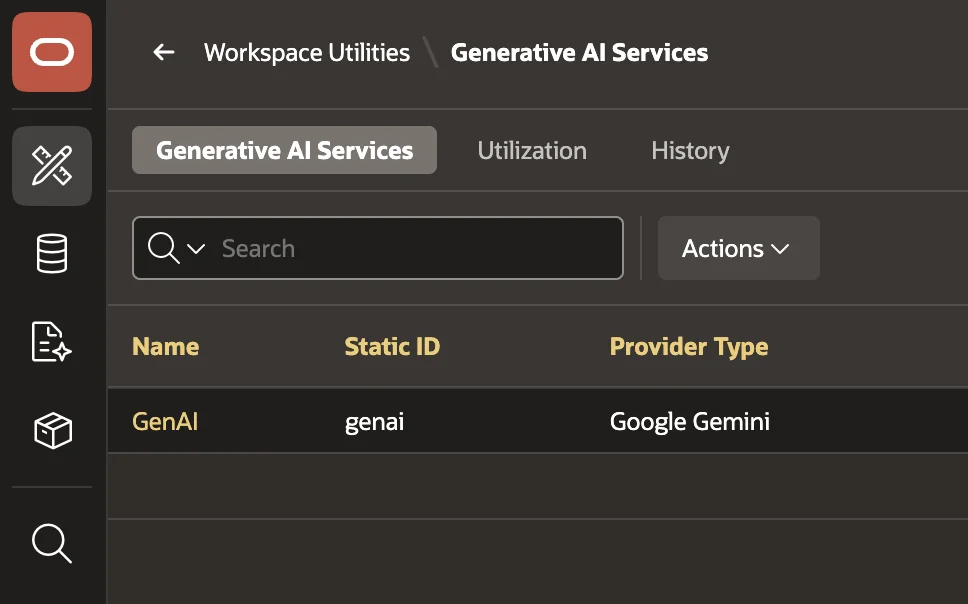
Before running the script below, you must replace the placeholder service ID with your actual Generative AI Service Static ID. You can find this by navigating to Workspace Utilities and clicking on Generative AI Services.
declare
    l_result clob;
begin
    l_result :=
        apex_ai.generate (
            p_service_static_id => 'genai', -- Replace this with your Static ID
            p_prompt            => 'Find Blake and tell me who else works in his department, along with their jobs.',
            p_tools             =>
                apex_ai.t_tools (
                    apex_ai.t_tool (
                        name               => 'find_employee',
                        description        => 'Look up an employee by name to get their details, including their department number (deptno)',
                        callback_procedure => 'find_employee_proc',
                        parameters         =>
                            apex_ai.t_tool_parameters (
                                apex_ai.t_tool_parameter (
                                    name => 'employee_name' ) ) ),

                    apex_ai.t_tool (
                        name               => 'get_dept_roster',
                        description        => 'Retrieve the list of employees and their jobs for a specific department number',
                        callback_procedure => 'get_dept_roster_proc',
                        parameters         =>
                            apex_ai.t_tool_parameters (
                                apex_ai.t_tool_parameter (
                                    name      => 'deptno',
                                    data_type => apex_ai.c_tool_param_type_number ) ) ) ) );

    sys.dbms_output.put_line( 'Result: ' || l_result );
end;
/
Reviewing the Final Output
When you run the above code, the underlying infrastructure springs into action. The model first realizes it needs Blake's department number and calls your initial procedure.
After receiving the department number, it triggers the second procedure to pull the full roster. Finally, it formats the raw data into a human-readable response. You will see output similar to the following result in your terminal:
- BLAKE (MANAGER)
- ALLEN (SALESMAN)
- WARD (SALESMAN)
- MARTIN (SALESMAN)
- TURNER (SALESMAN)
- JAMES (CLERK)
Scaling Your Ad-Hoc Solutions
This single-callback-per-tool pattern is excellent for isolated tasks, as each procedure has one clear responsibility. If you need global context across all model interactions, you might consider exploring the unified response handler pattern instead.
Regardless of the pattern you choose, the execution infrastructure remains highly reliable. Tool validation and argument handling function exactly as they do in the standard declarative model.
Conclusion
Creating an AI agent in PL/SQL removes significant constraints from your development process. You no longer have to choose between rigid visual configurations and skipping artificial intelligence entirely. By leveraging ad-hoc agents, you gain a powerful, code-driven approach that harnesses the full orchestration capabilities of Oracle APEX, while maintaining the ultimate flexibility your complex applications demand.
