
You might have noticed your database queries slowing down over time, even though you regularly delete old records. You run a massive cleanup operation, but your full table scans still take forever to complete. This frustrating scenario happens because of a hidden mechanism known as the high water mark in your Oracle database.
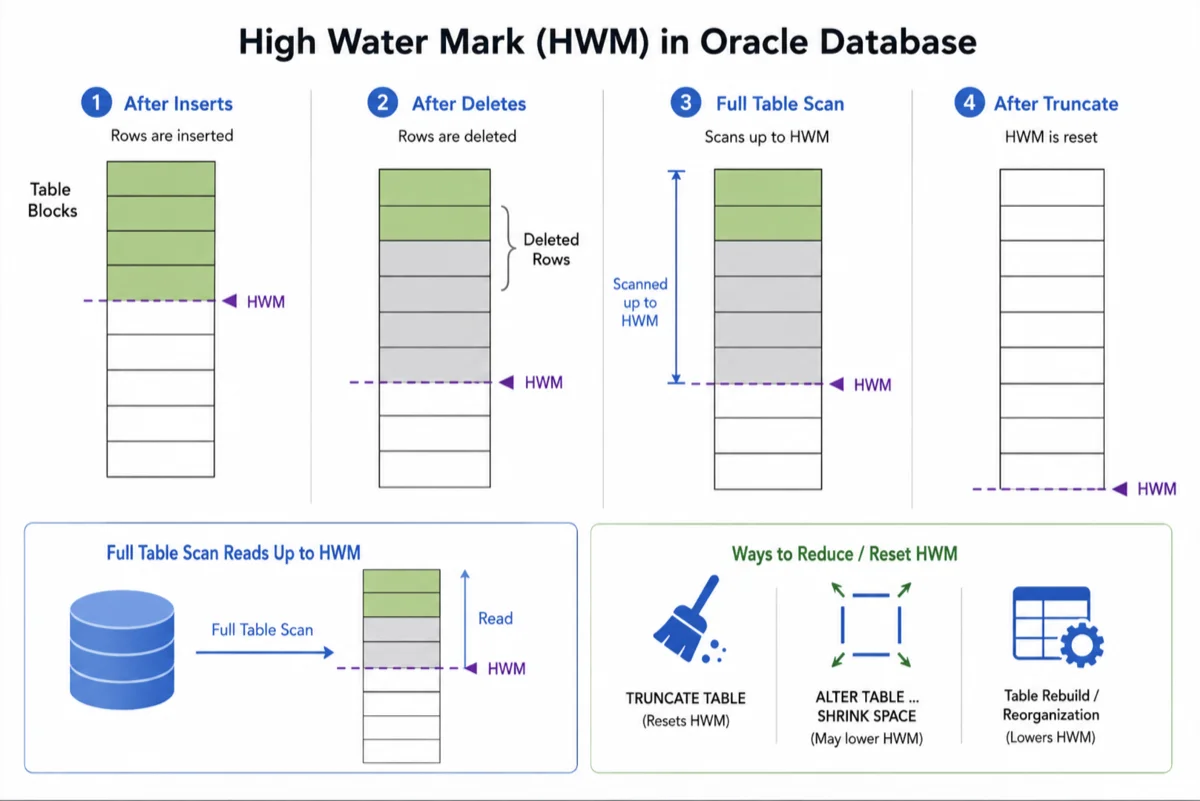
The high water mark acts as a boundary line within your database storage structures. It separates the storage blocks that have held data at some point from those that have never been used. You can think of it as the bathtub ring left behind after the water has drained away.
Every time you insert new records, your database pushes this invisible line higher to accommodate the fresh data. When you delete those records later, the line stubbornly remains exactly where it was. Understanding how to manage this boundary is essential for optimal database performance.
What Exactly is the High Water Mark?
When you create a table, the Oracle database allocates a specific amount of initial storage space for your data. As your application inserts rows, the system fills these empty data blocks one by one. The high water mark simply indicates the highest block that has ever contained information.
Blocks located below this mark might be currently full or they might be completely empty due to previous deletions. Blocks located above this mark represent virgin territory that your database has never formatted or used. Your database only tracks data below this critical threshold.
The high water mark never moves backward automatically when you remove data from your tables.
This one-way movement creates a significant challenge for storage management over the lifespan of an application. You might delete millions of rows, leaving behind massive pockets of empty space below the mark. Your database will eventually reuse this empty space for new inserts, but the mark itself stays elevated.
The Impact of the High Water Mark on Database Performance
You might wonder why a simple boundary line causes such severe performance issues in your applications. The problem becomes obvious when your system attempts to perform a full table scan. During this operation, your Oracle database must read every single block up to the high water mark.
If your table once held fifty million rows but now only holds five, the scan still reads all the blocks needed for fifty million rows. Your system wastes precious time reading millions of completely empty data blocks. This unnecessary input and output overhead cripples your overall database performance.
This invisible drag on your system explains why your queries remain slow after a massive data purge. Your developers might blame the network or the application code when the real issue lies hidden in your storage architecture. You must actively manage this space to keep your reporting and analytics running smoothly.
Delete vs Truncate Commands
Many developers misunderstand the difference between deleting rows and truncating a table. Both commands remove data, but they interact with the storage architecture in completely different ways. You must choose the correct command based on your long-term storage goals.
| Aspect | DELETE Command | TRUNCATE Command |
|---|---|---|
| High Water Mark | Remains exactly where it was | Resets back to zero |
| Space Recovery | Space is not released back to the system | Space is immediately released |
| Undo Data | Generates massive amounts of undo data | Generates almost no undo data |
| Execution Speed | Very slow for large tables | Extremely fast regardless of table size |
You should use the delete command when you only need to remove specific rows based on a condition. You should always use the truncate command when you want to wipe out the entire table contents quickly. Choosing truncate ensures your high water mark resets and your future full table scans run at lightning speed.
How to Identify a High Water Mark Problem
You cannot simply look at a table and visually determine if it suffers from a bloated high water mark. You need to query the system dictionary views to understand your true storage footprint. The best approach involves comparing the actual allocated blocks against the blocks that currently contain data.
If you see a massive difference between the allocated space and the used space, you have found a problem. This gap represents the empty blocks trapped below your elevated boundary line. Here is a simple script you can run to gather this crucial storage information:
DECLARE
  v_total_blocks NUMBER;
  v_total_bytes NUMBER;
  v_unused_blocks NUMBER;
  v_unused_bytes NUMBER;
  v_last_used_extent_file_id NUMBER;
  v_last_used_extent_block_id NUMBER;
  v_last_used_block NUMBER;
BEGIN
  DBMS_SPACE.UNUSED_SPACE('YOUR_SCHEMA', 'YOUR_TABLE', 'TABLE',
    v_total_blocks, v_total_bytes, v_unused_blocks, v_unused_bytes,
    v_last_used_extent_file_id, v_last_used_extent_block_id, v_last_used_block);
END;
This built-in package provides an exact reading of your storage distribution. You can use these metrics to justify scheduling a maintenance window to reclaim your wasted space. Data-driven decisions always yield better results when managing complex enterprise systems.
How to Reset the High Water Mark
Once you identify a bloated table, you must take explicit action to lower the boundary line and reclaim your space. You have several different methods available depending on your database version and system availability. Each approach requires careful planning and execution.
Reclaiming wasted space is just as important as writing efficient database queries.
The most modern approach involves shrinking the space directly while the table remains online. You can also move the table to a new tablespace entirely. Finally, you can export the data, drop the table, and import the data back into a fresh structure.
Using the Alter Table Shrink Space Command
Modern versions of the Oracle database allow you to shrink segments online without interrupting your users. This fantastic feature compacts your data and lowers the high water mark seamlessly. You must ensure you have enabled row movement on the table before attempting this operation.
The shrink operation works by moving rows from the end of the segment into empty pockets near the beginning. Once the data is compacted, the database formally lowers the boundary and releases the extra space back to the system. Here is the exact syntax you need to use:
ALTER TABLE your_table_name ENABLE ROW MOVEMENT;
ALTER TABLE your_table_name SHRINK SPACE;
This approach is highly recommended because it does not require an exclusive lock for the entire duration of the process. Your application can continue reading and writing data while the compaction happens in the background. It is the perfect solution for maintaining high availability systems.
The Alter Table Move Strategy
If you cannot use the shrink command, moving the table is your next best option. When you issue a move command, the Oracle database creates a brand new segment and copies only the existing data over. This process completely eliminates any empty blocks and sets a fresh high water mark.
You must remember that moving a table invalidates all associated indexes immediately. You will need to rebuild every single index on that table before your application can function properly again. This method requires a dedicated maintenance window because it locks the table exclusively.
Best Practices for Database Storage Management
You should not wait for your queries to slow down before you start thinking about storage optimization. A proactive approach prevents these issues from ever impacting your end users. You should integrate these essential practices into your regular database administration routine.
- Monitor your table growth rates weekly to spot unusual data spikes early.
- Schedule regular maintenance scripts to identify tables with excessive empty blocks.
- Use table partitioning for massive historical datasets to make purging old data easier.
- Always prefer truncating tables over deleting all rows when emptying staging areas.
- Rebuild highly fragmented indexes after completing major data archiving projects.
Following these guidelines ensures your storage architecture remains lean and highly efficient. You will save money on disk storage and delay expensive hardware upgrades. More importantly, your applications will deliver consistent, lightning-fast response times.
Conclusion
The high water mark in your Oracle database is a fundamental concept that dictates how your system processes information. You now understand that deleting rows never lowers this invisible boundary, which inevitably leads to wasted space and slow full table scans. Recognizing this behavior is the first step toward effective database administration.
You must actively monitor your storage structures and identify tables suffering from excessive fragmentation. By utilizing tools like the shrink space command or the truncate command, you can reset this boundary and instantly restore your database performance. You hold the power to keep your system running like a well-oiled machine.
Start auditing your largest tables today and reclaim the performance you have lost over the years. You will be amazed at how a simple storage cleanup can drastically accelerate your most complex reporting queries. Master your high water mark, and you will master your database.
