Free Laptop 3D Models: Gaming Laptop, Thin Laptop, Rugged Laptop, Cyberdeck, 1990s Laptop (GLB, OBJ, STL)
Twelve free laptop 3D models: a gaming laptop, a thin aluminium laptop, a cyberdeck, a rugged field laptop, a business laptop, a convertible in tent mode, a tablet with a keyboard cover, a dual-screen studio laptop, a school laptop, a 2000s laptop with a disc tray, a 1990s laptop with a trackball and a 1980s portable. Lids open and screens glow. Free for commercial use under CC BY 4.0, no login.
- 12 models
- 10,440–37,631 triangles
- 642 KB–1.9 MB each
- GLB, glTF, OBJ, STL
- CC BY 4.0
- No login
All 12 models
Drag a model to turn it, or tap it to open the 3D viewer with zoom. Sizes are width × depth × height. The tags under a model are its separate parts, by node name.
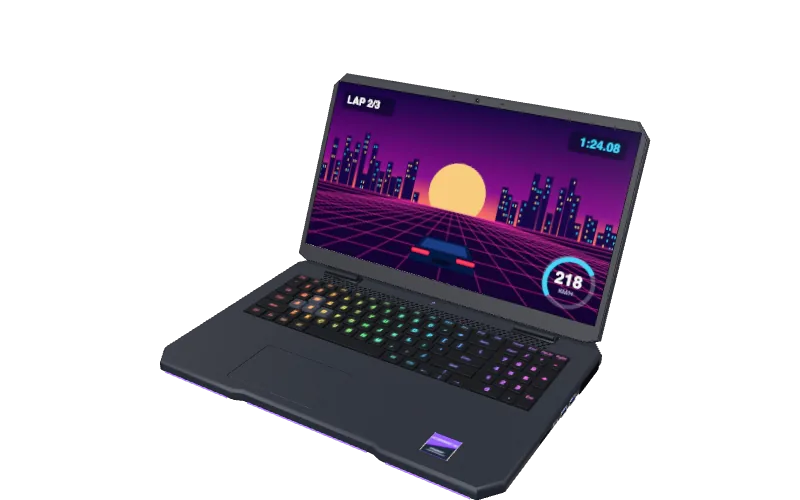
Gaming Laptop
17 inch gaming laptop
Large gun-grey gaming laptop with a glowing number-pad keyboard, rear exhausts, light bars, deck vents and a race on the screen. Lid and touchpad are separate parts.
- Lid
- Touchpad
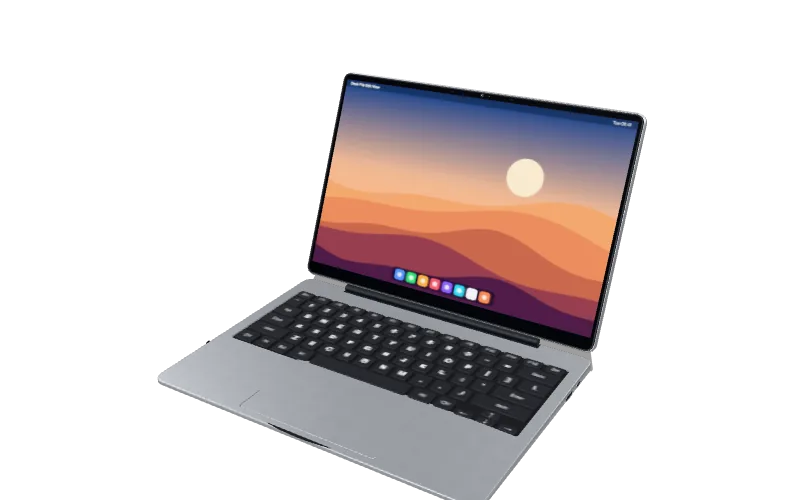
Thin Laptop
13 inch aluminium
Slim silver laptop with a tapered base, black keys, a big touchpad, speaker grilles, a finger notch and ports on both sides. Lid and touchpad move.
- Lid
- Touchpad
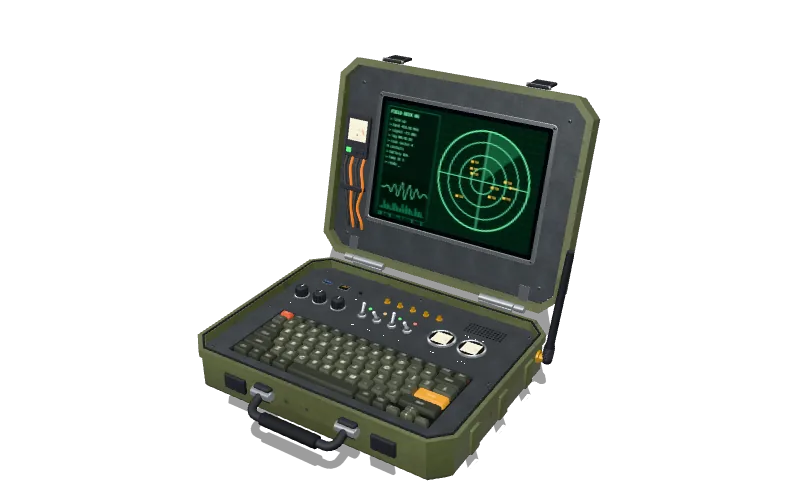
Cyberdeck
Computer in a tough case
Field computer built into an olive case: key deck, knobs, switches, two gauges, loose cables, an antenna and a radar screen. Lid, latches, handle and antenna move.
- Lid
- Latch ×2
- Handle
- Antenna
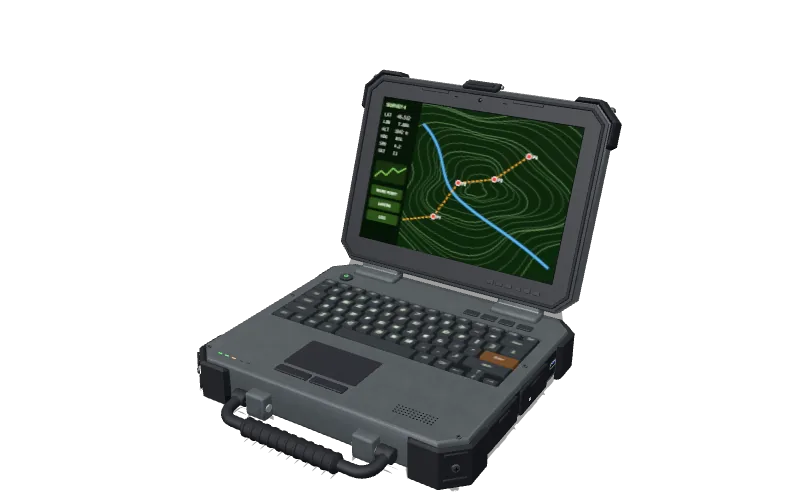
Rugged Laptop
Field laptop
Tough magnesium laptop with rubber corners, a carry handle, sealed port doors, a lid latch and a survey map on screen. Lid, latch, handle and port doors move.
- Lid
- Latch
- Touchpad
- Handle
- Port_Cover_1
- Port_Cover_2
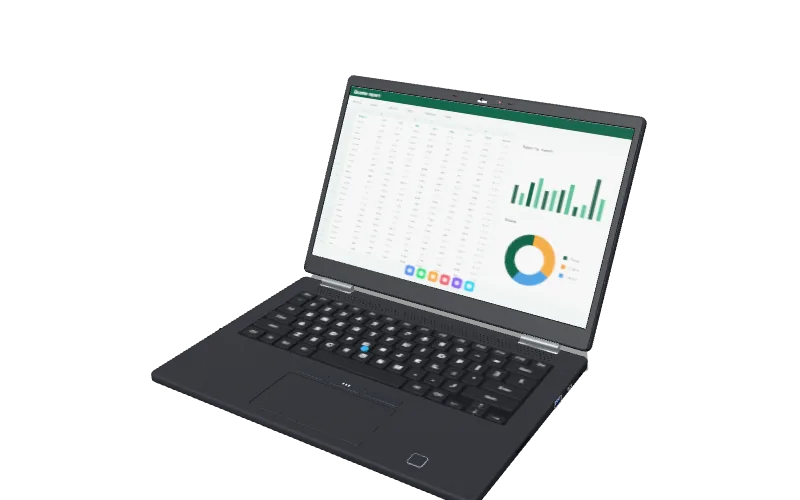
Business Laptop
14 inch office laptop
Matte black office laptop with a pointing stick, click buttons, a fingerprint reader, steel hinges and a spreadsheet on screen. Lid, camera shutter and touchpad move.
- Lid
- Camera_Shutter
- Touchpad
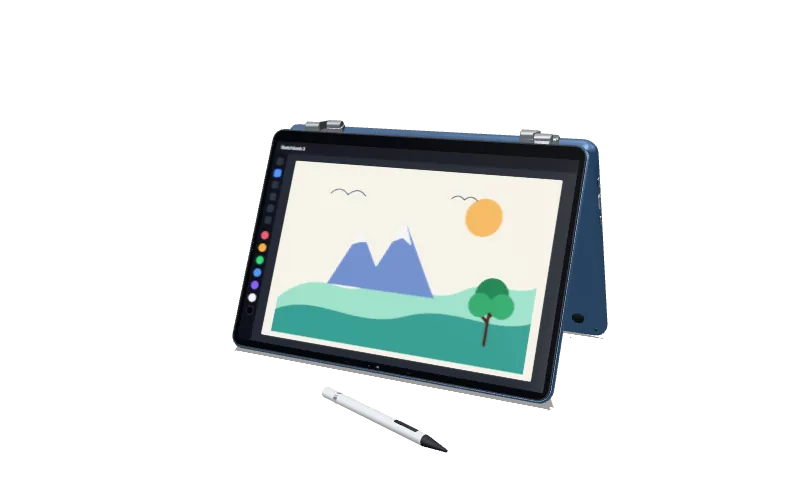
Convertible Laptop
Tent mode, with pen
Blue two-in-one standing as a tent with a sketch on screen and a pen beside it. Screen, keyboard base, hinge and touchpad are separate, so it folds back to a laptop.
- Touchpad
- Screen
- Hinge
- Pen
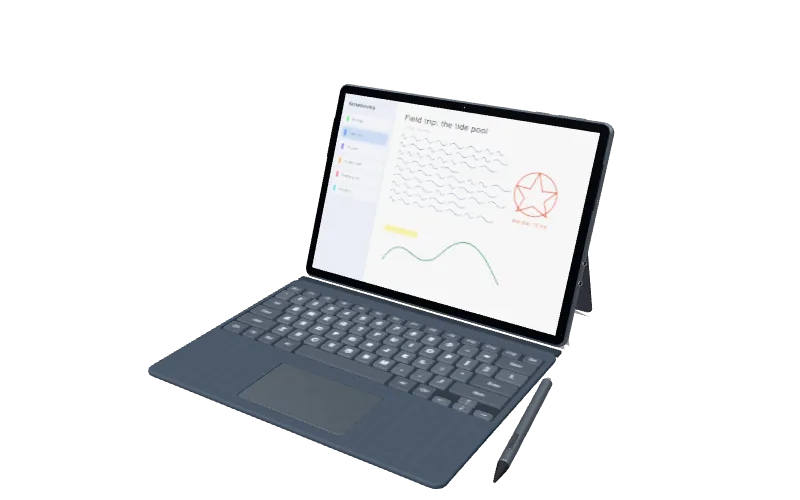
Tablet Laptop
Kickstand tablet and cover
Tablet computer on a kickstand with a fabric keyboard cover and a pen, showing handwritten notes. Tablet, kickstand, cover, touchpad and pen are separate.
- Kickstand
- Keyboard_Cover
- Touchpad
- Pen
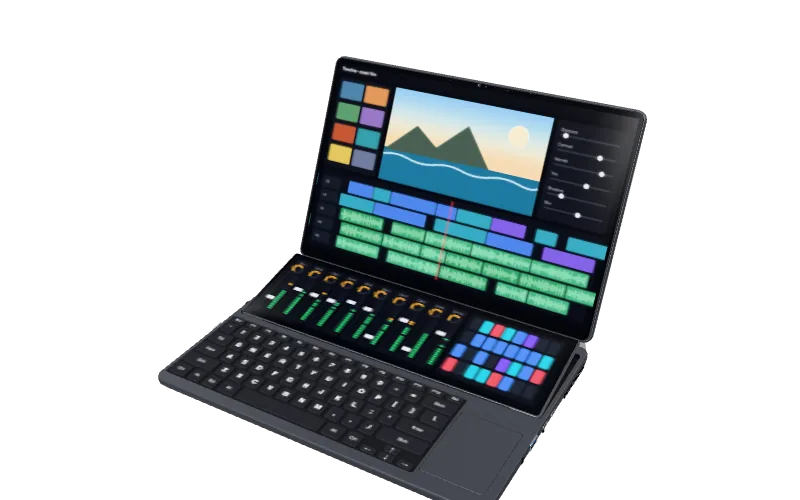
Dual-Screen Laptop
Second screen above the keys
Studio laptop with a second screen that tilts up above the keyboard, a side touchpad and a film timeline on the main display. Lid and both screens move.
- Lid
- Second_Screen
- Screen_Prop
- Touchpad
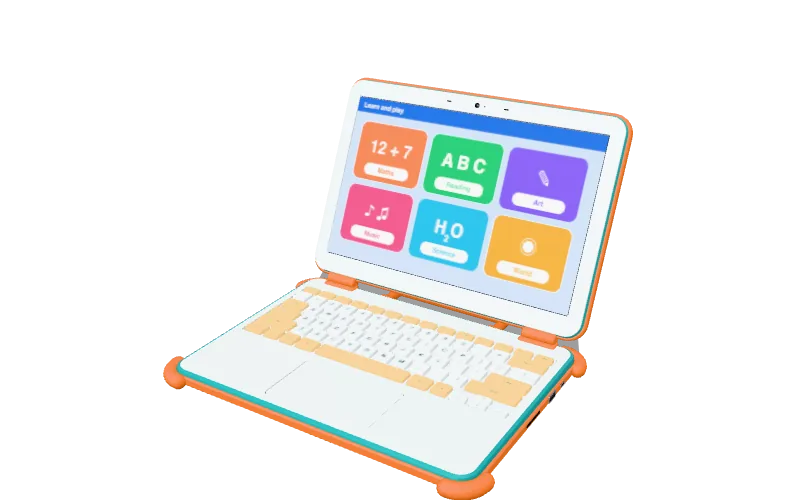
School Laptop
Classroom laptop
Teal and orange classroom laptop with a soft bumper, a fold-out handle, big white keys and a learning menu on screen. Lid, handle and touchpad move.
- Lid
- Touchpad
- Handle
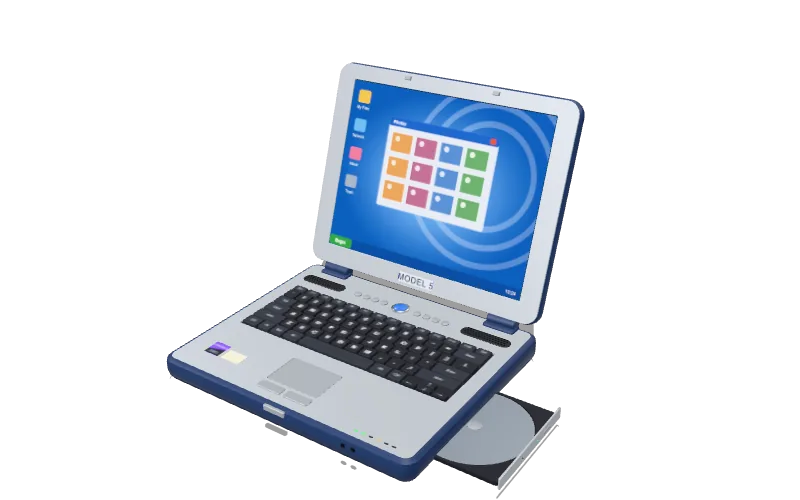
2000s Laptop
With disc drive
Two-tone silver and navy laptop from the 2000s with a disc tray, speakers, media buttons, stickers and a thick lid. Lid, disc tray and touchpad move.
- Lid
- Touchpad
- Disc_Tray
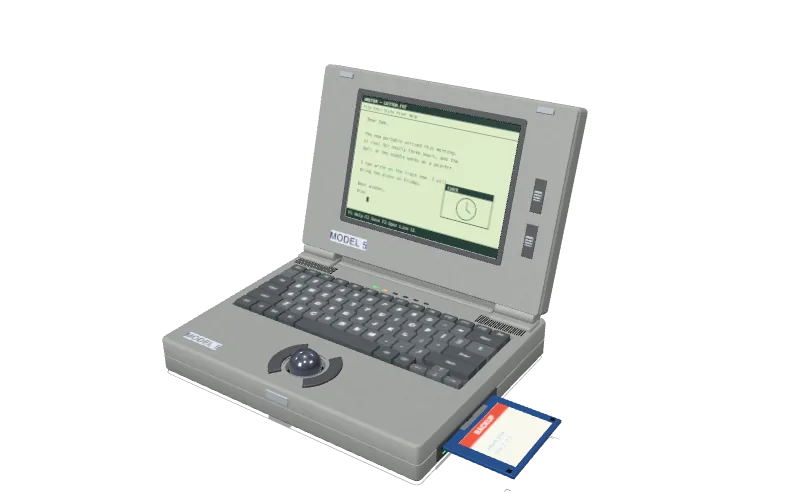
1990s Laptop
With trackball and floppy
Chunky grey 1990s laptop with a trackball, sliders beside a small screen, old ports and a floppy disk. Lid, trackball and disk are separate parts.
- Lid
- Trackball
- Floppy_Disk
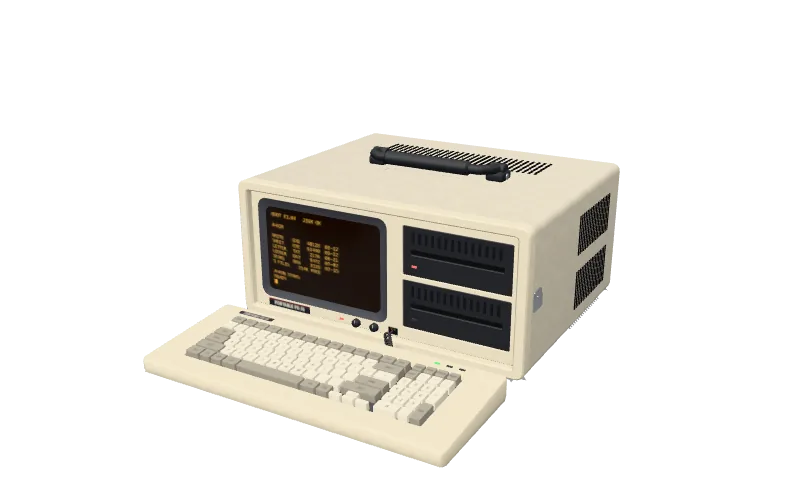
1980s Portable Computer
Suitcase computer
Suitcase computer from the 1980s with an amber screen, two disk drives, a fold-down keyboard on a coiled cable, vents and a carry handle.
- Handle
- Keyboard
- Cable
Made for games
- Lids that closeEvery lid is its own part with the pivot on the hinge. Turn it on x to open or shut the laptop.
- Every key is realAll keys are modelled and lettered, from flat modern keys to the tall ones of the 1980s, set into a sunk keyboard bed.
- Glowing screensThe screen is its own material with a picture that lights up, so you can swap in your own image, canvas or video.
- Forty years of laptopsSuitcase computer, trackball and floppy, disc tray, magnesium field unit, kickstand tablet and a second screen above the keys.
How to use these GLB models
GLB is binary glTF 2.0: one file with the mesh, materials and node names. Every modern 3D tool reads it.
three.js
Load it with GLTFLoader, as in the code below. Babylon.js, PlayCanvas and A-Frame load GLB directly too.
Unity
Add the free glTFast package (Package Manager, add by name: com.unity.cloud.gltfast), then drag the .glb into Assets.
Godot 4
Drop the .glb into the FileSystem dock. Godot imports it as a scene you can instance.
Blender
File, Import, glTF 2.0. From there you can also export to FBX, OBJ or STL.
import * as THREE from 'three';
import { GLTFLoader } from 'three/addons/loaders/GLTFLoader.js';

const gltf = await new GLTFLoader().loadAsync('model.glb');
const model = gltf.scene;
scene.add(model);

// the model is in metres, +Y up, facing +Z, standing on the ground at the origin

const gltf = await new GLTFLoader().loadAsync('gaming-laptop.glb');
const laptop = gltf.scene;
laptop.position.set(0, 0.74, 0);                // on your desk
scene.add(laptop);

const lid = laptop.getObjectByName('Lid');
lid.rotation.x = Math.PI / 2;                   // closed; about -0.4 is open

// your own picture on the screen
const tex = new THREE.TextureLoader().load('my-screen.jpg');
tex.flipY = false; tex.colorSpace = THREE.SRGBColorSpace;
laptop.traverse(o => { if (o.isMesh && o.material.name.startsWith('Screen_') && o.material.emissiveMap) {
  o.material.map = o.material.emissiveMap = tex;
} });
Licence: free with credit (CC BY 4.0)
All models are made by vinish.dev and released under Creative Commons Attribution 4.0. You may use them in personal and commercial projects, change them and share them. The one condition is credit, for example in your game's credits, your app's about page or your video description:
Each file carries its own credit line inside it (the glTF asset.copyright field), and each zip has a CREDITS.txt. If you change a model, say so after the credit, for example "recoloured".
Questions
How do I close the lid?
Set the x rotation of the Lid part to 90 degrees. The pivot sits on the hinge, so it comes down flat on the keys. The 1980s portable has no lid, and the tablet stands on its Kickstand part.
Can I change the picture on the screen?
Yes. Each screen is one flat face with its own material, named Screen_ and a word. The picture fills it from edge to edge, so replace the colour map and the emissive map.
Can the convertible fold back to a laptop?
Yes. Screen and Keyboard_Base are separate parts with their pivots on the hinge.
Are these real brands?
No. They are our own designs with no makers, logos or real software.
How heavy are the files?
About 10,000 to 37,000 triangles and 0.6 to 2 MB each, with keys, ports and screens included.
Can I use these models in a commercial game?
Yes. CC BY 4.0 allows commercial use. Put the credit line in your credits or about screen.
Do I need an account?
No. There is no login, sign-up or email. Click Download and the file is yours.
Can I get OBJ, STL or glTF?
Yes. Press the arrow next to Download GLB, or open the 3D view, and pick glTF, OBJ or STL. Your browser makes the file from the GLB in a second or two. OBJ and STL have no animation. STL is in millimetres with Z up; the models are made of separate parts, so a slicer may need to repair or merge them before 3D printing. For FBX, import the GLB into Blender (File, Import, glTF 2.0) and export it.
Can I change the models?
Yes. You may edit, recolour or cut them up. Keep the credit and mention that you changed them.
More from vinish.dev
- Free 3D Models: every pack in the library
- All 3D model categories: the full list on one page, with a search box
- Free Door 3D Models: Front, arched, vault, grand double, barn, shop, French, security, elevator, fire exit, saloon, stable, roller shutter and panel doors.
- Free Dragon 3D Models: Fire, ice, shadow and forest dragons, wyvern, eastern dragon, drake, sea dragon, hydra, bone dragon, sleeper and hatchling, all animated.
- Free Bus 3D Models: City bus, electric bus, articulated bus, trolleybus, double-decker, tour bus, coach, minibus, school bus, vintage bus and more.
- Free Toy 3D Models: Tin robot, rocking horse, teddy bear, blocks, wooden train, spinning top, dollhouse, jack-in-the-box, dump truck and more.
- Free Classroom 3D Models: School desks, chair, teacher desk, blackboard, whiteboard, globe, lockers, bookcase, notice board, school bag and supplies.
- Free Zombie 3D Models: Walker, woman, runner, crawler, brute, worker, nurse, soldier, office worker, rotten, bloated and prisoner, all rigged and animated.
- Free Chess Set 3D Models: Wooden, modern, glass, medieval, marble, travel, tournament and garden sets, chess table, pieces, board and clock.
- Free Lamp 3D Models: Table, banker, stained glass, desk, arc, tripod and reading lamps, storm lantern, lava lamp, wall lamp and chandelier.
- Free Headphone and Speaker 3D Models: Headphones, gaming headset, earbuds, in-ear monitors, bookshelf and floor speakers, soundbar, smart and stage speakers.
- Free Emergency Vehicle 3D Models: Fire engine, ladder truck, rescue truck, airport fire truck, ambulance, police cars, command truck and response cars.
- Free Phone and Tablet 3D Models: Smartphone, foldable, flip phone, rugged phone, tablets, e-reader, desk phone and charging stand.
- Free Train 3D Models: High speed train, metro, tram, coach, steam, diesel and electric locomotives, boxcar, tank wagon and track.
- Free Hospital Room 3D Models: Hospital bed, drip stand, patient monitor, curtain, wheelchair, crash cart, ventilator, stretcher and more.
- Free Sword 3D Models: Longsword, greatsword, claymore, broadsword, rapier, scimitar, cutlass, sabre, katana, gladius and more.
- Free Bicycle 3D Models: Road, mountain, enduro, BMX, city, tandem, fixed gear, cruiser, folding, electric, cargo and kids bikes.
- Free Hand Tool 3D Models: Hammer, saws, wrenches, pliers, screwdrivers, level, tape measure, plane, chisels, knife, ratchet and clamp.
- Free Computer 3D Models: Gaming PCs, desktop set, office PC, workstation, all-in-one, mini PC, cube PC, home server, motherboard, graphics card and CPU cooler.
- Free Truck 3D Models: Tractor unit, long-nose truck, box, fridge, curtainside, flatbed, tipper, tanker, crane, logging, garbage and recovery trucks.
- Free Money 3D Models: Cash bundles, banknotes, gold bars, coins, a briefcase of cash, a piggy bank, a money bag, a wallet and bank cards.
- Free Realistic Car 3D Models: Sedans, a limousine, an off-roader, an SUV, sports coupes, a muscle car, a hatchback, a city car, an EV and a supercar.
- Free Motorcycle 3D Models: Street, sport, cruiser, chopper, touring, adventure, enduro, cafe racer, scooter, moped, vintage and police bikes.
- Free Character Animations: Two rigged mannequins, a man and a woman, with 36 clips: walk, run, wave, salute, fight, push-ups, sitting and dance.
- Free War Zone 3D Models: Sandbag position, blast barrier, hedgehog, razor wire, guard tower, army tent, field howitzer, bombed ruin, camouflage net and a shell crater.
- Free Dinosaur 3D Models: T. rex, Triceratops, Stegosaurus, Brachiosaurus, Ankylosaurus, Parasaurolophus, Velociraptor, Pteranodon, an egg nest and a cycad.
- Free Town 3D Models: Pastel townhouses, a garden home, shops, a mall, apartments, an office tower, a clock tower, parks, a playground and a cherry tree.
- Free Bathroom 3D Models: Toilet, vanity unit, bathtub, shower enclosure, mirror cabinet, towel rail, toilet roll holder, laundry basket, pedestal basin, soap set, scale and a rubber duck.
- Free Kitchen 3D Models: Fridge freezer, gas cooker, microwave, sink unit, base and wall cabinets, cooker hood, washing machine, toaster, kettle, espresso machine, blender, pans and a cutting board.
- Free Fantasy Item 3D Models: Health and mana potions, elixir vial, spellbook, crystal ball, magic staff, crown, gold coin pile, cut gems, goblet, treasure map, rune stone and key.
- Free Graveyard and Halloween 3D Models: Mausoleum, headstones, ring cross, obelisk, family grave, wooden cross, cemetery fence and gate, coffin, carved pumpkin, cauldron, candelabra, lantern and web.
- Free Dungeon Kit 3D Models: Modular floor, walls, doorway, archway, alcove, pillar, column, stairs, portcullis, prison bars and spike trap, plus a brazier, chains, sarcophagus and lever.
- Free House 3D Models: Family house, modern house, log cabin, stone cottage, bungalow, townhouses, A-frame, beach house, villa, tiny house, container home and Victorian house.
- Free Rock and Terrain 3D Models: Boulders, rock pile, stepping stones, cliff wall, rock arch, sea stack, desert mesa, small island, crystal cluster, snowy rocks and a cave entrance.
- Free Musical Instrument 3D Models: Acoustic, electric and bass guitars, ukulele, violin, cello, grand piano, keyboard, drum kit, trumpet, saxophone, microphone, amp and xylophone.
- Free Sports 3D Models: Soccer ball, basketball, volleyball, tennis, baseball, American football, bowling, golf, hockey, fitness gear, skateboard, trophy, soccer goal and hoop.
- Free Food 3D Models: A burger, pizza, fries, hot dog, donuts, ice cream, cupcake, layer cake, pancakes, coffee and croissant, fruit, sushi, bread and popcorn.
- Free Christmas 3D Models: A Christmas tree, presents, snowman, candy canes, sleigh, reindeer, wreath, ornaments, gingerbread house, stocking, snow globe, fireplace and gingerbread man.
- Free Sea Life 3D Models: A shark, dolphin, whale, reef fish, fish school, sea turtle, octopus, crab, jellyfish, manta ray, seahorse and coral reef, all animated.
- Free Wildlife 3D Models: A lion, elephant, giraffe, zebra, rhino, hippo, camel, fox, dog and cat, each with Idle, Walk and Run clips.
- Free Space 3D Models: A rocket and its launch pad, a capsule, a lander, a satellite, a station module, a rover, a starfighter, a flying saucer, asteroids, a ringed planet and a radio telescope.
- Free Construction 3D Models: An excavator, a bulldozer, a wheel loader, dump and mixer trucks, a tower crane, a forklift, a road roller and site props from a cement mixer to a hard hat.
- Free Farm 3D Models: A tractor and trailer, a red barn, a grain silo, a windpump, fences and a gate, hay bales, a trough, a chicken coop, a pumpkin and a milk churn.
- Free Animal 3D Models: A horse, deer, wolf, bear, cow, pig and sheep, each with Idle, Walk and Run clips.
- Free Street Prop 3D Models: A bus stop, bins, road signs, barriers, a bicycle, a kick scooter, a vending machine, a food cart, a utility pole and a billboard.
- Free Boat 3D Models: A speedboat, sailboat, rowboat, trawler, container ship, jet ski, submarine, kayak and RIB with moving parts, plus buoys, a bollard and a dock.
- Free Aircraft 3D Models: A light plane, airliner, jet fighter, helicopter, biplane, drone and hot-air balloon with spinning props, rotors and moving control surfaces.
- Free Low Poly Car 3D Models for Games: 12 vehicles with separate wheels
- Sample GLB Files: small test files for loaders, viewers and engines
- Free browser games and simulators by vinish.dev