Free Shop 3D Models: Bakery, Bookshop, Barber, Corner Shop, Café, Florist, Pharmacy (GLB, OBJ, STL)
Twelve free shop and storefront 3D models: a bakery, a bookshop, a barber shop, a corner shop, a café front, a florist, a butcher, a hardware store, a toy shop, an ice cream parlour, a pharmacy and a laundromat. Painted shopfronts with signs, awnings, clear display windows full of goods and the pavement out front. Free for commercial use under CC BY 4.0, no login.
- 12 models
- 7,644–66,773 triangles
- 667 KB–2.7 MB each
- GLB, glTF, OBJ, STL
- CC BY 4.0
- No login
All 12 models
Drag a model to turn it, or tap it to open the 3D viewer with zoom. Sizes are width × depth × height.
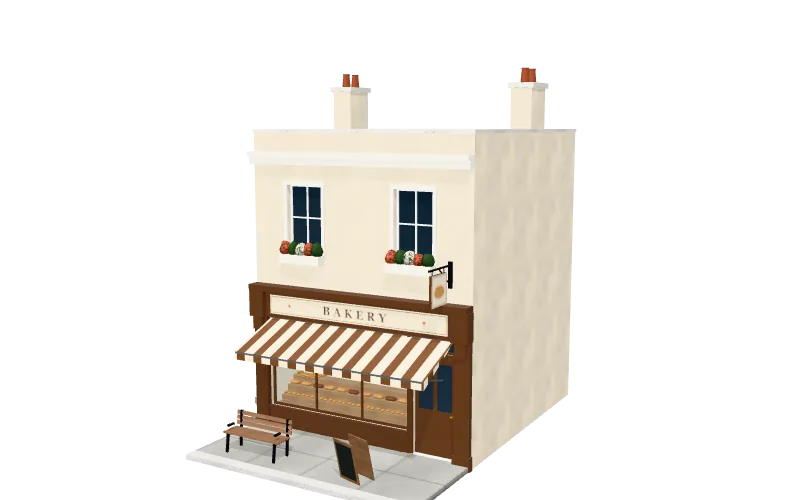
Bakery
Bread in the window
A two storey bakery: a brown shopfront, a brown striped awning, a window of loaves, buns, baguettes and a cake on steps, and a loaf sign.
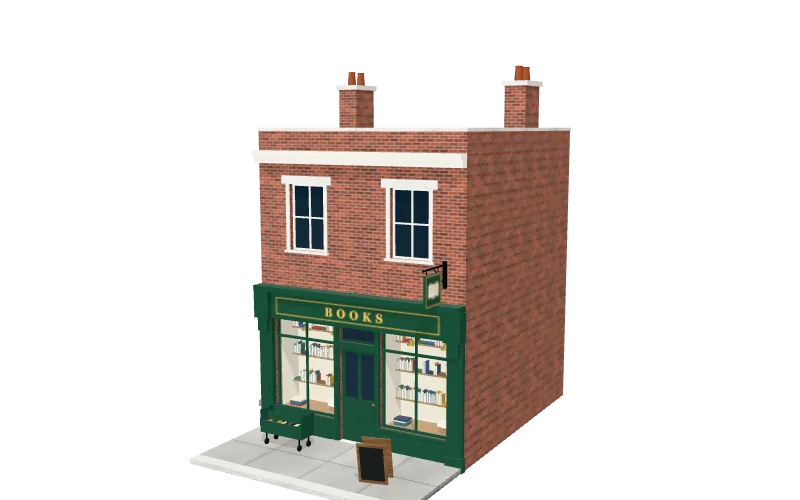
Bookshop
Brick, shelves of books
A red brick bookshop with a green shopfront, a centre door between two windows of book shelves, a hanging book sign and a book trolley.
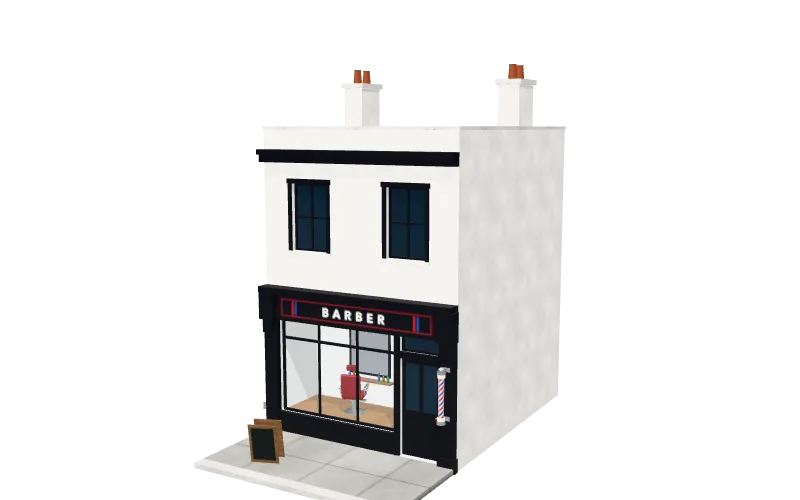
Barber Shop
Striped pole, chair
A white barber shop with a black shopfront, a red, white and blue striped pole, and a red barber chair before a mirror in the window.
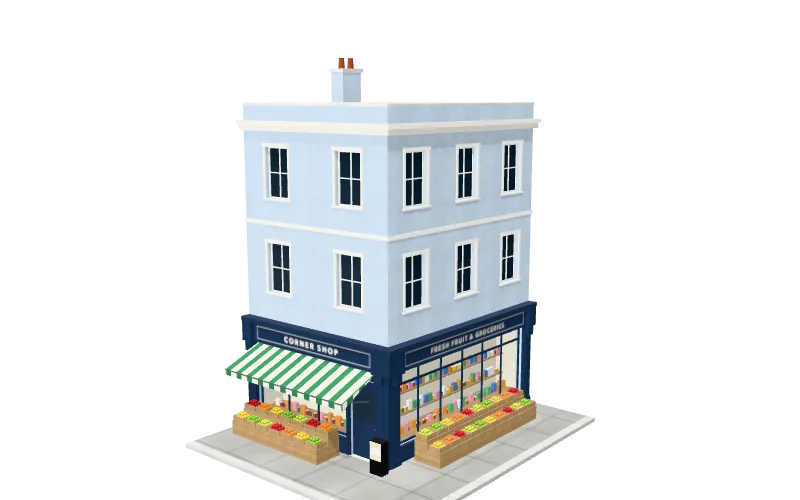
Corner Shop
Two shopfronts, fruit
A corner grocery with navy shopfronts on two streets, shelves of tins, jars and boxes, and crates of apples, oranges and lemons outside.
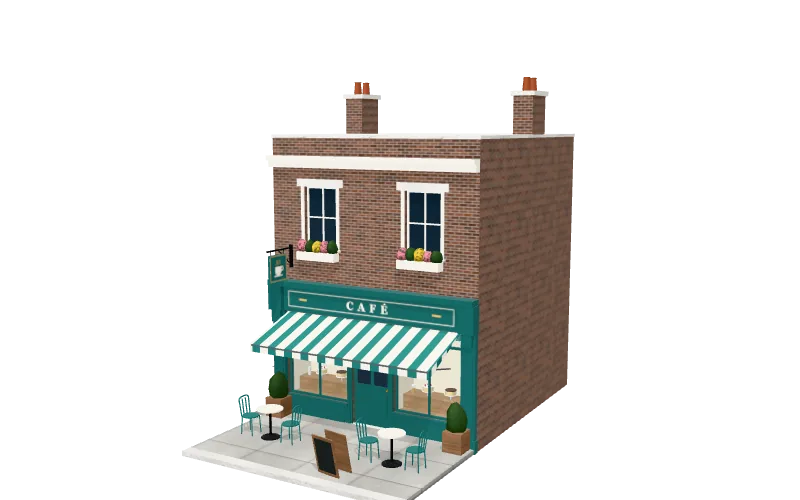
Café Front
Tables on the pavement
A brown brick café with a teal shopfront and awning, cakes and cups in the window, bistro tables on the pavement and a chalk A-board.
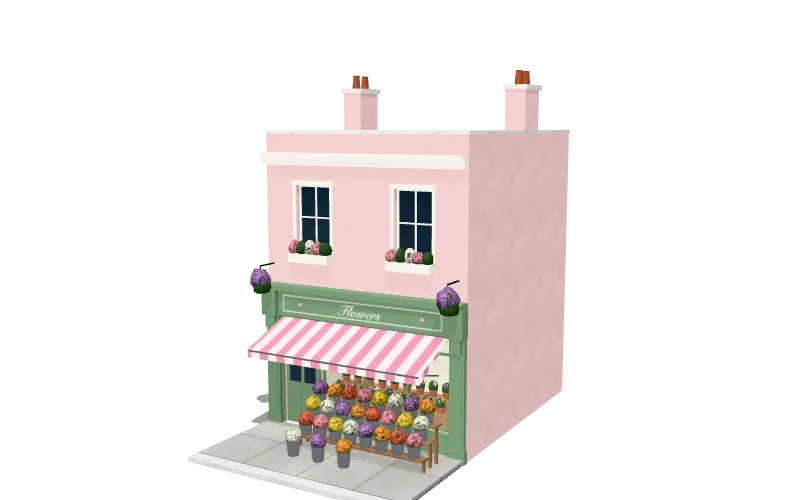
Florist
Buckets of flowers
A pink florist with a sage shopfront, a pink awning, potted plants in the window, hanging baskets and buckets of flowers on staging.
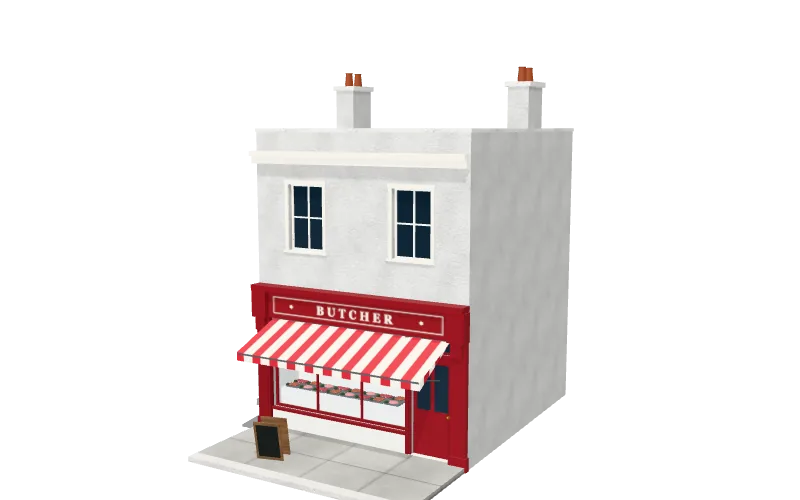
Butcher
Tiles, meat counter
A butcher with a red shopfront, white tiles under the window, a red striped awning and trays of meat, sausages and parsley on a counter.
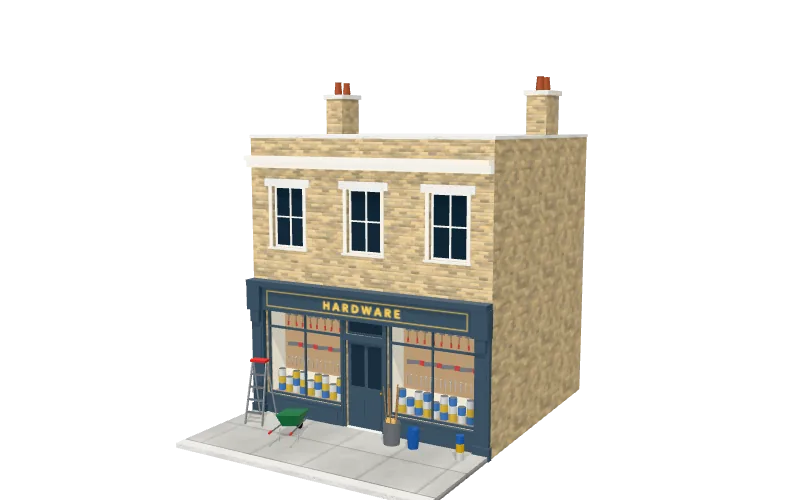
Hardware Store
Ladders, tools, tins
A yellow brick hardware store with tools on pegboard and paint tins in the windows, and a ladder, wheelbarrow and brooms outside.
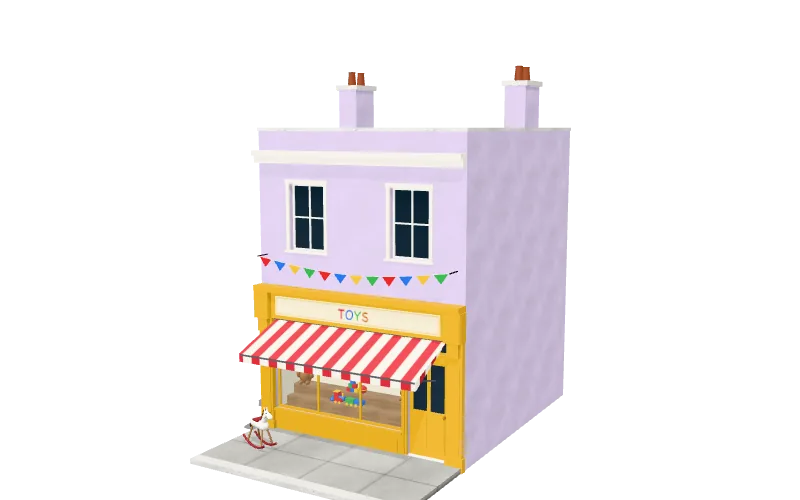
Toy Shop
Teddy bear, blocks
A lilac toy shop with a yellow shopfront, a red awning and bunting, a teddy bear, blocks, a ball and a toy train in the window.
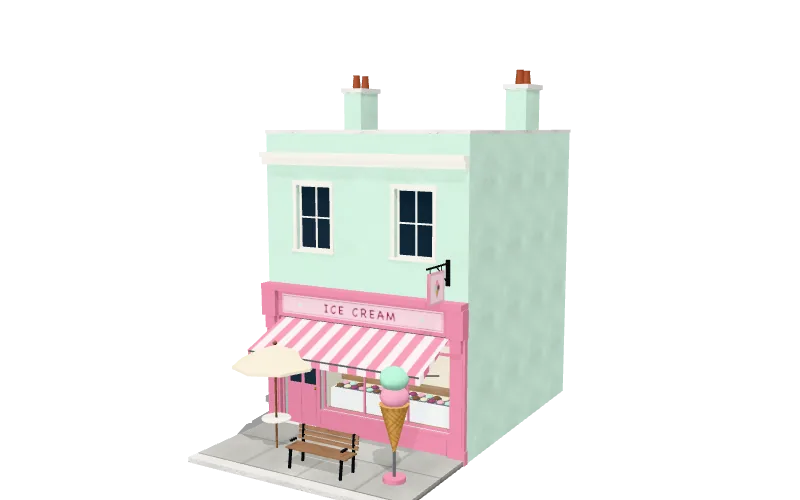
Ice Cream Parlour
Tubs, giant cone
A mint ice cream parlour with a pink shopfront and awning, tubs of ice cream in the window, a giant cone outside and a cone sign.
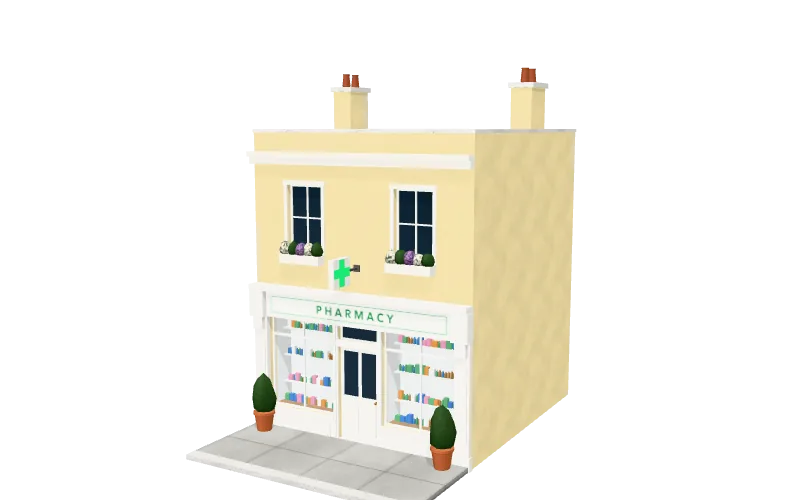
Pharmacy
Green cross sign
A pharmacy with a white shopfront, a glowing green cross sign, and shelves of bottles and boxes in the windows behind clear glass.
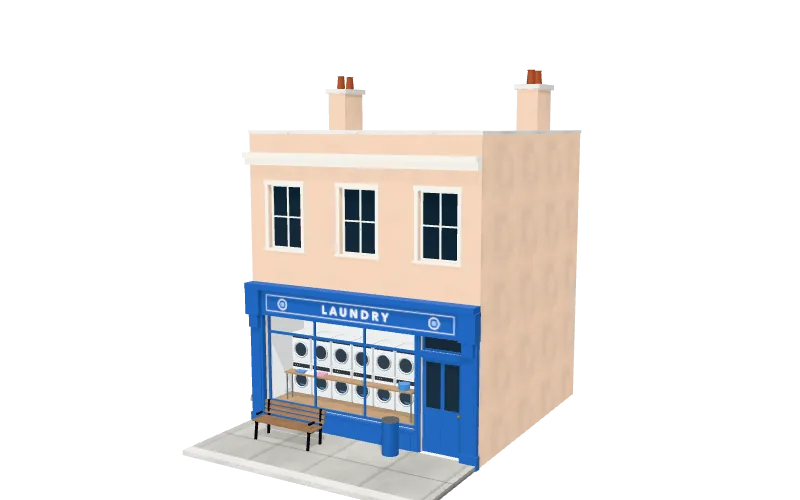
Laundromat
Washers and dryers
A laundromat with a blue shopfront and a wide window showing stacked white washers and dryers, with a bench and a bin outside.
Made for games
- Windows you can see intoDisplay windows use clear glass with a lit box behind, so you see loaves, books, a barber chair, meat trays, tools, toys, ice cream tubs or washers inside.
- A whole high streetTwelve narrow terraced buildings of the same scale with stucco or brick upper floors, two storeys tall and the corner shop three, so they line up into a street.
- Street life includedStriped awnings, hanging signs, A-boards, benches, bistro tables, fruit crates, flower buckets, a barber pole, a giant cone and a glowing green cross.
- Real sizeIn metres, each about 5 to 7 m wide and 9 m to the chimney tops, with the shopfront facing +Z and the pavement at ground level.
How to use these GLB models
GLB is binary glTF 2.0: one file with the mesh, materials and node names. Every modern 3D tool reads it.
three.js
Load it with GLTFLoader, as in the code below. Babylon.js, PlayCanvas and A-Frame load GLB directly too.
Unity
Add the free glTFast package (Package Manager, add by name: com.unity.cloud.gltfast), then drag the .glb into Assets.
Godot 4
Drop the .glb into the FileSystem dock. Godot imports it as a scene you can instance.
Blender
File, Import, glTF 2.0. From there you can also export to FBX, OBJ or STL.
import * as THREE from 'three';
import { GLTFLoader } from 'three/addons/loaders/GLTFLoader.js';

const gltf = await new GLTFLoader().loadAsync('model.glb');
const model = gltf.scene;
scene.add(model);

// the model is in metres, +Y up, facing +Z, standing on the ground at the origin

// line up a high street: each shop is about 6 m wide
const names = ['bakery', 'bookshop', 'barber-shop', 'florist', 'pharmacy'];
let x = 0;
for (const n of names) {
  const shop = (await new GLTFLoader().loadAsync(n + '.glb')).scene;
  const w = new THREE.Box3().setFromObject(shop).getSize(new THREE.Vector3()).x;
  shop.position.x = x + w / 2;
  scene.add(shop);
  x += w;
}
Licence: free with credit (CC BY 4.0)
All models are made by vinish.dev and released under Creative Commons Attribution 4.0. You may use them in personal and commercial projects, change them and share them. The one condition is credit, for example in your game's credits, your app's about page or your video description:
Each file carries its own credit line inside it (the glTF asset.copyright field), and each zip has a CREDITS.txt. If you change a model, say so after the credit, for example "recoloured".
Questions
Are these real shops or brands?
No. Each one is an original design made in code by vinish.dev. The signs carry plain words such as BAKERY or BOOKS, with no shop names, brands or logos.
Can I see inside the shops?
You can see into the display windows: each window has a shallow lit box behind clear glass with goods set out in it. The rest of the building is a closed shell with no rooms inside.
Can I change the sign or colours?
Yes. Each sign is its own material, such as Sign_Bakery, so you can swap its texture. Shopfront paints like Paint_Green and walls like Stucco_Pink are separate materials too.
Do the shops fit together in a row?
Yes. They share one scale, storey height and pavement height, with plain side walls, so you can set them side by side into a terraced street. The corner shop has shopfronts on two sides for a street corner.
Can I use them in Unity, Unreal, Godot or Blender?
Yes. Download GLB, or pick OBJ or STL. They are light, from 8,000 to 67,000 triangles, so a full street runs well in a game.
Can I use these models in a commercial game?
Yes. CC BY 4.0 allows commercial use. Put the credit line in your credits or about screen.
Do I need an account?
No. There is no login, sign-up or email. Click Download and the file is yours.
Can I get OBJ, STL or glTF?
Yes. Press the arrow next to Download GLB, or open the 3D view, and pick glTF, OBJ or STL. Your browser makes the file from the GLB in a second or two. OBJ and STL have no animation. STL is in millimetres with Z up; the models are made of separate parts, so a slicer may need to repair or merge them before 3D printing. For FBX, import the GLB into Blender (File, Import, glTF 2.0) and export it.
Can I change the models?
Yes. You may edit, recolour or cut them up. Keep the credit and mention that you changed them.
More from vinish.dev
- Free 3D Models: every pack in the library
- All 3D model categories: the full list on one page, with a search box
- Free Arcade 3D Models: Arcade cabinet, claw machine, air hockey, pinball, racing and dance machines, basketball and ball roll games, a boxing machine, a token changer and prizes.
- Free Fence and Gate 3D Models: Picket, split rail, closeboard, slat, chain-link, bamboo and glass fences, a garden arch, driveway and field gates, brick, stone and gabion walls.
- Free Bed 3D Models: King, single, bunk, four-poster, loft, iron, platform and storage beds, a baby cot, a toddler bed, a daybed and a hospital bed, all made up.
- Free Platformer Kit 3D Models: Grass and stone blocks, a floating island, crate, coin, gem, heart, key, spring pad, spikes, saw, checkpoint flag, goal portal, ladder and button.
- Free Cosmetics and Perfume 3D Models: Perfume and cologne bottles, lipstick, lip gloss, nail polish, mascara, powder compact, eyeshadow palette, face cream, lotion, serum and a brush set.
- Free Low Poly City 3D Models: Office tower, apartment block, corner shop, fuel station, sedan, city bus, traffic light, street lamp, park tree, two road tiles and a park bench.
- Free Wild West Prop 3D Models: Covered wagon, wagon wheel, water trough, hitching post, wanted board, saguaro, saddle, oil lantern, cattle skull, mine cart, rocking chair and saloon doors.
- Free Fantasy Weapon 3D Models: Crystal sword, flame sword, rune hammer, battle axe, wizard staff, magic wand, shadow scythe, frost spear, longbow, emerald dagger, spiked flail and sea trident.
- Free Vegetable 3D Models: Carrots, vine tomatoes, bell peppers, broccoli, potatoes, red onions, cucumber, aubergine, corn, pumpkin, garlic, mushrooms, cauliflower, lettuce, chillies and a veg crate.
- Free Bag and Backpack 3D Models: School backpack, hiking rucksack, satchel, canvas tote, handbag, duffel, messenger bag, briefcase, rolling suitcase, clutch, drawstring bag and belt bag.
- Free Casual People 3D Models: Men and women in a hoodie, summer dress, shorts and cap, denim jacket, flannel shirt, sweater, cardigan, puffer jacket, backpack, dungarees, polo shirt and tracksuit.
- Free Insect 3D Models: Ladybug, honey bee, dragonfly, wasp, house fly, grasshopper, praying mantis, ant, firefly, cicada, stag beetle and rhinoceros beetle, rigged and animated.
- Free Broadleaf Tree 3D Models: Spreading oak, beech, copper beech, sugar maple, elm, horse chestnut, plane, lime, ash, Lombardy poplar, magnolia and pollard willow.
- Free Barrel and Drum 3D Models: Oak barrel, wine barrel on a cradle, beer keg, rusty drum, open-top drum, plastic drum, IBC tote, water butt, burn barrel, planter, fibre drum and spill pallet.
- Free Camera 3D Models: DSLR, mirrorless, compact, rangefinder, instant, action camera, tripod, camcorder, bellows, twin-lens, cinema and security cameras.
- Free Wild West Town 3D Models: Saloon, bank, sheriff's office, general store, livery stable, blacksmith, hotel, church, train depot, water tower, barber shop and outhouse.
- Free Sci-Fi Crate and Prop 3D Models: Cargo crate, crate stack, loot chest, hard case, barrel, fuel canister, energy cell, console, holo table, server rack, generator and cryo pod.
- Free Pirate Ship 3D Models: Galleon, ghost ship, sloop, schooner, brigantine, frigate, caravel, junk, longboat, raft, shipwreck and a cartoon pirate ship.
- Free Pickup and SUV 3D Models: Crew cab, work, extended cab, trail, canopy, sport and camper pickups, plus three-row, coupe, family, rugged and compact SUVs.
- Free Horror Props 3D Models: Porcelain doll, hanging hooks, old wheelchair, candle circle, spirit board, music box, old TV, bear trap, axe block, hanging cage, cracked mirror and haunted portrait.
- Free Chair 3D Models: Rocking, wingback, folding, bentwood, Windsor, ladder-back, Adirondack, director's, stacking, counter stool, deck, papasan, high chair and gaming chair.
- Free Phone Stand 3D Models: Angled, folding, desk dock, tablet, adjustable, zigzag, pen cup, bedside dock, cat, double, cube and card phone stands, ready to 3D print.
- Free Christmas Village 3D Models: Snowy cottage, toy shop, bakery, village chapel, market stall, lamp post, kids sled, snowy fir, square clock, ice rink, letter box and bandstand.
- Free Tavern 3D Models: Bar counter, ale tankard, trestle table, bar stool, stone fireplace, tavern sign, barrel rack, wheel chandelier, feast platter, quest board, lute and jug with goblets.
- Free Supermarket 3D Models: Shopping cart, basket, basket stack, grocery shelf, breakfast shelf, chest freezer, drinks fridge, checkout, self checkout, produce stand, deli counter, pallet display, aisle sign, grocery bag, entrance gate and bread rack.
- Free Stairs and Ladder 3D Models: Straight staircase, spiral staircase, fire escape, step ladder, extension ladder, wooden ladder, concrete steps, floating stairs, library ladder, loft ladder, stone steps and rope ladder.
- Free Ancient Egypt 3D Models: Pyramid, step pyramid, sphinx, obelisk, stone sarcophagus, painted coffin, canopic jars, papyrus column, temple gateway, scarab statue, gold ankh and carved wall.
- Free Conifer Tree 3D Models: Norway spruce, Scots pine, blue spruce, balsam fir, cedar, golden larch, stone pine, redwood, juniper, yew, monkey puzzle tree and spruce sapling.
- Free Power Tool 3D Models: Cordless drill, impact driver, angle grinder, circular saw, jigsaw, random orbit sander, belt sander, reciprocating saw, heat gun, brad nailer, rotary tool and wood router.
- Free Spaceship 3D Models: Orbital shuttle, interceptor, cargo courier, deep space explorer, science vessel, heavy freighter, mining ship, dropship, space yacht, scout ship, space tug and escape pod.
- Free Sports Car 3D Models: Hypercar, track day coupe, mid-engine coupe, V12 grand coupe, widebody drift coupe, targa, V8 fastback, drag coupe, super saloon, electric saloon, rally hatchback and pocket rocket.
- Free Sofa 3D Models: Two seat sofa, corner sofa, buttoned leather sofa, sofa bed, recliner, mid-century sofa, curved velvet sofa, camelback sofa, chaise longue, futon, modular floor sofa and rattan outdoor sofa.
- Free Treasure 3D Models: Open treasure chest, jewellery box, gem pouch, golden sceptre, royal orb, giant clam and pearl, golden owl statue, iron strongbox, coin urn, jewelled dagger, ruby ring and gold amulet.
- Free Helicopter 3D Models: Training, news, police, air ambulance, attack, tandem rotor, utility, coaxial, sky crane, sea rescue, firefighting and executive helicopters.
- Free Pirate 3D Models: Ship cannon, ship's wheel, anchor, rum barrel, spyglass, pirate flag, cutlass, treasure map, brass compass, powder keg, cannonball pile and tricorn hat.
- Free Street Lamp 3D Models: LED street light, cobra head, double arm, Victorian gas lamp, park globe, three globe post, bollard, solar light, hanging lantern, art deco lamp, wall lantern and floodlight pole.
- Free Clock 3D Models: Wall clock, grandfather clock, alarm clock, mantel clock, cuckoo clock, station clock, digital clock, pocket watch, wristwatch, sunburst, carriage and skeleton clock.
- Free Hat 3D Models: Top hat, bowler, fedora, cowboy hat, baseball cap, beanie, straw sun hat, bucket hat, beret, flat cap, chef hat and witch hat.
- Free Cat 3D Models: Orange tabby, black cat, Siamese, Persian, Maine Coon, British Shorthair, Sphynx, Bengal, Ragdoll, calico, tuxedo and Scottish Fold, rigged and animated.
- Free Fruit 3D Models: Apple, pear, bananas, orange, lemon, grapes, pineapple, watermelon, strawberries, cherries, peach, kiwi, plums, avocado, coconut and a fruit bowl.
- Free Window 3D Models: Sash, casement, arched, round, shop, bay, dormer, roof, awning, sliding, stained glass, shuttered, steel and louvre windows.
- Free Cafe 3D Models: Espresso machine, grinder, counter, cake case, menu boards, tables, coffee cups, pastries and barista tools.
- Free Sci-Fi Corridor 3D Models: Corridor modules, walls, floors, ceiling, sliding door, airlock, bulkhead, stairs and a light.
- Free Butterfly and Moth 3D Models: Monarch, swallowtail, morpho, peacock, cabbage white, glasswing, luna, atlas, two hawkmoths, a caterpillar and a chrysalis.
- Free Office Supplies 3D Models: Stapler, tape, scissors, hole punch, desk organizer, file, clipboard, fountain pen, stamps, sharpener, trimmer and letter trays.
- Free Low Poly Car 3D Models for Games: 12 vehicles with separate wheels
- Sample GLB Files: small test files for loaders, viewers and engines
- Free browser games and simulators by vinish.dev