NEW Written for Oracle Forms 14.1.2 · Fusion Middleware 14c

Oracle Forms 14c The Complete Developer's Guide

Build, program, and deploy Oracle Forms 14.1.2 applications — every form built and run in a real lab, with the screenshots to prove it. From your first data block to a finished clinic application, with every property, built-in, and trigger explained.

  • Data blocks
  • Triggers
  • Built-ins
  • LOVs
  • Menus and roles
  • WebUtil
  • REST and JSON
  • Oracle Reports
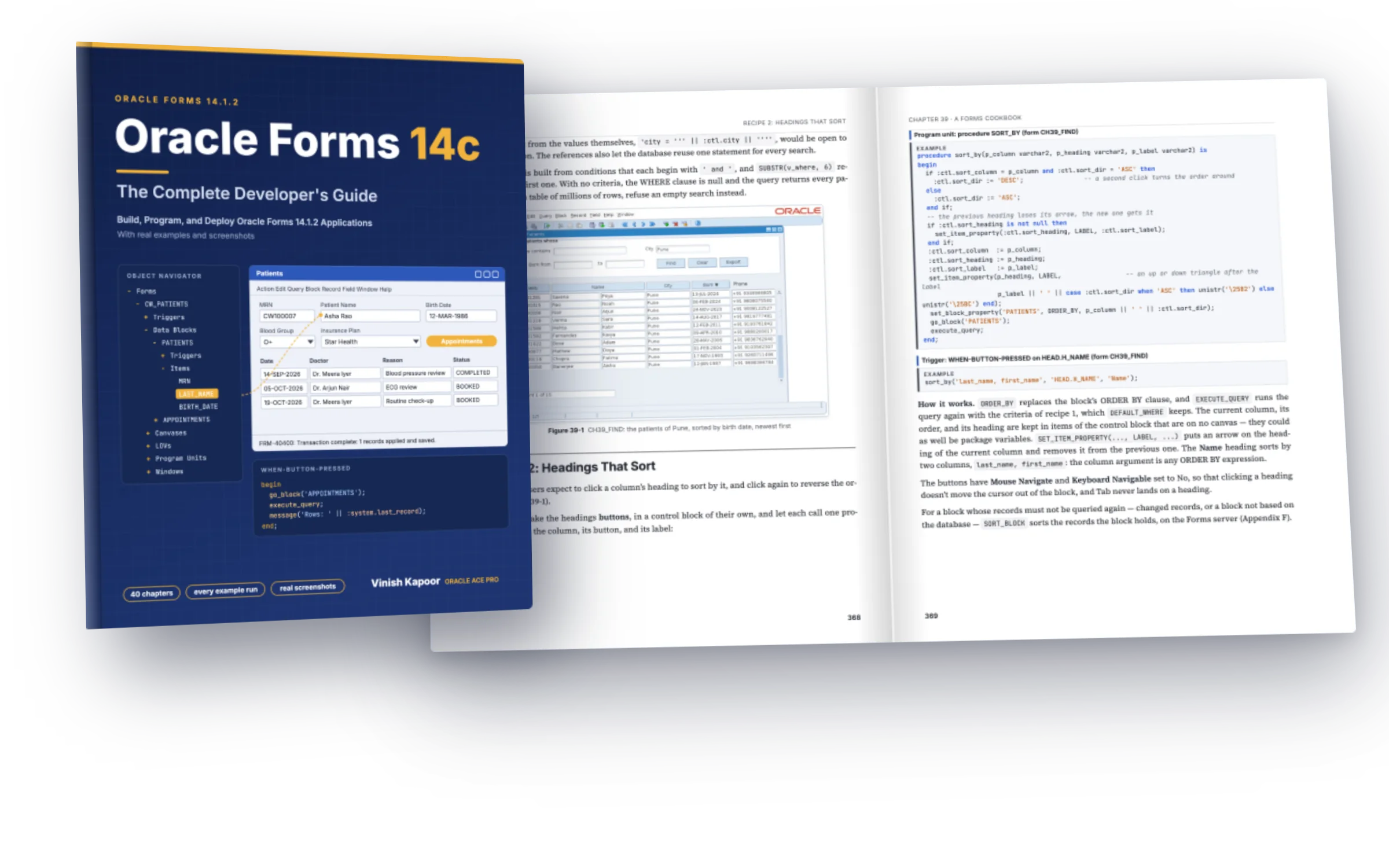
The book Oracle Forms 14c, in front of two facing pages of the Forms Cookbook with a patient search form and its code
40Chapters
64Forms built and run
147PL/SQL examples
187Figures and screenshots
484Pages
Why this book

Forms explained, and shown running

Oracle Forms runs thousands of business applications, and Forms 14.1.2 is its largest release in years. Yet most of what you find about it was written for Forms 6i, 10g, or 11g. This book covers the current release completely, and every form in it was built and run.

The usual way

Old forum answers, and screens you have to imagine

  • Online help that lists a property or a built-in, but rarely shows what it does to a running form.
  • Forum posts and blog snippets for client/server Forms, with no word on what the web and Java clients changed.
  • Trigger order, validation, and locking learned by trial and error in production.
  • REST, JSON, database events, and the new item styles of 14.1.2, barely described anywhere.
With this book

Every feature, built, run, and shown

  • One book for Forms Builder, PL/SQL in Forms, and Forms Services, written for Forms 14.1.2.
  • 64 forms built and run against Oracle AI Database 26ai, with 187 figures of what they did.
  • One sample application, CareWell Clinic, from the first chapter to a finished application.
  • Every property, built-in, trigger, and common error, in six reference appendices.
How an entry works

Syntax, example, and the screen it produced

Every code block in the book carries a label: SYNTAX for how to write a built-in, EXAMPLE for code from a form of CareWell Clinic, and OUTPUT for what the example did. For a form, the output is usually the screen itself.

01

Find the built-in

By task in the contents, or by name in Appendix B and the index. Each entry starts with its syntax — here, a built-in new in Forms 14.1.2.

Syntax
sort_block(item, [option1, option2, option3, option4])-- options, in any order: -- ASCENDING | DESCENDING -- NULLS_FIRST | NULLS_LAST -- CASE_SENSITIVE | CASE_INSENSITIVE
02

Read the example

A trigger from a form of the book, with the lesson the lab taught: SORT_BLOCK sorts only the records the block has fetched, so fetch the rest first.

Example · WHEN-BUTTON-PRESSED
-- SORT_BLOCK sorts the records the block holds: fetch the rest first go_block('DOCTORS'); last_record; sort_block('DOCTORS.CONSULT_FEE', DESCENDING, NULLS_LAST); first_record; -- the cursor stays with its record: go back to the top
03

See what it did

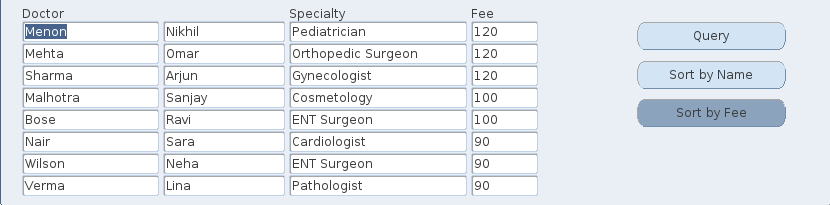
The form as it ran in Oracle Forms 14.1.2: the doctors sorted by fee on the Forms server, without a new query.
Output · APPF_NEW
The doctors of the form APPF_NEW sorted by consultation fee, highest first
Examples and screens

The code, and the form it ran in

Every form was generated, compiled, and run in Oracle Forms 14.1.2, and every screenshot was taken from the running form. Here are six examples, as they appear in the book.
Oracle Forms 14.1.2 · Chapter 39 · A query-find form
PL/SQL · procedure FIND_PATIENTS
procedure find_patients is v_where varchar2(1000); begin -- each criterion the user filled adds a condition; the values stay bind references if :ctl.name is not null then v_where := v_where || ' and upper(last_name || '' '' || first_name) like ''%'' || upper(:ctl.name) || ''%'''; end if; if :ctl.city is not null then v_where := v_where || ' and city = :ctl.city'; end if; if :ctl.born_from is not null then v_where := v_where || ' and birth_date >= :ctl.born_from'; end if; if :ctl.born_to is not null then v_where := v_where || ' and birth_date < :ctl.born_to + 1'; end if; set_block_property('PATIENTS', DEFAULT_WHERE, substr(v_where, 6)); go_block('PATIENTS'); :system.message_level := '25'; -- hide FRM-40355, the message of COUNT_QUERY count_query; :system.message_level := '0'; :ctl.total := get_block_property('PATIENTS', QUERY_HITS); execute_query; end;
The running form
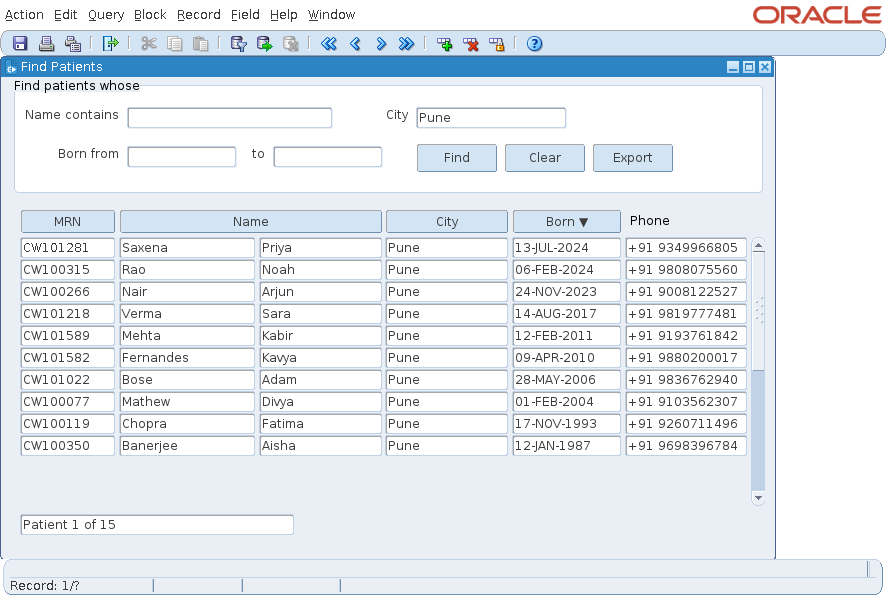
The form CH39_FIND with the patients who live in Pune
PL/SQL · procedure CHECK_DOUBLE_BOOKING
procedure check_double_booking is v_other appointments.appt_id%type; begin if :appointments.status = 'CANCELLED' then return; end if; select min(appt_id) into v_other from appointments a where a.doctor_id = :appointments.doctor_id and a.status <> 'CANCELLED' and a.appt_id <> nvl(:appointments.appt_id, -1) and a.appt_start < :appointments.appt_start + :appointments.duration_min / 1440 and :appointments.appt_start < a.appt_start + a.duration_min / 1440; if v_other is not null then message('Dr ' || :appointments.doctor_name || ' already has appointment ' || v_other || ' at that time.'); raise form_trigger_failure; end if; end;
The running form
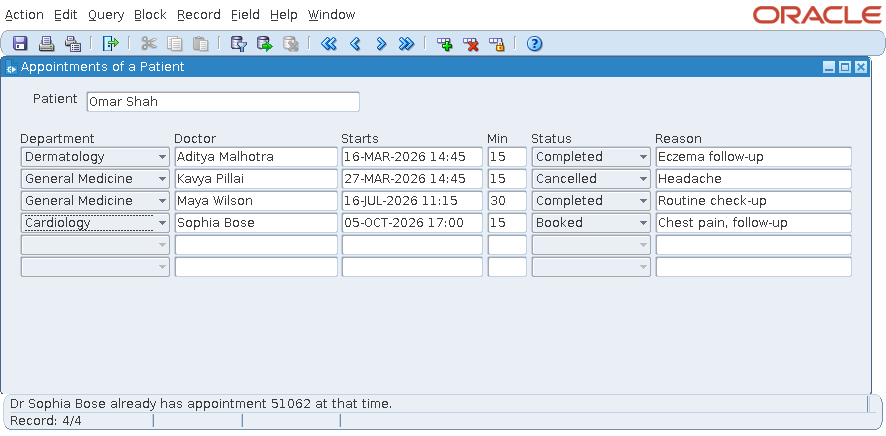
The appointments of a patient, with the message that the doctor already has an appointment at that time
PL/SQL · WHEN-BUTTON-PRESSED
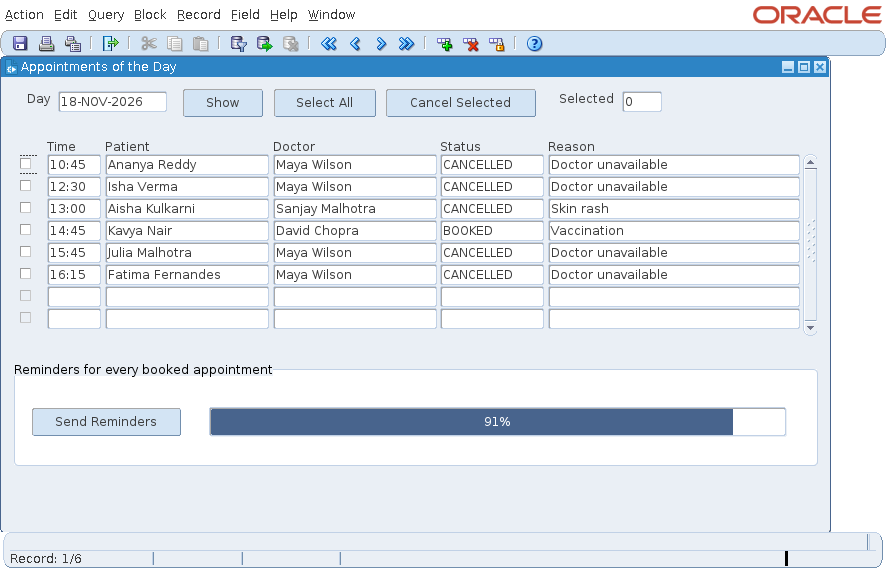
declare v_out text_io.file_type; v_total pls_integer; v_done pls_integer := 0; begin select count(*) into v_total from appointments where status = 'BOOKED' and appt_start > sysdate; v_out := text_io.fopen('/work/transfer/out/reminders.txt', 'w'); set_application_property(CURSOR_STYLE, 'BUSY'); for r in (select a.appt_start, p.first_name, p.phone, d.last_name doctor from appointments a, patients p, doctors d where p.patient_id = a.patient_id and d.doctor_id = a.doctor_id and a.status = 'BOOKED' and a.appt_start > sysdate order by a.appt_start) loop text_io.put_line(v_out, r.phone || ': Dear ' || r.first_name || ', a reminder of your appointment with Dr ' || r.doctor || ' on ' || to_char(r.appt_start, 'DD-MON-YYYY "at" HH24:MI') || '.'); v_done := v_done + 1; if mod(v_done, 10) = 0 or v_done = v_total then :ctl.progress := round(100 * v_done / v_total); synchronize; -- show the new value now, not when the trigger ends end if; end loop; text_io.fclose(v_out); set_application_property(CURSOR_STYLE, 'DEFAULT'); end;
The running form
The form of the day's appointments with a progress bar at 91 percent
PL/SQL · WHEN-BUTTON-PRESSED
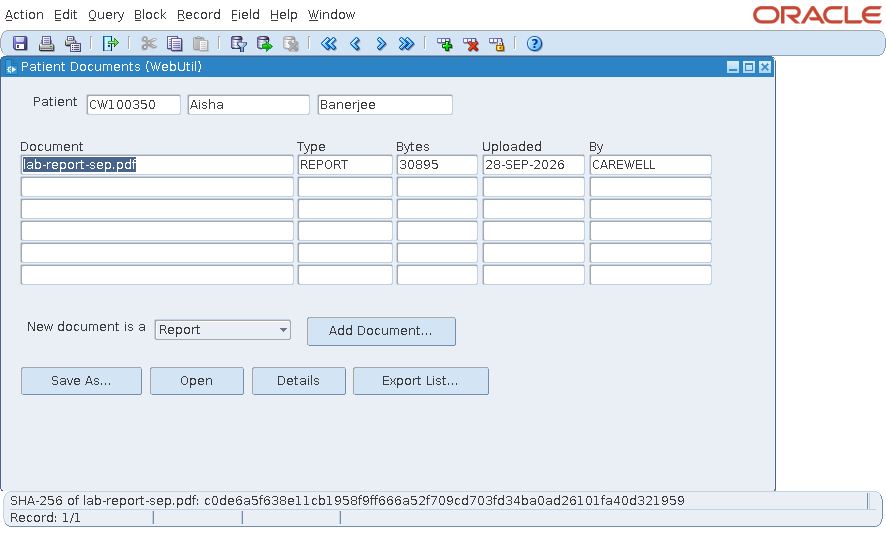
-- runs a program on the client and reads what it printed: the SHA-256 checksum of the document declare v_file varchar2(500); v_cmd varchar2(600); v_proc webutil_host.process_id; v_out webutil_host.output_array; begin v_file := rtrim(webutil_clientinfo.get_system_property('java.io.tmpdir'), webutil_clientinfo.get_file_separator) || webutil_clientinfo.get_file_separator || :docs.file_name; if not webutil_file_transfer.db_to_client(v_file, 'PATIENT_DOCUMENTS', 'CONTENT', 'DOC_ID = ' || :docs.doc_id) then return; end if; v_cmd := case when webutil_clientinfo.get_operating_system like 'Mac%' then 'shasum -a 256 ' else 'sha256sum ' end || v_file; v_proc := webutil_host.blocking(v_cmd); v_out := webutil_host.get_standard_output(v_proc); if v_out.count > 0 then message('SHA-256 of ' || :docs.file_name || ': ' || substr(v_out(v_out.first), 1, 64)); end if; webutil_host.release_process(v_proc); end;
The running form
The form Patient Documents with the SHA-256 checksum of a document on the message line
PL/SQL · WHEN-BUTTON-PRESSED
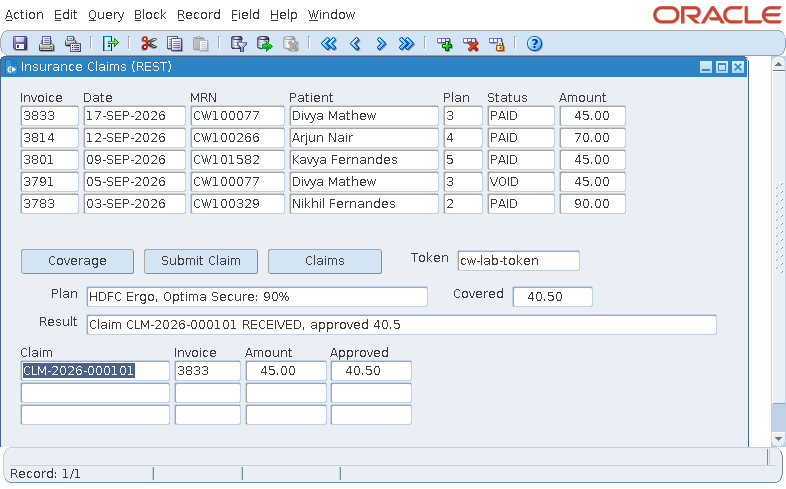
declare v_params fjson.element_t := fjson.new_object(1); v_headers fjson.element_t := fjson.new_object(1); v_rheads fjson.element_t; v_claims fjson.element_t; v_claim fjson.element_t; v_status pls_integer; begin fjson.put_string(v_params, 'mrn', :invoices.mrn); fjson.put_string(v_headers, 'Authorization', 'Bearer ' || :ctl.token); v_status := fhttp.issue_request('GET', 'http://localhost:8098', '/api/v1/claims?patient={mrn}', v_params, v_headers, null, null, '*', null, 5000, 5000, v_rheads, v_claims); go_block('CLAIMS'); clear_block(no_validate); for i in 1 .. fjson.num_elements(v_claims) loop -- the response is a JSON array v_claim := fjson.find(v_claims, i); :claims.claim_id := fjson.get_string_value(v_claim, 'claimId'); :claims.invoice_id := fjson.get_number_value(v_claim, 'invoiceId'); :claims.amount := fjson.get_number_value(v_claim, 'amount'); :claims.approved := fjson.get_number_value(v_claim, 'approvedAmount'); next_record; end loop; first_record; fjson.free_all; end;
The running form
The form Insurance Claims with coverage, a submitted claim, and the claims returned by a REST service
PL/SQL · sign-in, and the shared library
-- WHEN-BUTTON-PRESSED on CTL.SIGN_IN (form CW_LOGIN) cw_sec.login(:ctl.username); -- fails with a message for an unknown user new_form('cw_main', full_rollback, no_query_only, share_library_data);-- WHEN-BUTTON-PRESSED in CW_PATIENTS: every form opens the others through -- the package CW_NAV of the library CW_LIB, for the patient on the screen cw_nav.open_module('cw_appointments', :patients.patient_id);
The running form
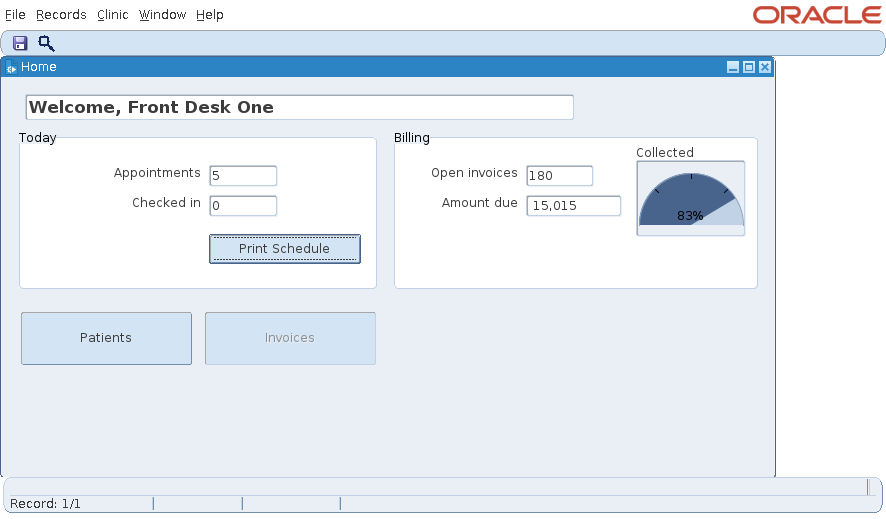
The home form of CareWell Clinic with today's appointments, open invoices, and a half gauge of the amount collected

Chapter 39: a search form builds its WHERE clause from the criteria the user filled in, counts the rows, and queries them.

Look inside

Real pages from the book

Chapters that open with what you will learn, code labeled SYNTAX, EXAMPLE, and OUTPUT, and screenshots of every form at work. Click any page to read it.

Pages shown from the full-color edition. The Kindle edition shows code and screenshots in color; the paperback is printed in black and white.

What the book covers

All of Oracle Forms, from Builder to production

Every kind of object a form is made of, PL/SQL in Forms from triggers to libraries, the integrations of a modern Forms application, and how to deploy, secure, and upgrade it.

CH 1–5Getting startedInstalling Forms 14.1.2, a tour of Forms Builder, a first working form, and the CareWell Clinic schema.
CH 6–8Modules and blocksForm modules, data blocks, the Data Block Wizard, and master-detail relations.
CH 9–12Every kind of itemText and display items, lists, check boxes, radio groups, buttons, images, charts, and trees.
CH 13–16Screens and dialogsCanvases, windows, the Layout Editor, visual attributes, LOVs, record groups, alerts, and editors.
CH 17–21PL/SQL and triggersTriggers and the order they fire in, validation, query processing, transactions, and locking.
CH 22–26Larger applicationsChanging a form at run time, libraries, applications of many forms, menus and roles, and debugging.
CH 27–29Advanced blocksBlocks on procedures and queries, object libraries and templates, timers, and database events.
CH 30–31WebUtil, Java, JavaScriptThe user's files and documents in the database, Java beans, and JavaScript in the browser page.
CH 32–33REST and Reports 14.1.2REST services with FHTTP and FJSON, the REST Package Designer, and Oracle Reports.
CH 34–36Deploy and administerPerformance, formsweb.cfg and Forms Services, the Standalone Launcher, administration, and security.
CH 37–38Upgrade and automateUpgrading forms from older releases, and building and compiling forms with scripts and the Java API.
CH 39–40Putting it togetherA cookbook of eleven recipes, and CareWell Clinic assembled from sign-in to deployment.
Contents

Six parts, 40 chapters

Read Part I to set up Forms 14.1.2 and meet CareWell Clinic, then read on or go to the chapter you need. Six appendices hold every property, built-in, trigger, and common error.

IChapters 1–5

Getting Started

Installing Oracle Forms 14.1.2, a tour of Forms Builder, a first working form, and CareWell Clinic.

  • 1How to Use This Book
  • 2Installing Oracle Forms 14.1.2
  • 3A Tour of Forms Builder
  • 4Your First Form
  • 5The CareWell Clinic Application
IIChapters 6–16

Building Forms

The objects a form is made of, and the Layout Editor that arranges them.

  • 6Modules
  • 7Data Blocks
  • 8Master-Detail Relations
  • 9Text and Display Items
  • 10Lists, Check Boxes, and Radio Groups
  • 11Buttons, Images, and Charts
  • 12Hierarchical Trees
  • 13Canvases and Windows
  • 14The Layout Editor and Visual Attributes
  • 15Lists of Values and Record Groups
  • 16Alerts, Editors, and Parameters
IIIChapters 17–26

Programming Forms

PL/SQL in Forms, from the first trigger to applications of many forms.

  • 17PL/SQL in Forms
  • 18Triggers
  • 19Validation
  • 20Query Processing
  • 21Transactions and Locking
  • 22Changing a Form at Run Time
  • 23PL/SQL Libraries
  • 24Applications of Many Forms
  • 25Menus and Security
  • 26Errors, Messages, and Debugging
IVChapters 27–34

Advanced Forms

Advanced blocks, reuse, events, and the integrations of a modern Forms application.

  • 27Blocks on Procedures, Queries, and Triggers
  • 28Object Libraries and Templates
  • 29Timers and Events
  • 30WebUtil
  • 31Java and JavaScript in the Forms Client
  • 32REST Services and JSON
  • 33Oracle Reports
  • 34Performance
VChapters 35–38

Deploying and Managing

Configuring, administering, securing, and upgrading Forms applications.

  • 35Configuring Forms Services
  • 36Administration and Security
  • 37Upgrading to Forms 14.1.2
  • 38Automating Forms Development
VIChapters 39–40

Putting It Together

Recipes for the problems every Forms application meets, and CareWell Clinic from start to finish.

  • 39A Forms Cookbook
  • 40CareWell Clinic, End to End
A–FAppendices

The Reference

Everything in Forms 14.1.2 by name, to look up while you work.

  • AProperties by Object Type
  • BBuilt-ins and System Variables
  • CTriggers
  • DErrors and What They Mean
  • EKeys of the Forms Client
  • FWhat's New in Forms 14.1.2
New in Oracle Forms 14.1.2

The largest Forms release in years

Forms 14.1.2, released with Fusion Middleware 14c at the end of 2024, follows the 12c releases. The book marks what is new where it is described, and Appendix F lists every addition with its chapter.

32
REST services and JSONFHTTP calls REST services from PL/SQL, FJSON builds and reads JSON, and the REST Package Designer generates the calls
29
Database change notificationevents that tell a form a table, or a query's result, has changed
F
New item stylesplaceholders, character counters, switches, toggle buttons, progress bars, and gauges
F
Blocks that size and sort themselvesAutosize Block, WHEN-BLOCK-AUTOSIZED, SORT_BLOCK, tiles, and splitters
35
JDK 17 and 21, and the Standalone Launcherthe Java clients of 14.1.2, and Forms run without a browser
38
XML after saving, and Application Namemodules ready for version control, and for tools that read them
545properties described in Appendix A, by object type
260built-ins in Appendix B, with their parameters
93triggers in Appendix C, with when they fire
71common errors in Appendix D, with what they mean

Run in 14.1.2

Every form was compiled and run in Oracle Forms 14.1.2.0.0 while the book was written.

Real screens

No screen was mocked up: every screenshot shows a form of the book at work.

One application

All examples belong to CareWell Clinic, a clinic's patients, doctors, appointments, and billing.

A free lab

Oracle Forms is a free download for development, and Oracle AI Database 26ai Free costs nothing, as Chapter 2 shows.

Vinish Kapoor

Oracle ACE Pro · Oracle developer and architect

  • Oracle ACE every year since 2020
  • Oracle Forms and Reports for more than twenty years
  • Author of books on Oracle APEX and Oracle Database
About the author

Two decades of Oracle Forms

Forms applications since the early 2000s

Vinish wrote his first programs in 2001 and moved to Oracle Forms, SQL and PL/SQL soon after. Oracle Forms and Reports were for many years the center of his work, in applications for healthcare, education, hospitality, logistics, legal services, finance and retail.

A developer and architect

His work ranges from building and migrating large Oracle Forms systems to products of his own, such as the Rounds hospital management system and VinAura PDF, a visual report designer for Oracle APEX.

His fourth book

His earlier books are Oracle APEX 26.1: The Complete Guide, Oracle APEX 26.1 API by Example, and Oracle Database 26ai SQL and PL/SQL. His blog, vinish.dev, formerly foxinfotech, is read by developers around the world for its Oracle Forms, SQL, PL/SQL and APEX tutorials.

Every property. Every built-in. Every trigger. Each one shown at work in a form that really ran.

Get the book
  • Paperback, 484 pages
  • Kindle edition
  • Free forms and code on GitHub
FAQ

Frequently asked

Anything else? Ask on vinish.dev.

Who is this book for?

Developers who build or maintain Oracle Forms applications: those new to Forms who know some SQL and PL/SQL, experienced developers moving from Forms 6i, 10g, 11g, or 12c to 14.1.2, and anyone who needs a complete reference of properties, built-ins, and triggers. Read Part I first, then go on or go to the chapter you need.

Which version of Forms does it cover?

Oracle Forms 14.1.2, part of Oracle Fusion Middleware 14c. Most of the book applies to Forms 12c as well: what is new in 14.1.2 is marked in the text, and Appendix F lists it with its chapters. Chapter 37 covers upgrading forms from older releases.

Were the examples really run?

Yes. Every form of the book was generated, compiled, and run in Oracle Forms 14.1.2.0.0 against Oracle AI Database 26ai Free, and every screenshot was taken from the running form. The lab also showed what the documentation leaves out, and the book explains those lessons where they matter.

What is CareWell Clinic?

The book's sample application: a clinic with patients, doctors, departments, appointments, visits, prescriptions, and billing, on a schema of fourteen tables that installs with one script. Every example is a form of CareWell Clinic, and Chapter 40 assembles them into one application with sign-in, menus, and roles.

Does it cover WebUtil, REST, and Reports?

Yes. Chapter 30 covers WebUtil in depth: files, documents in the database, programs on the client, and large files. Chapter 32 covers REST services and JSON with FHTTP, FJSON, and the REST Package Designer. Chapter 33 covers Oracle Reports, and Chapter 31 Java beans and JavaScript.

Does it cover deployment and upgrades?

Yes. Part V covers configuring Forms Services and formsweb.cfg, the Forms Standalone Launcher, administration and security, performance, upgrading forms from older releases, and automating development with scripts and the Forms Java API.

Where are the forms and the code?

On GitHub, free: github.com/devvinish/oracle-forms-book-code has the 64 forms, the menus and libraries, the PL/SQL of every example, and the scripts that install the CareWell Clinic schema.

Is the paperback in color?

The paperback is printed in black and white on white paper, 7.5 by 9.25 inches, 484 pages, with a glossy cover. The Kindle edition shows the code and the screenshots in color.

Get the book

Paperback or Kindle, on Amazon

Both editions have the same 40 chapters, six appendices, and index. Pick the paperback for your desk, and the Kindle edition for code and screenshots in color on any screen.

  1. Get the bookFrom Amazon, in the edition you prefer.
  2. Install Forms and CareWell ClinicOracle Forms 14.1.2 and the sample schema, as Chapters 2 and 5 describe.
  3. Open the formsOpen a form of the book in Forms Builder, run it, and change it.

Paperback

$39.99on Amazon.com

  • 484 pages, 7.5 Ă— 9.25 in
  • Black and white on white paper
  • Glossy cover
  • ISBN 9798177639284
Buy the paperback

Kindle edition

$12.99on Amazon.com

  • Code and screenshots in color
  • Reflowable on any Kindle
  • Linked contents and index
  • Kindle apps for phone, tablet and PC
Buy for Kindle
github.comdevvinish / oracle-forms-book-code
Public

The forms and code of the book, free: every form, menu, and library, the PL/SQL of every example, and the scripts that install CareWell Clinic.

  • forms/the 64 forms, two menus, a library, and an object library
  • examples/the PL/SQL of every example, one folder per chapter
  • setup/carewell/the CareWell Clinic schema and its data
Open on GitHub
Or clone it
git clone https://github.com/devvinish/oracle-forms-book-code.git

00