The visual PDF report designer for Oracle APEX
VinAura is an Oracle APEX application that you install in your development environment. In it you draw invoices, statements and labels on a canvas, bind them to your SQL queries and page items, and get the PDF from any APEX page with one PL/SQL call. VinAura runs entirely inside your Oracle database, with nothing to install on a server and no Word templates. It is free to use.
- Invoices
- Statements
- Labels & barcodes
- Batch PDFs
- Totals & groups
- Page X of Y
- One PL/SQL call
What you no longer need for PDFs in APEX
- BI Publisherand its print server
- Word / RTF templatesand XML mapping
- Hand-coded PDFx/y positions in PL/SQL
- External servicesyour data stays in the database
Design in development. Print in production.
VinAura is an Oracle APEX application that runs inside Oracle APEX, next to your own applications. You use it in your development environment to design the reports your applications print. Production needs only the small PL/SQL runtime and your reports, not the designer.
The designer application
Import VinAura into your development workspace, beside the application you are building. There you write each report's queries, draw its layout, preview it, and try the call your pages will make.
- The VinAura APEX application: designer, reports, log, How to Use
- The
PDF_*tables and packages, including the designer package - Optional demo data and sample reports to learn from
Only the runtime
Your application in production prints with one PL/SQL call. It needs four tables, three packages and the reports you designed. There is no designer application, no demo, and no extra server.
- Tables
PDF_REPORTS,PDF_QUERIES,PDF_IMAGES,PDF_LOG - Packages
PDF_API,PDF_ENGINE,PDF_WRITER - Your reports and logos, exported from development as JSON or copied as rows
PDF reports in APEX shouldn't need a second product
An invoice with a logo, a bill-to box, a table of lines, totals and a signature is everyday work. In APEX it usually means BI Publisher and Word templates, or a PDF library where every line is placed by hand. VinAura gives you a designer instead, and keeps the whole thing in PL/SQL.
Templates, mappings and a print server
- Design in Microsoft Word, then map every field to an XML element.
- Install and license a print server, and keep it running beside the database.
- Or write a PDF by hand: every text, line and page break at x/y positions in code.
- A change of layout means a developer, a new template and a new deployment.
A designer, your queries and one call
- Draw the page in the browser: text and fields, boxes, lines, images, tables, barcodes.
- Bind it to up to ten SQL queries that use your page items,
:P11_INVOICE_ID. pdf_api.generate('INVOICE')returns the PDF as a BLOB, made in the database.- Change the layout, press Save: every page that prints it uses the new one at once.
Three steps from data to PDF
Queries give the data, the designer gives the look, and one procedure makes the PDF wherever you need it.
Write the queries
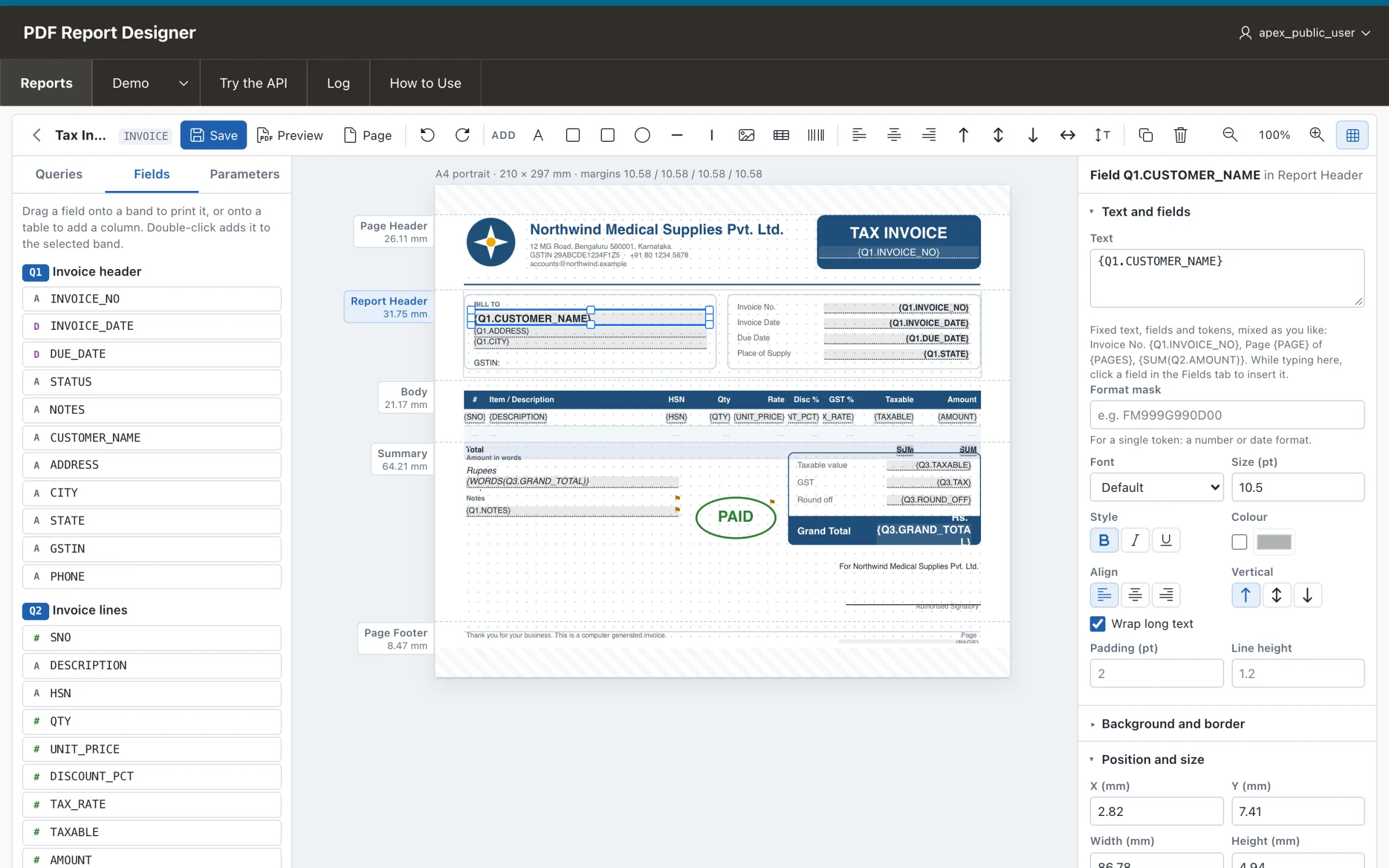
One SELECT for each part of the document: the header, the lines, the totals. Page items are bind variables.
Draw the layout
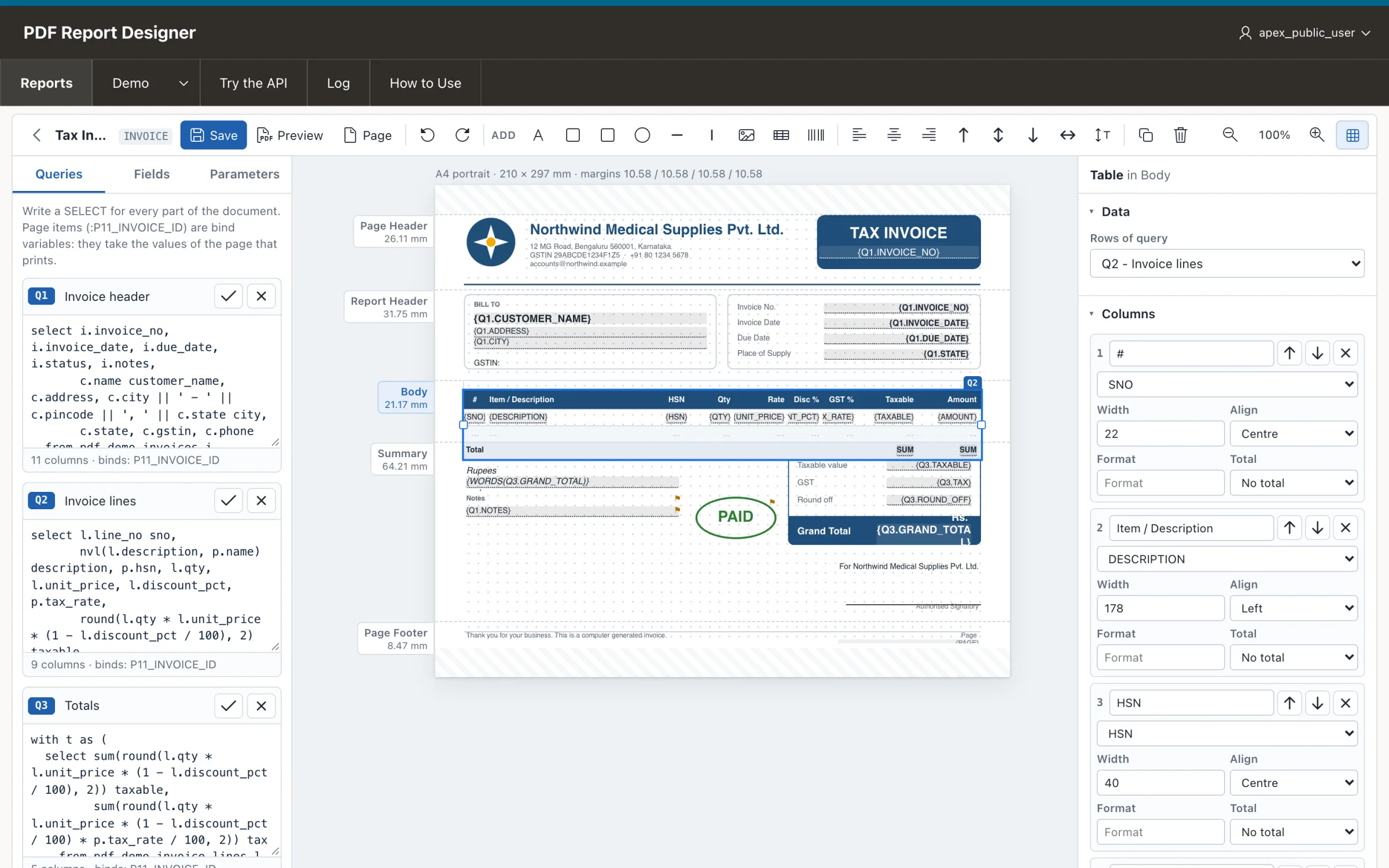
Drag fields onto the page, add a table for the lines with totals, boxes, a logo and page numbers. Preview it at once.
Call it from APEX
Get the BLOB to store or e-mail, or send it to the browser in a dialog or a new tab.
A real designer, in your APEX workspace
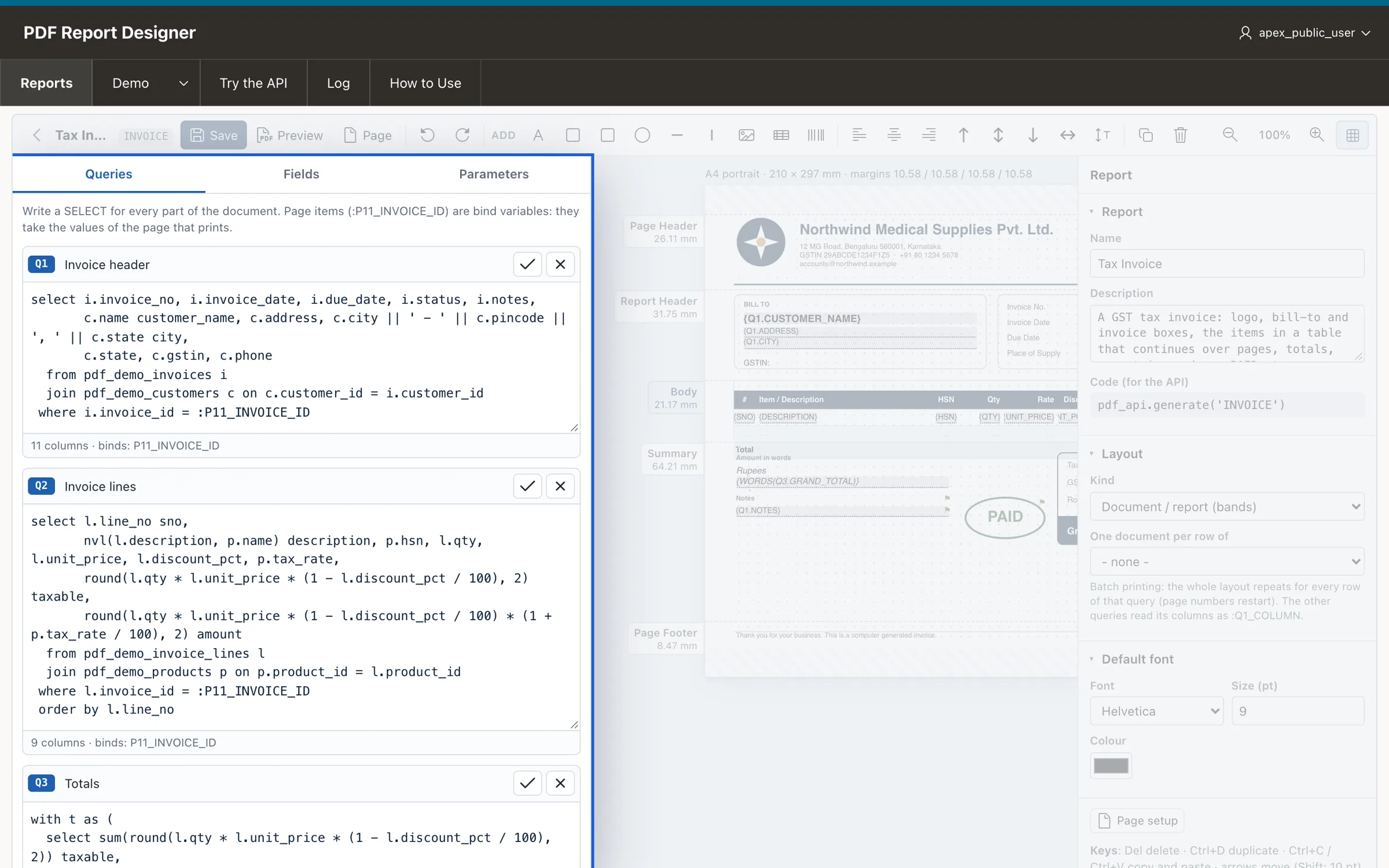
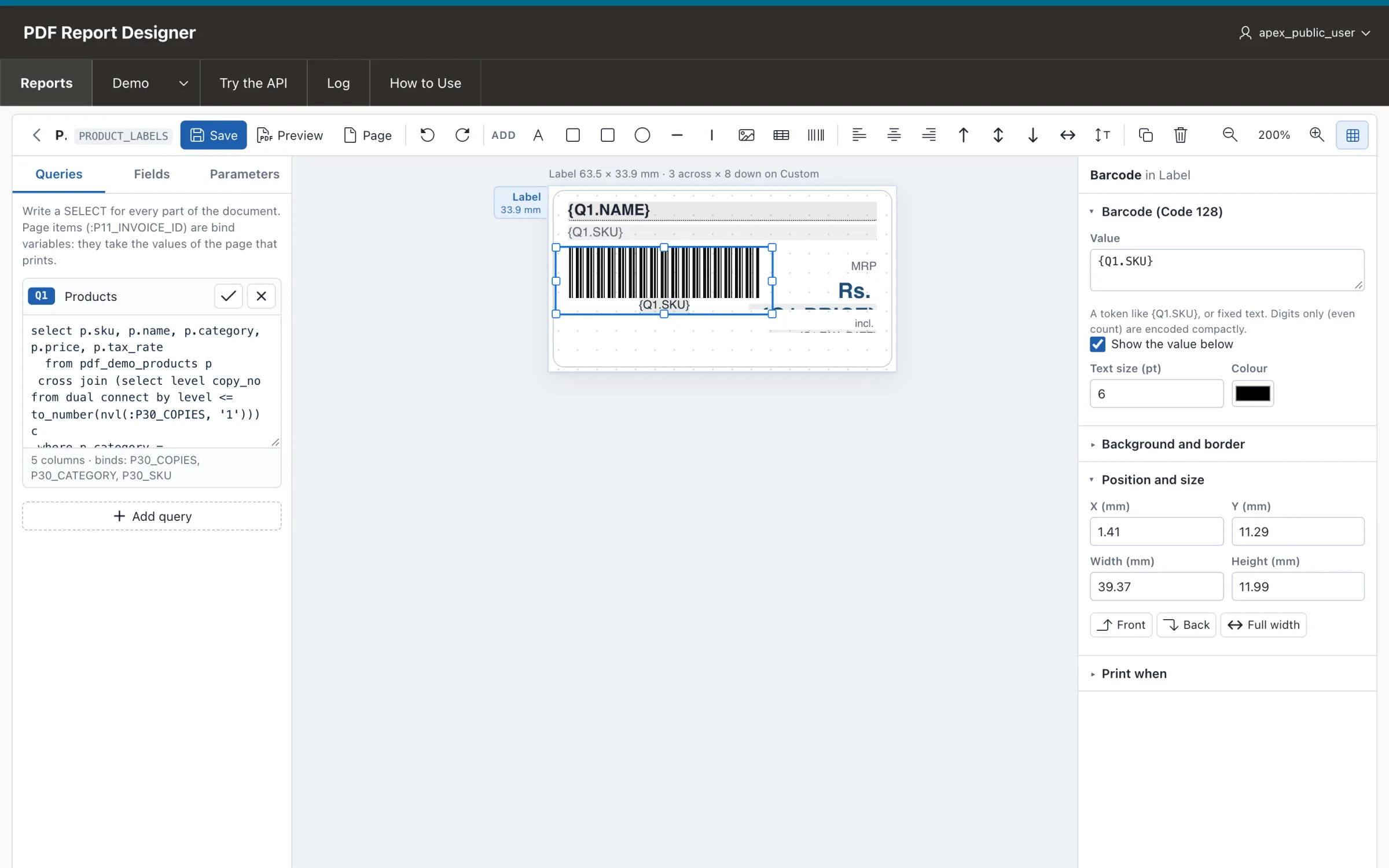
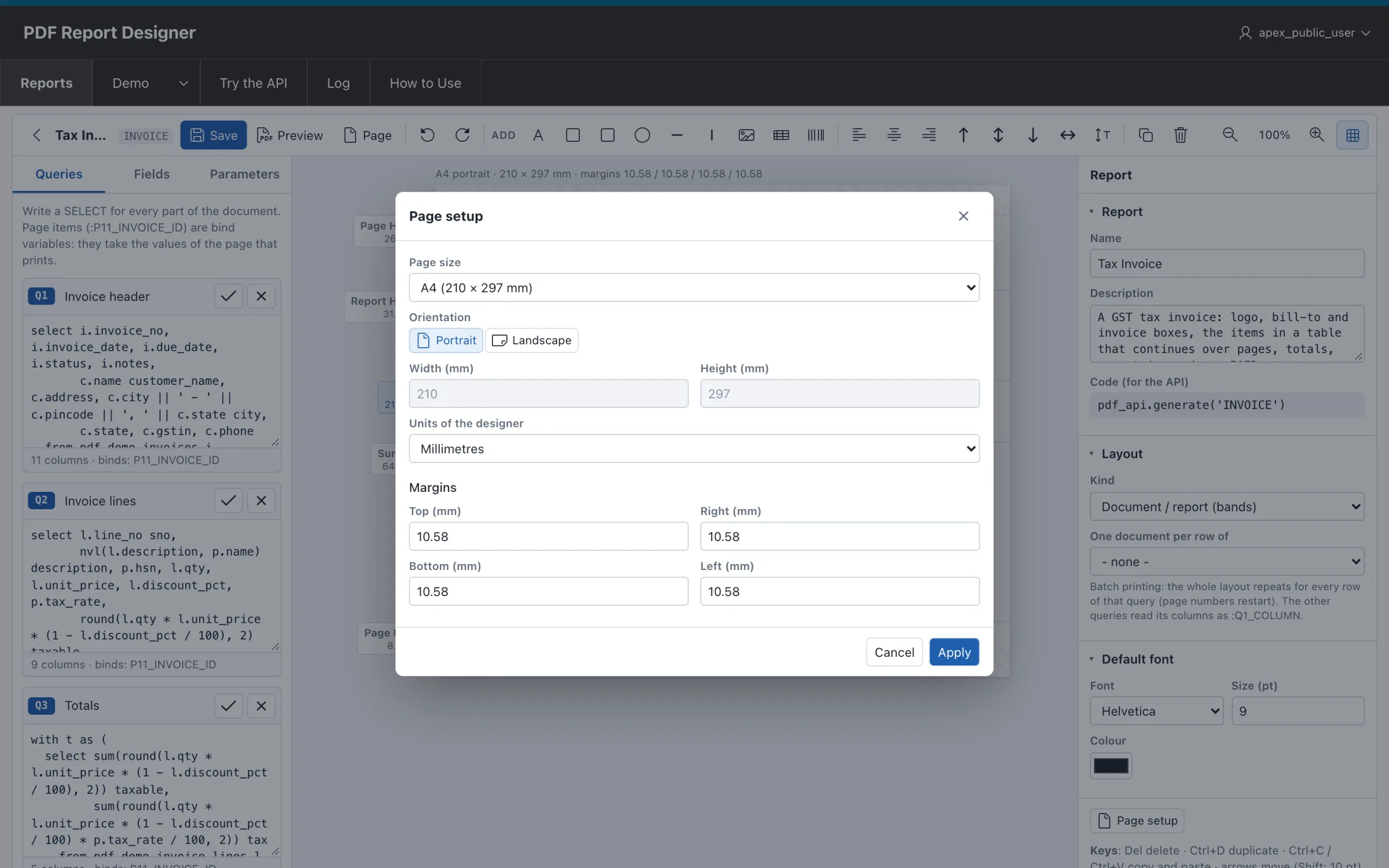
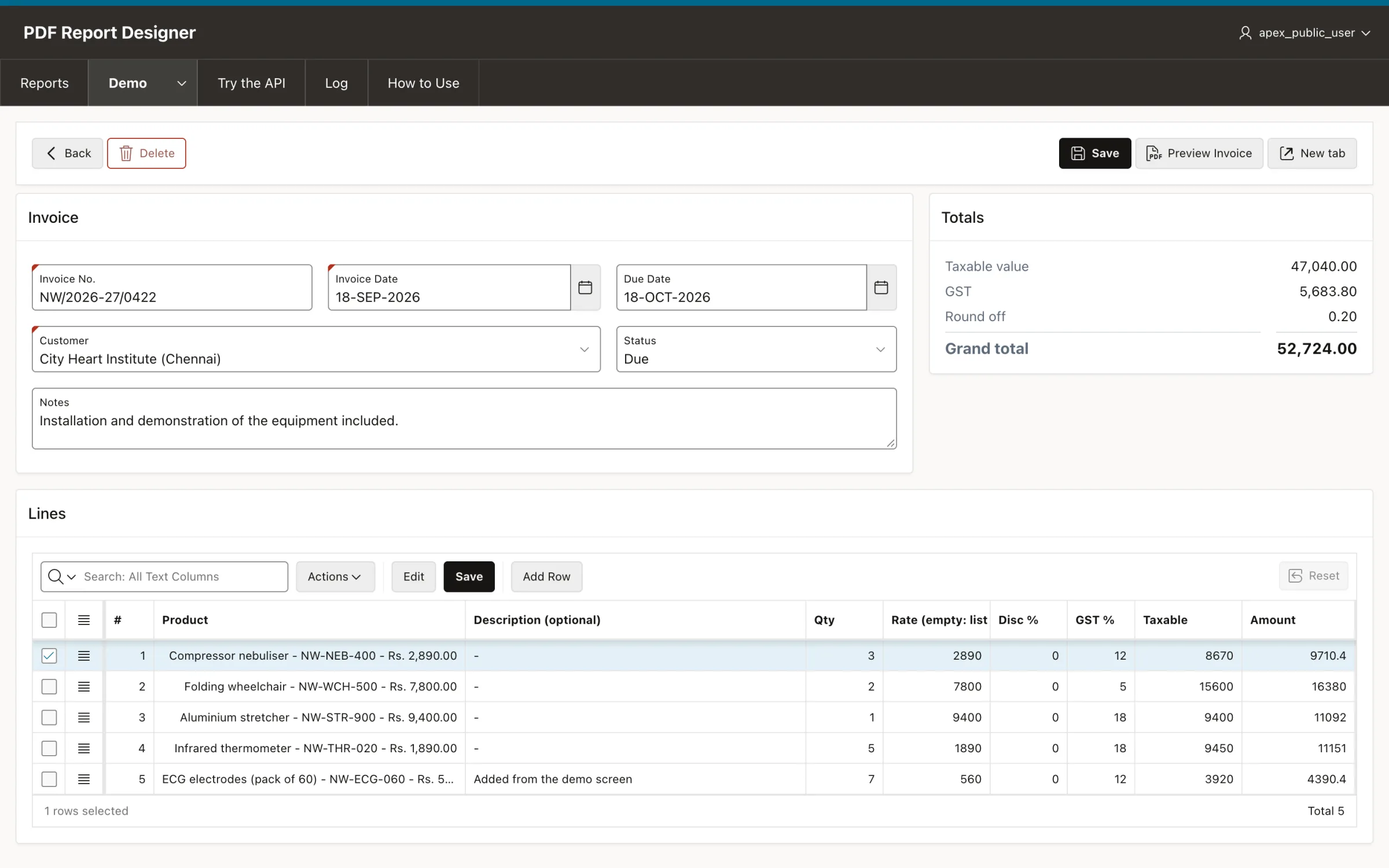
The page in bands: page header, report header, the body with its table, the summary and the page footer. The selected table shows its columns, formats and totals on the right.
Everything an invoice, a statement or a label needs
Invoice No. {Q1.INVOICE_NO}, with Oracle format masks for numbers and dates.{WORDS(Q3.TOTAL)} in lakh and crore with paise, or in million and billion.{Q1.STATUS} = PAID.Real PDFs from the VinAura engine
These come with VinAura as ready-made reports on demo data. Open one, change it in the designer, and see what the engine does with long tables, totals and page breaks.
From install to a PDF in a dialog
Everything below is also in the application, on its How to Use page, and in the demo screens that come with it. The names are those of the demo: an invoice form on page 11 with the item P11_INVOICE_ID.
Install it in minutes
VinAura is an APEX application and a set of PL/SQL packages and tables. Install it in a schema of its own, or straight into your application's schema.
The quick way: import the application
- App Builder > Import >
dist/pdf_report_designer.sqlfrom the GitHub repository. - Choose the parsing schema, and Install Supporting Objects.
- It creates the
PDF_*tables and packages, and the demo tables and sample reports.
Into your own application's schema
Run the scripts in this order as your schema, then import the application without its supporting objects. Leave out the demo scripts and the Demo menu hides itself.
Or a schema of its own, shared by several applications
One grant and one synonym for every application schema that prints. The queries of a report always run as the schema that calls the API, so each application reads its own tables.
Create a report and write its queries
Reports > New Report. Give it a code, for example INVOICE: your pages call the report by it. Then write one query for each part of the document.
Q1: the header, one row
Q2: the lines, many rows
Press ✓ beside a query to check it: its columns appear under Fields, its bind variables under Parameters, where you give test values for Preview.
Design the layout
The page is divided in bands. Put what repeats on every page in the page header and footer, the bill-to boxes in the report header, the lines table in the body and the totals in the summary.
Fields, text, boxes and images
- Drag a field from Fields onto a band, or add a Text / Field and type text and fields together:
Invoice No. {Q1.INVOICE_NO}. - Boxes, rounded boxes, circles and lines frame the page; upload a logo once and use it in every report.
- Every element has a font, colour, alignment, border and background, and an optional Print when condition.
A table for the lines
Add a Table and choose its query (Q2). Its columns come from the fields; give each a heading, a width, an alignment, a format mask and a total. Drop more fields on the table to add columns.
Tokens you can type in any text
{Q1.CUSTOMER_NAME}a column (the current row in a table or label, else the first row)
{Q3.TOTAL|FM999G990D00}with a format mask
{SUM(Q2.AMOUNT)}also COUNT, AVG, MIN, MAX over a query
{WORDS(Q3.TOTAL)}the amount in words (lakh, crore, paise)
Page {PAGE} of {PAGES}page numbers, in the page header or footer
{TODAY|DD-MON-YYYY}also {NOW}, {APP_USER}, {REPORT}Page setup
Page size (A4 by default, A3, A5, Letter, Legal and more, or a custom size), portrait or landscape, margins, and the units the designer shows: millimetres, inches or points.
Preview, save and try the API
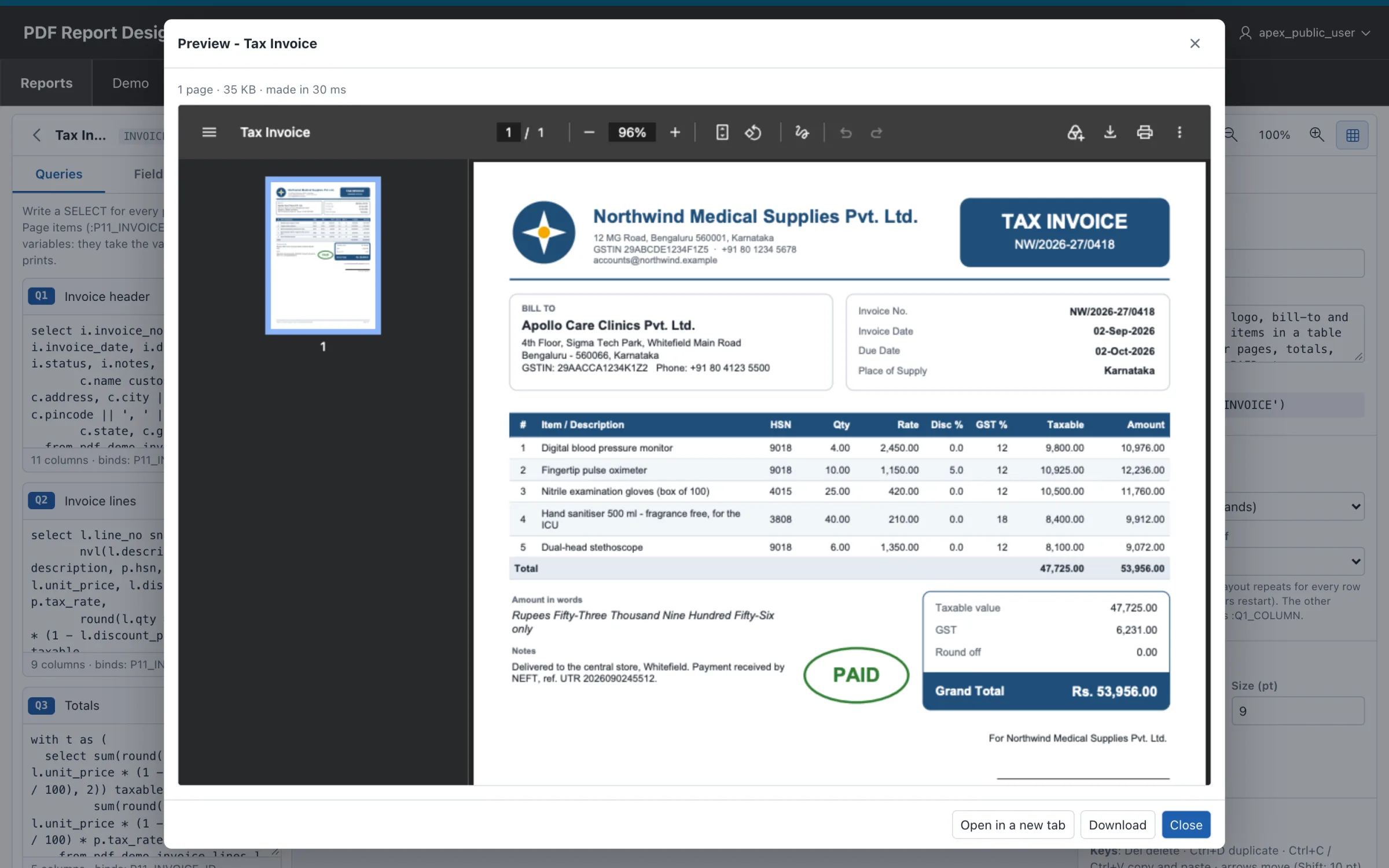
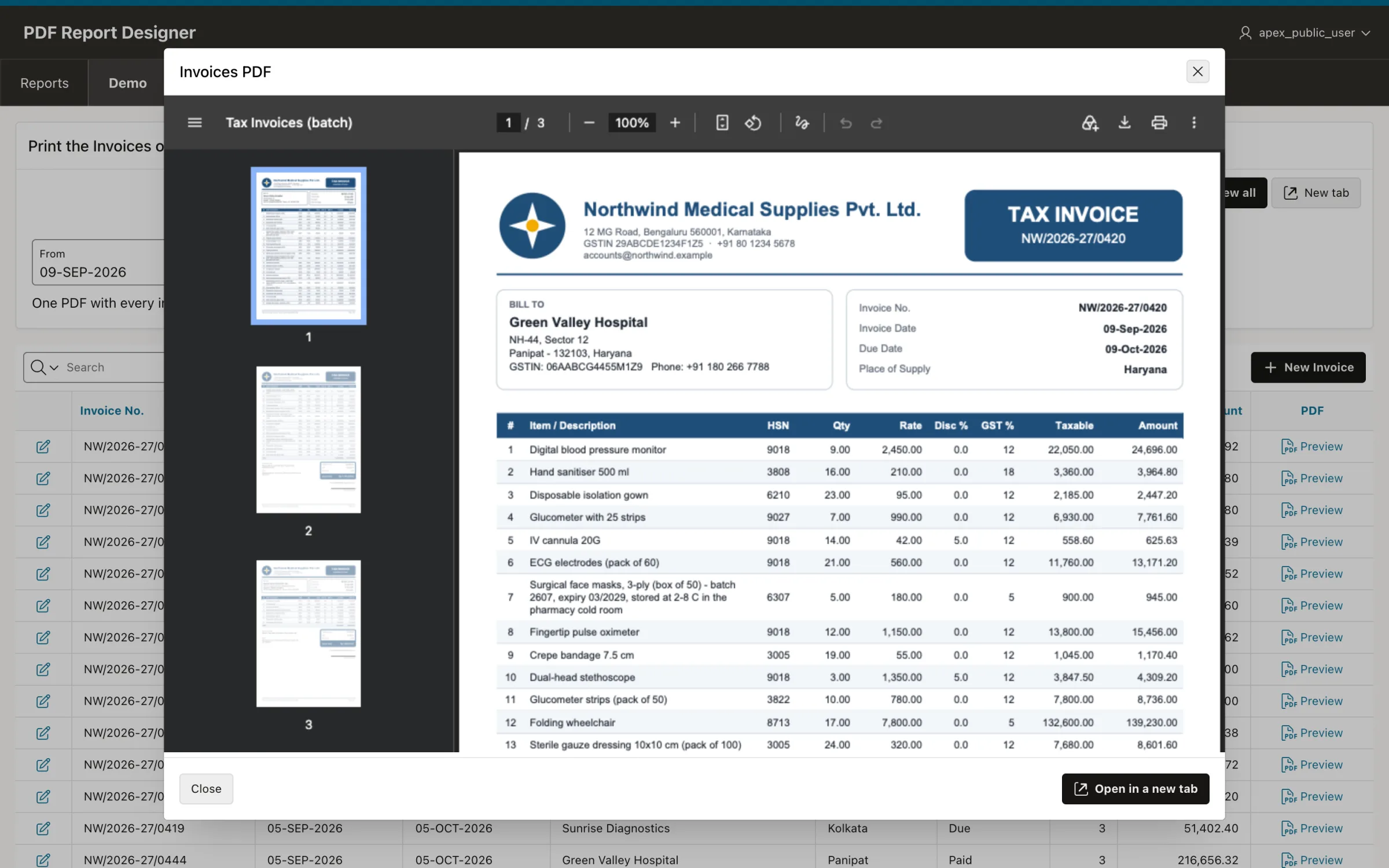
Preview makes the real PDF from the layout on the screen, saved or not, with the test values of the Parameters tab. Save stores the layout and the queries; every page that prints the report uses it at once.
The preview
Try the API
The Try the API page runs pdf_api.download for any report with the parameters you type, and shows the PL/SQL call to copy into your page.
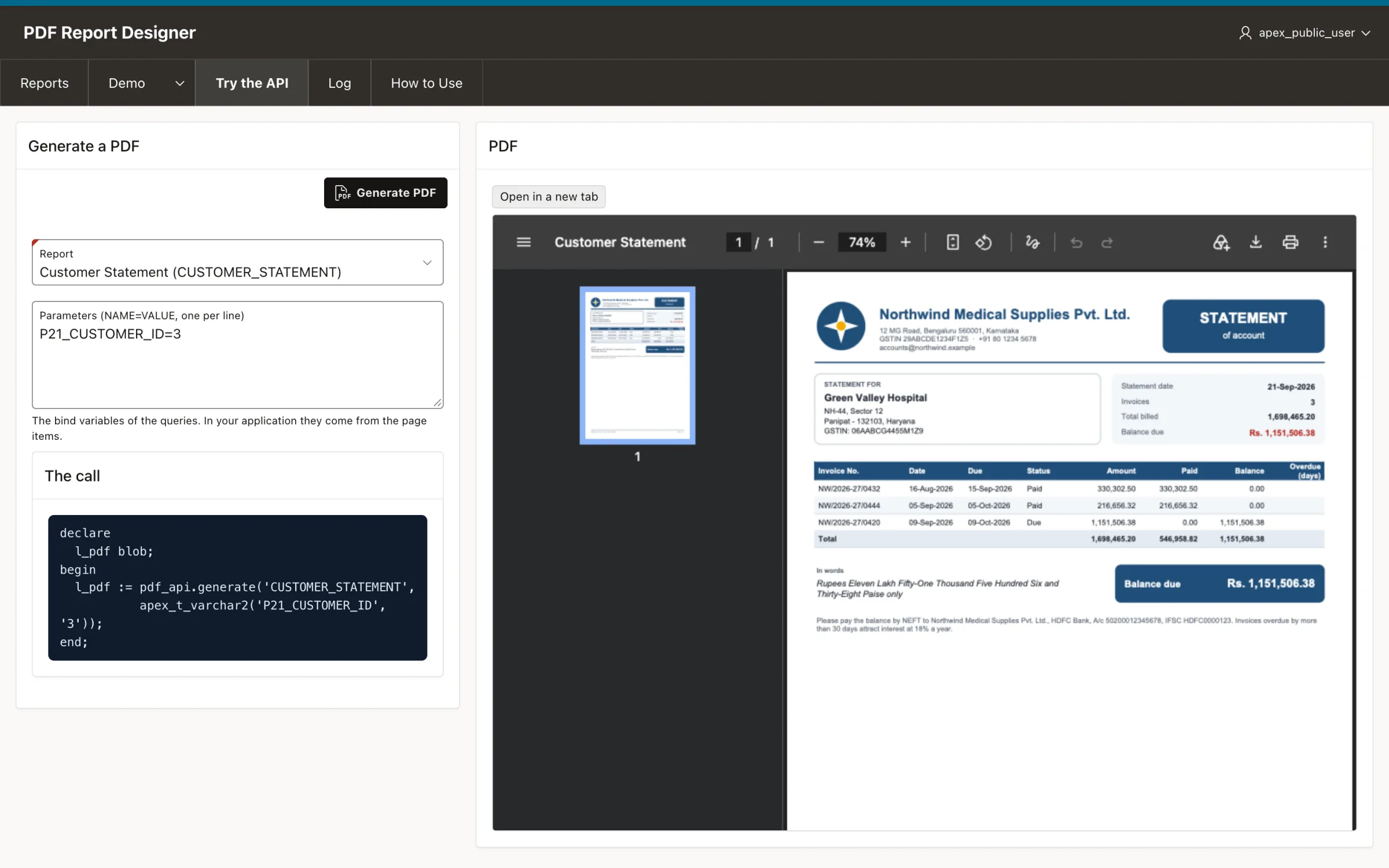
Get the PDF as a BLOB
pdf_api.generate returns the PDF. Page items are read from session state, or you give the values yourself as name/value pairs.
In any PL/SQL: a process, a package, a job
Show the PDF in a dialog
Three declarative pieces, and no JavaScript: an application process that sends the PDF, a modal page with a URL region, and a link or button that opens it.
1. An application process
Shared Components > Application Processes, point Ajax Callback, name INVOICE_PDF:
2. A modal page with a URL region
- A new page, Page Mode: Modal Dialog, e.g. page 92 Invoice PDF, with a hidden item
P92_INVOICE_ID. - One region of type URL, Inclusion Mode IFrame, URL:
3. Open it from a report or a form
- A column link of an interactive report: Target page 92, Set Items
P92_INVOICE_ID=#INVOICE_ID#. - A button of a form page: Action Redirect to Page in this Application, page 92, Set Items
P92_INVOICE_ID=&P11_INVOICE_ID.
APEX opens it as a dialog because page 92 is a modal page.
A new tab, or a download
The same application process opens in a new browser tab. A second process with p_inline => false downloads the file instead of showing it.
A "New tab" button
Action Redirect to URL, target:
A download
Batches, labels, e-mail and REST
The PDF is a BLOB in the database, so it goes wherever PL/SQL goes.
All the invoices of a period in one PDF
In the report's properties, One document per row of Q1. The other queries read the current row as :Q1_INVOICE_ID, and the page numbers restart for every invoice.
Labels on a sheet that is partly used
E-mail it
A REST endpoint with ORDS
A GET handler of source type Media Resource returns the PDF to any client:
Pure PL/SQL, from your query to the PDF bytes
No Java, no print server, no JavaScript library makes the PDF. It is written byte by byte by PL/SQL inside the database, so it runs wherever Oracle Database and APEX run.
Your data stays home
The PDF is made where the data is. Nothing is sent to an outside service.
Your schema's rights
The API has invoker rights: every application reads only its own tables.
Logged
Every PDF made is logged: report, user, pages, size and time.
Portable reports
A report is a JSON layout and its queries: export, import, keep it in git.
Design it once. Print it from any page in APEX. No BI Publisher, no Word templates, no print server.
- The designer application
- The PL/SQL engine and API
- Demo screens and sample reports
Do I need BI Publisher, a print server or APEX Office Print?
No. VinAura makes the PDF in PL/SQL inside your database. There is nothing to install or run beside Oracle and APEX.
Which versions of Oracle and APEX does it need?
The engine and the API need Oracle Database 19c or later with Oracle APEX. The designer application is an Oracle APEX 26.1 export, so the workspace where you design needs APEX 26.1 or later.
Does it work on Autonomous Database?
It is built for it: plain PL/SQL and SQL, with no operating-system access, no Java, no files and no network calls, so it uses nothing that Autonomous Database restricts.
Can my page items be used in the queries?
Yes. A bind variable such as :P11_INVOICE_ID takes the value of that page item from session state, or the value you pass to pdf_api.generate.
Where are the layouts kept?
In tables of your schema: PDF_REPORTS (the layout, as JSON) and PDF_QUERIES. A report can be exported as JSON and imported into another environment.
Which fonts and characters does it print?
Helvetica, Arial, Arial Narrow, Arial Black, Times and Courier, in regular, bold and italic, with the characters of Western European languages. The rupee sign prints as Rs.
How fast is it, and how big are the files?
A one-page invoice with a logo takes about 30 ms and is about 35 KB. A batch of invoices is one call and one file.
Is it free?
Yes. VinAura is free on GitHub. Download it, install it in your workspace, and change it to fit your applications.
What is in the repository?
The APEX application export (dist/pdf_report_designer.sql), the SQL scripts of the tables and packages, the demo data and sample reports, the source of the designer, and the installation guide (docs/INSTALL.md).
Free on GitHub
VinAura is on GitHub, free to download. Take the whole project, install it in your development workspace, fork it and change it as you need.
- Open the repositoryOn GitHub: devvinish/pdfgen-apex.
- Download or clone itCode > Download ZIP, or git clone.
- Install itFollow docs/INSTALL.md, or chapter 1 of the tutorial above.
VinAura, the visual PDF report designer for Oracle APEX: the designer application, the PL/SQL engine and API, demo screens and sample reports.
dist/the APEX application to importsql/tables, packages, demo data, sample reportsdocs/INSTALL.mddevelopment and production installsapp/the designer's JavaScript and CSS